No Root Required: 4 Technical Approaches to Letting AI Send WeChat Messages Autonomously

Using the system smart assistant as a trusted proxy, AI can send WeChat messages without root access.
This article breaks down four technical approaches to letting AI autonomously send WeChat messages: accessibility service UI parsing, system smart assistant proxy, root/hook, and official API. WeChat actively suppresses external control-reading, making OCR-based coordinate tapping slow and brittle; root/hook offers the best performance but requires device flashing, risks account bans, and breaks on updates; the official API is compliant but limited. The demo ultimately uses the system's built-in smart assistant as a trusted intermediary — completing the full flow of launching WeChat, locating a contact, and sending a message with standard permissions, no root, and a single natural language command.
AI attempting to operate WeChat on a phone often hits a wall at the very first step — WeChat, like many apps, blocks external access to its UI elements for security reasons, leaving AI unable to "see" the on-screen coordinates and text. There are multiple ways around this barrier, but each differs dramatically in terms of permissions, stability, and risk. Based on a hands-on demo by a Bilibili content creator, this article breaks down four technical approaches to letting AI send messages autonomously — and explains why the no-root, anyone-can-replicate option ultimately won out.
Why WeChat Is Hard to Automate
The standard approach to mobile automation is OCR plus coordinate tapping: take a screenshot, use image recognition to locate buttons, then simulate taps at the corresponding coordinates. On WeChat, this workflow has two obvious flaws — it's slow, and it's error-prone. Any slight UI change, difference in resolution, or shift in widget position can invalidate the coordinates entirely.
The creator's core insight is to switch control channels: instead of wrestling with WeChat's UI directly, invoke the system-level smart assistant to handle the task of "send a message to a specific contact." The benefit is that it's faster, simpler, and requires no root access. To understand this approach, it helps to first look at the trade-offs across the available technical options.
Comparing the Four Technical Approaches
Based on the video demo, there are four main implementation paths for getting AI to operate WeChat:
Accessibility Service — Read UI and Tap Coordinates
This approach uses Android's Accessibility Service to read the UI structure and locate controls for tapping. It works with standard permissions — just enable an accessibility service — making it safe and easy for anyone to replicate. The downside is that it relies heavily on UI parsing, which is significantly hampered by apps like WeChat that suppress control information.
Android's Accessibility Service was originally designed as a system-level API for visually impaired users. It allows apps to read the current screen's View Hierarchy, obtaining each element's text, type, position, and clickability. Automation tools borrow this channel as a kind of "programmatic eye" — faster and more structured than screenshot + OCR. However, WeChat has long implemented defenses against accessibility services, deliberately nullifying the text and description fields of most controls so that what external services receive is essentially a "silent" control tree — coordinates without semantics. This is why relying solely on accessibility services to operate WeChat is unreliable: even if you can tap a control, you can't easily confirm you're tapping the right one.
System Smart Assistant as Proxy (The Chosen Approach)
This method directly invokes the system's built-in smart assistant, which then opens WeChat, locates the contact, and sends the message. This approach leverages the assistant's existing app-calling capabilities, bypassing the need to parse WeChat's internal UI entirely.
Android's built-in smart assistants (such as Google Assistant or manufacturer-customized variants) hold special system-level permissions that allow them to launch third-party apps and pass structured instructions via standard App Actions interfaces or system whitelist mechanisms. WeChat has been pre-integrated with these interfaces on most major domestic Android systems, allowing the system assistant to execute semantic operations like "send a message to contact X." The essence of this channel is that the system assistant acts as a trusted intermediary on behalf of the user, completing the cross-app operation — and WeChat simply responds to a standard system-level request without needing to expose any internal control structure. For everyday users, the entire process never touches root access or modifies system partitions, making it extremely easy to replicate.
Root Access or Hooking WeChat
This involves gaining root privileges or hooking into the WeChat process to control it directly. It's the highest-permission, fastest, and most stable approach — but the cost is steep: it requires flashing the device, carries a risk of account bans, and hook scripts often break after WeChat updates.
Hook technology on Android is typically implemented through the Xposed framework or its successors (such as LSPosed or EdXposed): by injecting code into the Zygote process, custom logic is inserted before and after method calls in the target app, bypassing any of the app's own defenses. For WeChat, hooking can directly call its internal message-sending methods — entirely independent of the UI, extremely fast and stable. The cost is that you must unlock the Bootloader and flash a custom Recovery to install root frameworks like Magisk, which voids the phone's warranty. WeChat's security detection logic can also identify root environments and may trigger an account ban. More problematically, every WeChat version update changes internal method signatures, requiring hook scripts to be actively maintained — otherwise they simply stop working.
Official API
This approach uses officially provided interfaces. It's the most compliant path, but constrained by the degree of API openness, limiting both versatility and flexibility.

As shown above, the permission tier essentially defines the character of the entire solution: high-permission approaches are fastest and most stable, but come at the cost of device flashing, account ban risk, and breakage on updates; standard-permission approaches are slightly slower but safer and easier to replicate. The creator's decision logic is straightforward — among the standard-permission options, pick the one with the least friction.
Live Demo: One Sentence to Send a Message
The final solution is remarkably simple to use. No scripting is needed, no coordinates need to be recorded — just issue a natural language command.
The instruction used in the demo: "Send a test message to a WeChat contact."

After the instruction is sent, the control channel goes through the system accessibility service — no root access, no touching WeChat's internal logic. Once you hit send, the task is handed off to the AI.

The AI pauses for just over a second, consolidating the entire operation into a single batched call and only reading a few frames at key checkpoints to verify state. This design detail is worth noting: reducing the frequency of screenshots and recognition is fundamentally about saving tokens and compute, making execution more efficient.
Execution Flow and Safety Confirmation
Once the AI finishes thinking, it returns to the home screen, invokes the system assistant, automatically opens WeChat, and navigates to the target contact.
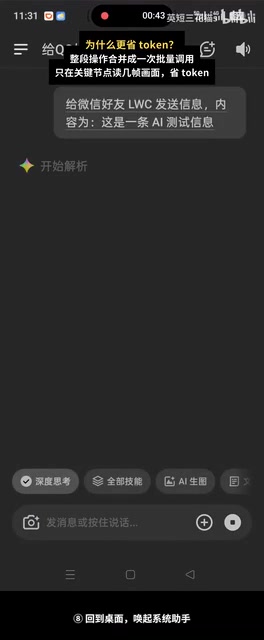
Throughout the process, WeChat displays a prompt reading "executing system assistant request" and shows a confirmation dialog. The AI automatically taps send, the message is delivered, and the task is complete. The system-level confirmation dialog here functions as a safety valve — it ensures that even automated operations retain system-level visibility and user control at critical moments, rather than executing entirely in the background.
The Trade-off Logic Behind the Approach
The real value of this demo isn't the outcome — "AI can send WeChat messages" — but rather what it demonstrates about pragmatic technical decision-making. Faced with the same goal, the root/hook approach offers maximum performance but maximum risk; the official API is the most compliant but the most constrained; coordinate recognition is the most universal but the most brittle. The creator didn't chase peak performance. Instead, working within the constraints of "anyone can replicate it, no ban risk, no device flashing required," they chose the system assistant as the simplest available standard-permission path.
For developers and enthusiasts looking to experiment with mobile AI automation, this comparison offers a clear decision framework: first define the risk boundary you're willing to accept, then pick the simplest implementation within the corresponding permission tier. After all, for everyday use cases, stable and reproducible usually matters more than maximum speed.
Related articles

The Chaotic Aesthetics of Apple's HomeView Ad: A Marketing Code Only Parents Can Read
Apple's HomeView smart display ad ditches minimalist style for chaotic family mornings to win over parents. We analyze why it confuses most viewers but resonates instantly with families — and the trade-offs and risks of Apple's targeted marketing.

Cerebras CEO Pushes Back on AI Doomerism: Stop Spreading Panic
Cerebras CEO Andrew Feldman publicly pushes back on AI doomerism at TechCrunch Disrupt, arguing excessive risk focus drowns out AI's real opportunities.

Retooling in Minutes: Industrial Next Redefines Factory Robot Flexibility
Industrial Next aims to let factory robots retool in minutes instead of weeks, automating complex delicate tasks and advancing flexible manufacturing and small-batch production.