NotchDodo: Turning Your Mac's Notch Into a Productivity Dashboard

NotchDodo turns the Mac notch into a pull-up dashboard with 14 built-in productivity tools.
NotchDodo is a lightweight productivity app for notch-equipped MacBooks, built by indie developer Almas Malik. Its core idea is to transform the long-ignored notch into an on-demand dashboard housing 14 tools for everyday workflows. The app earned 130 upvotes and an #8 daily ranking on Product Hunt, validating real demand for notch utilization. Its key insight is reframing a contested hardware design as a software interaction entry point — though it requires a newer MacBook with a notch, and the full tool list hasn't been fully disclosed.
Ever since Apple introduced the notch to MacBook displays, that black cutout at the top of the screen has been an awkward presence — occupying prime real estate at the center of the display while serving virtually no practical purpose. Most apps simply work around it, and users have learned to ignore it by default. NotchDodo, which landed at #8 on Product Hunt's daily rankings, takes the opposite approach: instead of routing around the notch, make it actually useful.
Turning Dead Screen Space Into a Workstation
NotchDodo's core concept is refreshingly straightforward — transform the Mac's notch area into an on-demand dashboard you can pull up at any time. Developer Almas Malik put it plainly in the product description: "Instead of working around the notch, put it to work."
The app ships with 14 built-in tools covering common high-frequency needs across everyday workflows. Users can quickly access these utilities through the notch without interrupting whatever they're currently doing. Officially positioned as a lightweight tool designed exclusively for notch-equipped Mac models, the emphasis is on being "simple and lean."
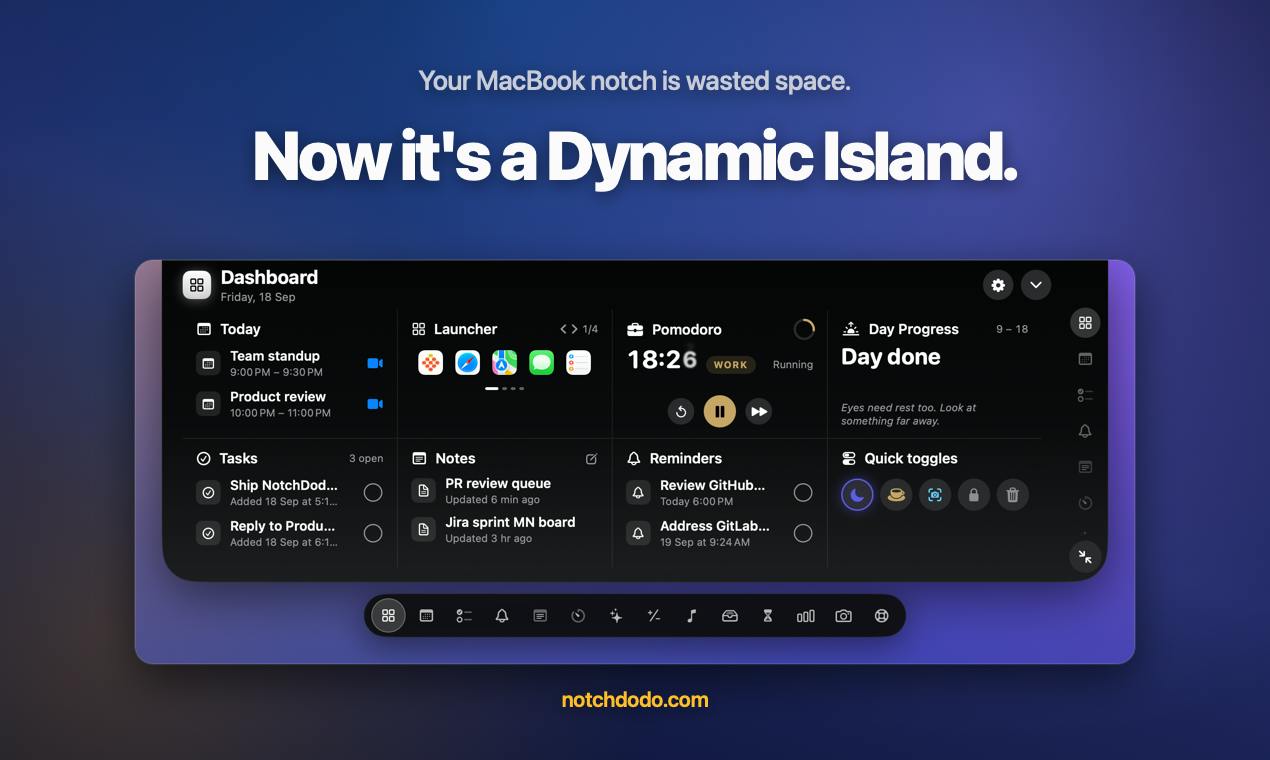
In terms of product categories, NotchDodo sits under Mac, Productivity, and Menu Bar Apps — a combination that neatly captures its nature: a lightweight enhancement that lives persistently in your system and is ready when you need it, rather than a heavyweight application you have to open and manage separately.
Apple first introduced the notch to laptops with the 14-inch and 16-inch MacBook Pro in 2021, followed by the MacBook Air M2 in 2022. The notch houses a 1080p front-facing camera, but because it physically cuts into the menu bar area, Apple's solution was to let the menu bar flow around either side of it. At the system level, the notch itself is rendered as a black masked-off zone with no interactive surface exposed to developers. This design saves bezel space in hardware terms, but leaves a visual "no man's land" on screen — which is precisely what has inspired a wave of third-party developers to try filling that void.
The Design Logic Behind "14 Tools, One Notch"
NotchDodo summarizes its value proposition in a single line: "14 tools. One notch. A more useful Mac."
The clever part of this approach is that it reframes a widely criticized hardware "flaw" as an interaction entry point. The notch sits naturally at the top center of the screen — an area that's easy to reach with both your eyes and your cursor — which actually gives it inherent usability advantages as a trigger zone for quick-access tools. This line of thinking has appeared before in tools like NotchNook and Boring Notch, suggesting that "notch utilization" has quietly grown into a niche but genuine product category.
That said, the available materials don't provide a detailed breakdown of all 14 tools, so prospective users will still need to verify whether the specific offerings actually match their own workflows — more tools doesn't automatically mean more relevant tools. For Mac users who prefer a minimal desktop but don't want that notch just sitting there doing nothing, this type of product offers a middle ground worth exploring.
NotchNook and Boring Notch are among the earliest and most notable tools in this space. NotchNook focuses on expanding the notch into a drop zone where you can drag files and apps for quick actions; Boring Notch leans toward media playback controls and clipboard management, with a more minimal aesthetic. Both have validated the concept of using the notch as an interactive trigger area, while also revealing a shared limitation: macOS doesn't natively expose the notch region through any public API, so developers have to work around this using transparent overlay windows or mouse event monitoring. Stability and compatibility with future macOS updates remain ongoing concerns.
Market Reception and Target Audience
NotchDodo earned 130 upvotes and 18 comments on Product Hunt, finishing 8th for the day. For a small tool built by an indie developer, that response suggests it's touching on a real pain point — the desire to get some use out of that notch resonates with a genuine slice of users.
One thing worth being clear about: there's a hard prerequisite here. The app is "designed exclusively for notch-equipped Macs," which means it's essentially off-limits for anyone using an older or non-notch MacBook. The target audience is specifically limited to users of newer MacBook Pro and MacBook Air models.
For users who frequently context-switch between tasks, want to minimize mouse travel, and prefer lightweight utilities, notch-enhancing apps like NotchDodo are worth trying. On the other hand, if you're already settled into a well-established menu bar manager or app launcher workflow, you'll want to weigh whether NotchDodo adds enough new value to justify changing your habits.
Final Thoughts
NotchDodo represents a genuinely creative product philosophy: taking a contentious hardware design decision and reframing it as a software-level feature entry point. Rather than trying to change the hardware or complain about it, the app redefines how users relate to the notch. While public information about its specific tools remains limited, the underlying insight — making idle screen space actually useful — is a product observation worth paying attention to. For the right users, it might be the thing that finally makes that black rectangle at the top of the screen earn its place.
Related articles

Free Unlimited Claude Code Solution: Agnes AI + CC Switch Setup Guide
No paid subscription needed — pair the free AI platform Agnes AI with the open-source tool CC Switch to provide a backend for Claude Code, enabling unlimited free calls to text, image, and video models. This guide covers the full setup, test results, and usage boundaries.

A Complete Zero-Cost Guide to Getting Started with Claude Code for Beginners in China
A beginner's guide to Claude Code for users in China: two installation methods (command line and IDE plugin), full configuration steps for replacing the official API with the free domestic LongCat model, and a hands-on demo of building a small tool with natural language, plus tips.

When the NSA Gets Involved: The AI Supply Chain Crisis Behind Open-Source CVEs and API Key Hijacking
Multiple open-source projects disclosed severe CVEs in one day, PHP flaws alarmed the FBI, and Railway and OpenCode were breached with API keys stolen. This article breaks down the vulnerability window, AI-accelerated exploitation, and the AI supply chain crisis behind the API key black market, with a developer defense checklist.