NotchMind: The Native Tool That Turns Your MacBook Notch Into a Productivity Hub

NotchMind turns the MacBook notch into an interactive hub with 28 built-in productivity tools and a one-time purchase model.
NotchMind, built by developer Rudra Satani, is a native macOS app that repurposes the MacBook's idle notch into an interactive productivity hub. Hovering or clicking the notch opens a panel with up to 28 everyday utilities — music controls, file staging, download progress, clipboard history, timers, and more — aiming to replace multiple standalone menu bar apps with a single entry point. It uses a one-time purchase model rather than a subscription, making it especially appealing to power Mac users. The tool earned 73 upvotes and ranked 15th on its Product Hunt launch day. Its main challenge is that the broad feature set may feel overwhelming for lighter users, while its edge over competitors lies in covering far more use cases than the typical single-focus notch tool.
After Apple added the notch to MacBook displays, that black strip was largely seen as a visual compromise — impossible to ignore, yet completely useless. Developer Rudra Satani created NotchMind to change that, transforming the idle notch area into an operational hub that integrates music controls, file management, clipboard history, timers, and more. The product launched on Product Hunt, earning 73 upvotes and ranking 15th for the day, listed under Mac, Productivity, and Menu Bar Apps.
Turning the Notch Into a Functional Entry Point
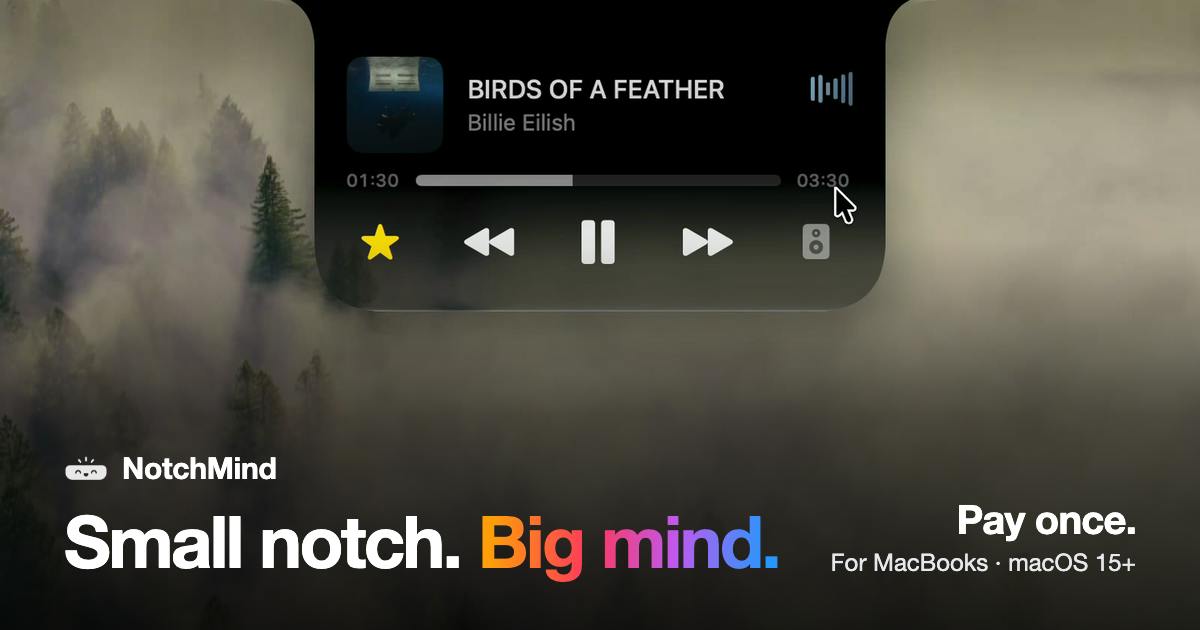
NotchMind's core idea is space repurposing. The MacBook notch occupies physical screen real estate, but by default the system treats it as nothing more than a housing for the webcam. NotchMind turns that area into an interactive panel — hover or click the notch, and a panel expands where you can control currently playing music, monitor download progress, and access recent files.
This interaction model follows in the footsteps of Dynamic Island-style tools that became popular earlier, but NotchMind casts a wider net. According to the official description, it integrates up to 28 everyday utilities, going well beyond a single music widget to position the notch as a lightweight "control center."
Dynamic Island was originally an interaction concept Apple designed for the iPhone 14 Pro lineup, dynamically expanding the cutout housing the front camera and Face ID sensors into a display area for notifications and live activity updates. This design soon inspired imitators on macOS — developers porting the same concept to the MacBook notch. Notable examples include the early TopNotch (which simply hid the notch), Notchmeister (dynamic wallpaper effects), and the more feature-complete Notchify and HiDock. The shared premise of these tools: the menu bar areas on either side of the MacBook notch aren't reduced by its presence — the system still renders that region — so third-party apps can legitimately "pop out" a floating panel below the notch without requiring special system permissions.
Feature Coverage
Based on the official description, NotchMind's feature set targets a few high-frequency use cases:
Media & Files
Music playback control is table stakes for notch tools, and NotchMind delivers — you can skip tracks, pause, and view song info directly from the notch panel. On the file side, it offers something akin to an AirDrop staging area, letting you temporarily park files at the notch for easy cross-app drag-and-drop. Real-time download progress is also included, saving you from constantly switching to the browser or Downloads folder to check status.
Clipboard & Timer
Clipboard history is a staple need for productivity tools. NotchMind integrates it into the notch panel so previously copied content is always within reach — no need for a separate clipboard manager. The timer feature suits Pomodoro sessions, short task reminders, and similar scenarios, weaving time management directly into the system interface.
Combined with the rest of the everyday utilities, NotchMind aims to replace multiple standalone menu bar apps with a single otherwise-useless strip of screen, reducing icon clutter along the top of your display.
The Pomodoro Technique is a time management method developed by Francesco Cirillo in the 1980s. The core idea is to break work into 25-minute focused intervals (each called a "pomodoro"), separated by 5-minute short breaks, with a longer 15–30 minute break after every four pomodoros. The method has become a perennial demand driver in the productivity tools market, spawning dozens of dedicated apps. The advantage of embedding a timer directly in the always-present notch panel is that you can start or check remaining time without opening a separate window, reducing context-switching friction and cutting down on menu bar icon clutter — entirely consistent with NotchMind's overall product logic of consolidating multiple standalone tools into one.
Native App and One-Time Purchase
Two positioning choices stand out. First, it's a native macOS app — native means better system integration, lower resource usage, and consistency with macOS design language, all of which are genuine plusses for Mac users who care about a smooth experience.
Second, it uses a one-time purchase model. In an era dominated by subscriptions, a buy-once approach is more user-friendly — especially for utility software. Users generally don't want to pay ongoing fees for a tool that sits quietly in their menu bar. This pricing strategy also tends to earn goodwill in Product Hunt comment sections.
"Native macOS app" in this context specifically means an application built with Apple's official frameworks — primarily AppKit or SwiftUI — as opposed to apps packaged with cross-platform solutions like Electron or Flutter. Native apps can directly call system-level APIs such as accessibility permissions, sandboxed file access, and Continuity-related features, and typically have significantly lower memory and CPU footprints than Electron apps. For a tool that lives permanently in the background as a menu bar or notch process, this matters enormously — a resident process that consumes even 50MB more RAM or occasionally spins up the fan becomes a source of negative user experience. The one-time purchase model is a relatively rare choice in the current Mac indie developer market; the rise of Setapp and Apple's own push toward subscription revenue has led many small utilities to switch to monthly or annual billing. Developers who stick with buy-once pricing typically use it as a trust signal, implying the product is stable enough that it doesn't need recurring charges to sustain its development momentum.
Thoughts on Product Positioning
NotchMind isn't operating in an empty market. Several tools already leverage the notch area, most focusing narrowly on media controls or notification display. NotchMind's differentiation is its breadth — assembling 28 utilities to claim a larger share of user attention and desktop real estate.
This strategy cuts both ways. The benefit is one-stop convenience, eliminating the hassle of installing multiple separate apps. The potential downside is that stacking so many features can raise interaction complexity, or leave some tools as unused decorations. Whether this feature set feels too heavy for lighter users who only need music controls or clipboard management is something that requires hands-on use to judge.
The 73-upvote tally and 15th-place daily ranking suggest NotchMind attracted meaningful attention without becoming a breakout hit. It feels more like a practical tool built for a specific audience — heavy MacBook users who prioritize a clean, efficient desktop — than a mass-market product. For that segment, the idea of converting a "forced compromise" into a genuine productivity entry point is a genuinely clever angle.
Related articles

AI-Powered SRC Vulnerability Hunting: A Hands-On Guide to Building the Hermes Agent Workbench
Based on a hands-on Bilibili video: how to build an AI-powered SRC vulnerability hunting workbench—three-step method, four report elements, Agent mode vs web chat, and tool selection.

CLI-Anything Complete Beginner's Guide: How AI Operates Software — Principles and Practice
A complete beginner's guide to CLI-Anything: how AI Agents operate professional software via the command line, covering the three-layer architecture, CLI Hub installation, DrawIO practice, generator principles, and limits.

Carbon-X: A 14.8B Open-Source Model That Handles DNA and Text Simultaneously
Carbon-X is a 14.8B open-source multimodal model on Hugging Face where DNA and text share a token stream. 6-mer tokenization, 302B token mid-training, deployable on a single 80GB GPU, 66.7% average on five DNA benchmarks, Apache 2.0 license.