NVIDIA Kimodo AI Animation Generator: Complete Guide to CPU & Low-VRAM Local Deployment

Kimodo CPP lets you run NVIDIA's AI animation generator on CPU or just 2GB VRAM, with a full game engine pipeline.
Kimodo CPP is a community C++ port of NVIDIA's text-to-animation model Kimodo, lowering the hardware requirement to as little as 2GB VRAM or pure CPU — at the cost of speed (roughly 5 minutes per 3-second clip). Windows installation requires C++ Build Tools, Vulkan SDK, Golang, and Git. Recent updates added commercially usable Soma and G1 skeletons to replace the NC-licensed SMPLX, plus native GLB export. Animations can be retargeted via Mixamo and imported into Unreal Engine, with the only notable gap being a lack of finger animation.
NVIDIA's AI animation generator Kimodo (pronounced Kimoto/Komodo in some demos) has finally broken free from its heavy dependence on GPU VRAM. Thanks to a C++ port called Kimodo CPP, contributed by a developer named Richard Pellentropi, everyday users can now run this high-quality text-to-animation model on a pure CPU or a device with minimal VRAM. AI animation generation is being truly democratized.
This article is based on hands-on testing and demonstrations, covering the tool's hardware requirements, installation process, available skeleton options, and the complete pipeline for importing generated animations into Unreal Engine and other game engines.
What Problem Does Kimodo CPP Actually Solve
The original Kimodo was heavily dependent on VRAM — the more the better — which locked out the vast majority of users without high-end GPUs. The core value of Kimodo CPP, this C++ port, is that it dramatically lowers the barrier to entry.
It can run entirely on CPU, or with as little as 2GB of VRAM — and unlike the original, this version doesn't scale nearly as sensitively with additional VRAM. Testing confirmed it runs on pure CPU, on a 12GB GPU artificially throttled to 4GB, and other users have verified it on real 4GB to 6GB GPUs.
The tradeoff, of course, is speed. At minimum specs, a 3-second animation takes roughly 5 minutes on pure CPU, with 2–4GB VRAM performing similarly. In other words, you trade generation speed for the freedom to run it on almost any machine — a worthwhile deal for creators without professional hardware.
One important caveat: while VRAM requirements are lower, system RAM must still be at least 4GB, and the model weights themselves require approximately 25GB of storage — there's no cutting corners there.
Installation on Windows
Kimodo CPP is hosted on GitHub and was originally designed for Linux, but porting it to Windows isn't complicated — the process has been tested and documented in full.
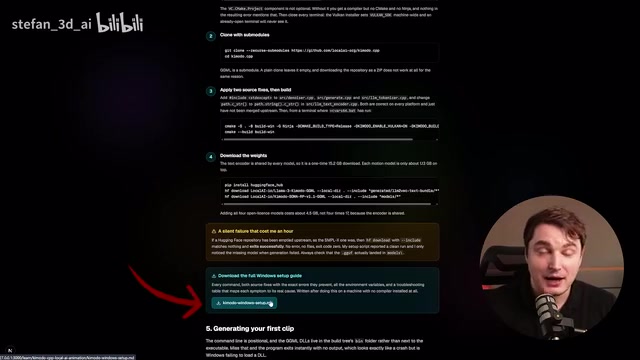
From the demonstration, the core dependencies include:
- C++ Build Tools: Required for compiling and building directly on your local machine
- Vulkan SDK
- Golang (Go language support)
- Git: Install this first if you haven't already
You'll also need to download two models: the Kimodo GGML weights for Llama 3, and a skeleton model to drive the animation.
One particularly useful tip: compile all the installation steps into a Markdown file, then hand that .md file directly to an AI agent like Claude Code or ChatGPT and let it handle the entire installation process — including any errors that come up along the way. For users unfamiliar with command-line compilation, this is a practical way to significantly lower the barrier.
Skeleton Selection and Commercial Licensing
The skeleton choice is an area where it's easy to make a costly mistake — particularly around licensing compliance.
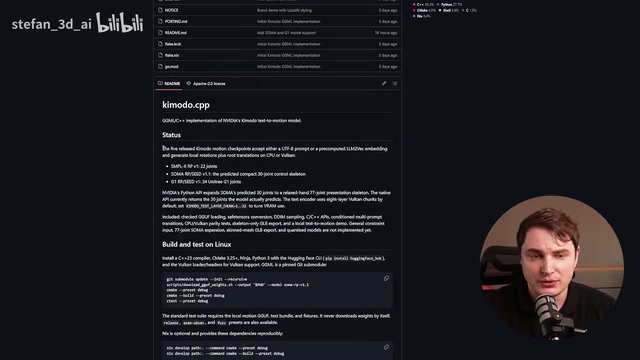
The initial release of Kimodo CPP only supported the SMPLX skeleton, but that skeleton's license does not permit commercial use — a critical point for many users. The good news is that the project was updated just before this guide was written to include additional skeleton options, bringing the total to four.
Beyond the not-recommended SMPLX, users can now choose Soma or G1 skeletons. These are actually more detailed, with more bones, and produce higher-quality animations overall. After testing all skeletons locally for comparison, Soma RP v1.1 is the recommended primary option.
Looking at the tool's interface, users have a prompt input window, can set the number of frames, and the default inference step count is 20 — higher steps mean longer processing. In addition to the GUI, headless operation is supported via command line to control steps, frames, and prompts. The Komodo text layer chunk parameter can be set to CPU to force CPU-only computation.
SMPLX (SMPL-eXpressive) is a parametric human body model developed by the Max Planck Institute for Intelligent Systems. It can express body pose, hand gestures, and facial expressions, and is widely used in academic motion capture research. However, its license is a non-commercial research license (NC license), meaning it cannot be used in any product, game, or commercial project with profit intent. The Soma skeleton is an open-source solution designed specifically for animation rigging, with a joint hierarchy that more closely matches conventions in mainstream game engines and typically features 65+ bones, enabling more nuanced limb twisting weights. G1 is another community-maintained general-purpose humanoid skeleton, designed to be compatible with both Mixamo and the UE5 Mannequin. Choosing either of these over SMPLX eliminates legal risk and saves additional joint mapping work during skeleton retargeting.
Exporting GLB and Importing into Game Engines
The ultimate goal of generating animations is usually to bring them into Blender or a game engine, which makes export format and skeleton retargeting critical steps in the pipeline.
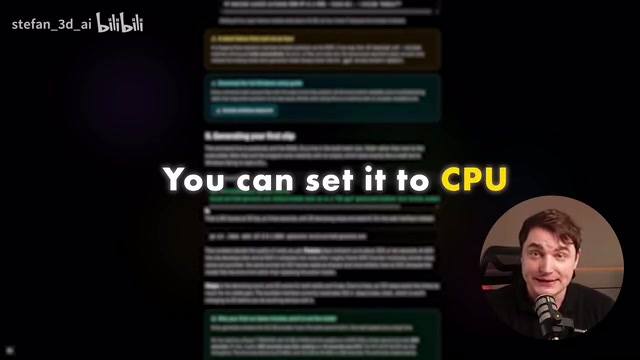
Early versions couldn't export GLB format, but the latest version now natively supports GLB export directly from the UI. If your version is missing this feature, an AI agent can help you add it.
Since skeletons like Soma and G1 can't be used directly in games as-is, the retargeting workflow involves first running the pipeline with the SMPLX skeleton to verify everything works, then switching to Soma. From there, retargeting to the Mixamo skeleton was tested successfully — and from Mixamo, you can retarget to virtually any other skeleton. The animations were successfully imported into Unreal Engine with good results in practice.
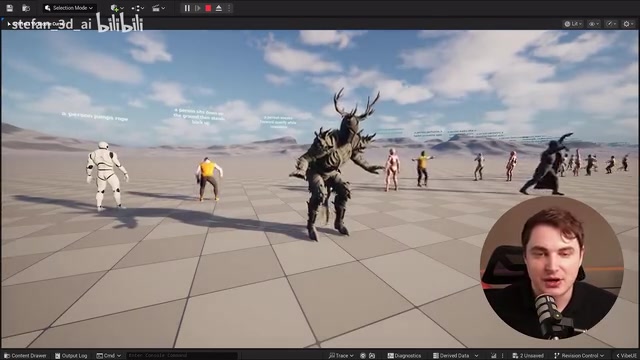
The only notable limitation right now is no finger animation. All generated animations show hands in a relaxed pose with no detailed finger movement. Unreal Engine 5.8's new markerless motion capture feature, which can track hand movements, is worth considering as a way to compensate for this gap.
Skeleton Retargeting is the process of mapping animation data from one skeleton to another with a different topology. Because different skeletons have varying joint names, counts, and rest poses (T-pose or A-pose), directly copying keyframe data causes severe limb misalignment. The Mixamo skeleton serves as an ideal "relay" in this pipeline because it's one of the most widely standardized humanoid skeletons in the game industry — Unreal Engine, Unity, and the vast majority of character assets all provide pre-built retargeting configurations to Mixamo. Retargeting Soma/G1 animations to Mixamo first, then from Mixamo to the target skeleton (such as the UE5 Mannequin), maximizes reuse of existing retargeting assets and avoids the tedious work of manually mapping joints one by one. GLB is the binary format of glTF, capable of packaging skeleton data, skinning weights, and animation data into a single file. It's the dominant format for cross-platform 3D asset exchange today, with native import support in Blender, Unreal Engine, and Unity.
The Democratization of AI Animation
Taken together, the significance of Kimodo CPP isn't that it outperforms the original — running on pure CPU is genuinely slower, and it can't fully leverage large amounts of VRAM — but that it puts this capability into the hands of far more ordinary users.
Recent updates have also resolved both the licensing issue (with usable Soma / G1 skeletons) and the export issue (with native GLB export), completing the pipeline from generation all the way to a game-engine-ready animation. For indie developers, animation enthusiasts, and small teams, the ability to generate high-quality animations locally, for free, and offline is a genuinely significant win.
If you want to get started, all the links, documentation, and Markdown installation files have been compiled and made freely available. The simplest approach is still to hand those files to an AI agent and let it handle the deployment for you.
Related articles

Apple HomeView Hands-On Review: Is the $300 Smart Home Hub Worth It?
Apple HomeView hands-on: a $300 smart home hub with facial recognition for quick account switching, but no App Store or voice recognition. Is the wall-mounted version worth it? Should you buy the first generation?

Meta Muse Wonder Launch: What It Means for Meta's Return to the Frontier AI Race
Meta releases Muse Wonder and WonderFull, benchmarks reach the frontier, community feedback is polarized. An in-depth look at Meta's return to the frontier AI race, its personal agent strategy, and Zuckerberg's different path.

Apple Home Smart Home Lineup Leaked: LG and Schneider Team Up, UWB Door Lock on Board
Apple Home ecosystem gains new LG and Schneider devices: UWB smart lock with proximity unlock, 2.5K dual-camera doorbell, privacy indoor camera, and AirPods-like seamless pairing.