Object Storage vs Cloud Drives: Cost, Reliability, and Strategy for Long-Term Backups

Comparing object storage and cloud drives for long-term backups: cost, reliability, and architecture choices.
This article analyzes a Reddit user's plan to migrate from Google Drive to object storage (BackBlaze B2, OVH) for long-term backups. It compares storage costs, explains 11-nines durability through erasure coding, details the 3-2-1 backup rule implementation, and discusses the architectural shift of making a local server the primary copy with object storage as disaster recovery insurance.
A Real-World Dilemma from Reddit
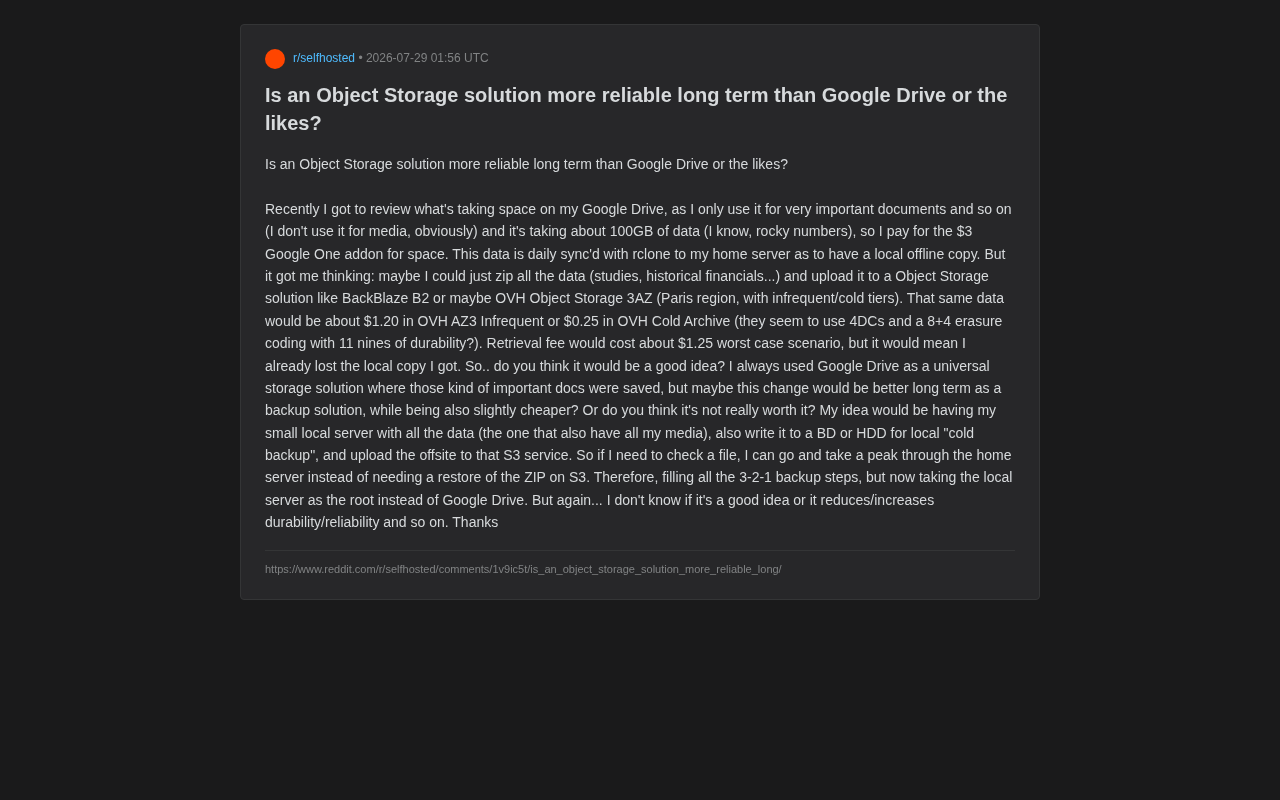
I recently came across a very representative question on Reddit: a user who only stores important documents on Google Drive (study materials, historical financial records, etc.—no media files), totaling about 100GB, paying $3/month for Google One. Every day, he uses rclone to sync the data to his home server as a local offline copy.
rclone is an open-source command-line tool often called the "Swiss Army knife of cloud storage." It supports over 70 cloud storage services and protocols (including Google Drive, S3, SFTP, etc.) and provides rsync-like file synchronization, but targeting cloud endpoints rather than local disks. rclone's core capabilities include incremental sync (only transferring changed files), bandwidth throttling, client-side encryption (rclone crypt), and mounting cloud storage as a local filesystem. For individual users, rclone serves as the bridge tool connecting local servers to various cloud storage services, making automated backup workflows possible.
This got him thinking about a more advanced approach: instead of continuing to rely on a cloud drive, should he package and upload his data to object storage services like BackBlaze B2 or OVH Object Storage as a true long-term offsite backup?
BackBlaze B2 is an S3-compatible object storage service from the American company Backblaze, known for its extremely low storage pricing ($0.006/GB/month) and free egress bandwidth quota, positioned as a low-cost alternative to AWS S3. OVH is one of Europe's largest cloud providers, headquartered in France, with its Object Storage service built on the OpenStack Swift architecture while maintaining S3 API compatibility. OVH's 3AZ (three availability zone) product distributes data across more than three physical data centers, providing higher redundancy levels. Both share a common trait: they target developers and technical users, offering nothing like Google Drive's graphical interface or collaboration features.
The question behind all this actually touches on the core challenge of personal data storage—the tradeoff between convenience, cost, and reliability.
Storage Cost Comparison: How Much Cheaper Is Object Storage?
Let's look at the math this user worked out. The monthly cost differences for storing 100GB across different solutions are quite significant:
- Google One: ~$3/month (starting at the 100GB tier)
- OVH Object Storage 3AZ Infrequent tier: ~$1.20/month
- OVH Cold Archive: ~$0.25/month
From a pure storage cost perspective, cold archive is nearly one-tenth the price of Google One. But object storage has a hidden cost that cloud drives typically don't—retrieval fees. This user estimated a worst-case retrieval would cost about $1.25.
Why Is Cold Storage So Cheap?
Cold Archive is inexpensive precisely because it assumes you rarely access the data. At the underlying technical level, cold storage typically uses high-density but slow storage media (such as tape libraries) or keeps hard drives in low-power sleep states, only waking them when a retrieval request is received. AWS Glacier Deep Archive has retrieval times of 12-48 hours precisely because the system needs to sequentially read data from tape. Its positioning is "write once and basically never touch"—a final backup, not a working document library for daily access. Therefore, the $1.25 retrieval fee only comes into play in the extreme scenario where "the local copy is already lost and you must recover from the cloud"—which is precisely a disaster recovery scenario where you wouldn't care about a dollar or two.
Data Reliability: What Does 11 Nines of Durability Mean?
This user mentioned that OVH AZ3 uses 4 data centers, 8+4 Erasure Coding, and claims to achieve 11 nines of durability (99.999999999%).
How Erasure Coding Protects Your Data
Erasure coding is a data protection technique rooted in information theory, originally applied in satellite communications and optical disc storage. Unlike traditional multi-copy redundancy (such as HDFS's three-replica strategy with 200% storage overhead), 8+4 erasure coding needs only 50% extra storage overhead (4 parity blocks out of 12 total shards) while providing stronger fault tolerance. Its mathematical foundation is Reed-Solomon encoding—by constructing polynomials over finite fields, any k points (here k=8) can uniquely determine the original data.
In this specific case: 8+4 erasure coding means data is split into 8 data blocks + 4 parity blocks, totaling 12 shards distributed across storage. As long as any 8 shards survive, the data can be fully restored. In other words, the system can tolerate up to 4 simultaneous shard losses without any data loss. Combined with distribution across 4 data centers, even if an entire facility goes down, the data remains safe.
This design's mathematical expected reliability far exceeds the multi-copy approach used by typical cloud drives. 11 nines of durability means: if you store ten million objects, statistically you'd only lose one file every ten thousand years on average. For reference, AWS S3 Standard also claims 11 nines of durability—this is the industry's recognized highest standard. By contrast, Google Drive has never publicly committed to such explicit durability metrics—cloud drives emphasize availability and usability rather than underlying durability guarantees.
How to Properly Implement the 3-2-1 Backup Rule
This user's plan is actually quite mature. He intends to build an architecture that follows the 3-2-1 backup rule:
- 3 copies of data: Home server + local cold backup (Blu-ray discs or HDD) + offsite object storage
- 2 different media types: Disk/server + optical disc
- 1 offsite backup: Uploaded to S3-compatible object storage
The 3-2-1 backup rule was first systematically proposed by American photographer Peter Krogh in his 2005 book The DAM Book, and was later officially recommended as a best practice by the U.S. Cybersecurity and Infrastructure Security Agency (CISA). In recent years, this rule has evolved into stricter variants: the 3-2-1-1-0 principle requires an additional immutable copy (to defend against ransomware encryption) and 0 unverified backups (regular restoration testing). For individual users, strictly following 3-2-1 already covers the vast majority of data loss scenarios, including hardware failure, natural disasters, human error, and malware attacks.
"S3-compatible" means that third-party storage services (such as BackBlaze B2, MinIO, OVH Object Storage) implement the same interface specification as AWS S3, allowing tools and applications written for S3 to work with other providers without modification. This compatibility greatly reduces migration costs and vendor lock-in risk—a user on BackBlaze B2 today can switch to Wasabi or Cloudflare R2 tomorrow at virtually zero cost, needing only to change the endpoint and credentials.
The Core Architectural Shift: What's the Primary Copy?
The most critical change is: he moved the data's "source of truth" from Google Drive to the local server.
In the old setup, Google Drive was the primary copy, with the local server merely a synced mirror. In the new setup, the local server becomes the primary data source—daily file access happens directly through the server without needing to decompress ZIP archives from the cloud. Object storage is relegated to a pure "last line of defense." This shift makes the entire system better aligned with the fundamental logic of backups—backups should be insurance for primary data, not the daily access point.
This architectural shift has another implicit benefit: it eliminates dependency on a single cloud provider. When Google Drive is the primary copy, if the Google account gets mistakenly suspended (not an uncommon case on Reddit), terms of service change, or prices increase, the user is left in a passive position. With a local-server-centric architecture, the cloud backup target can be swapped at any time, and primary data always remains in your own hands.
Is Object Storage Worth It as a Backup Alternative to Cloud Drives?
Overall, this migration plan is reasonable across most dimensions:
Clear advantages:
- Lower long-term costs (especially for cold archive tiers)
- Durability backed by explicit technical guarantees (erasure coding + cross-data-center distribution)
- Architecture better aligned with professional backup principles, with the local server providing instant access
Tradeoffs to consider:
- Object storage sacrifices convenience. Google Drive provides a web interface, mobile apps, real-time collaboration, and sharing features. Object storage is fundamentally designed for programmatic access—the experience of "casually opening a document" will be significantly worse.
- ZIP packaging loses file-level incremental sync capability. If data changes frequently, having to repackage and upload the entire archive each time is actually less efficient than a cloud drive's incremental sync. A better approach is to use deduplication-capable incremental backup tools like restic, Kopia, or rclone rather than simple ZIPs.
restic and Kopia represent the new generation of open-source backup tools. restic, released in 2015, uses Content-Defined Chunking technology to split files into variable-length data blocks based on content boundaries, storing identical blocks only once (deduplication), thereby enabling efficient incremental backups. It natively supports AES-256 client-side encryption, and backup repositories can reside on local disks, SFTP, or any S3-compatible storage. Kopia is a younger competitor (2019) that offers a graphical interface and more flexible compression/encryption strategy options. Compared to simple ZIP packaging, the core advantage of these tools is: even if only a small file changes, only the modified data blocks need to be uploaded rather than the entire archive.
- You need to manage encryption yourself. Before uploading to third-party object storage, client-side encryption (e.g., rclone crypt) is essential—otherwise the privacy of important financial documents cannot be guaranteed.
Client-Side Encryption means data is encrypted before it leaves the user's device, making it impossible for the storage provider to decrypt or view the data contents. This is fundamentally different from Server-Side Encryption—while the latter stores data encrypted on disk, the provider holds the keys and can theoretically still access it. For financial records, tax returns, identity documents, and other sensitive files, client-side encryption is a non-negotiable security baseline. rclone crypt, age, and GPG are all commonly used client-side encryption solutions. Note that client-side encryption means if you lose the key, the data is permanently unrecoverable, so the key itself also needs secure backup (such as a paper copy stored in a safe).
When to Use Object Storage vs. When to Keep a Cloud Drive?
For "important but infrequently accessed" archival data (study materials, historical financial records), migrating to object storage + local server is indeed the better approach. But if some documents need frequent editing, multi-device sync, or sharing, keeping a cloud drive remains the more hassle-free choice. The two aren't mutually exclusive—they each serve their own purpose—cloud drives handle the "active workspace" while object storage handles the "cold archive vault."
From an enterprise storage management perspective, this temperature-based tiering strategy (Hot/Warm/Cold/Archive) has long been an industry standard. Personal data can follow the same logic: the thesis you're currently writing is hot data (local + cloud drive real-time sync), last semester's course materials are warm data (local server), and tax returns from five years ago are cold data (object storage cold archive). Using the storage solution best suited to each tier's access pattern is the optimal balance of cost and experience.
Conclusion: Evolving from a Single Cloud Drive to Tiered Storage
This Reddit user's thinking actually represents the maturity stage many tech enthusiasts reach in personal data management: evolving from "dump everything into one cloud drive" to "store data in tiers based on access frequency and importance."
Object storage genuinely excels in long-term reliability and cost, but its value only materializes with proper architectural design—using incremental backup tools instead of raw ZIPs, implementing client-side encryption, and keeping the local server as the daily access point. Achieve all of this, and you'll have a personal data protection system that's more professional, more cost-effective, and more reliable than simply depending on a cloud drive.
Key Takeaways
Related articles

Machine Learning Project Portfolio: A Complete Guide to Building Resume-Worthy ML Projects
From project selection to deployment, learn how to build resume-worthy ML projects. Covers end-to-end workflows, tiered project recommendations, and practical tips for ML learners transitioning from beginner to intermediate.

A Beginner's Guide to Reinforcement Learning: Complete Roadmap from Zero to RLHF
A systematic RL learning roadmap covering Sutton & Barto, David Silver's course, OpenAI Spinning Up, and more — guiding learners from RL fundamentals to RLHF practice.

AI Subscription Service Trust Crisis: When Credits Don't Arrive, Why Are Annual Subscribers Furious?
Analyzing AI subscription trust issues—credit delivery failures, opaque billing—from a Reddit complaint, exploring provider accountability and offering users practical tips to protect their rights.