Ollama Finishes Thinking But Doesn't Output an Answer? Causes and Solutions

When running Qwen 3.5 9B on Ollama, the thinking process is complete but the answer is missing—the root cause lies in template or parameter configuration, not hardware.
The article analyzes a typical problem encountered by a user running the Qwen 3.5 9B model through Ollama on EndeavourOS: after the model fully outputs the thinking process, the final answer disappears, leaving only a cursor waiting for input. Although the hardware configuration (AMD 6700 XT 12GB, i5-13600K, 32GB memory) is sufficient to run a 9B model, the problem may stem from improper handling of the thinking end marker by the model template, or from parameters such as stop words and maximum generation length (num_predict) causing premature truncation of generation. The author recommends troubleshooting in order: confirm model version and Modelfile template, check stop words and length parameters, compare non-thinking mode, and check runtime logs. The article emphasizes that thinking models bring new challenges to the local deployment toolchain regarding the junction between the thinking segment and the answer segment—hardware meeting requirements is only the first step, and software-level matching is equally critical.
The Problem: Thinking Process Ends, but the Answer "Disappears"
A user running the Qwen 3.5 9B model through Ollama on EndeavourOS (Arch Linux) encountered a rather representative issue: the model fully outputs a lengthy thinking process, with timing showing it takes about 15 to 30 seconds, and then the screen shows only a blinking cursor waiting for the user to enter the next question—the actual answer never appears.
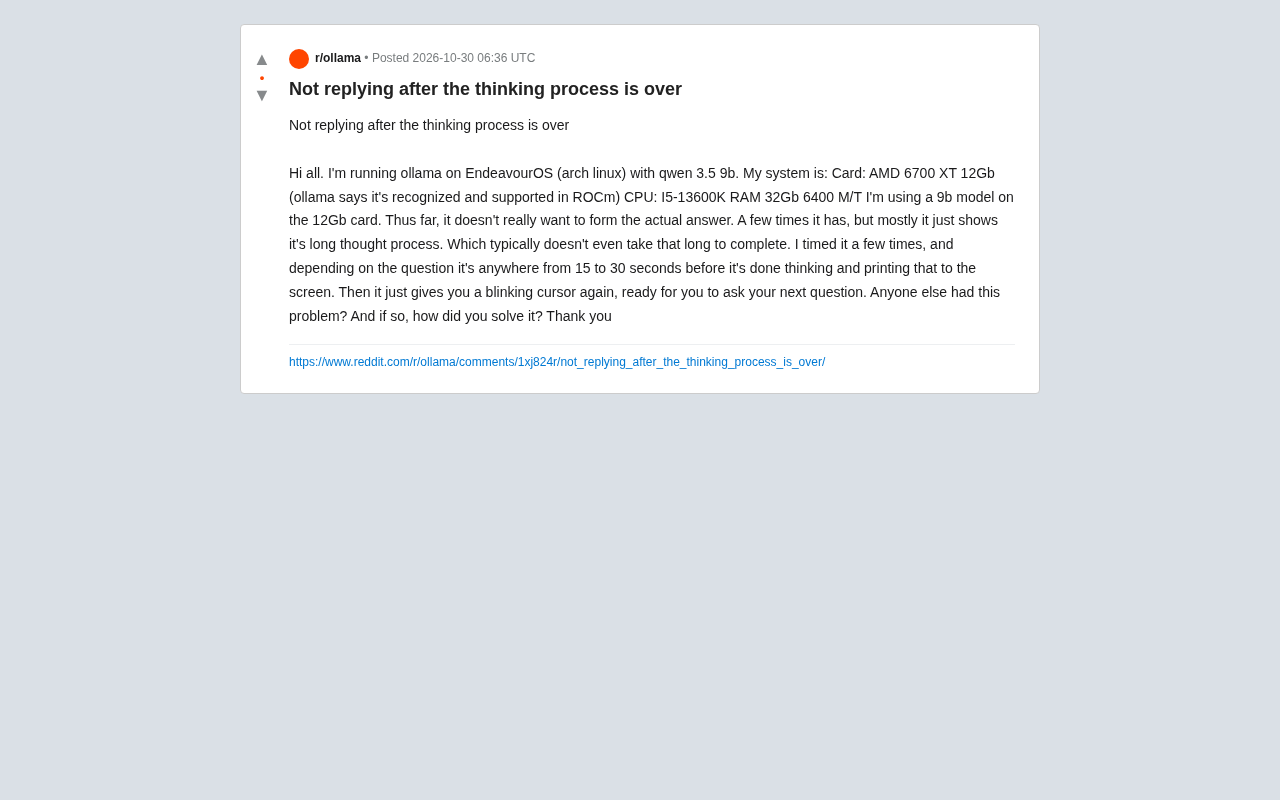
Looking at the hardware configuration, this machine is no slouch: AMD 6700 XT 12GB graphics card (Ollama reports it as recognized and supported by ROCm), i5-13600K processor, 32GB 6400 MT/s memory. Running a 9B model on 12GB of VRAM should theoretically not be stressful, so the problem is likely not "insufficient compute power" but rather some link in the inference pipeline or configuration level.
Why Does "Only Thinking, No Answer" Occur?
Output Phenomenon of Thinking Models
Models with explicit thinking capabilities like Qwen 3.5 output a reasoning process before generating the final answer. Normally, after thinking ends, the model should continue generating the formal response. But in this user's scenario, thinking ends and then it cuts off, indicating that the model is being cut off at the junction between the "thinking segment" and the "answer segment."
A common trigger is generation being terminated prematurely. When the model outputs to a certain special token (such as the thinking end marker), if the runtime environment handles that token improperly, it may treat subsequent content as an empty response or directly end this generation.
Thinking models (such as Qwen 3.5, DeepSeekAd-R1, etc.) architecturally use special tokens (such as Thinking or ``) to distinguish internal reasoning processes from final answers. These tokens are injected during training, teaching the model to generate chain-of-thought reasoning between the tokens and output the formal response after the tokens. The inference runtime (such as Ollama) needs to correctly parse these tokens: typically inserting stop sequences or switching generation modes when the thinking segment ends. If the template doesn't align with the token format, or if stop words mistakenly treat the thinking end marker as a termination signal, generation gets cut off at the junction, resulting in the "only thinking, no answer" phenomenon.
Context and Parameter Settings
Another direction is parameter configuration. Stop tokens in generation parameters, maximum output length limits, and context window size can all affect whether the final answer is output. If the stop sequence happens to match the end marker of the thinking segment, the model will stop generating immediately after thinking completes, manifesting as "only thinking, no answer."
Additionally, although VRAM is sufficient, some layers of the model may be placed on the CPU due to VRAM allocation strategy, which slows things down but typically doesn't cause the answer to disappear. The user mentions that the thinking process itself doesn't take long, which also indirectly indicates that inference speed is not the bottleneck.
Troubleshooting and Solutions
Check Model Template and Version
First, it's worth confirming whether the Modelfile template of the model being used is correct. Ollama uses templates to organize conversation format; if the template's handling of thinking tokens doesn't match the model itself, output truncation will occur. It's recommended to pull the latest official version of the model and check whether a corresponding non-thinking variant exists for comparative testing.
Modelfile is the configuration file Ollama uses to define model behavior, where the TEMPLATE directive specifies the conversation format (such as how system prompts, user messages, and assistant replies are concatenated), and the PARAMETER directive sets generation parameters like stop words and temperature. For thinking models, the template must include correct handling of thinking tokens, such as inserting the thinking start marker before the assistant reply and switching to answer generation after thinking ends. If the template is missing or incorrect, the model may not recognize the end of the thinking segment, causing output truncation. Users can view the current template via ollama show --modelfile <model name> and compare it with the latest version in the official repository.
Adjust Generation Parameters
You can try explicitly setting stop words in the request to avoid accidentally affecting the thinking end marker; at the same time, appropriately increase num_predict (maximum number of generated tokens) to rule out premature truncation due to length limits. If the problem persists, you can temporarily disable thinking mode and observe whether normal mode can output answers properly, to determine whether the problem lies in the junction of the thinking segment.
Stop tokens are markers used to terminate sequences early during generation, commonly such as `
, <|im_end|>, etc. If the stop word list includes the thinking end marker (such as ``), the model will stop after outputting that marker, and subsequent answers cannot be generated. The **num_predict** parameter limits the maximum number of tokens per generation; if set too small (such as below the length of the thinking segment), the model will be forcibly truncated during thinking, also manifesting as no answer. It's recommended to explicitly set the stopparameter in the request to exclude thinking markers and increasenum_predict` to above 2048 to ensure sufficient space for generating a complete response.
Pay Attention to Community Feedback and Logs
The user asks "has anyone encountered the same problem"—this is actually a good starting point for troubleshooting. Compatibility issues between Ollama and specific model versions are often quickly reported in the community. Checking Ollama's runtime logs (by increasing log level) can show where generation terminates, which is a key clue for pinpointing the problem.
Ollama's log level can be adjusted via the environment variable OLLAMA_DEBUG=1 or the startup parameter --debug; when enabled, it outputs detailed request parsing, template rendering, and generation step information. The logs will show the actual stop words used, the generated token sequence, and the termination reason (such as stop, length). If the termination reason is stop and it occurs at the thinking marker, you can confirm it's a stop word configuration issue; if it's length, you need to adjust num_predict. Combining logs with similar cases in the community (such as searching for "thinking no answer" in GitHub Issues) can quickly locate compatibility defects or template errors.
Implications for Local Deployment
This case reflects a reality of local large model deployment: hardware meeting requirements is only the first step; the matching of model templates, generation parameters, and runtime versions also determines the experience. While thinking models bring stronger reasoning capabilities, they also introduce new output boundary issues—the junction between the thinking segment and the answer segment is a new link that the toolchain needs to handle correctly.
For users encountering similar situations, it's recommended to troubleshoot step by step in the order of "confirm version and template → check stop words and length parameters → compare non-thinking mode → check runtime logs," which usually quickly identifies the cause.
FAQ
Q: Is 12GB VRAM enough for a 9B model? A: Based on this user's configuration, the graphics card is properly recognized by ROCm, and the VRAM capacity is sufficient for a 9B model; the problem is more likely at the software level rather than hardware.
Q: Does the normal output of the thinking process indicate the model is working? A: Yes, the ability to generate the thinking segment normally indicates that model loading and the inference pipeline are working; the problem is concentrated in the output stage after thinking ends.
One-line Summary
When running Qwen 3.5 9B on Ollama, the thinking process is complete but the answer is missing—the root cause lies in template or parameter configuration, not hardware.
Paragraph Summary
The article analyzes a typical problem encountered by a user running the Qwen 3.5 9B model through Ollama on EndeavourOS: after the model fully outputs the thinking process, the final answer disappears, leaving only a cursor waiting for input. Although the hardware configuration (AMD 6700 XT 12GB, i5-13600K, 32GB memory) is sufficient to run a 9B model, the problem may stem from improper handling of the thinking end marker by the model template, or from parameters such as stop words and maximum generation length (num_predict) causing premature truncation of generation. The author recommends troubleshooting in order: confirm model version and Modelfile template, check stop words and length parameters, compare non-thinking mode, and check runtime logs. The article emphasizes that thinking models bring new challenges to the local deployment toolchain regarding the junction between the thinking segment and the answer segment—hardware meeting requirements is only the first step, and software-level matching is equally critical.
Related articles

Mistral Large 4 Open-Sources a Trillion Parameters, Microsoft Offers Voluntary Severance to 60,000 Employees
Mistral Large 4 open-sources a trillion-parameter multimodal model with a coding agent score of 48; SanDisk earnings show AI inference reshaping NAND demand; Google Gemini adds in-app file editing, OpenAI raises Codex quotas, and Microsoft offers voluntary severance to 60,000 employees.
Mistral Large 4 Opens Its Weights: AI Morning Brief Roundup of Models and Ecosystem Trends
Mistral Large 4 opens its weights, a 1-trillion-parameter MoE architecture that can run locally on MacStudio; Meta's test-generation technology enters production; top tax benchmark pass rate only 10.8%; Canadian government takes a stake in Cohere; Doubao Work opens third-party model calls. This AI Morning Brief rounds up model, ecosystem, capital, and policy developments.

Mistral Large 4 Goes Open Source: A 1T-Parameter European Qwen Challenging DeepSeek
Mistral Large 4 is now open source: 1T total parameters, 52B activated, focused on coding and cybersecurity, with ~610G NVFP4 weights. We analyze its comparison with DeepSeek V4 Flash, API pricing, demo realism, and local deployment value.