omnigent Complete Tutorial: One Framework to Orchestrate Claude Code, Codex, and Cursor

omnigent is an open-source MetaHarness that orchestrates multiple Coding Agents with unified cost controls and multi-device collaboration.
omnigent (V0.16.0) is an open-source MetaHarness framework that wraps a unified interface around Coding Agents like Claude Code, Codex, and Cursor, solving the pain points of context-switching, fragmented history, and lack of centralized governance. Users can connect major Agents with a single command, import past conversations in bulk, and immediately gain Web UI and collaboration features. Its most distinctive capability is stateful context policies — tracking cumulative spend, tool call counts, and risk scores at the conversation level — with three governance tiers for individuals, developers, and administrators. It also supports domestic models like DeepSeek, GLM, and Tongyi Qianwen, plus native desktop and mobile apps.
Why You Need a Unified Agent Orchestration Layer
Anyone who has used Coding Agents will recognize the pain: the more tools you install, the more cluttered your terminal gets — Claude Code, Codex, Cursor, each with its own commands, login flow, and config. Switching between them means readapting every time, while conversation history is scattered across tools and nearly impossible to track down. Worse, there's virtually no unified control over who's spending money or who's touching production data.
According to hands-on coverage by the YouTube channel "大叔大 Coding," the open-source framework omnigent (latest version V0.16.0) is designed to solve exactly these three problems. Its core positioning is as a MetaHarness — a framework for orchestrating multiple Agent runtimes — which the project summarizes in one line: "One framework to orchestrate all your Coding Agents."
The approach is straightforward: treat each Agent as a Harness (the runtime that actually executes the Agent loop), and instead of modifying the Agent internals, omnigent wraps a unified interface around the outside and layers on capabilities that individual Agents can't provide on their own. In short — Agents do their own work; omnigent handles the commanding, bookkeeping, and gatekeeping.
MetaHarness borrows the concept of a "Test Harness" from software testing — infrastructure used to drive and control a component under test, without executing the actual tasks itself, focusing instead on scheduling, feeding inputs, and collecting outputs. omnigent transplants this concept into the AI Agent domain: each specific Coding Agent (Claude Code, Codex, etc.) acts as the underlying Harness responsible for actual code generation and execution loops, while omnigent serves as the MetaHarness, providing unified scheduling and governance at a higher level. This layered approach is analogous to container orchestration tools like Kubernetes managing Docker containers — underlying runtimes remain independent while the orchestration layer uniformly manages lifecycle, resource quotas, and access policies.
Up and Running in Minutes: One Command to Launch
The environment requirements are minimal: Python 3.12 or higher, Node.js 22 LTS with npm, and tmux. Installation is flexible — the project provides a one-line script and also supports pip, uv, Homebrew, and other methods. Simply run pip install omnigent in your terminal to install it; optional packages (such as Databricks-related components) can be added when needed for additional integrations.
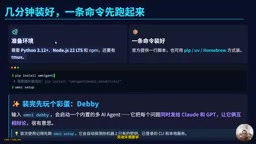
After installation, run omni setup and follow the wizard to configure credentials. This step is essential on first use — it automatically detects existing keys on your machine, already-logged-in CLI tools, and local services.
A fun bonus: typing omni debate launches a built-in multi-AI debate mode that sends the same question to both Claude and GPT simultaneously and lets the two models argue it out — quite entertaining in practice.
Connect to Major Agents with a Single Command
Once the environment is configured, the most practical step is using built-in commands to connect your commonly used Coding Agents directly — no email registration required:
omni claude— connect Claude Codeomni codex— connect Codexomni goose— connect Gooseomni hermes— connect Hermesomni copilot— connect open-source Copilotomni devin— connect Devin
This provides two immediate benefits. First, you can swap the underlying engine without relearning anything — regardless of which Agent is running underneath, you use the same interface and workflow, and switching Harnesses is instant. Second, you get an entire capability layer for free — once connected, you automatically gain a Web UI, persistent conversations, team collaboration, mobile access, and the context policies described below.
One-Click Migration of Conversation History
For anyone who frequently moves between tools, this feature is particularly valuable: previously accumulated Claude Code and Codex history can be migrated into regular conversations with a single command, immediately gaining Web UI, persistence, and collaboration capabilities.
The basic usage is omnigent import harness, specifying the source (e.g., claude or codex) along with additional parameters. There are several import modes:
- Import by session: use the
sessionparameter to specify a particular conversation ID - Bulk import: use the
lastparameter to pull the most recent N sessions — e.g.,last 10imports the 10 most recent, up to a maximum of 100, ordered from oldest to newest - Cross-tool merge: use
harness allwithlastto merge conversations from multiple Agents into a single globally ordered recent history - Replace existing records: add the
forceparameter to re-import in place while preserving the original conversation ID
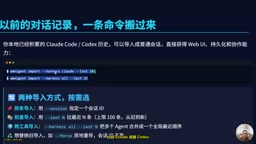
If you prefer not to use the command line, the Web UI's settings panel includes an "Import Conversations" option — just pick an online machine, then select recent conversations or import by ID. One reassuring detail: transcription happens locally on your machine, so the server never sees your local files.
Flexible Model Switching, Credentials Configured Once
Model management is refreshingly low-friction. Type /model in any conversation to switch models on the fly — conversation history and tool state are preserved, only the underlying model changes. Reasoning intensity is also adjustable via the reasoning_effort setting in the Agent configuration.
Credentials support four source types:
- Provider API Keys: enter keys directly from each provider
- Subscriptions: existing Claude Pro/Max or ChatGPT Plus/Pro plans via official CLI login
- Gateways: any gateway compatible with the OpenAI or Anthropic protocol — just paste the Base URL and Key
- Databricks: via workspace Profile using the Foundation Model API
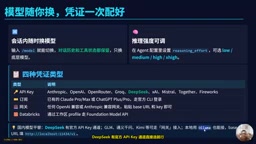
For users in China, the video specifically highlighted alternative options: DeepSeekAd has an official API Key channel available for direct selection; GLM, Tongyi Qianwen, and similar models can be connected via gateway; for local model inference, Ollama is also supported — just enter the localhost port address.
Gateway compatibility via the OpenAI protocol relies on what has become a de facto standard in AI inference services. After OpenAI publicly released its Chat Completions API specification in 2023, a large number of domestic and international providers — including certain Anthropic endpoints, DeepSeek, Zhipu GLM, Alibaba Tongyi Qianwen, and others — followed with compatible interfaces that only require swapping
base_urlandapi_key. This means any proxy, enterprise gateway, or self-hosted deployment that supports "OpenAI protocol pass-through" can theoretically connect to omnigent without waiting for official adapters. For users in China, this also bypasses direct connectivity issues with overseas services, allowing the same workflows to run through domestic mirror nodes or internal enterprise model gateways.
Core Feature: Giving Agents a Budget-Aware Brake
Where omnigent really shows its depth is in context policies. omnigent intercepts every Agent action — tool calls, model requests, file operations — and makes real-time decisions with three possible outcomes: allow, require approval, or block outright.
There are four core capabilities:
- Cost budgeting: tracks cumulative spending across an entire conversation — for example, alert at $3, block expensive models at $5
- Rate limiting: counts tool invocations over a time window and rejects calls beyond the threshold, preventing runaway Agent loops
- Risk scoring: sensitive operations like writing to production data accumulate a risk score; once the threshold is crossed, the action is automatically escalated for human approval
- Model routing: redirects simple tasks away from expensive models, automatically routing by context
Unlike the static rules in ordinary Agents, omnigent's policies are stateful and memory-aware — they remember how much this conversation has already spent and how many calls have already been made.
Three-Tier Management
Policies are organized across three tiers, each managed by different stakeholders:
- Conversation level: for end users — just tell the Agent in plain language, e.g., "Ask me before running any shell command"
- Configuration level: for developers — written into the Agent's YAML config, applied at every startup
- Server level: for administrators — covers all conversations on the entire server, manageable from the settings page or pushed dynamically via REST API
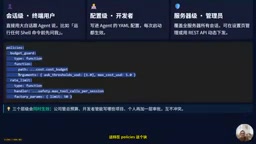
In terms of configuration syntax, declare a BudgetGuard in the policies block with alert and cap thresholds, then add a RateLimit to cap tool calls per conversation at 50. The benefit of all three tiers operating simultaneously: the organization controls the total budget, developers control the project scope, and individuals add a personal approval layer — all without conflict.
The risk scoring mechanism in context policies is essentially a cumulative operational audit model. Unlike traditional "single-operation allowlist/blocklist" approaches, it tracks the cumulative impact of all high-risk operations across an entire conversation lifecycle — for example, one write to a production database might score 30 points, one file deletion 20 points, and only when the cumulative score exceeds the threshold is human intervention triggered. The value of this design lies in detecting risk chains: individual operations that appear harmless in isolation can combine into high-risk sequences that static rules fail to catch, while a stateful scoring mechanism can identify this progressive risk. This aligns conceptually with the UEBA (User and Entity Behavior Analytics) approach in security, applied at the granularity of individual Agent tool calls.
Multi-Device Collaboration and Version Management
omnigent also extends the experience across multiple devices. A native desktop app is available — on macOS it runs as a native window connecting to localhost port 6767, with system notifications and dock badges. Mobile apps are available for both Android and iOS, so you can check in on running conversations from anywhere.
Upgrades and uninstalls are handled conservatively: omni upgrade updates to the latest stable version; adding the nightly flag tracks daily builds (published approximately daily at 04:30 UTC), suitable for those who want early access. omni uninstall defaults to a preview-only dry run and requires an explicit parameter to actually execute — and it backs up your data first.
Summary
omnigent uses one framework to orchestrate all Coding Agents. Its core value can be summarized in four points:
- MetaHarness provides unified orchestration for Claude Code, Codex, Cursor, and more — connect any of them with a single command
- Conversation history can be imported directly — old records come in and immediately gain Web UI and collaboration capabilities
- Context policies deliver cost budgeting, rate limiting, risk scoring, and model routing across three simultaneous tiers
- Multi-device support via desktop and mobile apps lets you take over conversations from anywhere
For developers and teams juggling multiple Coding Agents who want unified control over costs and permissions, this kind of orchestration framework is well worth trying.
Related articles

Apple HomeView Hands-On Review: Is the $300 Smart Home Hub Worth It?
Apple HomeView hands-on: a $300 smart home hub with facial recognition for quick account switching, but no App Store or voice recognition. Is the wall-mounted version worth it? Should you buy the first generation?

Meta Muse Wonder Launch: What It Means for Meta's Return to the Frontier AI Race
Meta releases Muse Wonder and WonderFull, benchmarks reach the frontier, community feedback is polarized. An in-depth look at Meta's return to the frontier AI race, its personal agent strategy, and Zuckerberg's different path.

Apple Home Smart Home Lineup Leaked: LG and Schneider Team Up, UWB Door Lock on Board
Apple Home ecosystem gains new LG and Schneider devices: UWB smart lock with proximity unlock, 2.5K dual-camera doorbell, privacy indoor camera, and AirPods-like seamless pairing.