One MCP URL, 100+ Tools for Your AI Agent: A Hands-On Guide to API Stack

API Stack uses MCP to compress hundreds of APIs into three meta-tools, letting AI Agents discover and call external capabilities on demand.
API Stack addresses the tool bloat problem in AI Agents using the MCP (Model Context Protocol). Instead of defining 100 separate tools for 100 APIs — which quickly overflows the model's context window — it exposes just three meta-tools: search the API directory, read API docs, and call the API. This lets Agents discover and use tools at runtime rather than preloading everything upfront. It supports one-click configuration for Claude Code, Cursor, VS Code, and Claude Desktop, with tested code samples for Vercel AI SDK, LangChain, and more. The free plan offers 1,000 calls/month with no credit card required.
AI models are great at language — but they can't verify real-world information. They don't know whether an email address actually exists, or what an API's latest documentation says. Traditionally, giving an AI Agent this kind of "hands-on" capability meant defining tools one by one — and the more tools you add, the more bloated and unmanageable things get. API Stack's answer: one MCP URL that instantly connects your Agent to hundreds of tools.
Three Tools Instead of a Hundred Definitions
The common pain point is this: when you want your Agent to call a large number of external APIs, you typically need to write a separate tool definition for each one. A hundred APIs means a hundred definitions — which rapidly blows out your context window and makes configuration a nightmare.
API Stack's MCP page provides a single endpoint that packages the entire API directory for your Agent. The key is a shift in thinking — instead of 100 tool definitions, the Agent gets 3 tools:
- Search (
search): Find the right API in the directory - Read API details (
read): Retrieve documentation and usage instructions for a specific API - Call API (
call): Actually execute the request
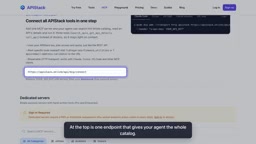
This is a classic "meta-tool" design. Rather than front-loading the model with every capability at once, you give it a mechanism to discover and invoke capabilities on demand. The Agent searches, reads the docs, then calls — a workflow that conserves context and allows the toolset to scale infinitely without adding any burden to the model.
The context window is the maximum amount of text a large language model can process in a single interaction, measured in tokens. Tool definitions themselves consume valuable context space — each one needs to describe its name, purpose, parameter types, and return format, typically running into hundreds of tokens. When an Agent system preloads dozens or hundreds of tool definitions, they crowd out the space needed for user conversation, history, and intermediate reasoning. This can cause the model to "forget" earlier information in long conversations, or force context truncation. The meta-tool design avoids this bottleneck at its root by making tool discovery part of the Agent's execution steps — so the model only ever needs to hold a small number of tool definitions at any given moment.
How to Connect with Popular Clients
One of MCP's (Model Context Protocol) biggest advantages is that it works across clients. API Stack provides ready-made connection configurations for several popular AI development environments:
Claude Code
The simplest to set up — a single command is all it takes.
Cursor
Paste the corresponding configuration into your MCP settings file and you're good to go.
VS Code and Claude Desktop
Both have their own dedicated tabs on the page with configurations ready to copy.
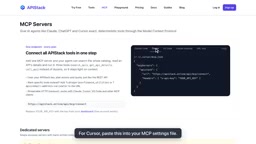
Regardless of which client you use, the core steps are the same: copy the configuration, then replace the placeholder with your API key from the dashboard. No complex SDK integration required — it's quite approachable for developers who prefer GUI-based configuration.
MCP (Model Context Protocol) is an open standard proposed by Anthropic in late 2024, designed to unify how AI models interact with external tools and data sources. Before MCP, every AI application had to write custom integration code for each tool, with no shared standard. MCP defines a standardized client-server communication format, so a tool provider only needs to implement an MCP Server once to be callable by any compatible AI client (Claude, Cursor, VS Code extensions, etc.). Think of it like a USB port — a standardized interface that makes devices plug-and-play without needing separate drivers for every computer. By hosting an MCP Server endpoint, API Stack exposes its entire API directory as a protocol-compliant service, so developers can access the whole ecosystem by configuring a single URL.
A Real Working Example: Email Safety Validation
Abstract tool-calling descriptions only go so far — nothing beats watching it run. The demo uses a Vercel AI SDK example, posing the question: "Is this email address safe to send a receipt to?"
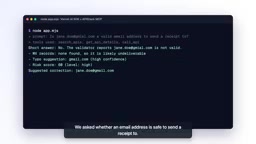
The Agent's reasoning chain is clear:
- Search the directory for email-related APIs
- Read the documentation for the email validation tool, understanding its parameters and return values
- Call the tool to perform the validation
The result is compelling — the Agent discovers that the domain gmil.com has no corresponding mail server, and suggests correcting it to gmail.com. This is exactly what a language model on its own cannot do: it might guess at a typo, but it can't actually verify whether a domain's mail server exists. With an external API, the Agent turns a "guess" into a "verified fact."
Building Your Own Agent? There's Tested Code Ready to Go
If you want to go beyond using ready-made clients and build your own Agent from scratch, API Stack's documentation includes tested code examples for multiple popular frameworks:
- Vercel AI SDK
- OpenAI Agents SDK
- LangChain
- And more
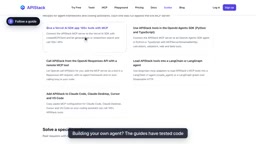
Whatever your tech stack, you'll find a working example to reference — reducing the friction between reading the docs and having something that actually runs.
Pricing and Getting Started
For developers who want to try it out first, API Stack offers a free account. The free plan includes 1,000 calls per month with no credit card required. That's more than enough quota to validate a prototype or run small-scale experiments without any cost pressure during the exploration phase.
Takeaway: MCP Is Changing How Tools Connect to AI
The real value here isn't "yet another API aggregation service" — it's what this demonstrates about a mature approach to tool integration under the MCP protocol: expose enormous capability through a minimal set of meta-tools. The Agent doesn't need to know all the tools upfront; it gains the ability to discover, understand, and call tools at runtime.
As the AI Agent ecosystem matures, how to equip models with external capabilities in an efficient, scalable way will become a critical question. The search–read–call pattern may well become the standard architecture for the tool layer in future Agents. For developers currently building Agents, MCP-based aggregation solutions like this are worth serious consideration in your technology stack.
Related articles

ChatGPT Space Launches: Team Collaboration and New Pages Features Explained
ChatGPT Space is OpenAI's new team collaboration feature with Pages, real-time collaboration, and Slack/Google Drive sync. We break down its privacy design, multi-platform integration, and the full workflow from conversation to document.

Migrating Apache Spark UDFs to GPU Acceleration with AI Agents
NVIDIA developer blog explains how AI Agents rewrite Apache Spark UDFs for GPU acceleration, covering migration criteria, agent rewriting and verification workflows, plus pitfalls like result consistency and CPU-GPU transfer overhead.

Zed Editor v0.40.4-rc2 Released: Usage Credits Now Available Without Upgrading
Zed editor releases v0.40.4-rc2, allowing users to use usage credits for AI features without upgrading to a paid plan, lowering the trial barrier.