One Year with Niri: Why This Scrolling Window Manager Makes People Never Want to Switch Back

A user shares his satisfying near-zero-config experience one year after migrating from Qtile to Niri with Dux Shell.
A user with over a decade of tiling window manager experience switched from Qtile to Niri in early 2026, pairing it with Dux Shell as his desktop environment. He was drawn to Niri's pure native Wayland experience and unique scrolling layout—new windows always push to the right, forming an infinite horizontal stack. Dux Shell fills in the panel, launcher, wallpaper, and screenshot components that Niri lacks by default, saving the hassle of assembling Polybar/Waybar under Wayland. For nearly a year, he's barely modified his configuration; dynamic workspace management, built-in screenshots, and window rules fully cover his daily needs. He concludes: the core appeal of this combo is that "it doesn't demand anything from you," ideal for users who want to escape configuration tinkering and focus on work.
A long-time tiling window manager user shares his real-world experience after switching from a traditional tiler to a Niri + Dux Shell combo for a year. This article not only chronicles his migration journey but also reveals the practical feel behind the concept of "scrolling window management" and how an out-of-the-box desktop environment can drastically reduce the hassle of running Wayland.
Switching from a Traditional Tiler to Niri
According to a YouTube channel share, this user migrated from Qtile—which he'd used for years—to Niri in early 2026. The direct reason for his switch was wanting to try a more pure Wayland compositor. He noted that although Qtile can work under Wayland, it has some minor quirks and annoyances, whereas Niri's Wayland experience gave him no negative feelings whatsoever.
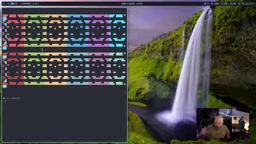
What really made him stay with Niri was its unique layout logic. Niri doesn't call itself a tiling window manager but a "scrolling window manager." Traditional tilers behave like this: open a second window, and the two sit side by side; open a third, and one half gets subdivided again; open a fourth, and you get a 2x2 grid or rows. But Niri's order is: every new window pushes to the right, forming an infinite horizontal stack extending rightward.
The user emphasized that this scrolling layout isn't as "weird" as many imagine. He explained: "It's really just another way of tiling—tiling that always goes to the right." Combined with Super + H/J/K/L directional keybindings for moving focus and Super + O to trigger the overview for quick window jumping, the whole navigation process is very smooth.

Wayland is the new-generation display server protocol on Linux, designed to replace X11, which has been used for decades. Compared to X11, Wayland improves security, input latency, multi-monitor support, and high-DPI screens, but it merges the responsibilities of the compositor and window manager, forcing many traditional tools to be rewritten. Qtile itself is a tiling window manager designed for X11, and later added Wayland backend support through libraries like wlroots—but the Wayland backend's feature completeness and stability often lag behind the X11 backend, which is the context behind the "minor quirks and annoyances" mentioned in the original. Niri, by contrast, is a compositor written natively for Wayland, so it isn't burdened by historical baggage.
Why Choose Dux Shell Instead of Polybar
Niri by default has no taskbar or panel, which is the first hurdle that makes many newcomers uncomfortable. This user initially tried Polybar, spent weeks on it, and concluded that "there's nothing special about it on Niri," plus it had bugs and incomplete features. He then turned to the QuickShell ecosystem and ultimately chose what was then called Dank Material Shell, recently renamed Dux Shell.
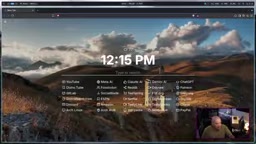
Dux Shell is essentially a complete desktop environment framework covering panels, launchers, screenshots, network management, wallpaper settings, notification centers, and other components users typically have to assemble themselves. The user mentioned that configuring all this on a traditional tiler requires installing Polybar or Waybar for the panel, finding a launcher like Fuzzel or Rofi, then handling Systray and various daemons—whereas Dux Shell has all of this built in.
He also specifically noted that Dux Shell supports not only Niri but also Hyprland, Mango, Sway, LabWC, Scroll, Miracle, and other Wayland compositors. This cross-compositor versatility gives it strong practicality within the Wayland ecosystem.
QuickShell is a desktop shell framework based on Qt/QML that allows developers to rapidly build desktop components like panels, launchers, and notification centers in a declarative way. Unlike standalone programs like Polybar or Waybar that only provide a panel, QuickShell is more like a programmable desktop environment runtime where components can share state and logic. Dux Shell (formerly Dank Material Shell) is a complete desktop environment built on QuickShell, which is why it can work across multiple Wayland compositors—as long as the compositor supports the necessary protocols (such as wlr-layer-shell), the same shell can run. This architecture explains why it can simultaneously support Niri, Hyprland, Sway, and other compositors, unlike traditional panels that require separate adaptation for each compositor.
Daily Use: The Satisfaction of Nearly Zero Configuration
The most interesting part of this article is the user's repeated emphasis that he "barely did any customization." He did a small amount of configuration in the first few days after installation, and for nearly a year afterward, he basically never touched the Niri config file or Dux Shell settings again.
He demonstrated several practical usage scenarios:
- Dynamic workspace management: Dux Shell automatically creates and destroys workspaces based on the number of windows. When a new window opens, the next empty workspace automatically appears; when it closes, excess workspaces automatically disappear, leaving no empty slots.
- Wallpaper changing: Click the date/weather widget to enter the overview, then switch to the wallpaper tab to change it. The user pointed out that on a minimal Linux system, even setting a wallpaper requires installing extra programs, whereas Dux Shell has it built in.
- Screen time statistics: Dux Shell recently added digital wellbeing features, allowing you to view weekly screen time and most-used applications.
- Color picker: As a built-in widget, the user frequently needs hex color values for content creation, so this widget is directly enabled without third-party tools.
Minimalism in Niri Configuration
When the user opened his Niri config file, he admitted that it was written about two weeks after switching and hasn't been modified since. The config contains only a few items: launching the Emacs daemon, launching Nextcloud, using Swayidle to put the monitor to sleep after 600 seconds, specifying the screenshot save directory, and setting window rules for some applications.
A very typical detail in the window rules: he forces Brave browser, Discord, GIMP, Kdenlive, Qt browser, and the Tasty Trade trading platform to open in fullscreen. His reasoning: "99% of the time, when you open a browser, you want it fullscreen," and these applications are designed for fullscreen anyway—they shouldn't be squeezed into half a screen.
The screenshot function is a capability he uses every day. Niri has built-in screenshot keybindings that save directly to a specified directory; he uses it to make YouTube thumbnails and capture stock charts to share on Discord. This means he doesn't need to install any additional screenshot tools.
Swayidle is an idle management daemon for Wayland that monitors user input activity and executes specified commands (such as locking the screen, turning off the monitor, or suspending the system) after a preset idle time. The "using Swayidle to put the monitor to sleep after 600 seconds" in the original is a typical idle management configuration. In the Wayland ecosystem, such daemons need to work with the compositor, and Niri supports them by implementing protocols like idle-notify. Window rules are another capability provided by the compositor, allowing users to automatically set how windows open (such as fullscreen, floating, or assigned to a specific workspace) based on matching criteria like application class name and title, thus avoiding manual adjustments every time.
Keybindings and Migration Cost
For users with years of tiling experience, Niri's learning curve is almost negligible. This user has been using tiling window managers for over a decade, starting with Exmonad, then Awesome and Qtile. In Niri, he continues to use Super + H/J/K/L to move focus and Super + Shift + H/L to move windows between monitors—these bindings seamlessly connect with his past habits.
He stated frankly: "Switching from a traditional tiler to Niri was effortless for me; I never felt anything strange about Niri."
Conclusion: If It Works, Don't Tinker
When asked whether he's satisfied with Niri, his answer was direct: satisfied, and he has no plans to migrate. His principle is—if something works, let it keep working; there's no need to complicate your life for the sake of novelty.
For users who fear that minimalist window managers require extensive configuration or even learning a new programming language, his experience is worth considering: Niri plus Dux Shell can be up and running in minutes, and the only thing left to learn is a few keybindings—about an hour to get the hang of it. After that, you just work in peace.
The core appeal of this combo isn't how powerful the features are, but that "it doesn't demand anything from you." In a Linux desktop ecosystem long joked about as "spending more time configuring than using," this out-of-the-box comfort is itself a rare commodity.
Related articles

Prompt Engineering for Beginners: From Writing Instructions to Systematic Design
A beginner's guide to prompt engineering: the difference between prompts and prompt engineering, the four roles of prompts, the six-step process and four goals, plus key limitations around capability ceilings, stability, hallucinations, context length, and cost.

GPT-6.2 Astra Leaked: Low-End Config Beats Previous Top-Tier, SVG Generation Stuns
Leaked GPT-6.2 Astra benchmarks and SVG demos surface: lowest inference tier beats previous top-tier; same batch includes Tencent HY4, Anthropic FlashProve model verification, DeepSeek V5 Ascend roadmap, and Binance security incident.

PolicyIK: Reinforcement Learning for High-Precision Robotic Arm Inverse Kinematics
PolicyIK uses goal-conditioned reinforcement learning to achieve high-precision robotic arm inverse kinematics, with 93.5% of simulated tasks within 1mm and 0.2° error, a deployment protocol raising success to 98.9%, and the ability to execute VLA policy commands.