Open-Source DLSS 5 Replica: OpenDLSS NR Runs on RTX 40-Series — Even in a Browser

OpenDLSS NR open-sources a bit-exact Vulkan replica of DLSS 5's neural renderer, running on RTX 40-series and browsers.
Developer MAAN has open-sourced OpenDLSS NR, a Vulkan reimplementation of NVIDIA's DLSS 5 neural rendering network under the MIT license. The 71-block, FP8, 141 MB replica achieves bit-exact intermediate outputs at 75 block boundaries — not merely approximating the final image but faithfully reconstructing the original computation logic. An RTX 4070 SUPER processes a 1080p frame in just 7.8 ms, making RTX 40-series deployment theoretically viable. A WebGPU browser version also enables AMD and Intel GPUs to run the network, albeit ~27× slower. Two major hurdles remain before in-game use: weights must be manually extracted from NVIDIA's closed-source runtime, and game integration requires community-built mods.
When NVIDIA announced DLSS 5 back in March, it was locked exclusively to RTX 50-series GPUs, leaving owners of older cards out in the cold. Then came an unexpected twist — developer MAAN rewrote DLSS 5's neural rendering network from scratch in Vulkan, open-sourced it under the MIT license, and released it as OpenDLSS NR, with full code and documentation available to the public. According to an analysis by Bilibili creator Peng Shu Da Wan Jia, this project's replication accuracy and cross-platform capabilities far exceed what most people would expect from a reverse-engineering effort.
How Accurate Is the Replica?
The true measure of a reverse-engineering project isn't simply whether it runs — it's whether it can align with every intermediate step of the original. This is precisely where OpenDLSS NR shines.
The full network consists of 71 blocks, uses FP8 activations, and weighs in at approximately 141 MB of weights. MAAN didn't just get the network running — he aligned everything from architecture down to rounding errors: given identical inputs, the final rendered output matches the original. More impressively, the intermediate outputs at 75 block boundaries are bit-exact.
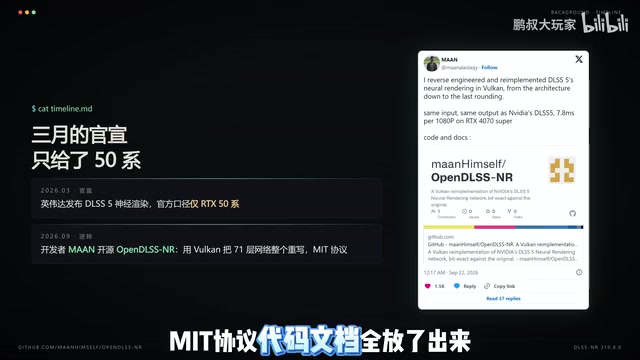
Matching the final image can be achieved through training approximations, but matching intermediate results byte-for-byte means the replicator genuinely reconstructed the original network's computation logic — not just a "close-enough" substitute. This bit-exact verification is the real technical achievement of this project.
What is FP8? FP8 (8-bit floating point) is a low-precision data format introduced by NVIDIA in its Hopper and Ada Lovelace architectures (RTX 40/50-series). Compared to FP32 and FP16, it significantly reduces VRAM usage and memory bandwidth requirements while maintaining acceptable precision — designed specifically for deep learning inference acceleration. DLSS 5's use of FP8 activations means every neuron's intermediate value is stored and transmitted in 8-bit floating-point form. This places specific demands on hardware: Ada architecture Tensor Cores natively support FP8 operations, while older GPUs lack this hardware unit and can only simulate it, resulting in a substantial performance penalty. OpenDLSS NR implements the same FP8 computation path at the Vulkan level, which is the fundamental reason why its native mode still requires specific hardware.
Performance: A 71-Layer Network That's Actually Usable
No matter how accurate the replica, it's worthless if it can't perform. Current benchmarks come from the developer's own testing on an RTX 4070 SUPER — a mid-range RTX 40-series card.
At 1080p, a single frame takes just 7.8 milliseconds, equivalent to a budget of roughly 128 fps. At 1440p that rises to 12.6 ms, and at 4K it's 29.3 ms. For a 71-layer neural network, these numbers fall within a practically usable range.
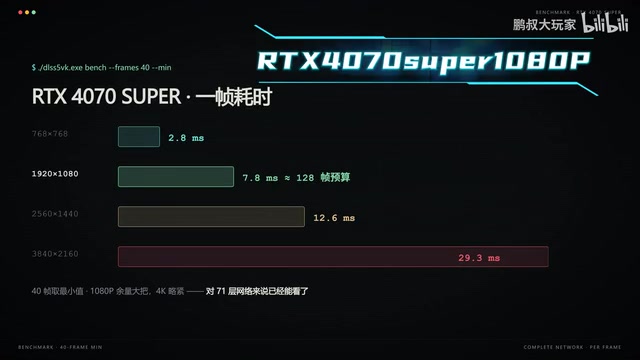
It's worth noting that these figures are self-reported by the developer, not independent third-party benchmarks, and real-world results may vary across different hardware and use cases. But in terms of order of magnitude, running DLSS 5's neural rendering network on an RTX 40-series GPU is no longer theoretically impossible.
Browser Version: A Surprising Cross-Platform Bonus
Perhaps even more interesting is a browser-based version of the project. The same network runs via WebGPU — no TensorRT required.
The trade-off is a roughly 27× speed penalty, but in exchange, AMD and Intel GPUs can theoretically run it too — a cross-platform capability that NVIDIA's closed-source solution could never offer. For researchers and anyone curious about the internal mechanics of neural rendering, being able to run a complete network pass right in the browser dramatically lowers the barrier to entry.
What is WebGPU? WebGPU is a next-generation web graphics and compute API standardized by the W3C, which landed in major browsers in 2023. Unlike WebGL, WebGPU natively supports general-purpose GPU compute (compute shaders), exposing a GPU's parallel computing power to web applications without binding to any vendor-specific driver layer like CUDA or Metal. Porting neural network inference to WebGPU means that any modern GPU — including AMD's RDNA architecture and Intel's Xe architecture — can participate in computation, as long as the browser supports the API. The 27× speed gap stems from two main sources: the overhead of the browser sandbox and JavaScript/WASM call stack, and the fact that WebGPU compute shaders cannot be deep-optimized for a specific GPU microarchitecture the way TensorRT can. For researchers trying to understand DLSS's neural rendering pipeline, this interactive browser environment offers an unprecedented level of transparency.
Installation: Three Steps to Get Started
For technically inclined users, the project provides a relatively clear installation workflow — just follow the documentation in three steps.
Step 1: Run a script to download the toolchain. Step 2: Build the main executable, which includes built-in benchmarking and bit-exact verification. Step 3: Build the demo renderer to observe neural rendering in action.

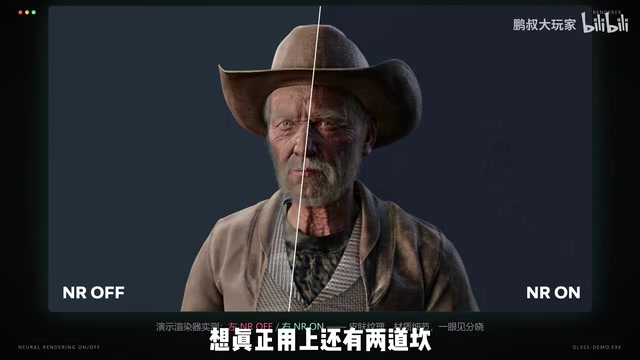
The demo's side-by-side toggle — neural rendering off on the left, on on the right — makes the difference immediately visible in skin textures and material detail. This real-time comparison transforms neural rendering from an abstract concept into something you can see with your own eyes.
Two Hurdles: Still Far From In-Game Use
As technically impressive as this all is, two very real obstacles stand between here and actual in-game deployment.
The first is the weights problem. The network weights must be extracted manually from NVIDIA's closed-source runtime — the highest-barrier step in the entire process and one that most ordinary users cannot complete on their own.
The second is game integration. The project currently includes no game integration whatsoever. To actually use it in a game, the community would need to package it as a mod — which takes both time and community effort.
There's also a hard hardware requirement: the native version still depends on specific hardware. AMD GPUs cannot run the native version and must resort to the much slower browser version as a workaround.
Why can't the weights be bundled directly? TensorRT is NVIDIA's official deep learning inference optimization library, and DLSS weight files are packaged in encrypted or proprietary formats within driver packages or game directories — not in standard ONNX or PyTorch formats, making direct export impossible. "Extracting from the closed-source runtime" typically involves intercepting model weights in runtime memory, which requires techniques such as driver-level hooks and memory dumps. In certain jurisdictions, this may touch on laws governing reverse engineering, and represents the primary source of legal risk for the project. The MIT license protects the code MAAN wrote himself, but it does not shield users from potential issues arising from extracting NVIDIA's proprietary weights. This explains why the project open-sources its architecture and computation logic, but cannot bundle the weights for distribution.
Why This Matters
Reproducing a closed-source network bit-for-bit and open-sourcing it has the most immediate impact on researchers and the modding community. It makes the previously black-box internals of DLSS 5 observable, reproducible, and available as a reference implementation for cross-platform neural rendering research.
But it's worth being clear-eyed: there's a significant gap between "replica complete" and "in-game deployment," with weight extraction and game integration standing as two major remaining steps. For RTX 40-series owners, the realistic options right now are waiting for NVIDIA to officially extend support, or keeping an eye on the community to see if someone ships a mod. Either way, OpenDLSS NR has already proven one thing: the technical walls around closed-source technology are not unscalable.
Related articles

Frontend to AI Agent Development: A Frontline Architect Explains Career Paths and Opportunities
A frontline AI architect explains the industry changes and practical paths for frontend developers transitioning to AI Agent development: why pure frontend jobs are disappearing, why Agent + full-stack has become mainstream in hiring, and three transformation routes—Agent development engineer, FDE, and remote contracting—along with corresponding learning strategies.

How to Choose an AI Agent Development Course: Five Pitfall-Avoidance Guidelines
A mechanical-engineering career changer's two-year pitfall-tested checklist for screening AI Agent development courses: complete delivery pipeline, resume-worthy projects, real development perspective, update frequency, and coaching feedback—with concrete judgment methods and pitfall-avoidance tips.

Coze AI Agent Building for Beginners: A Zero-Code AI Agent Development Guide
Coze, ByteDance's one-stop AI application development platform, supports zero-code drag-and-drop AI agent building. This article outlines Coze's core concepts, three advantages, differences between the domestic and international versions, and the distinction between agents and apps, helping beginners quickly get started with AI Agent development.