Open-Source Jev Model Alternatives: One-Click Local CPU/GPU Deployment Guide

Run open-source Jev discriminative probability models locally on CPU/GPU with one-click deployment.
Jev is a discriminative probabilistic model that differs from generative LLMs by focusing on True/False verdicts and probability scoring for text — outputting structured values rather than natural language. Since developer TypeSafe hasn't open-sourced the weights, community projects like OpenJev have emerged alongside one-click deployment packages that auto-detect CPU/GPU environments, support fully offline operation, and offer both a Web UI and a local API. Key tips: avoid Chinese characters in the path, use English for inputs, and expect a longer first load time.
A model called Jev (pronounced "Jave" in videos) has been making waves in the AI community lately. Unlike the conversational large language models we use every day, Jev is fundamentally a probabilistic prediction model — it doesn't generate fluent natural language. Instead, it returns a True/False judgment on a given statement, or ranks multiple candidate options with a probability score.
The problem is that the company behind it (TypeSafe, as mentioned in videos) has not open-sourced the model files or weights. As a result, community projects like OpenJev have emerged as open-source alternatives. This article is based on a one-click deployment package shared by a Bilibili creator, and walks through how to run this type of model locally and offline — including a hands-on look at its performance.
What Is the Jev Model?
In short, Jev is a discriminative probabilistic model, not a generative large language model. Its core capability revolves around making structured judgments about a piece of text:
- Giving a True/False verdict on a statement;
- Classifying candidate options;
- Assigning a probability score to each option.
The value of this kind of model isn't in "chatting" — it's in being quantifiable and decisive. For use cases that require rapid text classification, fact-checking, or confidence scoring, it's far more direct and lightweight than prompting a large model to generate a long-form response.
Since the official version isn't open-source, community implementations (like the one used in the referenced video) closely mirror the original's logic, with one key improvement: they can be deployed and run entirely on your local machine, with no internet connection required, using either CPU or GPU for inference. This is especially appealing for users with privacy concerns or those working in offline environments.
The fundamental difference between discriminative and generative models is worth unpacking here. Generative large models like GPT and Claude are trained with the objective of predicting "what comes next" — they output text token by token via autoregression, and excel at open-ended tasks like writing, conversation, and code generation. Discriminative models, on the other hand, don't generate new content. Instead, they learn to answer "given this input, which category does it belong to, and with what probability?" Classic examples include the original BERT and its many fine-tuned variants. Discriminative models typically have far fewer parameters, run faster at inference time, and use less VRAM — making them well-suited for resource-constrained local deployments. The True/False judgments and probability-scored rankings that Jev produces are standard outputs of discriminative modeling, fundamentally different from how a large language model "describes probabilities" by generating text. The former outputs structured numerical values that machines can consume directly; the latter requires parsing natural language to extract any actual conclusion.
Installation and Deployment
The main selling point of this one-click deployment package is that it works right out of the box — environment checks, dependency validation, and startup are all wrapped into scripts. Here's the full process:
Step 1: Extract the Archive
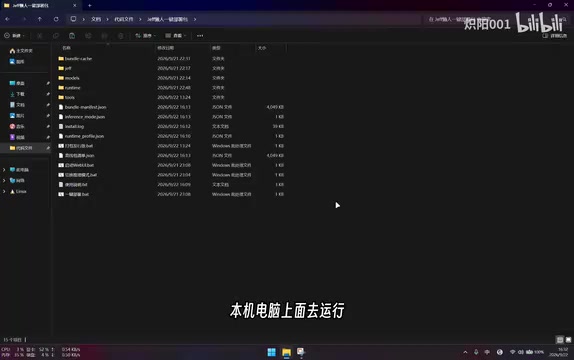
Download the compressed package and extract it to a local path. Make sure the path contains no Chinese characters, as this can cause script execution errors. The extracted directory will contain all the files and scripts needed to run the model.
Step 2: One-Click Deployment and Environment Check
For first-time setup, run the one-click deployment script. It will automatically check your current environment and verify that the deployment package is complete. This step catches missing files or environment issues early, preventing errors at startup.
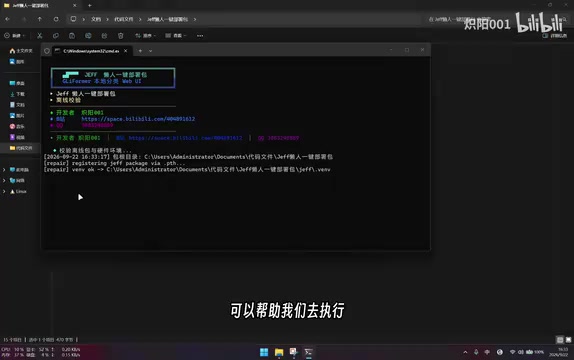
Step 3: Launch the Web UI
Once the check passes, launch the Web UI directly. The program will automatically detect your hardware and select the appropriate inference mode — if a GPU is found, it uses the GPU; otherwise, it falls back to CPU inference.
Note that initial load time varies significantly based on hardware. A capable machine might finish loading in a few dozen seconds, while a lower-spec machine could take one to three minutes. This is completely normal — just be patient.
Usage and Demo
Once inside the Web UI, the interface is straightforward: enter a piece of text you want to analyze, configure up to 5 questions, and click run to start classification.
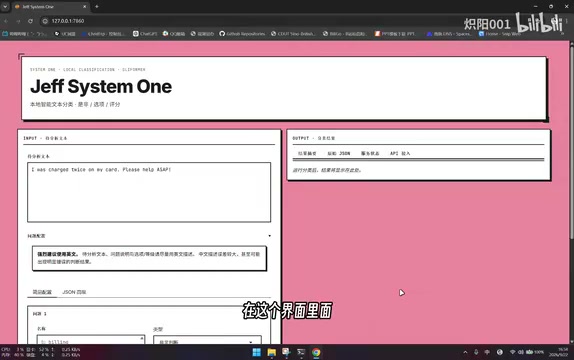
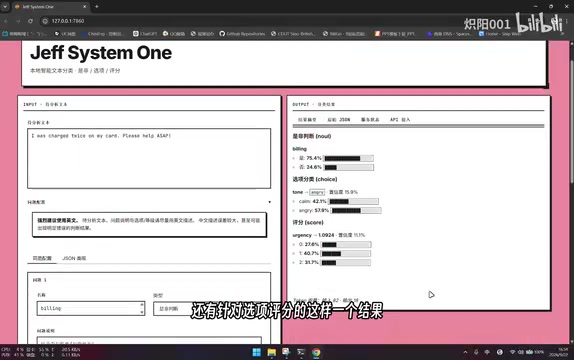
After the model finishes running locally, it returns three types of results:
- True/False verdict: a definitive true or false conclusion on a statement;
- Option classification: categorizes the candidate options;
- Option scoring: assigns a probability score to each option.
One important usage tip: it is strongly recommended to write both the input text and questions in English. The model was primarily trained on English-language data, so Chinese input may produce incorrect or unreliable results. To get started quickly, try loading the built-in examples to see how it performs, then swap in your own content.
API Integration: From Local Demo to Real-World Use
Beyond the graphical interface, this deployment package also includes API access, extending its use case from "hands-on exploration" to "production integration."
If you want to deploy the model on a server or have other programs call it while it's running locally, the deployment package supports local API connectivity. Once set up, external programs can call Jev's judgment and scoring capabilities via the API, embedding it into their own automation pipelines or applications.
For developers, this dual-mode design — graphical Web UI plus local API — is practical on both ends: non-technical users can click through the interface to explore its capabilities, while engineers get a proper integration point for building on top of it.
The typical integration pattern for the local API works like this: after starting the Jev service on your machine or an internal server, external programs send the text and questions as JSON to the model via HTTP requests (typically a REST interface), and the model returns a structured response with probability scores. The development experience is similar to calling the OpenAI API, except all traffic stays within your local network and never touches any third-party servers. For scenarios involving sensitive text (such as contract review or internal sentiment analysis) or restricted network environments, local API deployment is a practical choice that balances functionality with compliance. Developers can wrap this endpoint into Python scripts, automation workflows (like n8n or Airflow), or backend services to build batch text classification, content moderation scoring, and other pipeline tasks.
Conclusion
Models like Jev represent an alternative path beyond the generative AI wave: instead of chasing generation capabilities, they focus on structured judgment and scoring. With the official model closed-source, the community's open-source alternatives paired with a ready-to-run deployment package give everyday users a near-zero-barrier way to experience this kind of capability locally and offline.
If you want to try it out, keep three things in mind: no Chinese characters in the path, use English for your questions, and be patient on the first load. Whether it can truly match the judgment accuracy of the original Jev depends on how mature the community implementation becomes — something worth keeping an eye on.
Related articles

Free Unlimited Claude Code Solution: Agnes AI + CC Switch Setup Guide
No paid subscription needed — pair the free AI platform Agnes AI with the open-source tool CC Switch to provide a backend for Claude Code, enabling unlimited free calls to text, image, and video models. This guide covers the full setup, test results, and usage boundaries.

A Complete Zero-Cost Guide to Getting Started with Claude Code for Beginners in China
A beginner's guide to Claude Code for users in China: two installation methods (command line and IDE plugin), full configuration steps for replacing the official API with the free domestic LongCat model, and a hands-on demo of building a small tool with natural language, plus tips.

When the NSA Gets Involved: The AI Supply Chain Crisis Behind Open-Source CVEs and API Key Hijacking
Multiple open-source projects disclosed severe CVEs in one day, PHP flaws alarmed the FBI, and Railway and OpenCode were breached with API keys stolen. This article breaks down the vulnerability window, AI-accelerated exploitation, and the AI supply chain crisis behind the API key black market, with a developer defense checklist.