Open-Source Project Tested: Integrating DeepSeek and Other AI Models into WPS via API

Open-source project embeds DeepSeek and other AI models directly into WPS via DSL for in-document generation and chat-based editing.
A Bilibili creator has shared a working open-source project that uses DSL (Domain-Specific Language) technology to integrate an AI assistant into WPS Office, with support for DeepSeek and other major models. Users can trigger AI generation and conversational revision directly within the document editor, no browser switching required. In testing, generating a 2,000-character casual story consumed roughly 8,000 tokens. The project supports preset models and custom configuration, but requires a paid API key. It remains a personal prototype, with the author inviting community contributions.
An Open-Source Attempt to Embed AI Directly into WPS
Bringing large language model capabilities into everyday office software has long been a key direction for productivity improvement. A recent share from a Bilibili creator demonstrates a working personal project: using a DSL (Domain-Specific Language) approach to successfully integrate an "AI Link Assistant" into WPS, with support for DeepSeek and other mainstream models.
In short, the core of this open-source project is to equip WPS with a built-in "AI Link Assistant," allowing users to invoke large models directly during document editing to handle writing, drafting, and revision tasks — without constantly switching between a browser and the document. For users who frequently need to write, the value of this "generate in place" experience is significant.
DSL (Domain-Specific Language) is a programming or configuration language designed for a specific application domain, as opposed to general-purpose languages like Python or JavaScript. In AI integration scenarios, a DSL is typically used to describe logic such as "how to call a model, what context to pass in, and how to handle the output" — enabling non-developers to define AI behavior rules in a relatively concise way. WPS itself provides macro scripting and plugin extension interfaces (based on JavaScript or Lua). This project likely leverages those interfaces, using a DSL layer to map user actions into standard HTTP requests to large model APIs, enabling AI calls to be triggered from within the document editor without modifying WPS's underlying code.
Real-World Performance: ~8,000 Tokens to Generate 2,000 Characters in One Shot
The author's demo includes a concrete example: asking the AI to write a casual short story. After triggering the command, the assistant began "thinking" and generated over 2,000 Chinese characters in a single pass, consuming approximately 8,000 tokens in the process.
In terms of efficiency, 8,000 tokens for 2,000 characters falls within a normal range, suggesting there's no obvious resource waste in how the integration handles API calls. Once the content is generated, users can also refine the text through conversation — for example, asking it to "clean up the whole piece" — enabling quick revision passes.
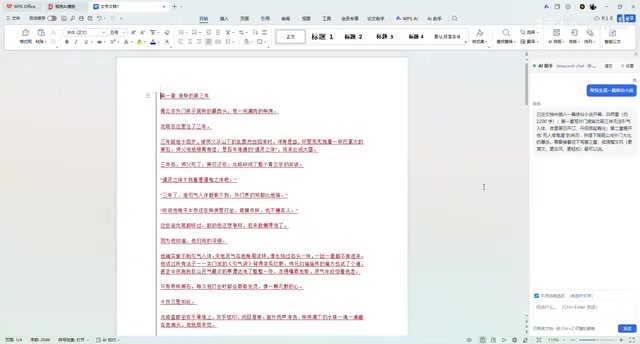
This "generate → converse → revise" loop is exactly what makes embedding AI into office software most practical: the document itself serves as the context, and changes are reflected in the body text in real time.
Model Compatibility and Custom Configuration
On the settings side, the project currently ships with built-in support for several mainstream AI models, which users can select directly. If the desired model isn't in the preset list, a "custom" option is available — allowing users to manually enter their own configuration.
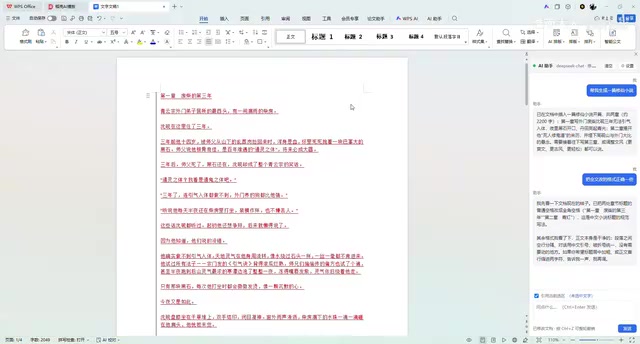
The author acknowledges that going the custom route is "a bit more involved" and requires some manual configuration ability. This is a common limitation of early-stage open-source tools: the preset options work out of the box, but flexibility comes at the cost of setup effort. For users who want to connect DeepSeek, this mechanism provides a clear integration path.
Key Requirement: You Need Your Own Paid API
It's important to note that this Link Assistant does not come with any free usage quota. Users must apply for and purchase their own API Key for the corresponding model.
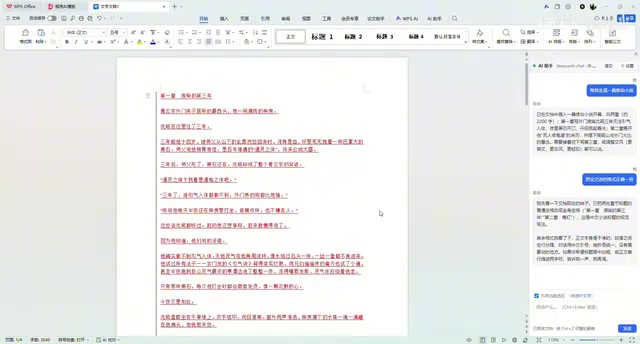
The author is candid that no free implementation has been found yet. This means the barrier to entry comes down to two things: having a valid API key (which involves actual payment), and completing the basic integration setup. For developers or power users already working with APIs from DeepSeek or similar providers, this is a non-issue. But for complete beginners, there is a learning curve to account for.
An API Key is the identity credential used to call commercial large model services, typically issued by the model provider (such as DeepSeek, OpenAI, etc.) after user registration. Usage is billed by token count — the basic unit models use to process text, where roughly every 1.5 Chinese characters corresponds to 1 token. DeepSeek's API pricing is relatively affordable; an 8,000-token call costs on the order of a few Chinese cents, making the daily cost quite manageable. The real barrier lies in the setup process: users need to register, add credits, obtain a key, and correctly enter it into the project's configuration — a series of steps that carries a learning curve for anyone who has never worked with API calls before.
An Open Invitation to Collaborate
The project is currently at the personal showcase stage, and the author has expressed a desire for community involvement — anyone willing to contribute code improvements is welcome to provide feedback, which the author can use as a basis for further iteration.
In terms of product maturity, this is more of a working proof-of-concept (PoC) than a polished product: the DSL integration works, generation and revision features are functional, and multi-model compatibility has taken shape — but the lack of a free tier, and the complexity of custom configuration, still need refinement.
For users interested in the AI + productivity space, this open-source effort offers a direction worth following: rather than waiting for a major vendor to release a paid AI office suite, why not use open-source tooling to plug your preferred model directly into WPS? Users eager to try it out can get started by preparing an API key and following the project's setup instructions.
Related articles
AI Programming at Xiamen University: A Full Breakdown from Textbook to Teaching
Xiamen University's Lin Ziyu shares how he built an AI programming course — covering three coding eras, Claude Code's production-ready milestone, three methodologies, and a fully free, reproducible curriculum design.

A DeepSeek Researcher's Confession: The AI He Trained Is About to Replace Him
DeepSeek V4.1 kernel engineer Liu Shengyu admits the AI he trained will surpass his own skills within a year—yet he keeps pushing forward. Here's why.
n8n Automation in Practice: How AI Workflows Help SMBs Cut Costs and Boost Efficiency
Learn how SMBs use n8n and AI tools to automate multi-platform messaging, AI customer service replies, and bulk exam data entry — real-world workflows for cutting costs.