OpenAI dots Deep Dive: Can This GPT-6-Powered Cloud Agent Actually Get Work Done?

OpenAI's dots cloud agent runs background tasks like coding, 3D modeling, and paper retrieval in parallel.
OpenAI unveiled dots at Dev Day — a long-horizon cloud agent powered by GPT-6 Astra, positioned as a "work-first background colleague." It runs on its own Debian Linux cloud computer with Blender, FreeCAD, and Codex pre-installed, and connects to 4,000+ apps via plugins. Testing showed dots can orchestrate Notion and retrieve papers via voice while proactively flagging experimental limitations; run game development and 3D modeling in parallel without blocking; and integrate scheduled tasks with CLI tools like Grok CLI and Codex CLI — marking a genuine shift from chatbot to autonomous cloud worker.
OpenAI dots: A Work-First, Long-Horizon Cloud Agent
OpenAI unveiled a product called dots at Dev Day — a long-horizon, background-capable cloud agent. Officially positioned as a "work-first, long-horizon colleague," it's powered by the flagship model GPT-6 Astra. It directly competes with Meta's Muse, which launched in early September, and other similar agent products that preceded it.
What sets dots apart from a typical chatbot is its nature as a long-horizon agent inside ChatGPT: even after a conversation ends, it continues pursuing its assigned goals in the background. It has its own cloud computer with a built-in browser and can connect to over 4,000 applications through the ChatGPT plugin ecosystem. Crucially, it learns user preferences and judgment criteria from feedback — a mechanism reminiscent of the previously viral Hermes agent. When idle, it also conducts proactive research, such as reading connected apps and keeping private notes.
The cloud environment specs are worth noting: Debian Linux as the OS, 10GB of RAM, 32GB of storage, and a suite of high-end productivity software pre-installed, including Blender and FreeCAD. Users can instruct dots to operate these applications directly to complete tasks.
Long-horizon Agent refers to an AI system capable of autonomously decomposing, planning, and executing multi-step tasks over extended time periods without continuous user intervention. Unlike traditional chatbots where each interaction is stateless and independent, long-horizon agents maintain persistent task state and memory, run asynchronously in the background, and can pause when blocked and resume when conditions are met. The core challenge lies in maintaining goal alignment during unsupervised long-running execution, preventing error accumulation, and accurately identifying when to "pause and check in" for human judgment. Meta Muse, Hermes agent, and dots collectively represent the industry's concentrated bet in this direction — upgrading AI from a "Q&A tool" to a "digital colleague" capable of independently handling workflows.
Setup and Configuration: From Avatar to Tech Stack Identification
The barrier to getting started with dots is low. After clicking setup on OpenAI's launch page, the system asks you to name the agent. In testing, the reviewer named it after the bronze automaton from Greek mythology and asked dots to design its own avatar — it generated a bronze robot head, then converted it into an animated image with dynamic effects. The overall result looked quite impressive.
One interesting detail: dots can infer your tech stack from your prior ChatGPT and Codex usage history. When asked "what tech stacks am I good at," it gave an accurate answer. This kind of personalization based on interaction history is a key pillar of its "colleague" positioning.
Once configured, dots can also connect to Slack for direct use in team collaboration scenarios. Asking it in Slack what it can do, it listed capabilities including generating AI content, development (fixing bugs, running tests), finding information, organizing Notion/GitHub notes, and tracking schedules.
Voice Interaction: Orchestrating Notion and Paper Retrieval End-to-End
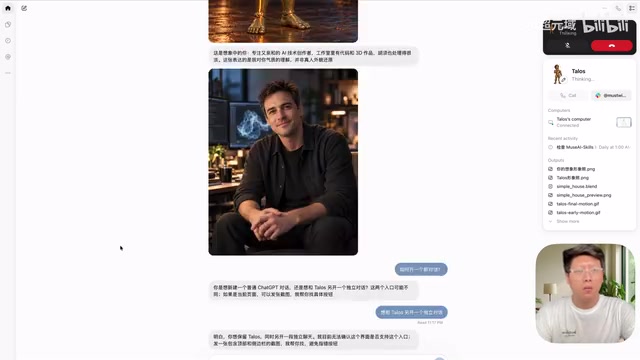
The most intuitive experience in testing came from the voice call feature. The reviewer used voice to ask dots to find notes on fine-tuning large language models in Notion. It quickly retrieved content related to LoRA and QLoRA, organized them by use case, and provided links.
What truly demonstrated its rigor was the paper retrieval task that followed. When asked to search for the latest QLoRA papers, dots explicitly stated it would "filter by actual publication date, not treat new versions of old papers as new research" — only including papers first published in the current year. It ultimately surfaced 4 papers and provided explanations of each paper's experimental results and limitations.
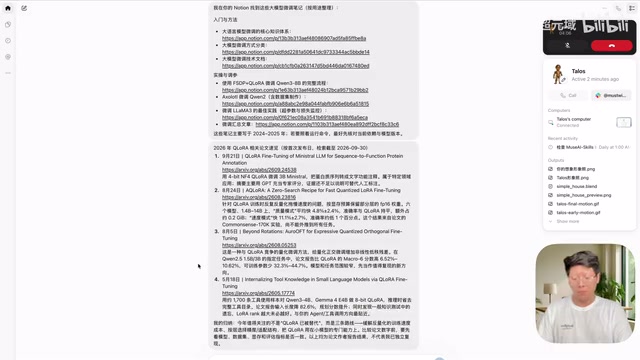
Even more commendable was its attitude when writing notes. When asked to organize one paper into a Notion note, dots proactively flagged a critical detail: the speedup findings in a particular paper only held in the V100 environment the authors tested, and the method didn't outperform equal-budget random layer selection in controlled experiments. It also warned that "your conclusion sounds overstated." This careful annotation of experimental prerequisites and limitations goes far beyond the paraphrasing-style summaries of typical tools.
LoRA (Low-Rank Adaptation) and QLoRA are currently the mainstream efficient fine-tuning techniques for large language models. LoRA's core idea is to inject low-rank matrices into the attention layers of a model without modifying the pre-trained weights, achieving task-specific adaptation with very few trainable parameters — drastically reducing VRAM and compute requirements. QLoRA builds on this by introducing 4-bit quantization to compress base model weights, making it possible to fine-tune models with tens of billions of parameters on a single consumer-grade GPU. The dots finding that "the speedup conclusion only holds in the V100 environment" is a classic hardware dependency issue in QLoRA research: the computational overhead of quantization and dequantization varies significantly across GPU architectures (Ampere vs. Volta), so benchmarks on an A100 don't necessarily translate directly to a V100, and vice versa. This is the important context behind dots proactively annotating the experimental prerequisites.
Parallel Multitasking: Game Development and 3D Modeling Without Blocking Each Other
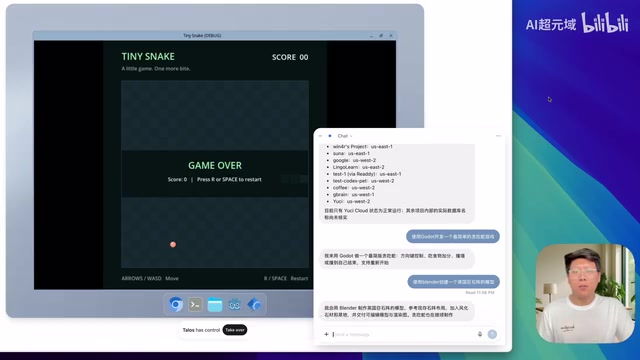
Parallel multitasking is another major highlight of dots. In testing, the reviewer first asked it to develop a Snake game using a game engine, then immediately assigned a second task: create a 3D model of Stonehenge in Blender. Dots indicated both tasks would proceed simultaneously without blocking each other.
The actual results confirmed this: it automatically opened the game engine, created the project, and ran tests. When the Snake walked out of bounds and the game ended, it reported back: "logical tests and actual window checks have passed; saving the project and screenshots" — while the Stonehenge model had also completed its render output. After downloading and running locally, the Snake game worked correctly, and the Stonehenge task produced a corresponding Blender file and render image.
Peeking inside dots' cloud computer revealed more details: the browser is Chromium, the terminal does not run as root, and — somewhat surprisingly — Codex is built in. This means it can not only operate pre-installed software but also invoke command-line toolchains.
Plugin Ecosystem and Scheduled Tasks: Connecting Supabase, Calling Grok CLI
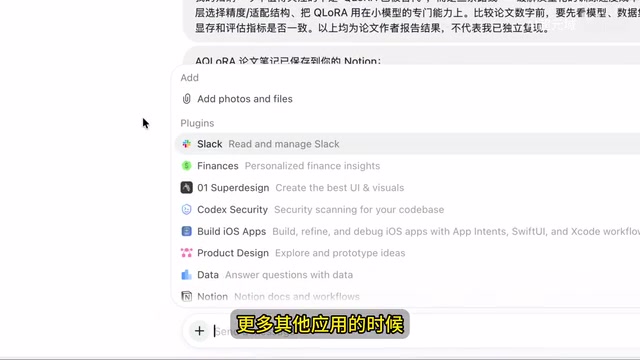
Dots' extensibility relies on its plugin ecosystem. In addition to Slack and Notion, the Supabase plugin was also installed during testing — after granting authorization, dots could quickly list the tables in the database, verifying its ability to actually operate backend services.
The scheduled task feature mirrors products like Hermes agent. The reviewer set up tasks to "check the project repository daily for new commits" and "check daily whether OpenAI has published new articles" — dots created both correctly and executed them at the specified times.
Installing applications on the cloud computer is also feasible. After instructing it to install Grok CLI and complete the login authorization, the reviewer then asked it to use Grok CLI to develop a simple login page demo. Within a few minutes, it successfully produced the output. This means users can use dots as an orchestration hub to flexibly invoke Grok CLI, Codex CLI, Claude Code, or other tools to complete development and browser automation tasks in the cloud.
Supabase is an open-source Backend-as-a-Service (BaaS) platform built on PostgreSQL, providing databases, authentication, real-time subscriptions, and storage — positioning itself as an open-source alternative to Firebase. Its API layer maps directly to PostgreSQL, allowing developers to interact with database tables via REST or GraphQL without deploying a separate backend service. Dots being able to list database table schemas through the Supabase plugin means it has the capability to read schemas, execute queries, and even write data — which has real practical value in automated data processing and backend operations scenarios.
Grok CLI is a command-line tool released by xAI (Elon Musk's AI company) that allows developers to call the capabilities of Grok-series models directly from a terminal environment. Dots being able to install and authorize Grok CLI within its cloud Linux environment, then use it as a toolchain to complete coding tasks, reflects an "orchestration hub" architectural philosophy — dots itself doesn't need to have every capability built in; instead, it extends its execution boundaries by invoking external CLI tools (including OpenAI's own Codex CLI and Anthropic's Claude Code).
Preliminary Conclusions
Based on this round of testing, dots delivers a credible answer to the core question of whether it can actually get work done: voice interaction is smooth, it exercises its own quality control over task rigor, parallel multitasking doesn't block, and the plugin and command-line toolchain integrations are functional. It pushes ChatGPT from a Q&A tool toward the role of a "colleague" capable of sustained work on a cloud computer.
Of course, this demo only covered basic scenarios, and more complex advanced use cases remain to be further validated. But based on the capabilities demonstrated so far, the practical value of cloud agents in productivity scenarios is becoming increasingly concrete.
Related articles

AI-Powered SRC Vulnerability Hunting: A Hands-On Guide to Building the Hermes Agent Workbench
Based on a hands-on Bilibili video: how to build an AI-powered SRC vulnerability hunting workbench—three-step method, four report elements, Agent mode vs web chat, and tool selection.

CLI-Anything Complete Beginner's Guide: How AI Operates Software — Principles and Practice
A complete beginner's guide to CLI-Anything: how AI Agents operate professional software via the command line, covering the three-layer architecture, CLI Hub installation, DrawIO practice, generator principles, and limits.

Carbon-X: A 14.8B Open-Source Model That Handles DNA and Text Simultaneously
Carbon-X is a 14.8B open-source multimodal model on Hugging Face where DNA and text share a token stream. 6-mer tokenization, 302B token mid-training, deployable on a single 80GB GPU, 66.7% average on five DNA benchmarks, Apache 2.0 license.