OpenAI GPT-5.6 Released: Three Versions Compared — Full Breakdown of the All-in-One Super App

OpenAI launches GPT-5.6 in three tiers and a unified super app combining Chat, Work, and Codex.
OpenAI's latest event introduced GPT-5.6 across three tiers — SOUL (flagship), TERA (balanced), and LUNA (developer-focused) — alongside a unified ChatGPT desktop app integrating Chat, Work, and Codex modes. The Work agent, powered by GPT-5.6, can operate across apps autonomously for hours. Image generation contender Reve 2.1 also debuted, ranking just below GPT Image 2.
OpenAI Event Highlights at a Glance
OpenAI delivered another information-packed event, centered on two major themes: the new flagship model GPT-5.6, and a "super app" that unifies ChatGPT, Work, and Codex into a single interface. On the side, the image generation space also saw a strong new contender — Reve 2.1 — which shot straight to the top of the arena rankings.
For everyday users, OpenAI's expanding product lineup can quickly lead to decision fatigue. This article breaks down the key takeaways from the event to help you figure out which model to use and how the three modes differ.
GPT-5.6: Which Version Should You Choose?
GPT-5.6 launches with three distinct capability tiers, designed to cover different budgets and use cases:
- SOUL (Flagship): The most capable version overall, outperforming the competing model Fable 5 on multiple benchmarks — yet priced more competitively. Best suited for complex programming and intensive knowledge work. Requires a subscription.
- TERA (Balanced): The default option for non-subscribers, on par with the previous-generation GPT-5.5. Capable of handling the vast majority of everyday tasks.
- LUNA (Value): Designed specifically for developers, scoring higher than Opus 4.8 on coding benchmarks while maintaining a better price-to-performance ratio.
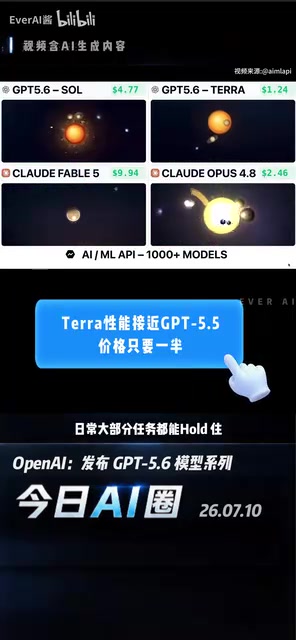
This tiered strategy follows the familiar playbook of major tech companies — think Adobe Creative Cloud's subscription tiers. From a technical standpoint, the three versions aren't simply "cut-down" variants of one another. Instead, they make deliberate trade-offs across dimensions like model parameter scale, inference compute (FLOPs), and context window size. LUNA's focus on coding tasks suggests OpenAI may have applied targeted fine-tuning on code data, continuing the specialized optimization lineage of the earlier Codex model. The overall strategy reflects OpenAI's dual-track approach: flagship models sit behind a subscription paywall, while value-oriented models target developer use cases — a further segmentation of user needs.
Advanced Modes for Harder Problems
For tasks that even SOUL struggles with, two additional options are available:
- MAX Mode: Gives the AI more time to reason through problems, ideal for complex questions requiring deep thinking.
- AUTO Mode: Dispatches four agents to work in parallel, using multi-agent collaboration to boost task completion efficiency.
The multi-agent architecture behind AUTO Mode is one of the hottest paradigms in AI engineering right now. Unlike the sequential inference of a single large model, a multi-agent system breaks complex tasks into subtasks, processes them in parallel through specialized agents, and then aggregates the results. In theory, this overcomes single-context-length limitations and reduces error accumulation. This architecture shares conceptual ground with the academic "Mixture of Experts (MoE)" approach — but while MoE operates at the internal weight level within a model, multi-agent coordination is an external orchestration layer at the inference-scheduling level. The two modes enhance capability along two distinct axes: "depth of reasoning" and "breadth of parallelism," representing a significant technical evolution from single-pass inference toward multi-agent collaboration.
ChatGPT Desktop: Three Modes, One App
The most significant product change announced is the consolidation of Chat, Work, and Codex into a single entry point on the ChatGPT desktop app. Each mode has a clear purpose:
- Chat: Everyday Q&A, handling general conversations and information queries.
- Codex: An agent mode for developers, focused on code-related tasks.
- Work: A newly launched workplace productivity agent, powered under the hood by both Codex and GPT-5.6.

Worth noting: Chat is positioned purely for Q&A, while both Codex and Work are agent modes that can "actually get things done" — a clear signal that ChatGPT is transitioning from a conversational tool into a genuine productivity platform.
Core Capabilities of the Work Agent
The Work agent is the headline feature of this release. Leveraging GPT-5.6's enhanced computer-use capabilities, the AI can view your screen, enter content, and coordinate actions across multiple applications — handling tasks like creating presentations, drafting documents, and processing spreadsheets.
A new capability called SYS has also been introduced, which can transform your work content or ideas directly into interactive websites or mini-apps, with support for public publishing. The Work agent can run continuously for hours when needed, and also supports scheduled tasks for truly automated workflows.

The combination of "screen awareness, cross-app operation, and long-duration execution" relies technically on computer vision (OCR and GUI recognition) and OS-level API calls — a capability the industry refers to as "Computer Use." Anthropic's Claude introduced similar functionality as early as late 2024; OpenAI's implementation here marks the transition of this capability from experimental to production-ready. The real engineering challenge lies in task-planning reliability — the AI must possess sufficient Long Horizon Planning ability to complete multi-hour automated tasks, rather than simply responding to one-step instructions. This combination of capabilities marks a fundamental shift from passive response to active execution, and is a critical milestone on the path to practical AI agents.
Two Product Changes to Be Aware Of
Alongside the feature consolidation, OpenAI has also made some product adjustments:
- AI Browser Atlas: Its features have been integrated into ChatGPT. If you want to use GPT within your own browser, update the Chrome extension to access it directly in the sidebar.
- Group Chat Being Phased Out: Users will eventually only be able to view chat history and will no longer be able to send new messages. Those who rely on this feature should plan their migration accordingly.
The Competitive Landscape and Image Generation's New Contender
Anthropic Resets Quotas in Sync
Around the same time as OpenAI's event and usage quota reset, Anthropic nearly simultaneously reset quotas for all of its users as well. The near-simultaneous moves from both major players offer users a rare side-by-side comparison window.

For users, this AI giant race directly translates into more generous free-tier quotas and a faster pace of capability iteration.
Reve 2.1: A New Force in Image Generation
Beyond large language models, a notable new player has emerged in the image generation space — Reve 2.1. It currently ranks just below GPT Image 2 in the arena leaderboard, with the team claiming significant improvements in both visual intelligence and reasoning.
Reve 2.1's key differentiator lies in its image generation logic: rather than going directly from a text prompt to a finished image, it first constructs a structured layout, then renders the final output. This "plan first, render second" paradigm is closely related to conditional control mechanisms in diffusion models. Traditional text-to-image models (such as Stable Diffusion and DALL-E) generate images directly from text prompts through a denoising process, relying on prompt engineering for compositional control — which often leads to issues like misaligned subjects or overlapping elements. Reve's structured layout stage is conceptually similar to ControlNet's "skeleton-first" approach: it generates a spatial relationship map (layout) of the scene first, then uses it as a conditioning constraint on the diffusion process, effectively decoupling compositional decisions from random sampling. This makes composition more precise and controllable, and should theoretically reduce the chaotic layouts that commonly plague AI-generated images.
Conclusion
This OpenAI event delivered two clear signals: first, model capabilities are being increasingly stratified — from flagship to value tiers — to cover the full spectrum of users; second, the product form factor is rapidly evolving from a conversational tool into a multi-agent productivity platform, with the Work agent being the most significant step in that direction.
Combined with Anthropic's synchronized quota reset and Reve 2.1's breakthrough in image generation, it's clear the entire AI industry is in a period of rapid iteration. For everyday users, the key to actually benefiting from these advances is understanding the logic behind model versions and tool modes — so you can choose the right tool for the right job.
Related articles

GitHub Copilot Fully Explained: Features, Usage, and Real-World Limitations
Deep dive into GitHub Copilot's workings, three core features (Ghost Text, Inline Chat, Sidebar), real project demos, and comparison with Cursor AI. Understand AI coding assistants' true capabilities and limitations.

Qwen 3.8 27B Hands-On: Running a Long-Horizon Coding Agent on a Single GPU
Qwen 3.8 27B local deployment hands-on: 4-bit quantization on a 24GB GPU, SGLang inference pitfalls, coding and long-horizon task testing. SWE-bench Pro surpasses Claude Opus—local long-horizon coding becomes reality.

PPT Agent Hands-On: AI Conversational Generation of Editable HTML Slides, Say Goodbye to the "Web Page Look"
Hands-on review of an open-source PPT Agent that generates editable HTML slides through conversational AI, with optimized rendering to eliminate the web page look and support for custom fonts and templates.