OpenCode Complete Beginner's Guide: Installation, Configuration, and Hands-On Practice

OpenCode is a highly customizable open-source AI command-line coding tool with flexible model, agent, and MCP tool configuration.
OpenCode is an open, developer-focused AI coding CLI tool built around deep customization — a stark contrast to closed, subscription-based coding assistants. It offers two installation paths (desktop or the recommended WSL for better Linux ecosystem compatibility) and supports model integration, rules files for code style enforcement, and multiple agent types. Users can extend functionality through custom commands and tools, and connect to external MCP services for plug-and-play capabilities. Agent SQL configurations can be self-built or reused directly from the community, significantly lowering the barrier to entry. The full learning path runs from concept → install → configure → agents → tool extension → resource reuse → hands-on integration.
What Is OpenCode
OpenCode is a command-line coding tool designed for AI/LLM developers. Built around highly customizable configuration and agent capabilities, it helps developers quickly invoke large language models to complete coding tasks in a local environment. Unlike some closed, paid tools, OpenCode takes an open and configurable approach — from model integration to tool extension, nearly every component can be tailored to your needs.
This article is based on a systematic tutorial series from a Bilibili content creator, organizing a complete learning path for OpenCode from beginner to hands-on practitioner. If you're looking for an AI coding assistant that's deeply customizable without being locked into a subscription, this guide can save you a lot of trial and error.
Two Installation Methods: Desktop and WSL
OpenCode can be installed via two main paths. The first is a desktop installation — a very straightforward process that's ideal for users who want to get up and running quickly without complex environment requirements. Just a few steps and you're done.
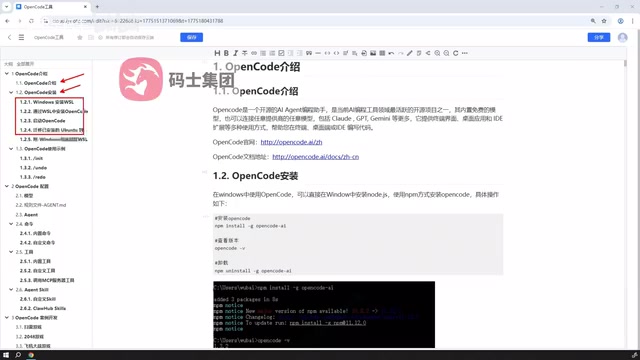
The second method involves first installing WSL (Windows Subsystem for Linux) on your Windows system, setting up a virtual Linux environment, and then installing OpenCode within that environment. While this takes a few extra steps, it's actually the officially recommended approach.
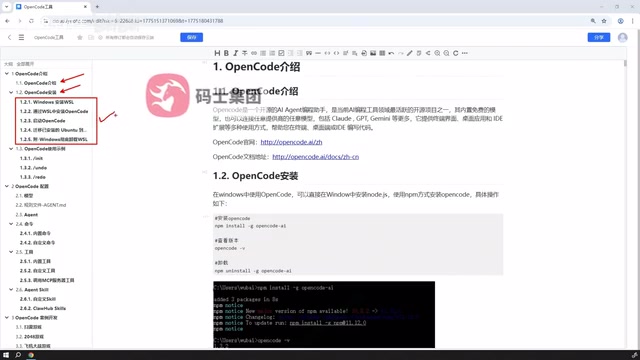
Why does the official team recommend the WSL route? The core reason is that command-line tools like OpenCode have far better compatibility and stability in Unix-like environments. Many dependencies, scripts, and toolchains are designed around the Linux ecosystem. Running directly on native Windows can lead to issues with paths, permissions, or missing dependencies. By setting up an isolated Linux environment through WSL, you get access to the full tool ecosystem while avoiding pollution of your host system. For developers planning long-term, in-depth use, the WSL approach is well worth the initial investment.
WSL (Windows Subsystem for Linux) is a compatibility layer built into Windows 10/11 by Microsoft, allowing users to run GNU/Linux binaries directly within Windows — no virtual machine or dual-boot setup required. The current mainstream version, WSL 2, is built on a real Linux kernel and far outperforms the earlier WSL 1 in terms of file system performance and system call compatibility. For developers, the WSL 2 experience is close to native Linux: you can use package managers like apt/brew, run shell scripts, and access the Docker daemon, all while seamlessly interacting with the Windows file system and applications. Installing OpenCode inside WSL means the tool runs on a genuine Linux kernel, avoiding common cross-platform issues like Windows path separators, line ending differences, and inconsistent permission models — making it the most developer-friendly way to use command-line tools on Windows.
Core Configuration: Models, Rules, and Agents
Once installed, configuration is the key to getting real value out of OpenCode. The tutorial breaks configuration down into several core areas.
Model Configuration
Model configuration determines which large language model OpenCode calls to handle your coding requests. The open architecture means you can flexibly connect to different model services, making trade-offs based on task complexity and cost budget.
Rules File Configuration
Rules files are used to constrain model behavior — things like code style, project conventions, or specific output requirements. With rules files, you can align AI output more closely with team standards and reduce the back-and-forth of repeated corrections.
Agent Classification
OpenCode comes with multiple built-in agent types, each responsible for different tasks. Understanding how agents are classified and when to use each type is a key milestone in becoming a proficient user.
Custom Commands and Tool Extensions
OpenCode's extensibility operates on two levels: commands and tools.
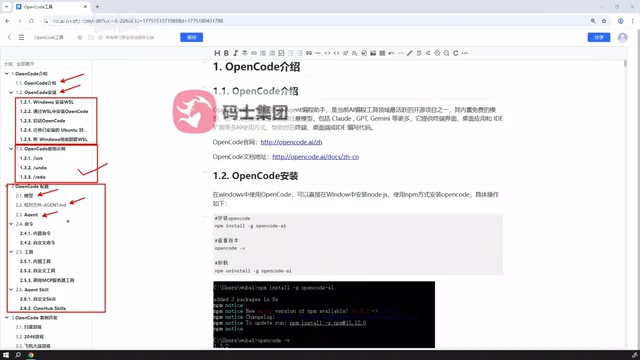
At the command level, beyond the built-in standard commands, users can define custom commands — packaging frequently used operations into a single instruction to boost day-to-day development efficiency. At the tool level, OpenCode supports custom tools and can invoke tools published by external MCP (Model Context Protocol) services. This means you can integrate external capabilities into your workflow, enabling your AI assistant to go beyond plain text conversation and actually invoke a wide range of practical functions.
This plug-and-play design is one of the defining characteristics that sets OpenCode apart from closed tools — it doesn't prescribe how you should work, but instead provides an open interface for you to compose the workflow you need.
MCP (Model Context Protocol) is an open protocol led by Anthropic, designed to provide large language models with a standardized "tool-calling" interface specification. Its core idea is to wrap external services — such as database queries, file operations, web search, code execution, and more — into tool descriptions with a unified format, so that different AI models and host applications can discover and invoke these tools in the same way, without needing per-model adaptations. You can think of MCP services as a "plugin marketplace" for the AI world: developers publish tool services that conform to the protocol, and users simply reference the corresponding MCP endpoint in their tool of choice (like OpenCode) to gain access to those capabilities. This design means the capability boundary of an AI assistant is no longer determined by a single vendor, but continuously expands with the community ecosystem.
Agent SQL and Reusing External Resources
OpenCode also supports agent SQL capabilities. Users can either define their own SQL agents or directly import existing SQL configurations shared online.
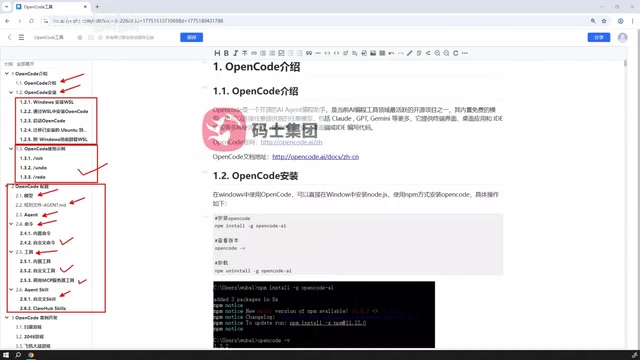
This reflects the openness of the OpenCode ecosystem: mature configurations from the community can be reused directly, avoiding the need to reinvent the wheel. For newcomers, a gentle learning curve involves starting with a ready-made agent SQL configuration from the community, then gradually understanding the underlying principles and making personalized adjustments.
"Agent SQL" here doesn't refer to a SQL database itself, but rather an agent configuration specifically designed to handle database-related tasks — including generating SQL query statements from natural language, explaining query results, and performing database schema analysis. Because data operation scenarios are highly structured, using a dedicated agent rather than a general-purpose programming agent typically yields more precise output. The feasibility of "reusing ready-made configurations from online" lies in the fact that OpenCode agent configurations are typically stored as plain text files (such as YAML or JSON), which community users can share publicly after fine-tuning. New users who import these configurations are essentially starting from a foundation built on others' debugging experience, significantly lowering the cold-start cost. As usage deepens, making targeted modifications based on your own project's schema and business conventions is an efficient, progressive learning strategy.
Hands-On Practice: Putting the Tools to Work
The final section of the tutorial demonstrates a simple development example, connecting all the previously covered pieces — installation, configuration, commands, tools, and agents — into one complete flow. This is the most important step in learning any tool: you only truly internalize the scattered concepts once you've run through a complete end-to-end workflow.
Looking at the overall design, OpenCode's positioning is clear: it hands control to the user. Through a complete set of mechanisms — configurable models, writable rules, extensible commands and tools, and reusable agents — it builds a highly flexible AI coding environment. For developers willing to invest time in configuration and who value control, this open approach often delivers more long-term value than an out-of-the-box paid tool.
Summary
OpenCode is an AI coding tool centered on custom configuration. The learning path roughly follows: understand the concepts → choose an installation method (desktop or the officially recommended WSL) → complete model and rules configuration → master agent classification → extend with custom commands and tools → reuse agent SQL configurations → integrate everything through hands-on examples. Following this path, you can quickly build a complete mental model of the tool and put it to use in real development work.
Related articles

Uber Deploys ChatGPT Work Company-Wide: AI in the Workplace Enters the Scaled Implementation Phase
Uber deploys ChatGPT Work to 30,000+ employees, extending it from engineering to all roles. We analyze its expert-engineer pairing, end-to-end automation, and questions of AI control and power concentration—insights for scaling AI in the workplace.

Shift at Midnight Hands-On: When "ID Verification" Becomes Alien Hunting
Shift at Midnight blends ID verification with horror survival in a four-player co-op game. We break down its inspection mechanics and chaotic humor.

Zelensky Recounts the Outbreak of War: I Need Ammunition, Not a Ride
Zelensky recalls the first day of war in a YouTube interview: farewell to family, rejecting Biden's evacuation offer with "I need ammunition, not a ride," and how Bucha shaped his stance on compromise and peace talks.