OpenCodex and CodexBar: Solving Two Key Pain Points — Model Switching and Quota Tracking in Codex

OpenCodex decouples models from tools; CodexBar puts all your AI quota info in one menu bar dashboard.
OpenCodex lets you use any compatible LLM within the familiar Codex interface by routing API calls to different providers, eliminating vendor lock-in. CodexBar is a Mac menu bar app that consolidates quota and usage data from Codex, Cursor, and other AI coding tools into a single glanceable dashboard, reducing the attention-breaking habit of repeatedly checking remaining quotas across multiple platforms.
For developers who use OpenAI Codex on a daily basis, two hidden pain points gradually emerge as the AI coding tool ecosystem grows richer: first, wanting to try other models without giving up the familiar Codex workflow; second, the mounting anxiety over remaining quotas when constantly switching between multiple AI tools. This article introduces two tools designed to address these exact problems — OpenCodex and CodexBar — each finely optimized for "model freedom" and "quota visibility" respectively.
Pain Point One: Want to Switch Models, Not Your Entire Workflow
When you've already internalized Codex's interaction logic and workflow but want to try Claude, GLM, MiMo, or even Kimi for certain tasks, the biggest frustration is: do you really have to switch your entire toolset and interface every time you change models?
Different model providers tend to bundle their own proprietary tools — Zhipu has the Z.ai toolchain, Kimi has KimiCode. This "model-tool bundling" trend is pervasive in today's market: OpenAI's Codex is tied to its own model ecosystem, Anthropic's Claude Code is deeply integrated with the Claude model family, and domestic providers follow the same pattern. From a business perspective, vendors want to build user stickiness through the tool layer. But for developers, it means every model comes with its own interaction paradigm, keyboard shortcuts, and project configuration approach — creating a de facto vendor lock-in. Adapting back and forth between multiple interfaces, shortcut systems, and interaction habits imposes an extremely high cognitive cost.
OpenCodex: Fully Decoupling Tools from Models
The core value of OpenCodex is completely separating "work tools" from "model providers." After installation, you still use the familiar Codex — log in with your official account as usual, and your subscription quota works as before. It doesn't affect your existing Codex experience in any way.
On top of that, you can connect other model providers and freely select pre-configured third-party models from within Codex's model list. This gives you much greater flexibility: you retain the consistent Codex experience while being able to switch the underlying LLM on demand.
This decoupling is possible because most model providers today are compatible with OpenAI's API format. Since the GPT-3.5 era, OpenAI's Chat Completions API format — including the messages array, role fields, streaming SSE protocol, and more — has become the de facto industry-standard interface. The vast majority of providers, both domestic and international, including Zhipu GLM, DeepSeekAd, MiMo, and others, offer OpenAI-compatible API endpoints. OpenCodex leverages this by inserting a routing middleware layer between Codex's frontend interaction layer and the backend model invocation layer, allowing users to maintain a unified interaction experience while forwarding actual inference requests to different providers.
Taking it a step further, if you already subscribe to token packages from multiple providers, OpenCodex lets you consolidate all these models into Codex or Claude Code for unified management. You can even set up multiple routes from different sources for the same model, enabling quick failover when one route becomes unstable. As the number of available models grows, this centralized management approach is clearly far more efficient than manually editing configuration files.
Pain Point Two: Quota Anxiety and Flow-Breaking Checks
The second problem is more subtle but even more widespread. When you're simultaneously using Codex, Claude Code, Cursor, and other AI coding tools, you'll find yourself increasingly preoccupied with one question: How much quota do I have left?
One root cause of this anxiety is the wildly different billing models across mainstream AI coding tools. Codex uses a subscription model where Pro users have a fixed monthly request quota cap. Cursor similarly uses a monthly subscription with quota limits — its Pro plan includes a certain number of "fast requests," after which users are downgraded to a slow queue. Claude Code bills based on Anthropic's API token consumption, or provides fixed quotas through Max subscription plans. The quota units aren't even consistent across tools — some count by request, some by token consumption, some by "coding time" — and reset cycles vary too (some reset by calendar month, some on a rolling 30-day basis, some weekly). This fragmented billing landscape makes it difficult for developers to intuitively grasp their overall usage.
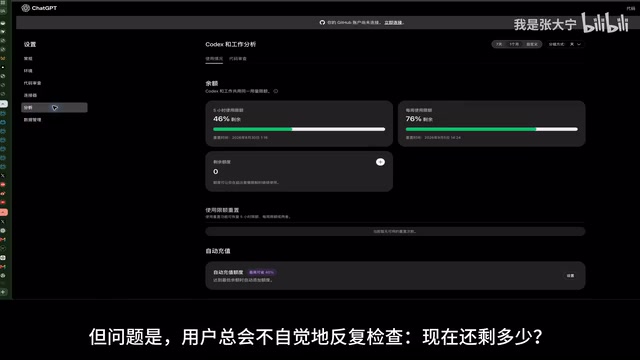
Checking quotas individually isn't complicated — open settings or your account page, click a few times, and you can see your usage. But the real problem is that users compulsively and repeatedly check: How much is left now? How much did that last task use? When does it reset? This anxiety becomes especially acute when quotas are running low.
The Hidden Cost of Attention Switching
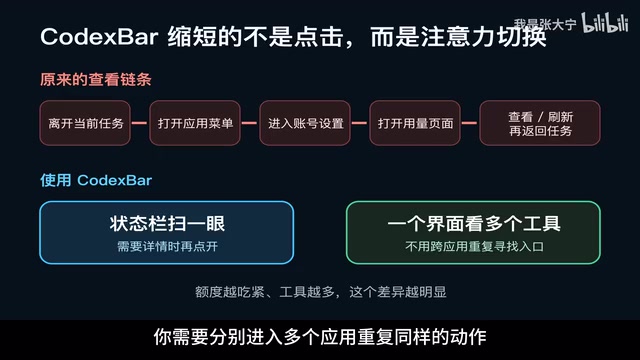
The essence of the problem is "attention switching." Every time you check your quota, you have to leave the code you're writing or the bug you're debugging, navigate to a usage page, review it, and then switch back. Each individual check seems quick, but this constant chain of interruptions continuously erodes your focus.
This phenomenon is well-supported by cognitive psychology research. Gloria Mark's research at UC Irvine shows that after a single work interruption, it takes an average of about 23 minutes to fully return to the previous state of focus. This problem is particularly acute in programming — when developers are debugging complex logic or refactoring code, the brain needs to maintain a "working memory stack" containing variable states, call chains, and business logic. Any interruption can cause partial information loss from this stack. Even if the act of "checking quotas" itself takes only 10 seconds, the context switch it triggers — from code editor to browser, from logical thinking to numerical calculation — imposes a cognitive cost far exceeding the surface time spent. Psychology refers to this as "switch cost," and its cumulative effect can significantly reduce development efficiency.
The situation gets worse as you add more tools: each tool has a different entry point, a different quota dashboard, and different reset times. You need to separately open multiple applications to repeat the same action.
CodexBar: A Quota Dashboard in Your Menu Bar
CodexBar shortens both of these chains simultaneously.
First, it lives permanently in your Mac menu bar. Choosing the macOS menu bar as its home isn't arbitrary — Menu Bar Apps occupy a special niche in the macOS ecosystem as "ambient information" carriers. Their design philosophy is "information always accessible but never intrusive." Unlike Dock apps that require window switching, menu bar apps reside at the very top of the screen, in the user's peripheral visual field: you can get summary information without visual focus (such as icon color changes or numeric indicators). When you need details, a single click expands a panel that overlays your current window rather than replacing it, and clicking elsewhere dismisses it. This "zero window-switch" information access model perfectly matches the design goal of "minimizing attention interruption." Some status information doesn't even require a click — a quick glance at the status bar tells you what you need to know. When you need more detail, one click shows quota specifics and reset times without leaving your current work.
Second, it consolidates quota status from different apps into a single interface. You no longer need to hunt for entry points across Codex, Cursor, and other tools — one place gives you the current status of all your services. This significantly reduces the attention switching and mental overhead of repeatedly confirming quotas.
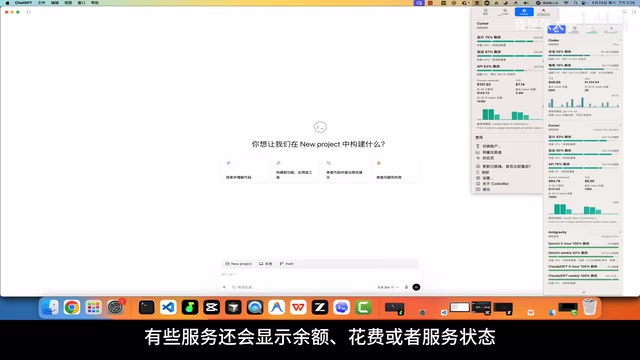
Beyond quotas and reset times, some services also display balance, spending, and even service status. With Codex, for example, you can see how much your consumed quota would cost at official API pricing in terms of token value. This not only helps you compare the cost-effectiveness of different subscription plans but also provides a satisfying sense of "getting a great deal." However, it's worth noting that different providers expose different data, so the content displayed on each card won't be completely identical.
Summary: Precisely Solving Specific Pain Points
Both tools have highly focused positioning:
- OpenCodex eliminates the hassle of switching your entire work environment when you want to change models, achieving true tool-model decoupling.
- CodexBar eliminates the attention drain of repeatedly navigating away from your current task just to check quotas.
They don't try to be all-encompassing. Instead, they polish the experience for a specific scenario until it's just right. If either of these problems resonates with you, the improvement after installation will be quite noticeable. For heavy Codex users, the value of tools like these often lies not in feature breadth, but in whether they can truly reduce the hidden friction in your workflow.
It's worth mentioning that setting up these tools can itself be delegated to AI — just send the project URL to your Codex and let it handle the installation and configuration, creating an amusing closed loop of "using AI to configure AI tools."
Related articles

Uber Deploys ChatGPT Work Company-Wide: AI in the Workplace Enters the Scaled Implementation Phase
Uber deploys ChatGPT Work to 30,000+ employees, extending it from engineering to all roles. We analyze its expert-engineer pairing, end-to-end automation, and questions of AI control and power concentration—insights for scaling AI in the workplace.

Shift at Midnight Hands-On: When "ID Verification" Becomes Alien Hunting
Shift at Midnight blends ID verification with horror survival in a four-player co-op game. We break down its inspection mechanics and chaotic humor.

Zelensky Recounts the Outbreak of War: I Need Ammunition, Not a Ride
Zelensky recalls the first day of war in a YouTube interview: farewell to family, rejecting Biden's evacuation offer with "I need ammunition, not a ride," and how Bucha shaped his stance on compromise and peace talks.