Parrot OS Ethical Hacking in Practice: From Linux Basics to Exploitation
Parrot OS crash course: from Linux commands and Nmap scanning to web brute forcing and Python automation.
Cybersecurity instructor Declan Middleton's crash course uses Parrot OS in a local CTF environment to teach the ethical hacking path. It covers Linux basics, network diagnostics, user permissions, and Bash automation, then details Nmap scanning, Web enumeration with WhatWeb, Dirsearch, and Ffuf, login brute forcing with Burp Suite and rockyou.txt, and a file upload exploit, finishing with custom Python recon scripts using socket and requests.
How does Parrot OS differ from Kali Linux? How can an ethical hacker, starting from scratch in a safe local environment, master Linux commands, Nmap scanning, web enumeration, and even write their own Python automation scripts? Cybersecurity instructor Declan Middleton's crash course lays out the complete path.
Why Choose Parrot OS: Similarities and Differences with Kali
At the start of the course, Declan points out that Parrot OS is very similar to Kali Linux—"the only differences are the branding, the color scheme, and maybe a few extra tools installed." For learners, which one you choose doesn't matter; what matters is understanding the principles behind the tools. The entire course is demonstrated in a local CTF lab environment, where all operations are safe and legal.
This stance of "the tool doesn't matter, the principle does" runs throughout. Declan repeatedly emphasizes that the terminal is the hacker's real weapon: every command you type performs a function, and Parrot OS and most Linux systems rely on the terminal for daily work.
CTF (Capture The Flag) is a form of cybersecurity competition in which participants solve security challenges to obtain a "flag" hidden in the system (usually a string), thereby proving a successful intrusion or compromise. CTF environments are typically intentionally vulnerable virtual machines or networks designed for learners to practice penetration testing skills under legal, isolated conditions. The VulnHub virtual machines used in the course are of this type: VulnHub is a platform offering a large number of free, downloadable vulnerable VM images that learners can run locally in VirtualBox or VMware to safely practice scanning, enumeration, and exploitation techniques.
Linux Command Fundamentals: Files, Networking, and User Management
File and Directory Operations
The course starts with the most basic ls, cd, mkdir, touch, and rm, then gradually moves to more detailed usage. ls -la shows hidden files, permissions, owners, file sizes, and dates; pwd prints the current working directory; cd .. goes up one directory. Declan demonstrates editing text files with nano or micro, and recommends micro because it supports syntax highlighting and plugins.
cat outputs file contents directly, cp copies files, and mv can both move and rename files. rm -rf (which Declan jokingly calls "remove fully") is a dangerous but efficient way to delete, and with the wildcard *.txt you can batch-delete files of a specific type. He specifically warns: if you accidentally run certain commands as root, "you could delete the entire system kernel."
The find command is used to search for files across the entire system. In the demonstration, a hidden file could not be found under normal user permissions due to "permission denied"; after adding sudo, it was successfully located in the /opt directory. du -sh * is used to estimate the disk space occupied by each file and folder in the current directory.
Network Diagnostic Commands
ip a and sudo ifconfig are used to view network interfaces and IP addresses. Declan demonstrates filtering output with the pipe character | together with grep, for example sudo ifconfig | grep inet, which reduces lengthy network information to only the lines related to IP.
ping is used to test connectivity. The course includes a vivid troubleshooting case: when the virtual machine was not properly bridged, ping 192.168.1.1 returned "network unreachable," and Declan explains that this usually points to a missing IP address, a disabled network adapter, or an invalid default gateway. After fixing the network configuration, ping successfully returned "64 bytes from 192.168.1.1," showing 44 packets sent, 44 received, and zero packet loss.
netdiscover is used to discover devices on the current network, listing IP addresses, MAC addresses, and sometimes hostnames.
User and Permission Management
sudo su switches to a root shell, whoami shows the current user, hostname shows the computer name, and uname -r shows the kernel version. The history command shows the record of previous commands—during the demonstration, Declan's history already contained 723 commands.
The user management section demonstrates creating a new user with adduser student, changing the password with passwd, and switching users with su student. A key detail: new users do not have sudo privileges by default, so running sudo su will fail; you need to add them to the sudo group with sudo usermod -aG sudo student before they can escalate privileges. To delete a user, use sudo deluser; merely deleting the user's home directory does not remove the account.
Bash Scripting: Let the Machine Handle Repetitive Work
Declan demonstrates Bash automation with a simple script.sh: the script content is just a single ls -la command, but running ./script.sh directly gives "Permission denied." The solution is to grant execute permission with chmod 755 script.sh.
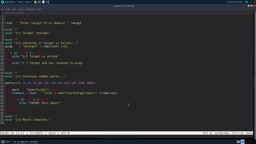
He then shows a more practical reconnaissance script, recon.sh: it first uses ping to determine whether the target is online, then loops through a set of common ports and outputs information about open ports. In the demonstration, the script detected ports 53, 80, and 8080 open on the local router—53 corresponds to DNS, and 80 and 8080 correspond to web services. Declan emphasizes that this script is not advanced and that Nmap does it better, but writing one yourself helps you understand the logic behind scanning.
The Penetration Testing Toolchain: From Nmap to Burp Suite
Nmap: The Starting Point of Network Scanning
The course sets up an intentionally vulnerable CTF virtual machine from VulnHub (named Explorer), running in VirtualBox in bridged mode and obtaining a LAN IP (192.168.1.56 in the demonstration).
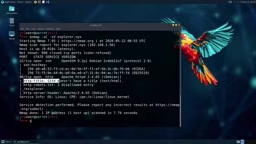
A basic scan, nmap 192.168.1.56, immediately finds port 22 (SSH) and port 80 (HTTP) open. nmap -sV further identifies service versions, including the SSH version and the Apache version running on Debian Linux. nmap -sC -sV runs the default scripts and unexpectedly discovers robots.txt, which exposes the /ext/explorer directory—visiting it reveals a login page.
Other scanning options include: -p to specify ports, -p- to scan all ports (time-consuming), and -A for aggressive scanning (OS detection, version detection, script scanning, but "very noisy" and easily detected by IDS and firewalls). -oN saves results to a text file. -sS is a SYN stealth scan, and -D RND:10 generates 10 random decoy IPs to mask the real source—Declan recommends keeping the number of decoys below 50 to 100 to avoid triggering bandwidth alerts.
SYN stealth scan (-sS) is Nmap's default scanning method (when permissions are available). It exploits the characteristics of the TCP three-way handshake: it sends a SYN packet to the target port, and if a SYN-ACK is received, the port is judged open; it then immediately sends an RST to close the connection, thus not completing the full handshake. This method is fast and relatively stealthy because many logging systems only record fully established connections. Decoy scanning (-D) mixes forged source IPs with real scanning traffic, making it difficult for the target to distinguish the attacker's real address; however, too many decoys significantly increase bandwidth consumption and the risk of detection, so Declan recommends keeping it within 50 to 100.
Web Enumeration: WhatWeb, Dirsearch, Ffuf
Both whatweb and curl can extract information such as server type, Apache version, and operating system from HTTP response headers. Dirsearch uses -u to specify the URL, along with --crawl and --exclude-status to filter out meaningless responses such as 403.
Ffuf ("fuzz faster you fool") is more feature-rich: directory fuzzing, subdomain enumeration, extension filtering (such as -e .txt,.html,.php), and it can also load raw HTTP requests with the --request parameter for brute forcing.
Web enumeration refers to the process of systematically gathering information about a target web application, including identifying server software and versions, discovering hidden directories and files, enumerating subdomains, and probing parameters. WhatWeb identifies CMSs, servers, and frameworks by analyzing HTTP response headers, HTML meta tags, and specific file fingerprints; Dirsearch and Ffuf rely on wordlists to brute-force paths or parameters. The quality of enumeration often determines the success of subsequent exploitation, because exposed backup files, admin panels, or unauthorized interfaces are often the entry point.
Burp Suite and Login Brute Forcing
On the Explorer login page, Burp Suite's proxy interception captures the POST request, revealing the parameter structure option=login&username=test&password=test. The request is saved to a file, the FUZZ keyword is inserted at the username and password positions, and then Ffuf's cluster bomb mode is used with the rockyou.txt wordlist to brute force.
The demonstration ultimately succeeds in guessing the credentials as admin/admin, and after logging in, gains access to the backend. The backend shows the version as "XT Explorer 2.1.15" and provides a file upload feature. A SearchSploit search finds an arbitrary file upload exploit module for version 2.1, but the version does not match. Declan instead manually uploads Pony Shell (a PHP web shell), and after accessing the file through the browser, directly gains command execution capability on the server from the web page.
Burp Suite is an integrated web application security testing platform whose core function is to run as an intercepting proxy between the browser and the target server, allowing testers to view, modify, and replay HTTP/HTTPS requests. rockyou.txt is a classic password wordlist preinstalled in penetration testing distributions such as Kali and Parrot. It originates from the 2009 RockYou data breach and contains more than 14 million real user passwords, and is often used for password brute forcing and dictionary attack demonstrations. SearchSploit is the command-line search tool for Exploit-DB, capable of querying publicly available exploit code offline and helping testers quickly locate usable exploit modules based on target software and version.
Python Scripting: More Flexible Automation
The course finally turns to Python. Outside interactive mode, scripts are written with VS Codium or a text editor. The basics covered include: print() output, variable assignment, f-string formatting (such as f"Hello {name}"), string concatenation, receiving user input with input(), if/else conditionals, and for loops over a list of ports.
import socket and import requests demonstrate library usage: socket.gethostbyname() resolves a domain name to an IP, requests.get() fetches a web page response, checking whether status_code is 200 determines whether the site is online, and iterating over response.headers outputs all response headers.
Finally, everything is integrated into a recon.py script: a banner function prints the title, get_ip() resolves the domain name, get_headers() retrieves the status code and response headers, and the main function calls them in order. During coding, Declan encounters and fixes multiple syntax errors (typos, wrong method names); this "write and debug as you go" process is itself a great teaching demonstration.
Key Takeaways
- Parrot OS and Kali Linux are highly similar; tool choice matters less than understanding the commands
- Linux terminal skills are the foundation of ethical hacking: file operations, permission management, and network diagnostics are all essential
- Nmap, from basic port scanning to version detection, script scanning, and decoy masquerading, is the core tool for information gathering
- The combination of Ffuf and Burp Suite can automate web login brute forcing, and rockyou.txt is a commonly used wordlist
- Python's socket and requests libraries allow you to quickly build custom reconnaissance scripts, more flexible than Bash
One-line Summary
Parrot OS crash course: from Linux commands and Nmap scanning to web brute forcing and Python automation.
Paragraph Summary
Cybersecurity instructor Declan Middleton's crash course uses Parrot OS as its platform to systematically explain the introductory path to ethical hacking in a local CTF environment. The course first points out that Parrot OS is highly similar to Kali Linux, emphasizing that understanding command principles is more important than choosing tools. It then covers basic Linux operations, network diagnostics, and user permission management, and demonstrates automated reconnaissance through Bash scripting. In the toolchain section, the course explains in detail Nmap's port scanning, version detection, script scanning, and decoy masquerading, as well as web enumeration tools such as WhatWeb, Dirsearch, and Ffuf, and combines Burp Suite with rockyou.txt to complete login brute forcing, ultimately gaining command execution on the server through a file upload vulnerability. Finally, it builds a custom reconnaissance script with Python's socket and requests libraries.
Related articles

74M-Parameter Open-Source Model Partially Outperforms Jev AI in Testing
Fastino AI's Glider 2.5 models, with just 74M–300M parameters, reportedly outperform Jev AI in some guardrail benchmarks per YouTube testing, run on consumer hardware, and even play Doom. We analyze small models' competitiveness and deployment value on specific tasks.

Gemini 4 Argon Hands-On: Aggressive Pricing, 3D Capabilities Need Coaching
Gemini 4 Argon hands-on: limited-time $2/$10 pricing, million-token output, strong 3D and reverse-engineering work, but weak front-end aesthetics and zero-shot ability need coaching.

Build Your Own ChatGPT with Flutter and Gemini API: Streaming Chat in 200 Lines of Code
Learn to build a ChatGPT-like AI chat app with Flutter and the Gemini API: secure API keys via Firebase AI Logic, stream replies with sendMessageStream, maintain memory with chat sessions—all in under 200 lines of code.