Particle Studio: Turn Static Images into Dynamic Particle Effects — A Zero-Code Interactive Art Creation Tool
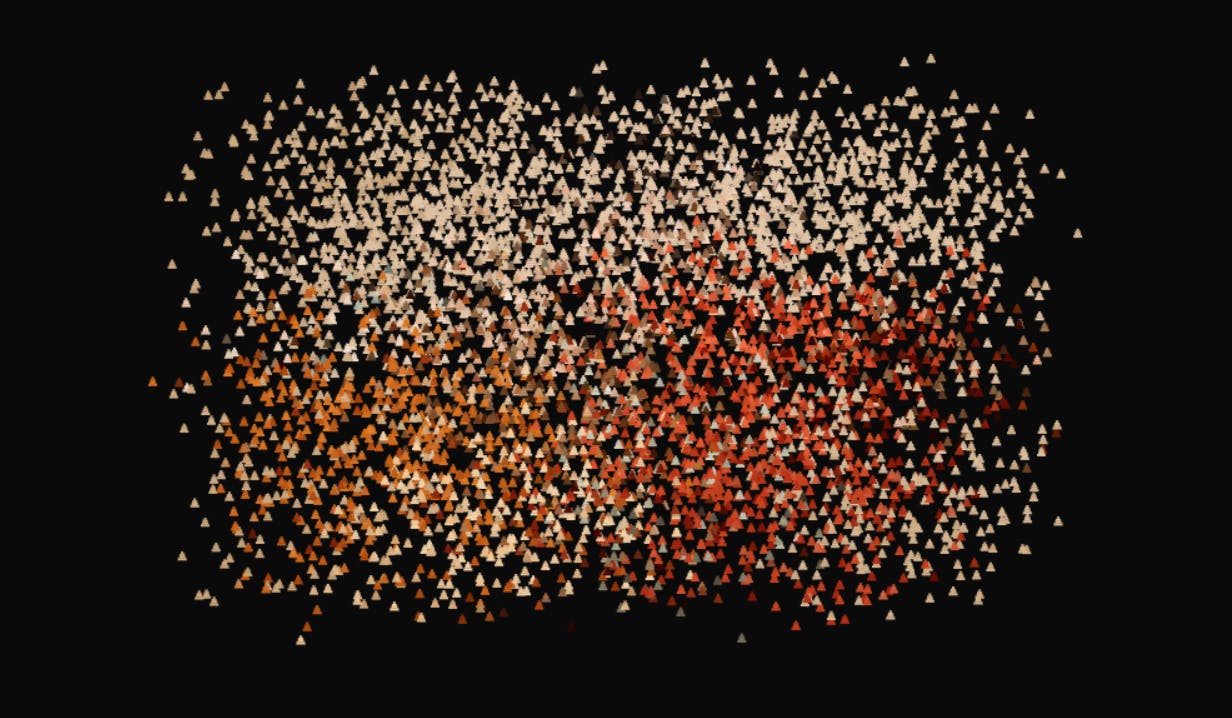
A No-Code tool that transforms static images into interactive, customizable particle animations.
Particle Studio is a No-Code creative tool that converts static images into dynamic, interactive particle animations. Users can choose from circle, square, triangle, and cube particle shapes, fine-tune parameters like particle size, motion trails, and cursor interaction, and export results as shareable links or self-contained HTML bundles for web integration. Designed for both designers and developers, it eliminates the technical barriers of particle system programming.
When Images Start to "Flow"
In an era of increasingly homogenized design tools, a product called Particle Studio has landed on Product Hunt, earning 71 upvotes and ranking 16th on the daily leaderboard. Its core concept is simple yet imaginative: transform an ordinary static image into an interactive, customizable dynamic particle artwork.
Particle Systems are a classic visual effects technique in computer graphics, first developed by William Reeves in 1983 for the "Genesis Effect" in the film Star Trek II: The Wrath of Khan. The basic principle uses a large number of tiny graphical elements ("particles") to simulate natural phenomena that are difficult to describe with traditional geometric modeling — flames, smoke, water, stardust, and more. Each particle has independent properties — position, velocity, color, lifespan — driven by physics rules or mathematical functions that govern their motion and transformation. In the web front-end world, particle effects are typically implemented using HTML5 Canvas or WebGL, and in recent years, open-source libraries like particles.js and tsParticles have emerged. Particle Studio takes this technology a step further by encapsulating the complex particle system into a WYSIWYG creative tool.
Built by independent developer Stelvin Saji, the tool is categorized under Design Tools, Developer Tools, and No-Code. The No-Code movement has seen rapid global growth in recent years, centered on the idea of enabling users without programming skills to build applications, automate workflows, or create digital content through visual interfaces and pre-built modules. According to Gartner, by 2025, 70% of new enterprise applications will use low-code or no-code technologies. In the design space, No-Code tools are bridging the gap between "creative vision" and "technical implementation" — traditionally, a designer's creative ideas required developer involvement to become interactive digital works, but No-Code tools compress this into a single step that designers can complete independently. Particle Studio's positioning speaks to its dual nature — it serves both designers seeking visual expression and developers looking to quickly integrate particle effects.
Core Features of Particle Studio
The Complete Workflow: From Uploading an Image to Generating Particle Animation
Particle Studio's usage logic is remarkably straightforward. Users simply upload an image, and the system parses the pixel data into countless particles, reconstructing the visual into an animatable presentation. The entire process requires zero code, fully living up to its No-Code positioning.
From a technical perspective, the core of this transformation lies in pixel sampling and particle mapping. The system first reads the RGBA color values and coordinate information pixel by pixel using the Canvas API's getImageData() method, then downsamples the pixels based on a set sampling density (i.e., the particle size parameter) — smaller particles mean denser sampling points and higher fidelity. Each sampling point is mapped to an independent particle object that inherits the original pixel's color properties while being assigned dynamic parameters such as position, velocity, and acceleration. When users trigger interactions, the system calculates distances and applies repulsive or attractive forces to particles, displacing them from their original positions. Once the external force is removed, particles return to their positions via an elastic recovery algorithm, creating a "disturbance-restoration" dynamic effect.
For particle shapes, the tool offers four options:
- Circle particles: Produce soft, smooth visual effects
- Square particles: Deliver more geometric tension and a pixel-art aesthetic
- Triangle particles: Create sharp, angular artistic textures
- Cube particles: Generate three-dimensional visual depth
The same image can present dramatically different visual qualities under different particle shapes.
Fine-Grained Particle Effect Parameter Controls
What truly sets Particle Studio apart from simple filter tools is its fine-grained control over details. Users can freely adjust several key dimensions:
- Particle size: Determines the level of detail and granularity — smaller values yield richer detail
- Motion trails: Add trajectory afterimages to particle movement, creating a flowing dynamic aesthetic
- Cursor interaction: Allows particles to react in real-time to mouse movement
Motion Trails is a common yet highly expressive visual animation technique. Its implementation works by not fully clearing the previous frame during each render pass, instead covering it with a semi-transparent background layer. For example, before drawing each frame on Canvas, a rectangle with rgba(0,0,0,0.05) is filled rather than completely clearing the canvas. This causes particle positions from previous frames to gradually fade out without disappearing immediately, creating a trailing afterimage effect. The length and intensity of the trail can be controlled by adjusting the transparency parameter — lower transparency means longer persistence and more pronounced trailing. This technique has extremely low computational cost yet delivers remarkable visual impact, making it one of the most cost-effective visual enhancements in particle animation.
The cursor interaction feature is the core highlight that best embodies the "dynamic experience" positioning. It transforms a one-directional viewing experience into a two-way interaction between the user and the canvas, making every mouse movement a "disturbance" to the particle artwork.
Sharing and Export: From Creative Tool to Real-World Applications
A tool's practical value often depends on how conveniently its output can be used. Particle Studio offers two practical paths.
Path One: Copy Link
After completing particle effect adjustments, users can instantly generate a shareable link. This "zero-barrier distribution" approach aligns perfectly with the content distribution logic of the social media era, ideal for quickly showcasing creative work on social platforms or within teams.
Path Two: Export HTML Bundle
This feature has greater technical depth, allowing users to export particle artworks as interactive HTML versions that run offline. An exported HTML Bundle means the particle artwork is packaged into a self-contained collection of static files, typically including an HTML file, inline or external JavaScript logic, CSS styles, and Base64-encoded image resources. The advantage of this packaging approach is complete independence from server dependencies — the files can be opened directly in any modern browser, embedded into existing websites via iframe, deployed to a CDN, or integrated into desktop application frameworks like Electron. For developers, the unpacked JavaScript code can also serve as a learning reference for particle effect implementation, enabling more complex customization through parameter modification or logic extension. Developers can take this bundled file, swap in their own images for further experimentation, or embed it directly into web projects. This is precisely why Particle Studio is also categorized as a "Developer Tool."
Product Positioning and Market Analysis
A "Small but Beautiful" Tool Focused on a Niche Scenario
From a product standpoint, Particle Studio is not a heavyweight piece of software aiming to disrupt an industry, but rather an elegant tool focused on a single scenario with a polished experience. It addresses a specific and clear need: how to inject dynamic and interactive vitality into static visual content at the lowest possible cost.
Particle effects have long been widely used in web design, creative landing pages, and brand visual presentations, but traditionally implementing such effects required Three.js, Canvas programming, or professional motion design software — all with significant technical barriers. Three.js is currently the most popular JavaScript 3D graphics library, wrapping core 3D rendering concepts like scenes, cameras, lights, and materials on top of WebGL, and is widely used to create immersive web experiences. HTML5 Canvas, on the other hand, provides a 2D drawing context where developers must manually manage render loops (requestAnimationFrame), handle coordinate transformations, implement physics simulations, and other low-level logic. Regardless of which path is chosen, implementing a particle effect with interactive responsiveness typically requires developers to understand vector math, frame animation principles, performance optimization techniques (such as offscreen rendering and object pool reuse), and browser/device compatibility issues. For designers without a technical background, these all represent significant learning and implementation costs. Through its No-Code approach, Particle Studio puts this capability into the hands of more non-technical creators.
Dual Positioning for Designers and Developers
Particle Studio's "Design Tool + Developer Tool" dual identity strategy is worth noting:
- For designers: It's a ready-to-use creative canvas — no coding required to create particle effects
- For developers: The exported HTML Bundle provides room for further customization and integration into existing projects
This design broadens the product's audience and enhances its practical value within real workflows.
Conclusion: An Interactive Tool That Returns to the Essence of Creation
Particle Studio showcases the creativity of independent developers in niche scenarios — not pursuing an all-encompassing solution, but polishing a specific visual experience to a refined degree. For creators who want to quickly add dynamic particle effects to images, it dramatically lowers the technical barrier; for developers, it retains extensible export interfaces.
At a time when AI and generative tools dominate the conversation, a tool like this — focused on interactive experience and visual expression — offers a refreshing return to the essence of creation: technology, after all, exists to serve expression.
Related articles

9 AI Subscription Plans Compared: The Real Cost Per 100M Tokens Revealed
Bilibili creator tests 9 AI subscription plans from Volcano, Alibaba, Tencent, Baidu, Zhipu, Xiaomi, MiniMax and more, converting them all to real cost per 100M tokens, breaking down fixed-quota vs. three-tier coefficient billing and how caching, time-of-day discounts, and window limits affect actual quota.

Vibe Coding for Beginners: Expressing Intent Instead of Handwriting Code
What is Vibe Coding? A 137-episode Bilibili course defines it: the core is expressing intent, not writing code. This article analyzes Vibe Coding's productivity logic, target audience, and entry expectations to help beginners decide if it's worth learning.

LangChain Beginner's Guide: An Agent Development Roadmap from LangGraph to Deep Agents
Clarify the encapsulation relationship among LangChain, LangGraph, and Deep Agents, and master the learning path and selection logic for agent development frameworks—suitable for beginners in large model development.