Pokébinder: A Free Binder Planning Tool Built for Pokémon TCG Collectors

Pokébinder is a free Pokémon TCG binder planner with 40K+ cards and placeholder printing — no account needed.
Pokébinder is a free binder planning tool for Pokémon TCG collectors that ranked #10 on Product Hunt on launch day. It indexes over 40,000 English and Japanese cards, supports standard 3×3 page layouts, and lets users set custom background art for themed display pages. Its standout feature is true-to-size placeholder printing for cards you don't yet own, enabling visual gap-tracking in your physical binder. No account is required, and all data is stored locally in the browser — privacy-friendly and zero-friction, though users should be aware of backup limitations when working across multiple devices.
The Pokémon Trading Card Game (Pokémon TCG) collecting craze has never really faded — but for serious collectors, organizing thousands of cards, planning binder pages, and tracking missing cards has always been a headache. Pokébinder, a recent Product Hunt launch aimed squarely at this pain point, earned 85 upvotes and ranked #10 on its debut day.
What Is Pokébinder
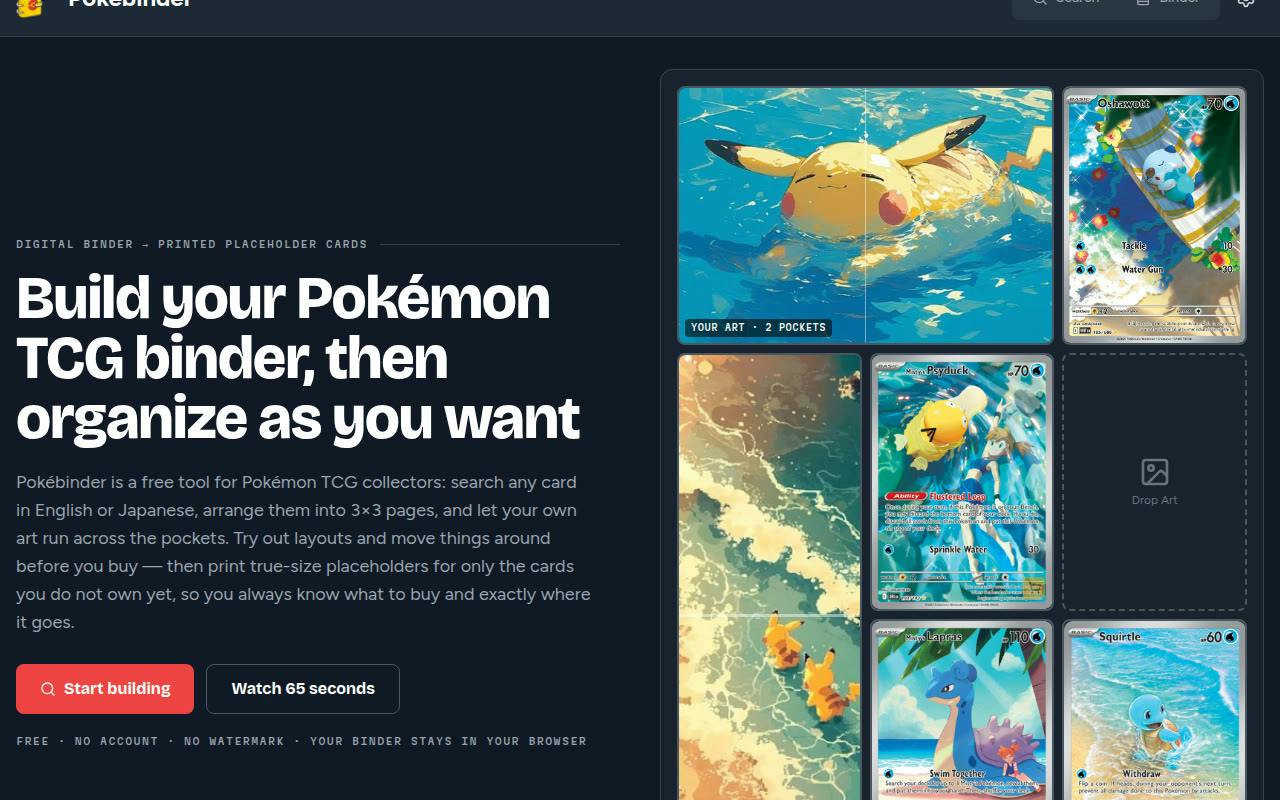
Pokébinder is a binder planner designed for Pokémon TCG collectors. The core idea is straightforward: plan your binder in a digital interface first, then print any cards you don't yet own as true-to-size placeholders to slot into your physical binder. This lets collectors instantly see which cards they're still missing while keeping their binder organized and cohesive.
Built by Vinicius Stevam, the product falls under the Card Games and Pokemon categories, and leads with a lightweight "free, no sign-up required" experience.
Core Features Breakdown
Search Over 40,000 Cards
Pokébinder includes 40,000+ English and Japanese cards in its database — a remarkably broad catalog. Whether you're collecting mainstream English sets or Japanese exclusive cards, you can look up the exact card art in the library. For veteran collectors who span both languages, this is particularly valuable, as Japanese card integration is often a weak spot in similar tools.
3×3 Page Layout
The tool supports the standard 3×3 binder page layout, letting users arrange cards on a nine-slot grid that mirrors a real physical binder page. This what-you-see-is-what-you-get approach makes it seamless to translate your digital plan into your actual binder.
Full-Page Custom Background Art
One of the more creative features is the ability to run your own art behind a whole page, with cards layered on top. For collectors who love building themed pages and care about visual presentation, this opens up room for personalized display — not just dry card cataloging.
True-to-Size Placeholder Printing
Pokébinder's most practical feature is undoubtedly its true-to-size placeholder printing. You can print any card you don't yet own at actual card dimensions and slot the paper cutout into the corresponding binder pocket. Even an incomplete binder maintains its full visual structure, while clearly marking the "still needed" targets — essentially a visual wishlist.
The placeholder card concept has a long history in physical TCG collecting. Standard Pokémon cards measure 63mm × 88mm, matching the universal TCG card size. Collectors typically use sleeves to protect valuable cards, and placeholder cards fill the empty sleeves to prevent binder pages from bulging or warping due to missing cards, while also serving as a visual reminder of wishlist targets. Pokébinder's print feature digitalizes this workflow — no measuring or hand-drawing required. Users simply output a standard-size print page with the card's artwork, cut it out, and it's ready to use.
Privacy and User Experience
Pokébinder emphasizes no account required — your binder data stays in your browser via local storage. Users don't need to register or worry about data being uploaded to a server, lowering the barrier to entry and aligning with the growing preference for privacy-friendly tools.
That said, local storage comes with trade-offs: data can't sync across devices, and clearing your browser cache could wipe your plans. For casual users it's plenty convenient, but heavy collectors managing large binders across multiple devices should be mindful of backing up their data.
Browser-based local storage typically relies on localStorage or IndexedDB, keeping data on the user's machine with no server transmission involved. The advantages include instant response times, offline capability, and no need for the developer to maintain a user database. The limitations are equally notable: data is isolated between different browsers and devices, private/incognito browsing sessions clear data on close, and some security software or browser settings may periodically purge local storage. Heavy users who invest significant time planning their binders should consider using any available export function or taking screenshots as a backup against accidental data loss.
Who Is Pokébinder For
This tool has a very clear positioning — free, focused, and zero barrier to entry. It doesn't try to be a comprehensive collection management platform; instead, it does one thing well: binder planning plus placeholder printing for missing cards.
It's especially well-suited for:
- Pokémon TCG collectors who want to systematically organize their physical binders
- Cross-language players managing both English and Japanese cards
- Users who love building themed display pages and care about binder aesthetics
- Privacy-conscious users who don't want to create an account for a collecting tool
As a free tool, Pokébinder tackles collectors' specific pain points with focused functionality. If you've been struggling with mountains of Pokémon cards and a fuzzy sense of what you're still missing, it's well worth trying out.
Related articles

Frontend to AI Agent Development: A Frontline Architect Explains Career Paths and Opportunities
A frontline AI architect explains the industry changes and practical paths for frontend developers transitioning to AI Agent development: why pure frontend jobs are disappearing, why Agent + full-stack has become mainstream in hiring, and three transformation routes—Agent development engineer, FDE, and remote contracting—along with corresponding learning strategies.

How to Choose an AI Agent Development Course: Five Pitfall-Avoidance Guidelines
A mechanical-engineering career changer's two-year pitfall-tested checklist for screening AI Agent development courses: complete delivery pipeline, resume-worthy projects, real development perspective, update frequency, and coaching feedback—with concrete judgment methods and pitfall-avoidance tips.

Coze AI Agent Building for Beginners: A Zero-Code AI Agent Development Guide
Coze, ByteDance's one-stop AI application development platform, supports zero-code drag-and-drop AI agent building. This article outlines Coze's core concepts, three advantages, differences between the domestic and international versions, and the distinction between agents and apps, helping beginners quickly get started with AI Agent development.