Privacy, Cost, Controllability: A Hands-On Test of Local AI Deployment and a Guide to Cutting Subscription Fees

Cloud AI has three pain points—privacy, cost, uncontrollability—while Strata local deployment offers an offline alternative, limited by VRAM.
Using the Strata tool tested by a Bilibili creator, the article explores the value and boundaries of local AI deployment. It analyzes cloud AI's three pain points: privacy leakage (data passes through network transmission and servers), high long-term costs (subscription fees accumulate to the price of a GPU), and uncontrollability (model updates, price hikes, rate limiting). It then presents three tested Strata scenarios: offline coding in VS Code, 260K-token long-context document processing, and unlimited overnight batch tasks. Strata offers an OpenAI-compatible API, so existing tools connect without code changes. The main barrier is VRAM, with 12GB as an entry-level reference, and model capability boundaries still need evaluation. Finally, it identifies who suits local deployment: developers, enterprises, high-frequency batch users, and privacy-sensitive individuals, while light users are better off with cloud.
Every contract, every line of code, every screenshot you send to ChatGPT is sitting on someone else's server right now. This isn't alarmism—according to Bilibili creator "踩坑达子" (Caikeng Dazi), in March of this year an AI agent in a group chat with over 3,000 members was "pumped for information" and spilled its owner's full name, workplace, and IP address. And that was just a chatbot. When you hand customer contracts, company code, and financial data over to cloud AI, data sovereignty is no longer in your hands.
The three major pain points of cloud AI—privacy leakage risk, long-term usage cost, and uncontrollability—are pushing more and more users toward local deployment. The Strata tool tested by the creator attempts to solve these problems by "moving AI back onto your own computer." This article, combined with hands-on testing experience, breaks down the real value and boundaries of local AI deployment.
The Three Pitfalls of Cloud AI: Privacy, Cost, Uncontrollability
Privacy: Your Data Is on Someone Else's Turf
Cloud AI providers typically reserve data usage rights in their privacy policies. Even if they promise not to use data for training, the data still has to travel over the network and be processed on servers. For scenarios involving trade secrets or personally sensitive information, this risk is hard to accept. The agent leak incident mentioned above, while an extreme case, reveals the potential fragility of the cloud environment—you can't control who accesses your data, how long it's stored, or whether it's reused.
The core logic of local deployment is "not a single step of data leaves your machine." The model runs on local hardware, and every contract you send and every line of code flows only through your own RAM and VRAM, disappearing when you shut down.
Cost: Subscription Fees Add Up Over Time
A $20 monthly subscription may not seem expensive, but with high-frequency use over a year, the accumulated cost is enough to buy a 12GB VRAM graphics card. Enterprise editions cost hundreds of dollars per person per month, and the long-term cost of using cloud APIs is even more like "slowly bleeding out."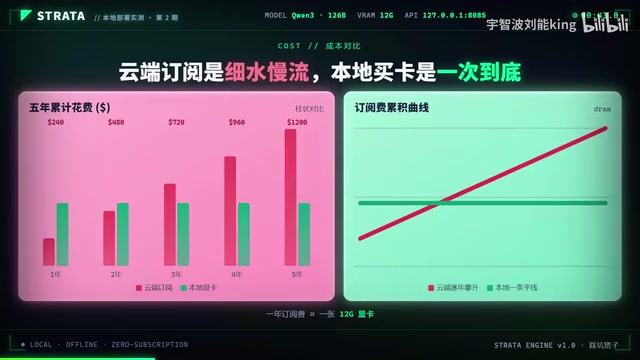
The cost structure of local deployment is different: after a one-time hardware investment, daily expenses are mainly electricity. The creator emphasizes that locally running models are exclusively yours—no queuing, no rate limiting, no awkward "please try again later" during peak hours.
Controllability: Model Updates, Price Hikes, and Content Blocking
The uncontrollability of cloud AI manifests on multiple levels: prompts you tuned today produce completely different output formats after tomorrow's model update; interfaces that worked fine get a price hike next month; batch tasks get rate-limited during peak hours; sensitive content gets rejected without even a reason. For users who rely on AI for stable work, these uncertainties are real friction costs.
Strata Hands-On Test: Three Real Usage Scenarios
Strata's positioning is clear—moving AI from someone else's server back to your own computer. It provides an OpenAI-compatible local API, so existing toolchains can connect directly, "without changing a single line of code."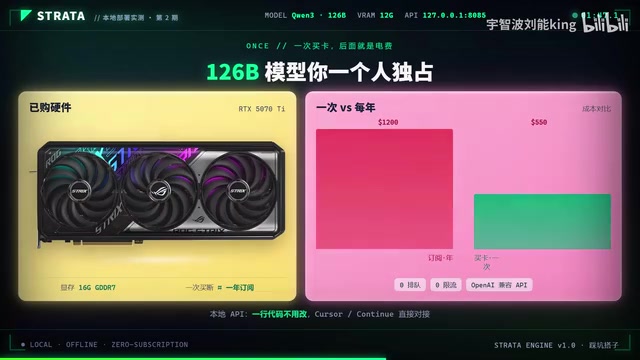
The creator shared three practical scenarios:
Scenario 1: Writing Code in VS Code, Usable Offline
Install the Continue plugin in VS Code, point the API address to local Strata, and the AI assistant directly calls the local model. It remains usable in offline environments, and not a single line of code leaves the computer. For developers working with unreleased codebases, this is extremely appealing.
H3 Document Processing: Reading Manuals with 260K Token Context
Throw a company product manual (PDF) into Strata, use the 260K token long-context capability to read it all in one go, then answer customer questions based on the manual. Data never leaves the local machine throughout the process, making it suitable for handling internal materials or sensitive customer information.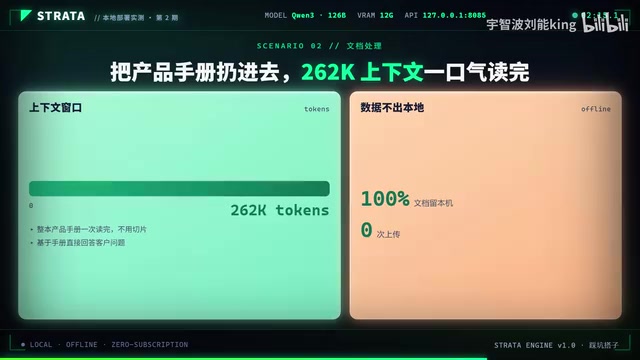
Continue is an open-source VS Code plugin for integrating an AI code assistant within the editor. It supports connecting to multiple model backends, including OpenAI, Anthropic, and local services compatible with the OpenAI API. By configuring the apiBase and model parameters in config.json, requests can be forwarded to local Strata. Offline usability works because the model and inference run entirely on the local machine, independent of an internet connection.
Long-context capability refers to the upper limit of tokens a model can process in a single inference. 260K tokens is roughly equivalent to 200,000 Chinese characters or 500 pages of text, enough to hold a complete product manual, technical documentation, or codebase. In local deployment, context length is limited by VRAM, and quantization techniques (such as 4-bit quantization) are usually needed to reduce VRAM usage, though this may sacrifice some precision. Long context enables the model to answer detailed questions based on the full text rather than relying only on fragment retrieval.
Scenario 3: Overnight Batch Tasks with No Call Limits
Before bed, throw 100 files at the local model to process, and check the results the next morning. No API call count limits, no insufficient balance prompts, and no need to worry about task queuing.
An OpenAI-compatible API refers to an HTTP service endpoint that follows the OpenAI API interface specification (such as request format, response structure, and model naming). When developers use the official OpenAI SDK or third-party tools, they only need to point base_url to that endpoint to call the local model without modifying business code. Strata implementing this compatibility layer means the existing ecosystem (such as Continue, LangChain, and the OpenAI SDK) can migrate seamlessly to local, lowering the deployment barrier.
The Real Boundaries of Local Deployment: What It Can and Can't Do
At the end of the video, the creator raised two key questions: Can my graphics card actually run this? And what can it actually do once running? He admitted that the next episode will reveal Strata's real capability boundaries—which tasks local models do even better than cloud, and which tasks they truly can't handle.
Judging from the tested scenarios, local models perform notably well on tasks like code completion, document Q&A, and batch text processing, but on complex tasks requiring top-tier model reasoning, local hardware may fall short. VRAM size directly determines how large a model can run, and 12GB VRAM is currently a common threshold for entry-level local AI deployment.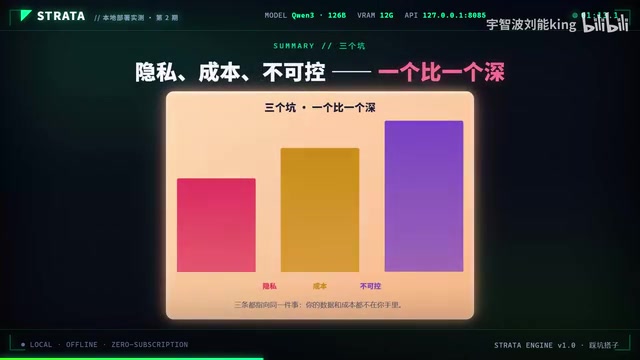
VRAM is the core bottleneck of local AI deployment and directly determines the scale of model parameters that can be loaded. Taking 12GB VRAM as an example, running a 7B parameter model (4-bit quantized) requires about 4-6GB, a 13B model requires about 8-10GB, and models above 30B require higher VRAM or multiple GPUs. Quantization techniques (such as GGUF and GPTQ) reduce VRAM usage by lowering weight precision, but slightly affect output quality. In addition, inference speed is also constrained by GPU compute power and memory bandwidth.
Who Is Suited for Local AI Deployment
Local deployment isn't for everyone. If you only ask occasional questions, aren't sensitive to cost, and don't deal with sensitive data, cloud AI remains the more worry-free choice. But if you match the following characteristics, local deployment is worth serious consideration:
- Developers: Sensitive code assets, need offline usability and seamless toolchain integration
- Enterprise users: Contracts, finances, and customer data can't leave the internal network; long-term subscription costs are high
- High-frequency batch task users: Need stable, unlimited batch processing capability
- Privacy-sensitive individuals: Unwilling to hand personal data to third-party servers
In the video, the creator invited viewers to leave their graphics card model and VRAM size in the comments, promising to analyze one by one in the next episode which can run and which can't. This interactive approach also indirectly shows that the hardware threshold for local AI deployment remains the biggest decision-making obstacle for ordinary users.
Final Thoughts
The local AI deployment approach represented by Strata is essentially about reclaiming the initiative across the three dimensions of privacy, cost, and controllability. It isn't perfect—hardware investment, model capability boundaries, and maintenance costs are all real constraints—but for specific groups, it offers value that cloud AI cannot replace. In today's world where data is an asset, "moving AI back onto your own computer" may not be everyone's answer, but it is at least an option worth seriously evaluating.
One-line Summary
Cloud AI has three major pain points—privacy, cost, and uncontrollability—while Strata's local deployment offers an offline-usable alternative, though it's limited by VRAM thresholds.
Paragraph Summary
Using the Strata tool tested by a Bilibili creator as an example, the article explores the value and boundaries of local AI deployment. It first analyzes the three major pain points of cloud AI: privacy leakage risk (data must pass through network transmission and server processing), high long-term costs (accumulated subscription fees can buy a graphics card), and uncontrollability (model updates, price hikes, rate limiting). It then presents three tested Strata scenarios: offline coding within VS Code, document processing with 260K token long context, and unlimited overnight batch tasks. Strata provides an OpenAI-compatible API, so existing toolchains can connect without code changes. The article notes that the main barrier to local deployment is graphics card VRAM, with 12GB as an entry-level reference line, and that model capability boundaries still need evaluation. Finally, it identifies who is suited for local deployment: developers, enterprise users, high-frequency batch task users, and privacy-sensitive individuals, while light users are better off with cloud solutions.
Related articles

Build an AI Super Employee System at Zero Cost: A Full Breakdown of Automated Agent Workflows
A deep breakdown of the AI super employee system demoed on Bilibili: agent orchestration, digital human voiceovers, map and enterprise lead generation, 24/7 customer service, and legal modules. We analyze the business logic and compliance risks behind zero-cost signup to help entrepreneurs judge the real ROI of this AI digital employee system.

The Essential Difference Between Chatbots and AI Agents: Crossing from Conversation to Execution
What's the difference between a chatbot and an AI agent? Based on the MCP series on the Learn Tech channel, this article uses examples like booking flights and summarizing notes to explain: a chatbot only gives answers, while an agent actually completes tasks through a think-act-observe loop. It breaks down the four core components—model, tools, memory, and goal—as well as MCP's role as a bridge, and discusses agents' applicable boundaries and permission risks.

Free GitHub Repo: 342 Hours of AI Courses, from Math to MCP Servers
A free GitHub repo offers 342 hours of AI courses: 523 lessons across 20 phases, from math fundamentals to agent building and MCP servers. Nearly 100,000 learners have started.