Project Feed: A File-Review-Centric Project Management Tool for Game and Design Teams
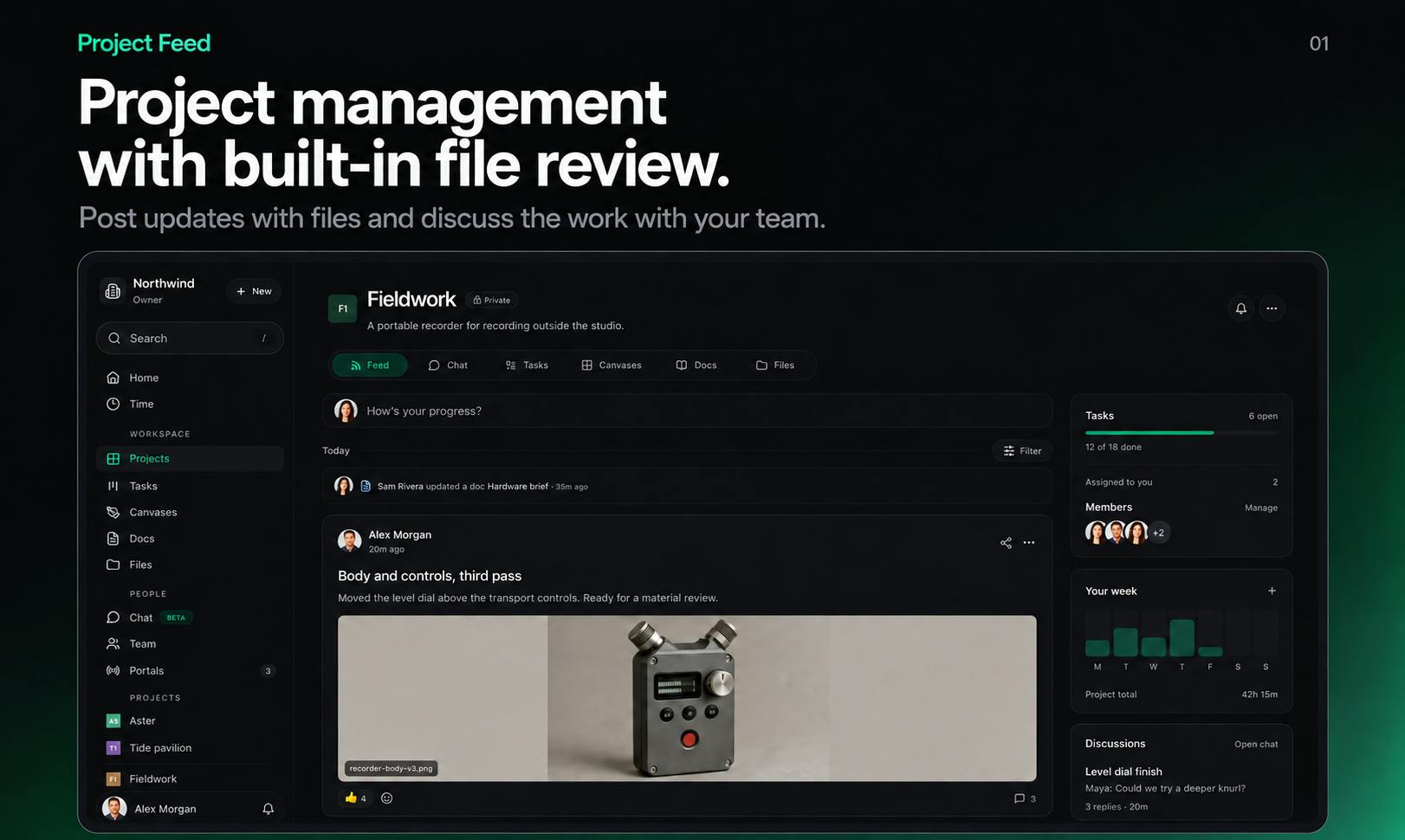
Project Feed unifies file review and task management for game dev and design teams in one collaborative workspace.
Project Feed is a collaborative workspace for game developers, design teams, and agencies that embeds creative asset review directly into the project management workflow. It natively supports 3D models, Rive animations, sprite sheets, and other game-industry formats, converting review annotations into trackable tasks with back-links to the original context — solving the long-standing problem of scattered feedback and lost context. It also offers a client approval portal for agencies with external delivery needs. The Pro tier introduces MCP support and a full API, signaling a forward-looking bet on AI-native workflows. The free tier supports up to 3 editors.
Game development, design, and creative teams often face an awkward disconnect: project management tools handle progress tracking, while file reviews happen on a completely separate platform — with feedback and tasks constantly copied back and forth. Project Feed, which recently launched on Product Hunt, aims to bring these two things together. It's a collaborative workspace that embeds file review directly into the project management workflow, earning 75 upvotes and a #13 ranking on launch day.
A Workspace That Bridges Reviews and Tasks
Project Feed is positioned as a collaborative space for game developers, design teams, and agencies. Its core features cover most of what teams need day-to-day: posting updates, planning tasks, collaborating on documents, and co-creating on a shared canvas.
What truly sets it apart from general-purpose project management tools like Trello or Asana is its native support for reviewing creative assets. Teams can review images, videos, audio, PDFs, 3D models, Rive files, and sprite sheets directly within the platform. Among those formats, support for 3D models, Rive animations, and sprite sheets is especially targeted at game and motion design teams — file types that typically require screenshots or exports to share through conventional collaboration tools, resulting in a poor review experience.
Rive is a real-time interactive animation design tool whose file format (.riv) is widely used in game UIs, mobile apps, and web animations. Unlike traditional videos or GIFs, Rive animations are state-machine-driven vector animations that respond to user interactions at runtime, making it impossible to fully preview their behavioral logic with static screenshots or regular video playback. Sprite sheets are a standard game development format that combines multiple animation frames or character states into a single image to reduce resource loading during rendering. Both formats typically lack native support in general collaboration platforms like Figma or Notion, forcing teams to export files or record screencasts just to share feedback — with significant loss of context. Project Feed's native support for both formats reflects its tailored approach for game and motion design teams.
Feedback as Tasks: The Closed-Loop Design Is the Standout Feature
Project Feed's most valuable design decision is converting review feedback directly into trackable tasks, with each task linking back to the original review context. This means a comment like "the animation timing feels too fast here" doesn't get buried in a chat thread — it becomes an assignable, trackable, completable work item that, when clicked, brings you back to the exact frame or version of the file in question.
For creative teams, this closed loop addresses a long-standing collaboration headache: scattered feedback, lost context, and untracked revisions. Tying the review, annotation, and task systems together should, in theory, significantly reduce communication overhead.
A Client-Facing Approval Portal
Beyond internal collaboration, Project Feed also offers a client portal where clients can approve specific updates or directly request revisions. This feature is clearly aimed at agencies and outsourced teams — the delivery and sign-off phase is where project delays tend to cluster, and a structured approval interface makes client feedback manageable and traceable.
Complementary features include chat, time tracking, and analytics, forming a fairly complete operational loop rather than just a file review tool.
Pricing and Developer-Friendliness
Project Feed follows a free + Pro model:
- Free tier: Supports up to 3 editors — suitable for small teams or evaluation;
- Pro tier: Adds third-party integrations, full API access, CLI, and MCP (Model Context Protocol) access.
The MCP support in the Pro tier is worth noting. As a protocol for connecting AI models to external tools, MCP signals that Project Feed intends to let AI assistants read and operate on project data — still a forward-looking capability for project management tools, and a sign that team collaboration software is gradually evolving toward AI-native architectures. The full API and CLI also give technical teams ample room for automation.
MCP (Model Context Protocol) is an open protocol proposed and championed by Anthropic in late 2024, designed to give large language models a standardized way to connect with external tools, data sources, and services. Think of it like a USB-C port: it doesn't define what the AI model itself can do, but establishes a universal handshake standard between models and external systems. Tools that support MCP can theoretically be called directly by any compatible AI assistant — such as Claude or Cursor — for example, letting an AI read a project task list, automatically create tickets, or query review status, without requiring custom integrations for each AI system. By listing MCP access as a Pro feature, Project Feed signals that its intended use cases go beyond manual operation — it aims to become a data node in AI-driven workflows.
Who It's For
Project Feed isn't trying to replace general-purpose project management platforms. Its differentiation is clear: if your team works with multimedia assets daily and review cycles consume a significant amount of communication overhead, its value becomes immediately apparent.
Game studios, motion design and creative teams, and agencies that frequently deliver creative work to clients are its most natural fit. For projects that are purely document- or code-based, the multi-format review advantage has little to offer.
As a newly launched product, Project Feed's completeness and real-world stability still need time to prove out — but from a feature design perspective, it accurately targets a genuine pain point for creative teams: the disconnect between review and management. Its openness around MCP and API also leaves meaningful room for growth.
Related articles

AI Agent Fundamentals: The Three Core Components — Brain, Memory, and Tools
A beginner's guide to AI Agents: covering the three core components (brain, memory, tools), four stages of LLM deployment, and why Agents matter for real business use cases.
Boycotting Software That Doesn't Support Linux: One Developer's Philosophy of Choice
A Linux-only developer shares his philosophy of boycotting non-Linux software — without sacrificing productivity — and explains how coding agents like Claude Code are closing the gap with commercial tools.
Why Do All AI-Generated Projects Look the Same? The Aesthetic Homogenization Problem in Vibe Coding
Why do vibe coding projects all use purple gradients and dark glassmorphism? We break down the technical roots of AI aesthetic homogenization and how to escape it.