ProtoNote: Pinning AI Prototype Feedback Precisely on the Page

ProtoNote pins collaborative feedback directly on AI prototypes and integrates with Claude for seamless iteration.
ProtoNote is a new tool that solves the feedback bottleneck in AI prototyping by letting reviewers pin annotations at exact page locations. It integrates deeply with Claude's connector ecosystem, enabling a complete create-feedback-iterate loop without leaving the conversation. With a free tier of 3 active prototypes and no registration required for reviewers, it targets the growing gap between cheap AI-generated prototypes and efficient collaborative iteration.
When AI Prototypes Meet the Pain Points of Collaborative Feedback
In an era of exploding AI coding tools, generating a working HTML prototype in minutes using Claude, Cursor, or similar tools is no longer difficult. Claude is a large language model developed by Anthropic with powerful code generation capabilities that can output complete HTML/CSS/JavaScript code directly from natural language descriptions. Cursor is an AI-enhanced code editor built on VS Code with built-in interfaces for multiple large models, supporting real-time AI assistance during the coding process. These tools share a common trait: they lower the programming barrier from "knowing how to code" to "knowing how to describe requirements," enabling non-technical users to quickly generate interactive interface prototypes.
But the real bottleneck often appears at the next step — how to efficiently collect feedback and iterate.
The traditional approach usually involves sharing the prototype link in a group chat, where team members describe issues in text: "the button color in the top nav bar is wrong" or "the second row of the form feels too cramped." This kind of vague description is not only inefficient but also highly prone to misunderstanding. The core pain point of design reviews has never been a lack of opinions — it's that opinions can't be precisely anchored to specific locations on the interface.
ProtoNote targets exactly this gap. It earned 72 votes and ranked #20 on Product Hunt, positioning itself as a tool to "share AI-built prototypes with feedback pinned directly on the page."
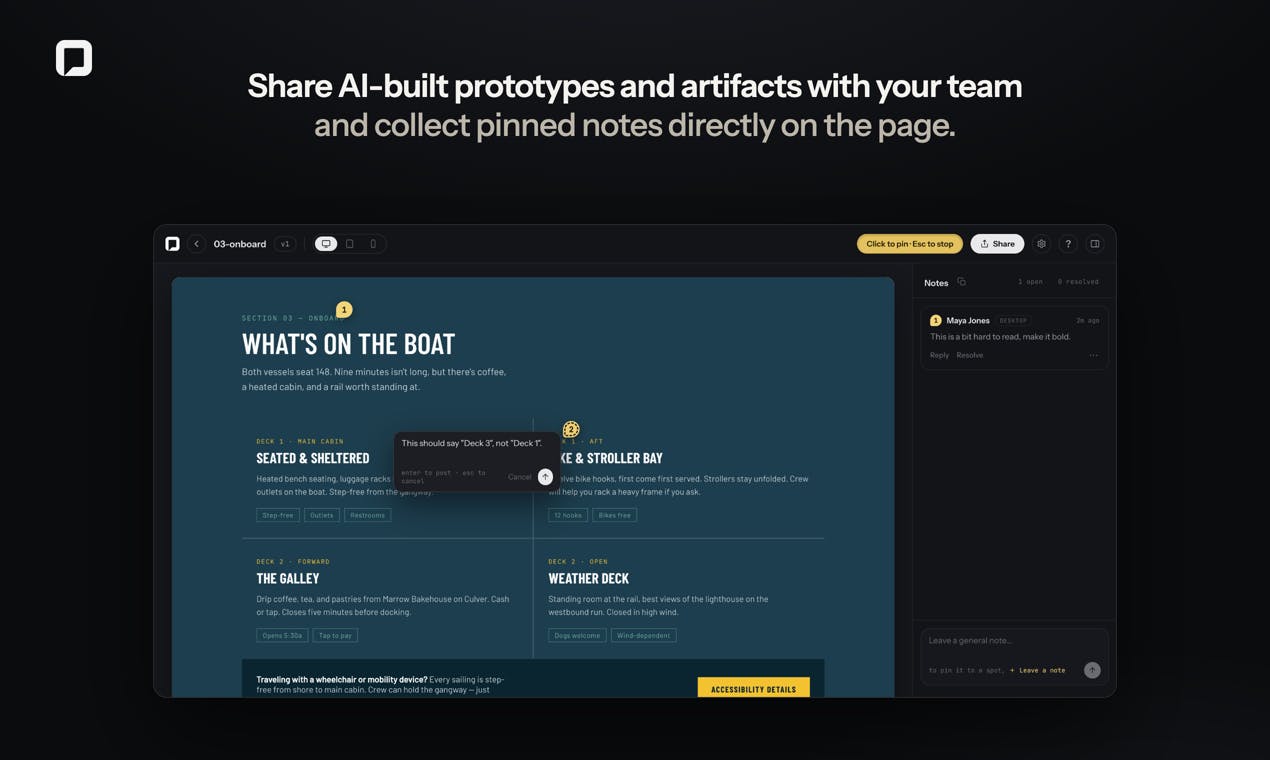
Core Feature: Pinning Feedback at Pixel-Level Precision
Zero-Barrier Sharing and Review Process
ProtoNote's workflow is remarkably straightforward: simply drag in an HTML prototype, image, or PDF, and the system generates a shareable link. Reviewers can then leave annotations at the exact spot on the page (pin to the exact spot) — just like sticking Post-it notes on a physical document.
More importantly, it reduces collaboration friction: reviewers don't need to create an account — they just enter a name to start commenting. And the review feature is permanently free. This is extremely friendly for scenarios where you need to quickly pull in external clients or non-technical colleagues for reviews — any registration process might cause feedback-givers to simply give up. Research shows that each additional registration step can increase user drop-off by 20-30%. For low-motivation behaviors like "giving quick feedback," no-registration is practically the only way to retain reviewers.
A Deep Integration with Claude for Iterative Closure
ProtoNote's most imaginative aspect is its connector integration with Claude. Claude connectors are an integration mechanism launched by Anthropic that allows third-party tools to deeply interface with Claude's conversation UI. Through connectors, users can directly invoke external service functions within a Claude conversation — such as publishing content, reading data, or triggering workflows. This is essentially an ecosystem expansion strategy similar to ChatGPT plugins or GPTs, designed to evolve Claude from a pure conversational AI into an "agent" capable of operating on the external world.
Based on this mechanism, ProtoNote forms a complete creation-feedback-iteration loop:
- Build a prototype in a Claude conversation and convert it to ProtoNote with one click
- Share with reviewers to collect annotations pinned on the page
- Once feedback comes in, tell Claude to "pull in these annotations and apply the changes"
- The new version is automatically published
This means developers can stay within Claude's conversation flow throughout the entire iteration process, without switching between multiple tools. Feedback is no longer text that needs to be manually translated into code instructions — it becomes structured information that AI can directly understand and act upon. From a technical perspective, location-based annotations are essentially a set of coordinate data plus natural language descriptions. This level of structure is far higher than pure text feedback — the large model can precisely know "where" something needs "what change," dramatically reducing ambiguity in interpretation.
Why ProtoNote Hits the Right Nerve Right Now
AI Generation Makes Prototypes Cheap; Feedback Becomes the New Bottleneck
With the rise of "vibe coding," the cost of generating prototypes approaches zero. Vibe coding is a concept proposed in 2024 by Andrej Karpathy, former OpenAI researcher and Tesla AI director. It refers to developers no longer writing code line by line, but instead generating software by conversing with AI, describing the "vibe" and intent. The developer's role shifts from "code writer" to "requirements describer and quality gatekeeper." The popularity of this concept reflects a fundamental paradigm shift in software development as AI coding tools mature — the productivity bottleneck moves from the coding phase to requirements clarification and quality iteration.
When creation becomes cheap, selection and iteration become the new high ground of value. ProtoNote captures exactly this shift: it doesn't solve "how to make a prototype" — it solves "how to make a prototype better."
Pinning annotations directly on the page and letting AI automatically digest those annotations is essentially providing high-quality contextual input to AI. Compared to vague text descriptions, location-precise feedback significantly reduces ambiguity when AI makes modifications. This aligns with a core finding in large model research: the quality of input context (not quantity) is the key factor determining output quality. A statement like "change the third button in the upper left from blue to green" carries several times more information density for AI than "that button color doesn't feel right."
A Cleverly Designed Freemium Strategy
ProtoNote's free tier is designed with strategic precision: the free version includes 3 active prototypes, with unlimited reviewers and annotations. In other words, team size and feedback volume are unrestricted — what's limited is the number of concurrent projects.
This design precisely places the paywall on "heavy professional users" — individual developers who use it occasionally get everything for free, while designers and product teams managing multiple projects simultaneously hit the paid tier. Meanwhile, "reviews are always free" ensures the product's virality: every share is a potential customer acquisition opportunity. This is a classic Product-Led Growth strategy — driving organic spread by letting end users experience core value for free, rather than relying on sales teams to push purchasing decisions. In the collaboration tools space, Figma, Notion, and Slack all achieved explosive growth through similar strategies.
Concerns and Limitations Worth Noting
As a newly launched indie developer product (Maker: Zach Friesen), ProtoNote still has some uncertainties worth considering:
- Ecosystem lock-in risk: Its core competitive advantage is heavily dependent on the Claude connector. If Anthropic adjusts its ecosystem strategy in the future, or if users primarily use other AI tools (like GPT or Gemini), this advantage could be weakened. It's worth noting that AI platform ecosystem strategies are still in a period of rapid change — OpenAI has already gone through multiple architectural shifts from plugins to GPTs to Actions, and Anthropic's connector ecosystem may face similar evolution. Single-platform dependency at this stage is both a differentiation advantage and a potential vulnerability.
- Questionable depth of collaboration capabilities: While no-account-required lowers the barrier, it also means it's difficult to implement permission management, annotation ownership tracking, version comparison, and other enterprise-grade collaboration features. Enterprise customers typically need audit logs, SSO, role-based access control, and other compliance features — these fundamentally conflict with the lightweight "no-registration" philosophy. ProtoNote may eventually need to make trade-offs between simplicity and enterprise requirements.
- Competitive pressure: Tools like Figma, Marker.io, and Pastel are already established in the "page annotation" space. Marker.io allows direct bug marking on any website with syncing to project management tools like Jira; Pastel focuses on visual feedback collection for web design; Figma enables precise location-based annotations on design files through its commenting feature. These tools already have mature user bases and feature depth. ProtoNote's differentiation ultimately needs to rest on the "AI-native iteration loop" — not just collecting feedback, but enabling AI to automatically digest and execute that feedback.
Conclusion
ProtoNote represents a rapidly emerging category of "AI workflow completion tools" — they don't generate content themselves but rather fill the gap between AI generation capabilities and real-world collaboration. Similar tools include v0.dev (solving preview and deployment of AI-generated UI components) and Replit Agent (solving runtime environment setup for AI-generated code). The essence of these tools is building "scaffolding" for AI capabilities, enabling them to truly embed into human collaboration workflows rather than remaining confined to conversation windows.
In an era where anyone can build a prototype in minutes, whoever can make feedback flow back into iteration faster and more accurately captures the new value node.
For developers and product people who frequently use Claude for rapid prototyping, ProtoNote's "pinned feedback + AI auto-iteration" offers a lightweight solution worth trying. Whether it can sustain itself long-term depends on its ability to maintain its unique loop value amid rapid AI ecosystem changes — or more specifically, whether it can expand beyond Claude to connect with more AI platforms while building iteration experiences in depth that competitors can't easily replicate.
Related articles

Uber Deploys ChatGPT Work Company-Wide: AI in the Workplace Enters the Scaled Implementation Phase
Uber deploys ChatGPT Work to 30,000+ employees, extending it from engineering to all roles. We analyze its expert-engineer pairing, end-to-end automation, and questions of AI control and power concentration—insights for scaling AI in the workplace.

Shift at Midnight Hands-On: When "ID Verification" Becomes Alien Hunting
Shift at Midnight blends ID verification with horror survival in a four-player co-op game. We break down its inspection mechanics and chaotic humor.

Zelensky Recounts the Outbreak of War: I Need Ammunition, Not a Ride
Zelensky recalls the first day of war in a YouTube interview: farewell to family, rejecting Biden's evacuation offer with "I need ammunition, not a ride," and how Bucha shaped his stance on compromise and peace talks.