Pure CSS Card Expand Animation: A Deep Dive into details and Modern CSS Techniques

Pure CSS card expand animation using details, ::details-content, interpolate-size, and @starting-style — no JavaScript required.
This article breaks down a pure CSS card expand animation built on native `<details>`/`<summary>` elements, requiring zero JavaScript. Height animation is handled via the `::details-content` pseudo-element with `block-size` transitions; `transition-behavior: allow-discrete` fixes the collapse direction being broken by `content-visibility: hidden`. `interpolate-size: allow-keywords` enables `auto` height to participate in CSS transitions as a progressive enhancement. Staggered entrance effects use `transition-delay` with CSS custom property indices, while `@starting-style` ensures the animation fires correctly the first time an element enters the render tree.
Many developers instinctively reach for JavaScript libraries like GSAP when adding interactive animations to a website. But some elegant expand/collapse effects can be achieved with pure CSS alone. Based on a hands-on demo by a frontend developer, this article breaks down how to use the <details> element combined with modern CSS features to build a smooth, layered card expand animation with staggered entrance effects.
Building Interactive Cards with details/summary
The foundation of this approach is the native HTML <details> and <summary> elements. The card image and basic info go inside <summary>, while additional driving stats are placed in the rest of the <details> content. The beauty of this setup is that the open/close toggle is a built-in browser interaction — no scripting required.
One easy pitfall: <summary> only allows phrasing content inside it — you can't freely nest <div> elements. The author initially used div tags and it appeared to work, but to stay spec-compliant, they switched to <span> for wrapping content. Outside of <summary>, the rest of the <details> area can freely use div and other flow content.
Another handy trick: giving multiple <details> elements the same name attribute turns them into a mutually exclusive group — only one can be open at a time, like an accordion. Remove the name attribute and multiple cards can be expanded simultaneously. The choice is yours depending on your needs.
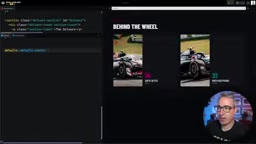
For layout, the author applies display: flex with flex-direction: column on <details>, letting <summary> fill available space via flex: 1. The stats section uses display: grid for horizontal alignment. These are baseline styles, but they lay the structural groundwork for the animations to come.
Height Transitions with ::details-content
To animate the expand/collapse height smoothly, you need to target the content outside <summary>. Directly selecting a div isn't ideal here, because <details> has an internal structure similar to a Shadow DOM web component. Modern CSS provides the ::details-content pseudo-element, which precisely targets all non-summary content.
The approach: set block-size (the logical-axis equivalent of height) to 0 on ::details-content with overflow: hidden, hiding the content when collapsed. When <details> is in the open state, set block-size to auto to restore it.
The challenge is making the transition between these two states work in both directions. With only transition: block-size 1s, the animation fires in one direction — expanding animates, but collapsing snaps instantly. The culprit is an inline style of content-visibility: hidden on ::details-content, which causes the content to be removed from rendering much like display: none, making transition impossible.
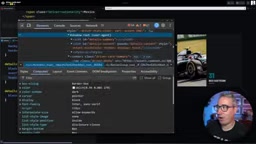
The fix is adding transition-behavior: allow-discrete, which allows discrete properties to participate in transitions. By including content-visibility in the transition declaration, the collapse is delayed until after the transition ends — making both directions smooth.
content-visibilityis a CSS property that controls rendering visibility. Itshiddenvalue behaves like a hybrid ofvisibility: hiddenanddisplay: none— the element is removed from the accessibility tree and the browser skips rendering it entirely, saving performance. Inside<details>, the browser automatically appliescontent-visibility: hiddento::details-contentvia inline style when collapsed, cutting the render pipeline immediately. This is a "discrete" property change — it can only jump between two discrete values with no intermediate interpolation.transition-behavior: allow-discreteis designed precisely for this: it tells the browser to temporarily maintain the visible state during the transition, only switchingcontent-visibilityafter theblock-sizeanimation completes, allowing the collapse animation to play out fully.
interpolate-size Makes auto Height Animatable
By default, CSS cannot transition between a numeric height and auto. To enable block-size: auto to participate in animation, the author declares interpolate-size: allow-keywords on the root element. This property is opt-in — once declared on :root or html, it inherits throughout the entire page.
Browser compatibility is worth noting: most features covered in this article are supported across major browser engines, but interpolate-size is currently Chromium-only. The author considers this perfectly suitable as progressive enhancement — browsers that support it get the animation, those that don't still get functional expand/collapse behavior. If you'd rather not depend on it, you can use other CSS-based workarounds or libraries for broader compatibility.

CSS has had a fundamental limitation for a long time:
height: autois a keyword, not a concrete value, so the browser can't interpolate between0andauto— transitions snap instantly. Historical workarounds include usingmax-heightwith a large estimated value as the animation endpoint, or using JavaScript to measurescrollHeightfirst and then assign a fixed height — both involve precision or performance trade-offs.interpolate-size: allow-keywordsis a new mechanism from the CSS Values Level 5 spec that authorizes browsers to animate keyword sizes likeauto,min-content, andmax-content. Declaring it on:rootmakes it apply globally, but because it can affect transitions on all keyword-sized elements across the page, the spec requires developers to explicitly opt in rather than enabling it by default.
Staggered Entrance Animations for Stats Items
Having all the content slide in at once works, but the author wanted finer detail — letting individual stats items enter one after another in a staggered sequence. This kind of polish is what separates a site that feels "fine" from one that feels "crafted."
The approach: give each stat item (value and label) an initial opacity: 0 and a downward offset with translate: 0 40%, then add transitions for both translate and opacity. The author recommends building out the animation logic first, then adding opacity last — since opacity is the easiest property to verify visually.
When the card opens, translate is reset to 0 0 and opacity to 1. To create the stagger effect, the key is transition-delay, using calc(var(--i) * duration) to increment the delay based on each element's index. The index can be passed in via an inline --i variable (the author generates this with an Astro loop). In the future, the new sibling-index() / sibling-count() functions could handle this automatically without manual annotation.

An interesting detail: using percentage-based offsets rather than fixed pixel values means different-sized elements travel different distances, giving them subtly different apparent speeds — which actually makes the stagger feel more natural.
There's also the problem of the first expand not triggering the animation. Since these elements don't truly exist in the DOM when the card is closed, there's no "starting state" for the transition to begin from. The solution is the @starting-style rule, which defines the initial styles for an element the first time it enters the page — ensuring the animation plays correctly on the very first click.
@starting-styleis a relatively new CSS at-rule that defines the initial styles for an element when it is first inserted into the render tree or transitions fromdisplay: noneto visible. Previously, the browser had no way to know "where to start" for transitions on newly inserted elements, since they simply didn't exist in the previous frame.@starting-stylefills this gap: properties declared inside the rule serve as the transition's starting point, and the browser computes the tween from that initial state to the final state. In this scenario, the stats items inside<details>aren't retained in the render tree when the card is closed — opening it for the first time is effectively the element's first "appearance." Without@starting-style, there's no starting frame and the animation simply won't trigger. This feature is now supported in recent versions of Chromium and Firefox, with Safari having joined as well.
Conclusion
This approach showcases the power of modern CSS: with no JavaScript whatsoever, combining <details>, ::details-content, transition-behavior: allow-discrete, interpolate-size, and @starting-style produces a smooth card expand animation with staggered entrance effects. As AI-assisted coding becomes increasingly common, understanding these underlying CSS mechanisms remains essential — because when auto-generated code breaks, only developers who truly understand the fundamentals can debug and optimize it efficiently.
Related articles

Free Unlimited Claude Code Solution: Agnes AI + CC Switch Setup Guide
No paid subscription needed — pair the free AI platform Agnes AI with the open-source tool CC Switch to provide a backend for Claude Code, enabling unlimited free calls to text, image, and video models. This guide covers the full setup, test results, and usage boundaries.

A Complete Zero-Cost Guide to Getting Started with Claude Code for Beginners in China
A beginner's guide to Claude Code for users in China: two installation methods (command line and IDE plugin), full configuration steps for replacing the official API with the free domestic LongCat model, and a hands-on demo of building a small tool with natural language, plus tips.

When the NSA Gets Involved: The AI Supply Chain Crisis Behind Open-Source CVEs and API Key Hijacking
Multiple open-source projects disclosed severe CVEs in one day, PHP flaws alarmed the FBI, and Railway and OpenCode were breached with API keys stolen. This article breaks down the vulnerability window, AI-accelerated exploitation, and the AI supply chain crisis behind the API key black market, with a developer defense checklist.