pushr: One HTTP Request Lets Your iPhone Receive Script and AI Agent Push Notifications
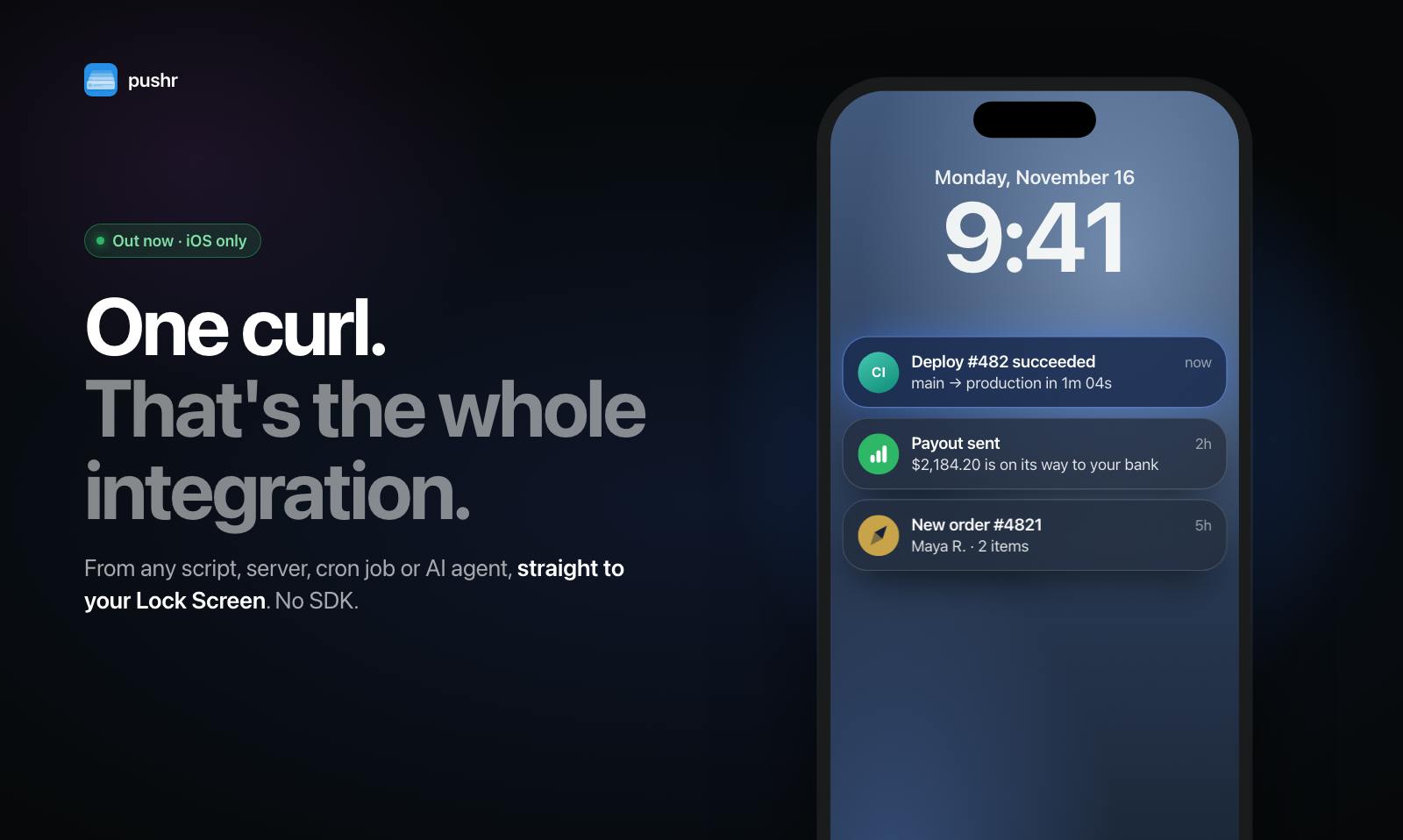
pushr uses a single HTTP request to push script, service, and AI agent status to your iPhone.
pushr is a lightweight notification tool for individual developers, operations staff, and small teams, with zero integration cost as its core selling point: no SDK needed—any script, server, cron job, or AI agent can land a notification on an iPhone with a single HTTP request. Beyond basic push, it offers Live Activities real-time progress, lock screen replies, alarms that only stop after confirmation, and uptime and heartbeat monitoring, covering the continuous range from task completion to failure alerts. The backend is MIT open-source and supports self-hosting, balancing data sovereignty with operational convenience, with a free-plus-Pro business model. The article notes that free-tier limits, pricing, and reliability metrics have not been disclosed.
Starting with "Notifying Yourself": What pushr Aims to Solve
Developers and operations staff often run into a recurring scenario: an order is placed, a payment completes, a deployment finishes, a service goes down, or a long-running task finally completes—you want to know right away, but you don't want to build a full monitoring system just for that. pushr, launched on Product Hunt, offers a minimalist answer: from any script, server, scheduled task, or even AI agent, add a single HTTP request and the notification lands on your iPhone.
It doesn't offer an SDK, nor does it require you to rewrite your existing logic. For individual developers and small teams, this lowers the barrier to wiring "state awareness" into daily work, positioning itself somewhere between a lightweight notification tool and a full observability platform.
The Product Logic Behind a Single HTTP Request
SDK-Free Integration
pushr's core selling point can be summed up as "zero integration cost." Traditional push services often require importing third-party libraries, configuring certificates, and handling the device token registration flow; pushr narrows the entry point to a single HTTP request that your script can call directly when it finishes. For people running batch jobs with cron, writing deployment hooks in shell, or adding a notification step at the end of an AI agent workflow, this approach has virtually no learning curve.
The official description emphasizes that orders, payouts, deployments, and failure alerts all flow into a single feed, and each notification type can carry its own logo and color. This means it's not just about "sending a message"—it also tries to make it easy to quickly identify the source of an event on your phone through visual differentiation.
A Notification Channel for AI Agents
Putting "AI agent" in the tagline is what distinguishes pushr from traditional push tools. As agents take on more and more background tasks, how to reach a human when a task completes, needs manual confirmation, or hits an exception becomes a real engineering problem. pushr's positioning is to package an agent's output into a readable push notification, letting a human receive—and even respond to—it on their phone.
An AI agent refers to a software entity capable of autonomously perceiving its environment, making decisions, and executing multi-step tasks, as distinct from a traditional script or chatbot that only responds to a single input. It is typically driven by a large language model, can call tools, read and write files, access the network, break tasks down according to a goal, and run continuously—for example, automatically organizing data, monitoring a code repository and submitting fixes, or handling the initial triage of customer support tickets on a human's behalf.
Because agents often run in the background for long periods with opaque processes, the visibility of their state becomes a real pain point: success, failure, or getting stuck at a step requiring human authorization all need a reliable outlet to reach a person. Externalizing notification capability as a single HTTP request lets agents built on different frameworks and running in different environments share the same alerting channel, without having to implement push logic separately for each agent.
More Than Push: Lock Screen Interaction and Monitoring Capabilities
In its product description, pushr lists several capabilities that go beyond "sending notifications":
- Live Activities: Provide real-time progress display for long-running tasks, so users don't have to repeatedly open the app to check.
- Lock screen replies: Respond directly to notifications from the lock screen, ideal for scenarios requiring quick confirmation.
- Alarms that ring continuously: They don't stop until the user confirms, for critical alerts that must not be missed.
- Uptime and heartbeat monitoring: Built-in uptime and heartbeat monitoring essentially brings "is the service alive" into the same notification system.
Combined, these features cover the continuous range from "task completion notification" to "failure alert." Creator Christian Preston clearly wants it to become a unified event entry point rather than yet another scattered notification channel.
Live Activities is a system capability introduced in iOS 16 that allows an app to continuously display the status of an ongoing event on the lock screen and in the Dynamic Island, such as food delivery progress, a game score, or a timer. It differs from a one-off push: the content is updated multiple times as the event progresses, and users can see the latest progress without unlocking or opening the app. For long-running tasks, this means a progress bar, remaining steps, or the current stage can stay on the lock screen the whole time.
Heartbeat monitoring, by contrast, is a reverse detection mechanism: the monitored object must actively report a signal at fixed intervals, and the monitoring party only judges something as abnormal and raises an alert when no signal is received beyond a predetermined time. Compared with uptime checks that probe externally at regular intervals, heartbeats are better suited to services running behind NAT or that are inconvenient to access externally, and can also catch hard-to-spot failures such as a process being stuck while the port is still alive.
Open-Source Backend and Business Model
pushr's backend is open-sourced under the MIT license and supports self-hosting. For teams that value data sovereignty or want intranet deployment, this is an important foundation of trust—notification content often contains internal business information, and being able to host the backend yourself means you can control where the data flows.
In terms of business model, pushr offers a free tier, with a Pro version aimed at users with greater needs. This "open-source core + hosted service" combination is fairly common among developer tools: self-hosting meets compliance and customization needs, while the hosted version saves on operations overhead.
Judging from Product Hunt data, pushr received 84 upvotes and 10 comments, ranking 20th. The traction isn't explosive, but the presence of comments shows that users are willing to discuss specific use cases, which is a positive signal for an early-stage developer tool.
Who It's For, and What to Watch Out For
pushr's target users are fairly clear: individual developers, operations staff, and small teams who need to sync the status of scripts, services, or agents to their phones. If your need is simply "remind me when the task is done," it's far less hassle than building your own push channel; if you're already using a complex alerting platform, pushr is more likely to be a supplement than a replacement.
It's worth noting that the original information doesn't disclose the specific limits of the free tier, Pro pricing, notification latency, or message reliability metrics. For scenarios where critical alerts are entrusted to a third-party channel, these details need to be verified before formal adoption. The self-hosting option alleviates some of these concerns to a degree, but it also means taking on operational responsibility yourself.
Overall, pushr's approach is to make "notification" thin and universal: a single HTTP request to integrate, an open-source, self-hostable backend, and a front end built around the iPhone with lock screen interaction and monitoring extensions. For developers building automated workflows—especially those involving AI agents—it offers a lightweight option worth adding to the toolbox.
One-line Summary
pushr uses a single HTTP request to push the status of scripts, services, and AI agents to your iPhone.
Paragraph Summary
pushr is a lightweight notification tool for individual developers, operations staff, and small teams, with zero integration cost as its core selling point: no SDK needed—any script, server, cron job, or AI agent can land a notification on an iPhone with a single HTTP request. Beyond basic push, it offers Live Activities real-time progress, lock screen replies, alarms that only stop after confirmation, and uptime and heartbeat monitoring, covering the continuous range from task completion to failure alerts. The backend is open-sourced under the MIT license and supports self-hosting, balancing data sovereignty with operational convenience, and it uses a free-plus-Pro business model. The article also notes that free-tier limits, pricing, and reliability metrics have not been disclosed, and critical alert scenarios need to be verified independently.
Related articles

Gemini 4 Neon Review: Benchmark Scores Rival Carbon, API Pricing and Quota Breakdown
Google Gemini 4 Neon is now live, benchmark scores closely tracking Carbon, API pricing 3/15 at twice Hydrogen's rate. This article compiles Bilibili creator testing: Neon can replace 90% of Carbon scenarios, AntiGravity quota consumption is only one-third of Carbon, plus subscription channel restrictions and 2API ban risks.

Gemini 4 Helium Coming Soon? Signals of Google Loosening Subscription Restrictions
Google team member hints releases will continue; community speculates Gemini 4 Helium (Flash Lite) may be next. Subscription ban controversy gets a response as product lead says "Soon," suggesting restrictions may be lifted. This article covers Gemini developments, OpenAI Coding Agent and risk management, Doubao real-time audio-video API, and compute business dynamics.

AI-Assisted React Development in Practice: Optimizing a Video App and Handling Errors
A 14-year veteran developer demonstrates AI-assisted React video app optimization: compressing video from 80MB to 5MB (~94%) via ImageKit, plus reliable error handling and retry mechanisms. Includes planning, code understanding, and verification methods for working with AI.