Python in Practice: The Core Differences Between Agentic AI, AI Agents, and Generative AI

Starting from a hands-on Python project, this clarifies the capability boundaries between generative AI, AI Agents, and Agentic AI.
Through a complete Python project setup process, the article demonstrates the engineering differences between generative AI, AI Agents, and Agentic AI. Generative AI (LLM) is essentially an input-output mapping whose knowledge is constrained by its training cutoff and cannot answer real-time questions; the core of an AI Agent is connecting the LLM to at least one external tool (such as Tavily web search) to break through the knowledge boundary; Agentic AI is the advanced architecture with multiple tools and multiple agents, covering patterns like Plan-and-React, ReAct, and multi-agent collaboration. The article also documents environment setup, dependency and key management, how tool function docstrings are understood by the model, and the pitfall that GPT-6 Astra doesn't support function calling, with the final conclusion that enterprise-grade automation must rely on Agentic AI.
The terms generative AI, AI Agent, and Agentic AI are often used interchangeably, but in terms of engineering implementation they correspond to completely different levels of capability. A Bilibili creator walks through a complete Python project setup from scratch, demonstrating where the boundaries between the three lie—and why enterprise-grade automation truly needs Agentic AI rather than plain generative AI.
Building the Project Structure: From VSCode to a Virtual Environment
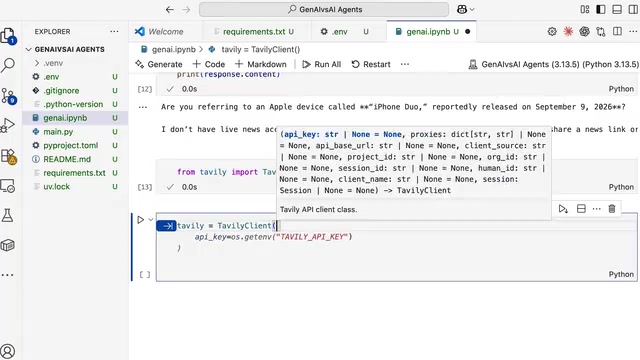
The video starts with a clean VSCode environment. Instead of writing code directly in a Jupyter Notebook, the creator first establishes a well-organized project structure. He creates a project folder called "G9 vs AI Agents" inside his documents folder, then uses the UA (uv) tool for dependency management in the terminal.
The reason for choosing UA over PIP is straightforward: installing libraries and creating virtual environments is much faster. After running pip install UA and then UA init, the project structure is automatically initialized, complete with a Gitignore file, Main.py, pyproject.toml, and README.md as standard files.
Activating the virtual environment follows the same best practices. The creator emphasizes that in production you don't need to install every library—only the ones required to run your scripts. After running UV-W to create the virtual environment, you simply copy the link into the terminal to activate it.
Dependency Management and API Key Configuration
The requirements.txt file lists all the Python libraries this project needs: python-dotenv for loading environment variables, LangChain and LangChain OpenAI for building Agents, the IPI Kernel library for running Jupyter Notebook, and the Deep Agents library as the core dependency for building Agents. They're all installed at once with UV pip install -r requirements.txt.
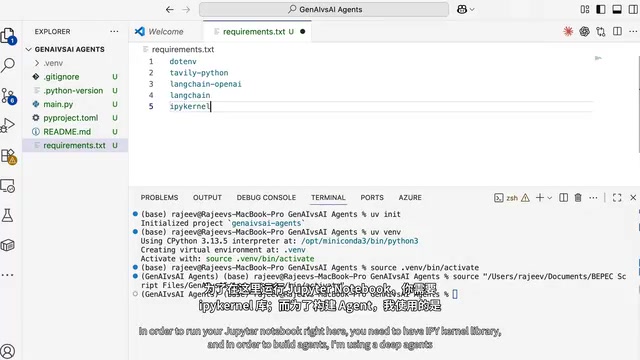
API key configuration involves two services. The OpenAI API key is used to call the large language model, and the Tavily API key is used for web search. The creator specifically points out that hardcoding API keys directly into Python code is not proper practice. The correct approach is to create a .env environment variable file, load it with load_dotenv, and read the values from the OS environment.
Why use .env instead of hardcoding keys: Putting API keys directly in Python source code creates two practical problems. First, there's a version control risk—once the code is committed to a Git repository, the key stays in the commit history, and it's difficult to thoroughly remove even if deleted later. Second, there's the environment isolation problem—dev, test, and production environments use different keys, and hardcoding means changing the code every time you switch. The .env file approach separates keys from code: python-dotenv's load_dotenv() reads the file and injects its contents into the process's environment variables, and the code reads them via os.getenv() or os.environ. A companion practice is to add .env to .gitignore and only commit a .env.example template without real keys. This way the same codebase can run with different credentials in different environments, and it's also easy to inject secrets via a secrets management service in CI/CD pipelines.
The Boundaries of Generative AI: The Knowledge Cutoff Problem
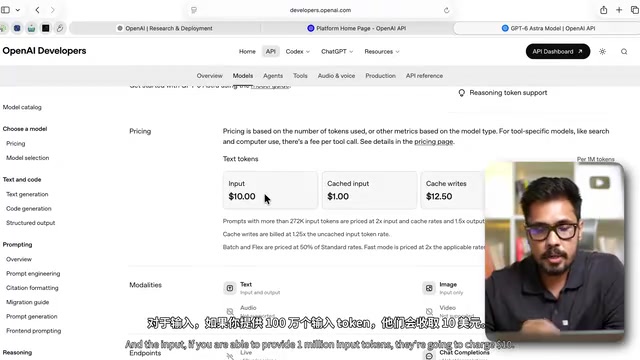
Once configuration is complete, the creator creates a basic LLM instance with ChatOpenAI and selects the GPT-6 Astra model. This model has a context window of 1 million tokens and a knowledge cutoff of April 30, 2026. For pricing, it costs $10 per million input tokens and $50 per million output tokens—notably more expensive than GPT 5.6's $4 input and $20 output.
The simplest test exposes the fundamental limitation of generative AI. The creator asks about an iPhone launch news story that happened on September 9, 2026, and the model's reply is: knowledge cutoff is April 30, 2026, so it can't access real-time information.
This is the defining characteristic of generative AI—provide input, get output, and the model's knowledge is entirely limited by the cutoff date of its training data. The creator calls this capability an LLM (large language model) and points out that if a business tries to use an LLM in this state to handle real-time operations, it has basically no practical value.
AI Agent: Giving the LLM Its First Tool
The idea for breaking through the knowledge cutoff limitation is clear: connect an external tool. The creator uses Tavily's search API to build an internet search tool function.
The key to this function is the docstring—when this function is registered with the LLM, the model understands the tool's purpose through the docstring. The function definition includes a query parameter and a result count parameter, with the creator setting it to fetch 5 results from the internet by default.
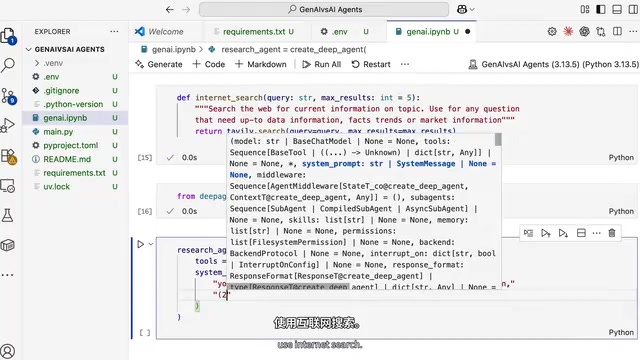
After the tool is created, a research agent is created using the Deep Agents library's create_deep_agent function. This Agent's configuration consists of three parts: the tool list (internet search), the system prompt (including always writing a to-do list, using internet search to get the latest information, saving research results to a file, and writing a final report), and the model (which here needs to support tool calling).
The creator specifically mentions a pitfall he ran into: GPT-6 Astra doesn't support tool calling, and after hitting an error he had to switch to a model that supports function calling to get things working.
When the Agent receives a query about the new iPhone, it determines that its own knowledge is insufficient to answer, so it triggers the internet search tool, integrates the search results, and outputs a reply. The creator calls this "only one tool" architecture an AI Agent.
The relationship between function calling and docstrings: An LLM doesn't actually execute code—it can only generate text. Tool calling (or function calling) refers to the model outputting a structured invocation intent (containing the function name and parameters) while generating a reply, which an external program parses and actually executes, then feeds the return value back into the conversation context for the model to continue reasoning. The basis on which the model decides "which tool to call and what parameters to pass" is precisely the function's name, parameter signature, and docstring—this information is serialized into JSON Schema and sent to the model along with the prompt. Therefore, how clearly the docstring is written directly determines the accuracy of tool calling. This also explains why GPT-6 Astra isn't usable on this path: the model must undergo specific alignment during training to reliably output invocation requests that conform to the Schema, and models without this capability will simply treat the tool description as ordinary text.
Agentic AI: Complex Architectures with Multiple Tools and Multiple Agents
If you connect multiple tools and introduce a more complex architecture, you enter the realm of Agentic AI. The architecture patterns mentioned in the video include:
- Plan and React architecture: The Agent first formulates a plan, then reacts and adjusts based on execution results
- ReAct architecture: Reasoning and acting alternate
- Multi-agent collaboration: Including different organizational forms such as sequential agents and swarm agents
The creator's core point is: generative AI alone cannot support truly real-time applications, and generative AI must be combined with AI Agents to unlock value. Agentic AI is the tool needed for enterprise-grade automation, which is why companies are requiring their employees to understand Agentic AI.
For developers who want to enter this field, the creator's advice is to master these capabilities through Python, because they ultimately need to be integrated into web applications rather than staying inside the ChatGPT chat box. This is also why software engineering fundamentals remain important in AI engineering.
The difference between ReAct and Plan-and-React: ReAct (Reasoning + Acting) works by having the model alternate within a loop between "think one step, act one step, observe the result, think again," with each step deciding what to do next based on the actual feedback from the previous step—suitable for tasks where the path is uncertain and you need to explore while correcting. Plan-and-React splits the process into two stages: the model first produces a complete task plan all at once (usually a to-do list), then executes it step by step and revises the plan when deviations occur. The former has the advantage of flexibility and fast response to feedback, but the disadvantage of easily losing direction in multi-step tasks and consuming more tokens; the latter has the advantage of a clear global structure that's easy for humans to review and intervene in, but the disadvantage that if the initial plan is misjudged, subsequent execution can go off track as a whole. In engineering, a common approach is a hybrid of the two—using a plan to define the skeleton and a ReAct loop to fill in the execution details of each subtask.
One-line Summary
Starting from a hands-on Python project, this clarifies the capability boundaries between generative AI, AI Agents, and Agentic AI.
Paragraph Summary
Through a complete Python project setup process, the article demonstrates the engineering differences between three concepts: generative AI, AI Agents, and Agentic AI. Generative AI (LLM) is essentially an input-output mapping whose knowledge is constrained by its training cutoff and cannot answer real-time questions; the core of an AI Agent is connecting the LLM to at least one external tool (such as Tavily web search) to break through the knowledge boundary; Agentic AI is the advanced architecture with multiple tools and multiple agents, covering patterns like Plan-and-React, ReAct, and multi-agent collaboration. The article also documents environment setup, dependency and key management, how tool function docstrings are understood by the model, and the pitfall that GPT-6 Astra doesn't support function calling, with the final conclusion that enterprise-grade automation must rely on Agentic AI.
Related articles

Random Pruning of the DPO Computation Graph: 1.4x Training Speedup and Lower Peak Memory
DPO training too slow and memory-hungry? This paper proposes a random pruning framework for the DPO computation graph, sampling independently across position, sequence, and branch dimensions; branch pruning achieves a 1.426x step-time speedup and cuts training time by about 30%, with in-depth attribution of memory and time gains.

Why Does JEPA Underperform MLM in Longitudinal EHR Representation Learning?
New study compares JEPA and MLM for longitudinal EHR representation learning on MIMIC-IV: three JEPA variants train stably without collapse but underperform MLM; target size, not heterogeneity, drives prediction error.

Transfer Learning + Visible Light Communication: A New Approach to Energy-Efficient Indoor Positioning
A study proposes a transfer learning-based visible light communication indoor positioning method, achieving 47% accuracy improvement on the BOSCH factory dataset, 67.5% model efficiency under high noise, and introducing the ME composite metric for energy-efficient positioning in energy-constrained industrial IoT scenarios.