RAG Full-Stack Development: From Core Concepts to the Five Key Stages Explained

RAG retrieves relevant document chunks before generating answers, solving LLM context window, cost, and speed limitations.
RAG (Retrieval Augmented Generation) is the go-to technology for enterprise knowledge bases and AI customer service. Instead of feeding entire documents to an LLM, RAG retrieves only the relevant passages and sends those to the model — solving context window limits, high inference costs, and slow response times. The pipeline has two phases: pre-query (chunking documents and indexing them as vectors in a vector database) and post-query (converting the user's question to a vector, retrieving top candidates, reranking them for precision, and generating the final answer). Understanding these five stages and the underlying concepts of vectors, Embedding, and similarity search is the foundation for building any RAG application.
If you want to build a reliable customer service bot or an enterprise knowledge base that can actually answer questions, there's one technology you can't avoid — RAG. In this video, Bilibili creator Ashui breaks down the complete RAG pipeline in plain language. This article is based on his explanation, offering a systematic walkthrough of how RAG works and its five core stages.
What Is RAG and What Problem Does It Solve?
RAG stands for Retrieval Augmented Generation. The name sounds fancy, but it really only does two things: retrieve relevant content from a knowledge base, then generate an answer based on that content — retrieve first, generate second.
It's one of the most widely used AI Q&A solutions today, powering countless enterprise customer service systems and internal knowledge bases. By loading employee handbooks, product manuals, and other materials into a knowledge base and querying them via RAG, companies can dramatically cut search time and improve operational efficiency.
So why not just dump all the documents directly into the LLM? Ashui points out three key problems: models can't read everything at once (context window size limits how much the model can process — feed it too much and it "forgets the beginning by the time it reads the end," hurting accuracy); inference costs are high (more input means more tokens, and for on-premise deployments, greater power and hardware requirements); and inference is slow (more content means slower processing — a hundred-page manual can severely drag down response times).
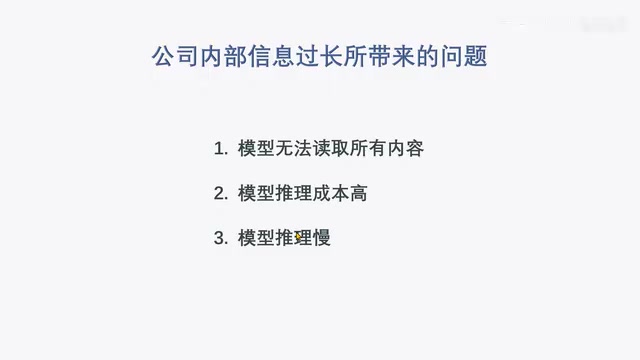
The solution is straightforward: don't send the entire document to the model — only send the passages that are relevant to the question. A hundred-page product manual might have just three passages that relate to a user's query. Pull those three out, send them along with the question to the LLM, and all three problems are solved.
RAG's Two Phases and Five Stages
Ashui breaks the RAG pipeline into two phases: pre-query (data preparation) and post-query (answering).
- Pre-query includes: chunking and indexing — both need to be done in advance.
- Post-query includes: retrieval, reranking, and generation — all triggered after the user asks a question.
Let's go through each of these five stages.
Chunking
Chunking means splitting documents into smaller pieces. There are several ways to do this: by word count (fixed chunks of 500, 800, or 1,000 characters), by paragraph, by section, and so on. Regardless of method, the goal is to break the full document into many smaller blocks.
The chunking strategy has a major impact on retrieval quality — and it's often the most overlooked aspect of RAG tuning. Fixed-size chunking is simple to implement, but may cut sentences in the middle, breaking semantic continuity. To address this, an overlap mechanism is commonly used — adjacent chunks share a certain number of characters (e.g., 500 characters per chunk with 100-character overlap between neighbors), ensuring information that spans chunk boundaries isn't completely lost. Chunking by paragraph or section preserves semantic coherence better, but results in variable chunk lengths, and very long paragraphs still require a secondary split. More advanced approaches include recursive splitting and dynamic segmentation based on semantic similarity. Chunks that are too long dilute relevant information and introduce noise; chunks that are too short may lack sufficient context for the LLM to generate a meaningful response. In practice, you typically need to experiment with specific document types and your model's context window size to find the optimal chunk granularity.
Indexing
Indexing means using an Embedding model to convert each chunk into a vector, then storing both the chunk text and its corresponding vector in a vector database. This involves three key concepts: vectors, Embedding, and vector databases.
Core Concepts: Vectors, Embedding, and Vector Databases
Vectors
A vector is a mathematical concept representing a quantity with both magnitude and direction, typically expressed as an array of numbers. The number of values in the array is the vector's dimensionality — four numbers make a four-dimensional vector. Low-dimensional vectors can be plotted on coordinate axes: one-dimensional on a number line, two-dimensional on a flat plane, three-dimensional in 3D space. Beyond three dimensions, visualization isn't possible, but that doesn't mean the vectors don't exist.
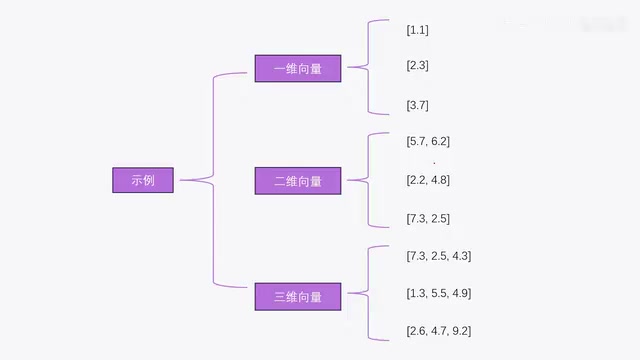
In real-world RAG systems, vectors can have hundreds or even thousands of dimensions. The higher the dimensionality, the richer the information each vector encodes, and the more capable and reliable the system becomes.
Embedding
Embedding is the process of converting text into vectors. Ashui uses a two-dimensional example: "Today is sunny" maps to (-1.5, 2.5), "Ashui likes eating pineapple" maps to (2, 3), and "Ashui likes eating apples" maps to (3, 3). Notice that the last two sentences have very similar vectors, while "sunny" is far away — this is exactly the point of Embedding: text with similar meaning produces similar vectors.
So when a user asks "What does Ashui like to eat?", the question is also converted into a vector, and the most relevant text chunks are found by comparing vector similarity. Embedding is performed by dedicated Embedding models — not general-purpose chat models like ChatGPT or DeepSeekAd. Ashui recommends checking the Embedding model leaderboard on HuggingFace to find suitable models (the rankings update as new models are released).
Vector Databases
Vector databases are purpose-built for storing and querying vectors. They include heavy optimizations for vector storage and provide built-in functions for computing vector similarity. One important note: when storing data, you must store both the vector and the original text — that way, once a similar vector is found, you can retrieve the corresponding text. A vector database therefore needs at least two columns: one for the vector, one for the text.
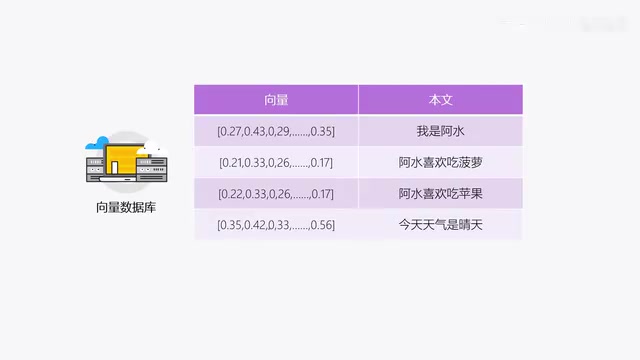
With these three concepts in mind, the indexing process becomes clear: convert each chunk to a vector using an Embedding model, store the vector along with the original text in a vector database, and repeat for all chunks. Once done, the indexing phase is complete. Both chunking and indexing happen before any user queries.
Popular vector databases include open-source options like Chroma, Qdrant, and Weaviate, as well as commercial offerings like Pinecone. Unlike traditional relational databases (such as MySQL) that perform exact matching, vector databases are optimized for Approximate Nearest Neighbor (ANN) search across high-dimensional vectors — they find the closest matches rather than exact ones. In practice, small projects often use the lightweight Chroma (which can run in-memory or on disk locally), while large-scale production environments tend to favor Qdrant or Weaviate for their support for distributed deployment and filtered search. It's also worth noting that many RAG frameworks (such as LangChain and LlamaIndex) already include connectors for popular vector databases, so developers don't need to write CRUD logic from scratch — just call the provided API.
The Three Post-Query Stages: Retrieval, Reranking, and Generation
Retrieval
Retrieval is the process of searching for chunks relevant to the user's question. After the user asks a question, an Embedding model converts the question into a vector, which is sent to the vector database to fetch the top N most relevant chunks (N is configurable — it could be 5 or 10, as long as it's a manageable number).
Relevance is determined through vector similarity calculation. Ashui introduces three commonly used methods:
- Cosine similarity: measures the cosine of the angle between two vectors — the smaller the angle, the higher the similarity;
- Euclidean distance: measures the straight-line distance between two vectors — the smaller the distance, the higher the similarity;
- Dot product: captures both vector direction and magnitude, and is currently the most widely used.
In practice, when using an Embedding model or RAG framework, similarity calculations are usually already encapsulated — you don't need to implement them yourself.
Reranking
Reranking means re-ordering results. It does something similar to retrieval, but goes a step further: from the N chunks returned by retrieval, it selects only the most relevant few. Why split this into two steps? Ashui uses a brilliant hiring analogy:
When a company receives thousands of applications, it can't conduct a full interview for every candidate. So it first does a quick screening (which may miss some good candidates, but is the most cost-effective approach) — narrowing ten thousand resumes down to twenty. Then it carefully interviews those twenty.
Retrieval is like the initial screening: uses vector similarity, low cost, fast, but relatively lower accuracy. Reranking is like the detailed interview: uses a Cross-Encoder model, takes longer, costs more, but delivers higher accuracy. The two use different similarity-scoring logic, and combining them produces better results than retrieval alone.
Retrieval uses a Bi-Encoder architecture: the question and each document chunk are encoded independently into vectors, then similarity is computed. This is fast but loses cross-attention information between the two. Reranking uses a Cross-Encoder, which concatenates the question and each candidate chunk and feeds them together into the model, letting it directly score the relevance of the pair. This captures finer-grained semantic matching, but computation scales with the number of candidates — making it impractical to run against an entire database. That's why the two-stage combination is the industry-standard approach: use the Bi-Encoder to quickly pull dozens of candidates from millions of documents, then use the Cross-Encoder to precisely rerank those candidates, balancing efficiency and accuracy. Popular open-source reranking models include the BGE-Reranker series and the Cohere Rerank API.
Generation
Generation produces the final answer. The relevant chunks selected through retrieval and reranking are combined with the user's original question and sent to the LLM, which generates a response and returns it to the user. The pipeline is now complete.
The Complete Pipeline End-to-End
Putting both phases together:
Pre-query (preparation): Source documents → Chunking → Embedding model converts chunks to vectors → Stored in vector database.
Post-query (answering): User question → Embedding model converts question to vector → Vector database retrieves top N most similar chunks (Retrieval) → Rerank model reorders and selects the most relevant few (Reranking) → Chunks + question sent to LLM → Answer generated and returned to user.
Both N (the number of chunks retrieved) and the number kept after reranking are configurable. Once you understand this pipeline, you're ready to start building RAG demos with your own data. Ashui also encourages beginners to start with a simple demo and learn by doing.
Summary
This breakdown takes RAG from "why you need it" to "how it works" in a clear and accessible way. The core idea: use retrieval to extract the relevant passages from a large document collection, then pass them to an LLM to generate an answer — overcoming context window limits, reducing costs, and improving speed. The five stages — chunking, indexing, retrieval, reranking, and generation — form a complete, production-ready technical blueprint for enterprise knowledge bases. For developers looking to get started with RAG, this is a solid conceptual map to build on.
Related articles

AI Compute Is the New Oil, But the Market Mechanism Has Yet to Take Shape
Hacker News compares AI compute to the new oil, noting the lack of price discovery, concentrated supply, and no hedging tools. The article analyzes structural issues in compute trading and explores a possible three-tier market of spot, contracts, and derivatives, plus the real impact on AI practitioners' cost management.

Running Full iOS 16.5 Firmware on Android Devices: Technical Demo or Marketing Gimmick?
A Hacker News post claims full iOS 16.5 firmware can run on Android, with 315 upvotes. This analysis argues it is more likely a web UI simulation than a true firmware port, and explores the value and risks of such projects.

Etsy Cracks Down on AI Slop: Addressing Buyer and Seller Anxieties
Etsy introduces stricter rules limiting AI-generated content in listings, addressing buyer confusion over AI products and seller fears of original work being diluted by AI slop.