Retested 51 Times: DeepSeek Harness Token-Saving Plugins — Use Them Right and Save Half, Use Them Wrong and Pay More

51 real test runs: the three DeepSeek plugins save money differently—right scenario saves half, wrong one costs more.
The author reran DeepSeek Harness's three money-saving plugins with 51 full tests, installing each separately and comparing standard vs. PTC mode, calculating real costs at official prices. Ops is a more compact toolset that saves over half when searching large logs in PTC mode but can cost more in standard mode or when fixing dependency code. Flash Presets cuts about a third of calls via 13 rules, unrelated to PTC. Billion Context compacts effectively without memory loss, but cuts only the cheapest cache portion and adds summary output costs, so total cost barely changes.
Last time's test of DeepSeek Harness's three money-saving plugins got criticized in the comments as "too simplistic"—only running one small task, one or two runs per setup, and no separation between modes. So this time we started over from scratch: 51 full test runs, each plugin installed individually, each in its own scenario, with standard mode and PTC mode compared separately. Conclusion up front: each plugin has its own use, but they don't save the same thing. Used in the right scenario, you can save more than half; used wrong, you actually pay more.
First, Understand Two Basic Concepts
Cache Hits: The Longer the Conversation, the Cheaper; Change the Earlier Text and It Gets Expensive
Every DeepSeekAd request has to read the entire conversation from the start. If the earlier text that gets read is exactly the same as last time, it counts as a cache hit, and the price is only one-fiftieth of the original. So the longer the conversation gets, the more it looks like a lot has to be re-read, but in fact most of it hits the cache and doesn't cost much. Conversely, as soon as the earlier text is modified, the following content no longer matches the cache and must be recalculated at full price. This is the foundation for understanding all the conclusions that follow.
DeepSeek's caching mechanism is prefix caching: the server hashes the input token sequence of each request by prefix. If the beginning of this request is exactly identical to some previous request, the KV cache for that prefix can be reused directly without redoing attention computation. Therefore the hit portion is billed at only about 1/50 of the original price, while the missed portion is billed at the standard input price. The key constraint is that "the prefix must be token-for-token identical"—even inserting a single character into the earlier text invalidates everything from that position onward. This is also why system prompts, tool definitions, file contents, and other parts placed at the very front of the conversation and rarely changed benefit the most, while frequently rewriting early messages (such as compaction or editing history) causes large-scale cache misses. Cache validity typically lasts from a few minutes to tens of minutes; requests sent after too long an interval also miss.
Standard Mode vs. PTC Mode: How Much Tool Output Gets Stuffed into the Conversation
In standard mode, the model calls one tool at a time, and the result is stuffed back into the conversation as-is. In PTC mode, the model first writes a short program, calls several tools at once, filters and aggregates inside the program, and brings only the result back to the conversation—so naturally less gets stuffed into the conversation. PTC mode is hidden by default; you have to enable "Show Code Workspace View" in settings before it appears in the mode menu.
PTC stands for Programmatic Tool Calling, a "code-execution-style" tool-calling paradigm: instead of returning tool_call items one by one for external execution and backfilling the results, the model generates an executable piece of code (e.g., Python), and a sandbox runtime calls the tools in batches, completes filtering, aggregation, and looping within the code, and finally returns only the condensed result to the model as a single message. Compared with standard mode, its advantages are fewer round trips and less raw data backfilled into context, thereby reducing input tokens and cache-miss costs; the trade-off is that the model needs the ability to write correct code, and in complex dependency scenarios it may spend extra tokens on repeated debugging. This also explains the split phenomenon described in the article: "saving more than half when searching large logs, but more expensive when fixing dependency code."
How We Tested This Time: 51 Runs, Split by Mode, Looking at Real Bills
Each plugin was installed and tested separately, using the latest version available that day, installed according to its own documentation. The model was uniformly flash, thinking intensity high, and agent team off—that is, the default settings right after a fresh install. Test tasks fell into two categories: for file and log tasks, we used the test questions from the plugin's own repository directly, copying the question text verbatim and judging answers by its rules; for long-conversation tasks, we had the model read the first 40 chapters of Dream of the Red Chamber in a single conversation and then quizzed it on earlier details. Standard mode and PTC mode were compared separately, with 2–4 runs per case.
We didn't look at the estimates shown in the interface for cost; instead we added up the input, cache, and output of every call from the billing records and calculated according to official prices. Why must we run multiple times? With the same settings and same task, the most expensive run was more than 5 times the cheapest—sometimes the model takes a detour on its own. So the rule was fixed before starting: only if every run is cheaper than the control group and all answers are correct does it count as saving; otherwise we write "no discernible difference."
Taking the Three Plugins One by One
Ops: Not a Money-Saving Plugin, but a More Compact Set of Tools
Ops reads files more compactly, can read spreadsheets, Word, and PDF, and comes with its own command-line environment on Windows. Its own documentation doesn't promise how much it saves, saying only that it is mainly optimized for PTC mode. In standard mode, across four tasks: one saved, one was more expensive, two showed no discernible difference. After switching to PTC mode, finding the single failing item in a test log of over 2,000 lines cost less than half as much; finding the answer in a code file of over 4,000 lines saved more than 30%. But also in PTC mode, fixing a chain of interdependent code files was instead 20% more expensive. So last time's claim that it "actually costs more" holds only in standard mode—it was stated too broadly.

Flash Presets: Saving Comes from Rules, Not PTC
It doesn't come with any tools, just a set of presets: switch to PTC mode, plus 13 rules, such as handing off work after checks are done and compacting the conversation early. Installing it doesn't take effect automatically; you have to manually select V3 in the mode menu for every new conversation, and restart after installation. This time all three runs were about 20% cheaper than without it, with all answers correct. We originally thought it saved money because it used PTC mode, so we also tested switching to PTC alone without installing it—on this task it didn't save. The saving comes from that set of rules: the number of model calls dropped by a third, at the cost of less self-checking. In one run last time, a percentage was written wrong in a summary, so for important numbers, take another look yourself.
Billion Context: Compaction Is Real, Saving Money Is Not
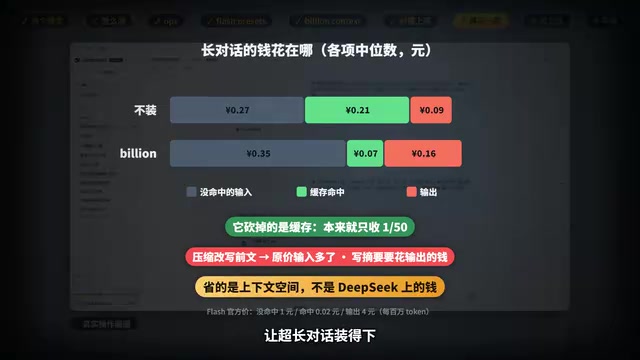
It lets the model decide when to fold earlier conversation into a summary, claims 100K context is enough, and that it can save 5x tokens. It waits until the conversation grows by about another 50K tokens before starting the first compaction, so in last time's small task it never got a chance to act and just added overhead. This time we switched to reading all 40 chapters of Dream of the Red Chamber, and the conversation grew to 300K tokens. It compacted 4 to 11 times per run, and the conversation maxed out at only 70K to 140K tokens. In the end, all four detail questions were answered correctly both with and without it—no memory was lost. But the cost: four runs showed no discernible difference from without it, two were cheaper, and two were more expensive.

Context compaction means that when a conversation approaches the model's window limit, the model rewrites several earlier rounds of messages into a summary, then replaces the original text with the summary to free up space and continue the conversation. It solves the "doesn't fit" problem, not the "cheaper" problem: most of the replaced history was originally in a cache-hit state at a very low unit price; after compaction the summary itself is newly added output (billed at output price), and the entire prefix after the rewrite position is invalidated and must be recalculated at full price. Therefore the economics of compaction depend on comparing "cache reads saved" against "new summary output + cache invalidation loss," and under a pricing system with extremely low cache unit prices, it is often not worthwhile. It is better suited to ultra-long sessions where you must break through the window limit.
Why They Save, and Why They Don't
Go back to the billing records for details. When Ops searches logs in PTC mode, it doesn't stuff the entire log into the conversation, and input that misses the cache drops by 80%; for fixing multiple files, the number of calls is about the same, but the content newly read into the conversation actually increases by 30%, and the specific reason isn't yet clear from the records. Flash Presets makes the model take fewer rounds—each additional round means re-reading the earlier text. Billion Context does cut the cache that needs re-reading by more than half, but the cache was already only one-fiftieth the price, so what's cut is the cheapest part; meanwhile compaction rewrites the earlier text, more input after that misses the cache, and writing summaries also costs output money—the give and take cancel out. So what it saves is context space, letting ultra-long conversations fit, not money on DeepSeek.
How Ordinary Users Should Choose
First, check the agent team switch on the plugin page: if it's on, the bill for the same small task is three times as much; normally keep it off, and turn it on for big tasks when you want it to check again. This step matters more than which plugin you install. For everyday office work where you want to save a little, install Flash Presets, select V3 each time, and verify key numbers yourself. For writing code, reading large files, and searching logs, install Ops and be sure to switch to PTC mode. If you often have very long conversations in one session and worry it won't fit, then install Billion Context, but don't expect it to save money. If you only ask a few questions occasionally, install nothing.
A few pitfalls: the "cost for this round" below a reply does not include sub-agents; to see everything, go to the cost page in settings; the cost plugin shows an estimated price, slightly higher than the official price, so reconcile against your balance; don't trust a single number like "installing this saves X percent"—only your own repeated bill checks count. What happens when several plugins are installed together was not tested this time; don't assume stacking saves more.
The "agent team" repeatedly mentioned in the article corresponds to Harness's multi-agent/sub-agent mechanism: the main model can dispatch subtasks to sub-agents with independent contexts, which have their own conversation history and tool calls, and then aggregate the results back into the main thread. The benefits are parallelism, context isolation, and letting subtasks check again; the cost is that each sub-agent independently pays input and output fees, and its overhead is usually not included in the "cost for this round" statistic shown in the interface. This is why "the bill for the same small task is three times as much"—the small task itself doesn't need to be split, yet you pay extra for multiple copies of system prompts and round trips. Understanding this makes it clear why toggling it affects your bill more than choosing a plugin.
What Wasn't Tested This Time
Only the Flash model, Windows, and this one version of Harness were tested; plugins update quickly, and new versions may differ; each case was run only 2–4 times, so a difference of a few cents could still be fluctuation; only half of the test questions in the plugin repositories were tested; the long-conversation test was reading books, not writing code—large projects with long coding sessions were not tested this time. Before installing a plugin, first check which kind of usage matches yours.
One-line Summary
51 real test runs: the three DeepSeek plugins save money through different mechanisms—use them in the right scenario to save half, use them wrong and pay more.
Paragraph Summary
Responding to criticism that last time's test was "too simplistic," the author re-evaluated DeepSeek Harness's three money-saving plugins with 51 full test runs, installing each separately, comparing standard mode and PTC mode separately, and calculating real costs from call records at official prices. The conclusion is that the three don't save the same thing: Ops is essentially a more compact toolset, saving more than half when searching large logs in PTC mode, but potentially more expensive in standard mode or when fixing dependency code files; Flash Presets relies on 13 rules to cut about a third of model calls, unrelated to PTC; Billion Context compacts effectively without losing memory, but because it cuts the cheapest cache portion and writing summaries adds output overhead, total cost is almost unchanged. The author also emphasizes that the agent team switch has the biggest impact on the bill, and gives advice on choosing plugins by usage scenario plus several billing pitfalls.
Related articles

9 AI Subscription Plans Compared: The Real Cost Per 100M Tokens Revealed
Bilibili creator tests 9 AI subscription plans from Volcano, Alibaba, Tencent, Baidu, Zhipu, Xiaomi, MiniMax and more, converting them all to real cost per 100M tokens, breaking down fixed-quota vs. three-tier coefficient billing and how caching, time-of-day discounts, and window limits affect actual quota.

Vibe Coding for Beginners: Expressing Intent Instead of Handwriting Code
What is Vibe Coding? A 137-episode Bilibili course defines it: the core is expressing intent, not writing code. This article analyzes Vibe Coding's productivity logic, target audience, and entry expectations to help beginners decide if it's worth learning.

LangChain Beginner's Guide: An Agent Development Roadmap from LangGraph to Deep Agents
Clarify the encapsulation relationship among LangChain, LangGraph, and Deep Agents, and master the learning path and selection logic for agent development frameworks—suitable for beginners in large model development.