RF-DETR Local Deployment Tutorial: A Higher-Accuracy Object Detection Alternative to YOLO

Deploy RF-DETR locally — the first real-time Transformer detector to break 60 mAP on COCO.
RF-DETR (Roboflow-DETR) is the first real-time object detection model to surpass 60 mAP on the COCO benchmark, offering higher accuracy than YOLO via a Transformer-based, end-to-end pipeline. This tutorial walks through full local deployment: creating a Conda environment, installing via pip, and running inference on both images and video.
RF-DETR: The Rising Star of Real-Time Transformer-Based Object Detection
If you've been using YOLO for object detection, this model is worth your attention — it's called RF-DETR. According to benchmarks, RF-DETR is the first model to achieve 60+ mAP on the COCO dataset under real-time detection constraints, which is a remarkable milestone in the field.
About COCO and mAP: COCO (Common Objects in Context) is the most authoritative benchmark dataset in object detection, released by Microsoft in 2014. It contains approximately 120,000 training images across 80 common object categories. mAP (mean Average Precision) is the core metric for evaluating overall detection performance. mAP50 measures average precision at an IoU threshold of 0.5, while the standard COCO mAP averages precision across 10 IoU thresholds from 0.5 to 0.95 — a much stricter standard. RF-DETR breaking the 60 mAP barrier means that under the demanding constraint of real-time detection (typically defined as inference latency under 10ms), the model's average detection precision across 80 categories has reached this level for the first time — a threshold no real-time model had previously crossed.
RF-DETR stands for Roboflow-DETR. DETR (DEtection TRansformer) is a Transformer-based object detection framework originally proposed by Meta, representing a fundamentally different technical approach from the familiar YOLO:
- YOLO: Built on convolutional neural network (CNN) architecture, optimized for detection speed;
- RF-DETR: Built on Transformer architecture, using an end-to-end detection pipeline.
The Evolution of DETR: DETR was introduced by Meta AI Research in 2020 and marked a paradigm shift in object detection. Before DETR, virtually all mainstream detectors (including Faster R-CNN, SSD, and the YOLO series) relied on hand-crafted components such as anchor boxes, NMS post-processing, and RPN (Region Proposal Networks). However, the original DETR had drawbacks: slow training convergence (requiring 500 epochs) and weak small-object detection. This led to a series of improvements — Deformable DETR, DN-DETR, DINO-DETR — that progressively reduced convergence to 12 epochs while significantly boosting accuracy. RF-DETR builds on this lineage and represents the latest engineering advances in the DETR family.
The end-to-end pipeline means that from image input to final bounding box and class output, no post-processing steps like NMS (Non-Maximum Suppression) are required, making the entire pipeline cleaner and more unified.
Why Can NMS Be Eliminated?: NMS (Non-Maximum Suppression) is an indispensable post-processing step in traditional detection pipelines — CNN-based detectors typically generate multiple overlapping candidate boxes for the same object, and NMS filters out redundant boxes by computing IoU (Intersection over Union) between them. However, NMS is a non-differentiable discrete operation that cannot be incorporated into end-to-end gradient training, and it performs poorly on dense or occluded objects while requiring manual threshold tuning. DETR-based models use the Hungarian Algorithm during training to establish one-to-one correspondences between predicted and ground-truth boxes, eliminating redundant predictions at the architecture level. This makes NMS unnecessary at inference time — one of the most revolutionary design choices in the DETR family.
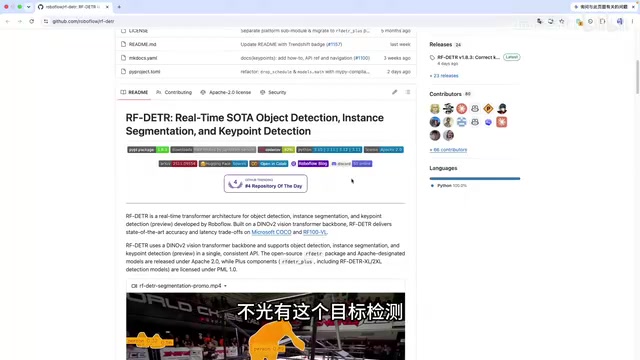
Notably, RF-DETR supports not only standard object detection but also instance segmentation and keypoint detection, making it a fairly comprehensive toolkit.
Accuracy Comparison: Can RF-DETR Replace YOLO?
In the official accuracy comparison curves, RF-DETR (purple curve) sits at the top of all compared models on the mAP50 dimension, outperforming mainstream versions like YOLO11 and YOLO26 in detection accuracy.
However, leading in accuracy doesn't mean it can fully replace YOLO. Both have their ideal use cases:
- When maximum real-time performance matters: YOLO's faster inference speed makes it the safer choice for high-framerate, low-latency scenarios (e.g., real-time surveillance, autonomous driving perception);
- When higher detection accuracy is the priority: If your use case demands greater accuracy with relatively relaxed real-time requirements, RF-DETR is the better option.
This is the classic accuracy-vs-speed tradeoff, and developers should make their choice based on actual business requirements.
Local Deployment: Setting Up the Environment
Now for the core of this article — the complete RF-DETR local deployment walkthrough. This assumes you already have Conda installed on your machine.
Why Use a Conda Virtual Environment?: Conda is the most fully featured package and environment management tool in the Python ecosystem. In deep learning projects, different projects often depend on different versions of the same library (e.g., PyTorch 1.x and 2.x have API incompatibilities), and sharing a single Python environment leads to dependency conflicts. Conda virtual environments have completely isolated Python interpreters and package directories that don't interfere with each other. Compared to pip's venv, Conda can also manage non-Python system-level dependencies (such as CUDA libraries), which is especially critical for deep learning frameworks — making it standard practice in engineering.
Start by creating an isolated virtual environment with Conda to avoid dependency conflicts:
conda create -n rf-detr python=3.13
conda activate rf-detr
Python 3.13 is used here; any version above 3.10 has been verified to work.
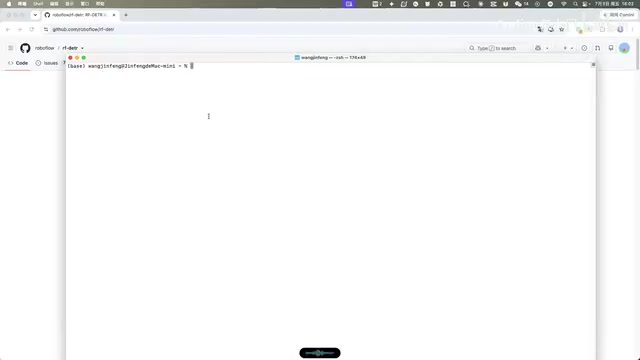
Once the environment is activated, installing dependencies is straightforward. RF-DETR has been published to PyPI under the package name rfdetr. Simply run:
pip install rfdetr
Wait a moment and all dependencies will be installed automatically — no need to manually manage complex dependency trees.
Image Detection: Getting Started with a Few Lines of Code
After installation, you can test with the official sample code. Before running, prepare your test images (you can grab a few from the COCO dataset test set).
The core inference flow has four steps:
- Create the model: The official example uses the Medium-sized model;
- Load the image: Replace the path with the actual path to your local image;
- Draw results: Overlay bounding boxes and class labels onto the image;
- Display results: Add visualization code to view the detection output.
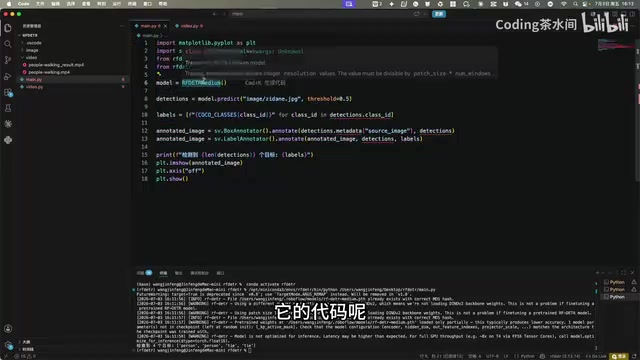
Note: On first run, the program will automatically download the weight file. Subsequent runs won't require re-downloading.
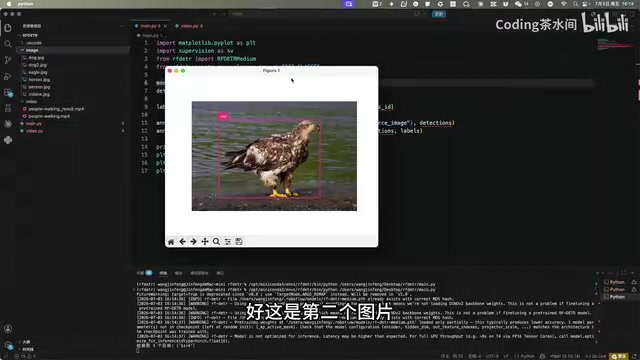
Real-world detection results are quite solid: the first image correctly identified "person" and "tie"; the second image successfully detected a "bird" target.
Video Detection: Real-Time Inference Performance Test
Beyond static images, video detection is also worth trying. The video detection pipeline is essentially the same as image detection, using OpenCV for frame-by-frame processing:
- Use
cv2.VideoCaptureto read the video file; - Loop through and read each frame sequentially;
- Run detection on each frame and overlay annotations in real time;
- Display the output live using
imshow.
In the video test, the model primarily detects pedestrian targets and occasionally identifies backpacks. The FPS counter in the top-left corner shows approximately 7 frames per second, which is on the lower side.
An important caveat here: this test was run on a Mac using CPU inference only. With a dedicated GPU and a CUDA-enabled version of PyTorch installed, inference speed would improve dramatically, yielding much smoother real-time performance.
The Performance Gap Between CPU and GPU Inference: The core operation in Transformers is the self-attention mechanism, whose computational complexity scales quadratically with the input sequence length (O(n²)), involving intensive matrix multiplication. GPUs have thousands of parallel compute cores purpose-built for matrix operations, while CPUs typically have only 8 to 16 cores with far lower parallelism. For reference, an NVIDIA RTX 3090 has a theoretical FP32 compute of ~35.6 TFLOPS, while a typical CPU offers under 1 TFLOPS — a gap of tens of times. Apple's M-series chips do include a Neural Engine, but standard PyTorch on Mac defaults to the CPU path (the MPS backend has limited support for some operators). On a machine with an NVIDIA GPU and a properly installed CUDA-enabled PyTorch, RF-DETR inference can exceed 30 FPS, delivering true real-time performance.
Conclusion: Is RF-DETR Worth Adding to Your Toolkit?
RF-DETR represents the latest progress in Transformer-based object detection. Its 60+ mAP score on COCO demonstrates that end-to-end detection frameworks can now compete head-to-head with CNN-based approaches in terms of accuracy. More importantly, the deployment barrier is extremely low — a single pip command and a few lines of inference code take you from installation to running inference.
For developers, this isn't an either-or replacement decision — it's the addition of another powerful tool you can reach for as needed: choose YOLO for speed, choose RF-DETR for accuracy. That's become a practical and well-grounded technical guideline.
This article covered the fundamentals of RF-DETR deployment. Future exploration could include training custom models with RF-DETR to apply it to real-world business scenarios.
Key Takeaways
Related articles

Code with Claude Event: AI-Powered Creative Experiments on Tiny Computers
At Code with Claude, Anthropic gave participants tiny computers to build creative projects with AI assistance, showcasing how AI coding tools empower the maker community.

Claude Code Adds Agent View: A Research Preview for Unified Session Management
Claude Code's new Agent View feature (research preview) consolidates all coding sessions into a unified list, advancing AI tools toward multi-agent orchestration.

Open-Source Python SDK: Measuring AI Agent Reliability with SRE Principles
Agent Reliability is an open-source Python SDK that applies SRE's SLO and error budget concepts to AI Agent evaluation, with PASS/FAIL/UNKNOWN states, CI assertions, and zero forced dependencies.