RTX 5060 Ti 16GB Local LLM Selection Guide: Ollama Model Recommendations and Benchmarks

A practical guide to running local LLMs on an RTX 5060 Ti 16GB with Ollama — model picks by use case.
This guide uses the RTX 5060 Ti 16GB as a case study to map out the real capabilities and model selection strategies for running LLMs locally on a consumer GPU. With 16GB VRAM, you can comfortably run Q4-quantized 7B–14B models, while 30B models are possible but slower thanks to 32GB of system RAM. The article recommends Qwen2.5-Coder 14B for coding, Llama 3.1 8B or Qwen2.5 14B for general reasoning, and Stable Diffusion (not Ollama) for image generation. Key tuning advice covers quantization level trade-offs, context length management, and VRAM monitoring.
Which Local LLMs Can You Run on a 16GB GPU?
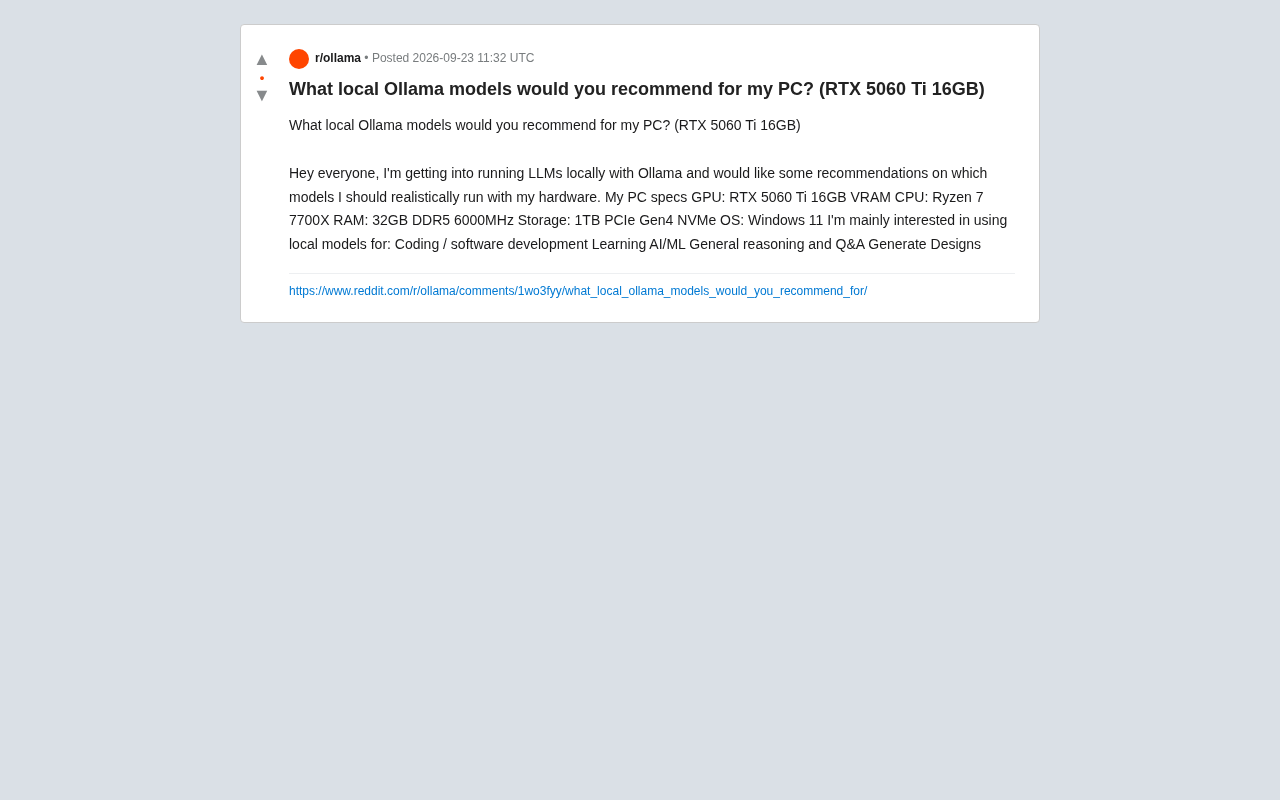
Now that Ollama has reduced local LLM deployment to essentially a single command, more and more consumer GPU owners are experimenting with running large language models on their own PCs. A Reddit user recently raised a highly representative question: with an RTX 5060 Ti 16GB, Ryzen 7 7700X, and 32GB DDR5 RAM, which models are best suited for coding, AI/ML learning, general reasoning, and design generation?
This is a very typical setup — 16GB of VRAM isn't top-tier, but it's well above entry-level, putting it squarely in the sweet spot of "capable enough to have real fun." Understanding its limits matters far more than blindly downloading a pile of models.
What 16GB VRAM Can Actually Handle
The core metric for determining how large a model your GPU can run is VRAM capacity versus the quantized model size. The rule of thumb: the quantized file size plus the context cache must fit within VRAM to get full GPU acceleration. Once the model spills over into system RAM and the CPU, speeds drop dramatically.
For 16GB VRAM, you can roughly divide your options into three tiers:
- 7B–9B parameter models: After Q4 or Q5 quantization, these typically take up 5–7GB, fit entirely in VRAM with plenty of room for context, and run smoothly — your everyday workhorses.
- 12B–14B parameter models: Q4 quantization brings these to around 8–10GB, still fully GPU-accelerated and comfortably within reach — the "upper sweet spot" for this card.
- 27B–32B parameter models: Even with aggressive quantization, these push up against or exceed 16GB, often requiring partial offload to the CPU. Speeds slow noticeably, making them suitable only when response latency isn't a concern.
It's worth noting that 32GB of DDR5 system RAM acts as a buffer for models that exceed VRAM, making it possible — if not fast — to run 30B-class models.
Quantization is the key concept for understanding this setup's limits. It compresses model weights from the 32-bit or 16-bit floats used during training into lower-precision integers (such as 4-bit, 5-bit, or 8-bit), dramatically reducing model size and VRAM usage at the cost of a very slight drop in accuracy. In a format like Q4_K_M, "Q4" means 4-bit quantization, "K" refers to the K-quant grouping strategy, and "M" denotes the medium quality tier. A 14B-parameter model, for example, requires roughly 28GB in FP16 but only about 9GB in Q4_K_M — which is exactly why a 16GB GPU can handle a 14B model. GGUF is currently the dominant quantization file format in the Ollama and llama.cpp ecosystem. It packages model architecture and quantized weights into a single file that can be loaded and run directly, with no additional conversion needed.
Model Recommendations by Use Case
The original poster's needs fall into four categories. Different tasks have very different model preferences — no single model excels at everything.
Coding and Software Development
Code tasks demand strong instruction-following and structured output. Within the 16GB VRAM budget, Qwen2.5-Coder 14B is a highly regarded choice — purpose-built for code, and fully GPU-runnable after quantization. For faster responses, you can step down to Qwen2.5-Coder 7B or a lightweight variant of DeepSeekAd-Coder-V2. Specialized code models consistently outperform general-purpose models of the same size on tasks like completion, refactoring, and debugging explanations.
Qwen2.5-Coder is a code-focused model series from Alibaba's Tongyi team, built on the Qwen2.5 base and further pre-trained and instruction-tuned on large-scale code corpora, supporting 92 programming languages. Compared to general-purpose models, specialized code models have a systematic advantage on tasks like autocomplete, cross-file context understanding, error localization, and unit test generation — a result of their training data distribution being much closer to real-world codebases. DeepSeek-Coder-V2, developed by DeepSeek, is a Mixture-of-Experts (MoE) code model with 236B parameters in its full version, but its lightweight distilled variants in the 7B–16B range deliver near-large-model coding performance in a locally deployable package. Choosing a specialized code model over a general one typically yields noticeably better programming assistance at the same parameter scale.
AI/ML Learning and General Reasoning
General knowledge and reasoning tasks call for instruction-tuned models with strong all-around capabilities. Both Llama 3.1 8B and Qwen2.5 14B are solid choices, with the latter performing better on Chinese-language queries and complex reasoning. If you lean toward math and logical reasoning, chain-of-thought models are worth exploring — but keep in mind they produce longer outputs and consume more context.
Design Generation
A common misconception worth clarifying: Ollama runs text-based large language models and does not directly generate images. If "design generation" means images, UI mockups, or visual assets, you need a diffusion model like Stable Diffusion (run via tools like ComfyUI or Automatic1111) — not Ollama. What LLMs can do is assist with design work: generating design specs, CSS/HTML code, creative copy, or image prompts. A 16GB GPU is also more than sufficient to run mainstream SDXL models.
Stable Diffusion is an image generation model based on the diffusion process, and its underlying mechanism is fundamentally different from an LLM: rather than autoregressively generating text tokens, it progressively denoises a random noise image until it matches a text description. SDXL (Stable Diffusion XL) is the current mainstream open-source image generation base model; at roughly 6.5GB, it runs smoothly on 16GB VRAM and supports high-resolution output. ComfyUI excels with its node-based workflow, ideal for fine-grained control over the generation pipeline; Automatic1111 (WebUI) is known for its user-friendly interface and is great for beginners. Note that running an LLM and Stable Diffusion simultaneously on the same machine means they compete for VRAM — you'll generally need to use them one at a time rather than in parallel.
Getting Started: Setup Tips and Tuning Advice
For newcomers, rather than downloading a dozen models at once, start with two or three that cover your core needs: one code model (e.g., Qwen2.5-Coder 14B), one general-purpose model (e.g., Llama 3.1 8B or Qwen2.5 14B), and add an image generation toolchain as needed.
A few key points to improve your day-to-day experience:
- Quantization level trade-offs: Q4_K_M offers a good balance between size and quality. For higher quality, try Q5 or Q6, but expect higher VRAM usage.
- Context length: Longer contexts consume additional VRAM. When working with long documents or large codebases, you'll need to balance window size against speed.
- Monitor VRAM usage: Keep an eye on whether CPU offloading is occurring during inference. A sudden drop in speed is a sign that the model or context has exceeded your VRAM capacity.
Conclusion
The RTX 5060 Ti 16GB paired with 32GB of RAM is an excellent setup for getting started — and going further — with local LLMs. It handles 7B–14B models smoothly, covering the vast majority of coding, learning, and Q&A use cases. 30B-class models are possible but come with speed trade-offs. The real key isn't chasing the largest parameter count — it's choosing the right specialized model for each task and dialing in your quantization and context settings. That's how you squeeze the most value out of limited VRAM.
Related articles

Free Unlimited Claude Code Solution: Agnes AI + CC Switch Setup Guide
No paid subscription needed — pair the free AI platform Agnes AI with the open-source tool CC Switch to provide a backend for Claude Code, enabling unlimited free calls to text, image, and video models. This guide covers the full setup, test results, and usage boundaries.

A Complete Zero-Cost Guide to Getting Started with Claude Code for Beginners in China
A beginner's guide to Claude Code for users in China: two installation methods (command line and IDE plugin), full configuration steps for replacing the official API with the free domestic LongCat model, and a hands-on demo of building a small tool with natural language, plus tips.

When the NSA Gets Involved: The AI Supply Chain Crisis Behind Open-Source CVEs and API Key Hijacking
Multiple open-source projects disclosed severe CVEs in one day, PHP flaws alarmed the FBI, and Railway and OpenCode were breached with API keys stolen. This article breaks down the vulnerability window, AI-accelerated exploitation, and the AI supply chain crisis behind the API key black market, with a developer defense checklist.