RTX 5090 vs M5 Ultra: Which Is Better for Local AI Inference?

RTX 5090 and M5 Ultra represent two paths for local AI inference: the trade-off between speed and capacity.
The article compares NVIDIA RTX 5090 and Apple M5 Ultra for local AI inference. On specs, the 5090 offers 419 TFLOPS and 1.8TB/s bandwidth but only 32GB VRAM, while the M5 Ultra delivers 110 TFLOPS and 1.2TB/s bandwidth with up to 256GB unified memory. In Qwen 3.8 27B 4-bit tests, the 5090 leads with ~3000 tokens/sec prompt processing and 136 tokens/sec generation with MTP on, versus 1700 and 100 for the M5 Ultra. The key decision formula: inference speed ≈ bandwidth ÷ model size — the 5090 is faster when the model fits in 32GB VRAM, otherwise only the M5 Ultra can handle it. Power-wise, the M5 Ultra draws ~214W versus 300–575W for the 5090, affecting cooling, noise, and long-term costs. The conclusion: no absolute winner — choose based on your typical model size.
Apple has just begun shipping the Mac Studio with the M5 Ultra, and a debate over the local AI inference hardware crown is heating up. The NVIDIA RTX 5090 and Apple M5 Ultra — one the pinnacle of consumer-grade GPU performance, the other Apple's latest flagship workstation chip — represent two fundamentally different approaches to AI computing. A YouTube tech channel conducted a detailed comparison of the two's specs and real-world inference performance, and the results are more informative than a simple benchmark win-or-lose.
Spec Comparison: Compute and Bandwidth Each Have Their Strengths

The difference in design philosophy between the two is immediately clear from the spec sheet. The M5 Ultra has a memory bandwidth of 1.2TB/s, while the RTX 5090 reaches 1.8TB/s — the GPU still leads in bandwidth. But when it comes to memory capacity, the M5 Ultra can be configured with up to 256GB of unified memory, with 512GB configurations coming in the future, whereas the RTX 5090 has only 32GB of VRAM.
The gap in compute performance is even more stark: the M5 Ultra delivers roughly 110 TFLOPS, while the RTX 5090 reaches 419 TFLOPS — nearly four times as much. Power consumption is just as different — the M5 Ultra draws about 214 watts at sustained peak load, while the RTX 5090 fluctuates wildly between 300 and 575 watts. This means that if you're after energy efficiency and a quiet experience, Apple's chip has a clear advantage; if you want absolute compute density, NVIDIA still holds the upper hand.
Unified memory architecture is the key to understanding Apple's chip positioning. In a traditional PC, the CPU uses system memory (DDR) while the GPU uses dedicated VRAM (GDDR/HBM), and data is shuttled between the two over the PCIe bus, typically at only a few dozen GB/s. Apple's M-series chips package the CPU, GPU, neural engine, and memory onto the same piece of silicon or package, with all compute units sharing a single high-bandwidth memory pool — that's what "unified memory" means. It offers three direct benefits: first, the GPU can directly address the entire memory capacity, no longer limited by the size of dedicated VRAM; second, it eliminates data copies between CPU and GPU, reducing latency; third, overall power consumption and package area are greatly reduced. This is precisely why the M5 Ultra can be configured with 256GB or even 512GB of memory, while the RTX 5090 is limited to 32GB of VRAM. But unified memory has its costs too — the memory controller must serve multiple compute units simultaneously, so peak bandwidth is typically lower than dedicated VRAM solutions of the same generation, which explains why the M5 Ultra's 1.2TB/s is still below the 5090's 1.8TB/s.
Inference Benchmarks: Performance on the Qwen 3.8 27B Model
In actual testing with Qwen 3.8 27B at 4-bit quantization and a 6K prompt, the two pieces of hardware reveal a key pattern: prompt processing and generation speed follow different bottleneck logic.
The RTX 5090's prompt processing speed is about 3000 tokens/sec, while the M5 Ultra is about 1700 tokens/sec. For first-token latency, the 5090 is about 2 seconds, and the M5 Ultra is about 4 seconds.

In the token generation phase, with MTP (multi-token prediction) disabled, the 5090 produces about 75 tokens/sec and the M5 Ultra about 52 tokens/sec; with MTP enabled, the 5090 jumps to 136 tokens/sec, and the M5 Ultra reaches about 100 tokens/sec. These numbers show that as long as the model fits within 32GB of VRAM, the RTX 5090's inference speed advantage is substantial — prompt processing is nearly twice as fast, and generation speed also leads clearly.
But keep in mind that these figures are estimates based on rapidly evolving inference engines, and real-world performance will change with software optimization.
MTP (Multi-Token Prediction) is an important technique for inference acceleration in recent years. Traditional autoregressive generation can only output one token at a time, because each new token depends on the computation of the previous token, creating a serial bottleneck. MTP adds extra prediction heads to the model so that it predicts multiple subsequent tokens in a single forward pass, then uses a verification mechanism to ensure output quality — greatly boosting throughput while keeping results essentially consistent. The 5090's jump from 75 to 136 tokens/sec and the M5 Ultra's from 52 to 100 in this article are exactly the effect of MTP. Note that MTP imposes additional requirements on VRAM usage and compute, so it may not be enabled or may yield limited gains on devices with small VRAM — which is why support for MTP directly affects the real-world performance ranking of different hardware.
The Core Trade-off: Model Size Determines Hardware Choice

The video provides an extremely practical decision formula: Inference speed (tokens/sec) ≈ Memory bandwidth ÷ Model size. This formula explains why the two pieces of hardware suit completely different scenarios.
If the model plus necessary overhead fits within 32GB of VRAM, the RTX 5090, with its higher bandwidth and compute, delivers a faster inference experience. But once the model exceeds 32GB — whether a larger unquantized model or a mixture-of-experts (MoE) architecture — the RTX 5090 can't handle it, while the M5 Ultra, with up to 256GB (soon 512GB) of unified memory, accommodates these large models with ease.
This is essentially a "speed versus capacity" multiple-choice question. For users running quantized models under 70B, the 5090 is the faster choice; for developers who need to run very large models, unquantized models, or MoE architectures, the M5 Ultra is almost the only option that can get the job done on a desktop-class device.
Mixture of Experts (MoE) architecture is one of the mainstream designs for today's large models. Unlike traditional dense models (which activate all parameters on every inference), MoE models contain multiple "expert" subnetworks, and only a small subset is activated on each forward pass — so they can have a much larger total parameter count at the same inference cost. For example, a MoE model with a total of 67 billion parameters might activate only about 12 billion parameters each time. This complicates hardware requirements: although fewer parameters are activated and compute is lower, all expert weights still need to reside in memory, so VRAM usage depends on the total parameter count rather than the activated parameter count. This is exactly the key point mentioned in the article — MoE models easily exceed 32GB of VRAM, yet run comfortably within the M5 Ultra's large unified memory. For such models, the M5 Ultra not only wins on capacity, but its bandwidth ÷ activated parameters ratio also tends to deliver good generation speeds, making it the realistic choice for running large MoE models on the desktop.
The Hidden Costs of Power and Cooling
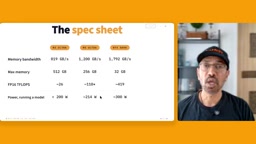
The power difference isn't just about the electricity bill. The RTX 5090's 300–575 watt draw under sustained peak load means you need a sufficiently powerful PSU, an efficient cooling solution, and noise that can't be ignored during long inference tasks. The M5 Ultra's roughly 214 watts of sustained power lets it run stably inside the compact Mac Studio chassis, making it friendlier for studio environments.
This difference gets amplified in 24/7 sustained inference scenarios — the power gap translates directly into a gap in cooling design complexity and long-term operating costs.
Energy efficiency (performance per watt) is often underestimated in sustained inference scenarios. The RTX 5090's 300–575 watt dynamic power means the cooling system must be designed for worst-case conditions, typically requiring a triple-fan, multi-slot-thick cooler, plus ample headroom in the system PSU. The M5 Ultra's roughly 214 watts of sustained power, by contrast, allows it to run stably in a compact, nearly silent chassis like the Mac Studio. For studios or small server environments that need 24/7 uninterrupted inference, the power difference translates directly into three costs: electricity, air-conditioning load, and hardware procurement and maintenance costs driven by cooling design complexity. In addition, the risk of thermal throttling in high-power GPUs under prolonged full load must be factored in — real sustained performance may differ from short benchmark runs. So when evaluating local AI hardware, don't just look at peak compute; also consider energy efficiency and thermal design under typical workloads.
Which Is Your AI Weapon?
There's no absolute winner in this comparison — only the choice that better fits specific needs. The RTX 5090 delivers unmatched inference speed within the range that 32GB of VRAM can cover, suiting users with controllable model sizes who want extreme response speed. The M5 Ultra, with its massive unified memory capacity and excellent energy efficiency, opens up the possibility of running large models on the desktop.
For developers interested in local AI deployment, the recommendation is to decide based on your typical model size: first measure the model's VRAM footprint, then estimate expected speed using the formula — the answer will be clearer than any benchmark.
Related articles

Free Unlimited Claude Code Solution: Agnes AI + CC Switch Setup Guide
No paid subscription needed — pair the free AI platform Agnes AI with the open-source tool CC Switch to provide a backend for Claude Code, enabling unlimited free calls to text, image, and video models. This guide covers the full setup, test results, and usage boundaries.

A Complete Zero-Cost Guide to Getting Started with Claude Code for Beginners in China
A beginner's guide to Claude Code for users in China: two installation methods (command line and IDE plugin), full configuration steps for replacing the official API with the free domestic LongCat model, and a hands-on demo of building a small tool with natural language, plus tips.

When the NSA Gets Involved: The AI Supply Chain Crisis Behind Open-Source CVEs and API Key Hijacking
Multiple open-source projects disclosed severe CVEs in one day, PHP flaws alarmed the FBI, and Railway and OpenCode were breached with API keys stolen. This article breaks down the vulnerability window, AI-accelerated exploitation, and the AI supply chain crisis behind the API key black market, with a developer defense checklist.