Running a 125B Model Locally on 8GB VRAM: Qwen3 Flash Deployment Walkthrough

Run 125B MoE models locally on 8GB VRAM using Scrata's VRAM/RAM offloading — starting at 32GB system RAM.
This guide covers a low-cost local LLM deployment strategy using the Scrata framework (built on llama.cpp): its VRAM/system-RAM offloading lets a 12–24GB GPU paired with 64GB RAM run large MoE models like Qwen3 Flash. MoE's sparse activation (e.g., only 3B of 30B params active) makes 30+ tokens/s achievable. Key pitfalls include replacing HuggingFace URLs with hf-mirror.com, correct model shard placement, and — critically — lowering the default "high" thinking intensity to avoid painfully slow responses.
Why Low-End GPUs Can Run Massive MoE Models
Local deployment of large language models has long faced a painful bottleneck: running high-performance models typically demands expensive hardware. Common setups for deploying dense models like Qwen3-27B often require RTX 3090s, second-hand mining cards, or compute cards (Tesla V100, P40, modded 2080Ti 22G variants) — costly options that undermine the value proposition of running models locally.
One Bilibili content creator, approaching this from a developer's perspective, shared a noteworthy alternative: using a framework called Scrata (which is essentially built on top of llama.cpp), you only need a GPU with 12–24GB of VRAM paired with 64GB of system RAM to run large-parameter MoE models like Qwen3 Flash at usable speeds.
The key here is the MoE (Mixture of Experts) architecture. Unlike dense models that activate all parameters on every inference pass, MoE models only engage a subset of expert networks at a time. Take Qwen3-30B-A3B as an example: despite its large total parameter count, only ~3B parameters are activated per inference, making it significantly faster than a dense model of equivalent scale while retaining strong capabilities. The creator's own upgrade path reflects this logic — from Qwen3.5-9B to Qwen3-30B-A3B and now to the Flash series — always chasing the balance between speed and "brainpower" on constrained hardware.
The core idea behind MoE (Mixture of Experts) dates back to 1991, but it only became truly prominent in large language models in recent years. Traditional dense models involve all parameters in every forward pass — a 30B dense model invokes all 30B parameters for every single token generated, placing enormous and continuous demands on memory bandwidth and compute. MoE models introduce an "expert routing" mechanism at the FFN (feed-forward network) layers of the Transformer: the model contains multiple parallel "expert" networks, and a lightweight gating network (Router) decides which experts to activate for each token, while the rest remain idle. The "A3B" in Qwen3-30B-A3B stands for "Activated 3B" — meaning the model has 30B total parameters, but only ~3B are active per inference, matching the compute cost of a 3B dense model while retaining the knowledge capacity of a 30B one. This property makes MoE models dramatically more efficient than same-scale dense models in terms of both inference speed and hardware requirements, which is why they're the key enabler for running large-parameter models on modest hardware.
How Scrata Works: Splitting Load Between VRAM and System RAM
Scrata's ability to run large models on modest hardware comes down to one core mechanism: it splits model weights between GPU VRAM and system RAM — a portion lives in VRAM, while the bulk resides in system memory. This design substitutes relatively cheap system RAM for expensive VRAM.
According to the creator, on a setup with an RTX 5070 12GB GPU and 64GB RAM, enabling MTP (Multi-Token Prediction) delivers generation speeds of 50+ tokens/s, with official benchmarks reaching 60–95 tokens/s. He offers a practical rule of thumb: don't obsess over whether it exceeds reading speed — anything above 30 tokens/s is perfectly usable in practice.
He also offers a sobering reality check: unless you're a heavy user or have data privacy requirements, local deployment provides limited value. Cloud API pricing for models like MiMo, Qwen series, and DeepSeekAd V3.1 continues to drop, making API calls the more economical choice for most people. Local deployment truly shines for high-frequency power users and privacy/confidentiality-sensitive scenarios.
Scrata is built on top of llama.cpp, an open-source inference framework developed by Georgi Gerganov in pure C/C++, designed to run large language models on consumer hardware and even CPUs. One of llama.cpp's core capabilities is support for quantized models in GGUF format — compressing model weights from float32 or float16 down to lower bit-widths (Q4, Q2, or non-uniform formats like IQ2_XS) to dramatically reduce file size and runtime memory usage. GPU/CPU hybrid inference ("GPU offloading") is also a built-in llama.cpp feature: users can specify how many model layers to offload to GPU VRAM, with the rest handled by the CPU in system RAM, and the framework automatically manages data scheduling between the two. Scrata wraps llama.cpp with a friendlier configuration interface and automated installation, lowering the barrier for everyday users while keeping llama.cpp as the underlying inference engine. MTP (Multi-Token Prediction) is a speculative decoding acceleration technique that boosts generation throughput by predicting multiple future tokens simultaneously — a major reason why speeds of 50+ tokens/s are achievable.
Choosing the Right Quantization Level for Your Hardware
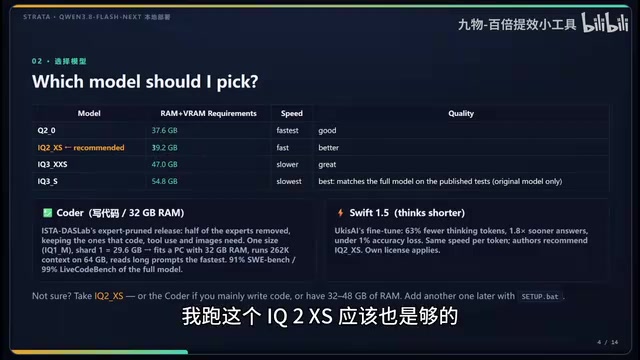
Picking the right quantization version is the most important decision in the entire deployment process — it comes down entirely to your hardware. The model page lists the combined VRAM + RAM requirement for each quantization variant, for example:
- Q2 quantization: ~38GB required
- IQ2_XS: ~40GB required
- Lower quantization variants: as little as 32GB total
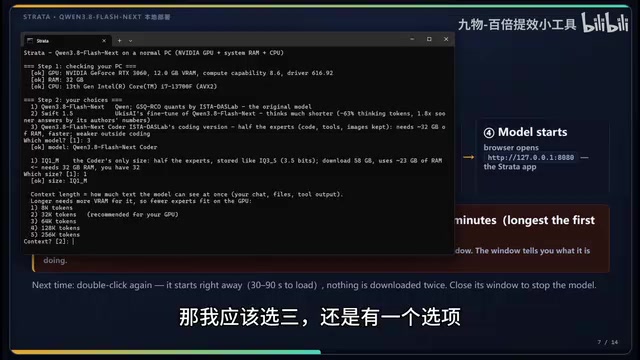
The creator's own setup is an RTX 3060 12GB + 32GB RAM, giving roughly 44GB of total addressable space. He currently runs the lowest quantization variant (32GB minimum), and while IQ2_XS is technically within reach, leaving headroom for other running processes makes the more conservative choice the safer bet.
He's candid about the experience: the lowest quantization variant isn't particularly sharp — slightly better than Qwen3-30B-A3B by his assessment, but the thinking process runs long and overall speed is mediocre. This is the classic tradeoff of aggressive quantization — the harder you compress, the more reasoning quality tends to suffer.
Quantization compresses neural network weights from high-precision floating-point numbers to low-bit integer representations. Common Q4 quantization stores each weight as a 4-bit integer, reducing storage by ~75% compared to 16-bit floats; Q2 compresses further to 2 bits, shrinking size more but with greater precision loss. IQ2_XS is a variant of "importance-aware quantization," which allocates different bit-widths to different weights based on their importance — preserving precision on critical weights while still achieving aggressive compression, theoretically outperforming uniform Q2 quantization in model quality. When choosing a quantization level, the core logic is: your total available memory (VRAM + system RAM) must exceed the variant's listed requirement, with an additional 2–4GB buffer reserved for the OS and other processes. Lower bit-widths mean smaller files and faster inference, but greater "intelligence loss" — particularly on complex reasoning, math, and coding tasks. This is exactly why the creator notices the lowest quantization variant feels less sharp than expected.
Installation Walkthrough and Common Pitfalls
Scrata is an open-source project on GitHub that's been updated rapidly (from 1.2.1 through 1.2.7 to 1.2.9). There are several pitfalls that users in China especially need to watch out for.
Download the source code and engine files in advance. It's recommended to pre-download both the source code and the runtime engine (the core executable files in the package). If the engine files are placed in the correct engine directory ahead of time, the installer will skip the download step entirely, saving you from a command-line re-fetch.
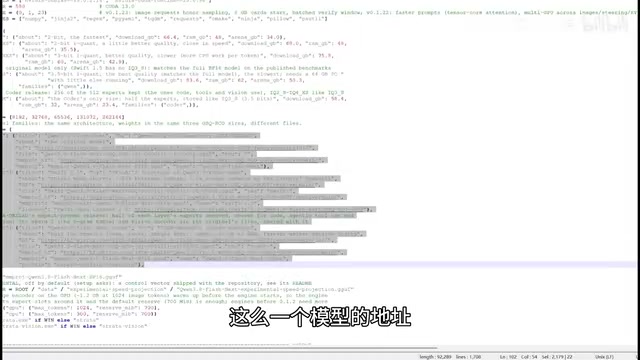
Use a domestic mirror for model downloads. This is the biggest obstacle. Models default to downloading from HuggingFace, which is inaccessible from mainland China. The fix is to edit the relevant Python script and replace huggingface.co with the domestic mirror hf-mirror.com. Two places need updating: the base mirror URL, and the specific download URLs for each model variant (first, second, and third quantization versions). After this change, downloads work normally within China.
Manually placing model files. You can specify the model download directory in the config file. If you've downloaded the model yourself, place the model shard files in the corresponding folder and create a placeholder file (essentially a .txt file) to signal completion. The program reads this marker and skips re-downloading that shard.
Where to place the vision component. If you enable multimodal features, you'll need to download the vision component (the "world reasoner"). Note that it must be placed outside the model's named subfolder, not inside it — otherwise the program won't recognize it.
Practical Configuration Tips for Actual Use
After deployment, launching the model requires patience — loading tens of gigabytes of data into RAM and VRAM takes 1–3 minutes on startup, which is completely normal.
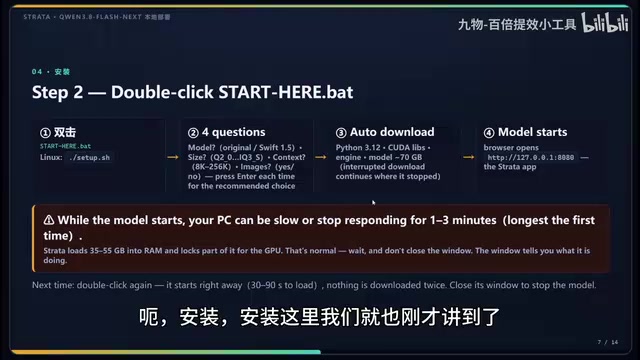
A few things to keep in mind during actual use:
Port conflicts. The default port 8080 is often occupied during development. Change it to 8081 in the config, or shut down whatever local service is occupying port 8080.
Connecting to development tools. Most developers won't use the web interface directly — instead, they'll connect via the API endpoint, which supports the OpenAI-compatible protocol.
Critical setting: reduce thinking intensity. The creator repeatedly emphasizes this gotcha — the model's thinking intensity defaults to "high," which causes extremely long reasoning chains, slow responses, and even repetitive looping behavior. Many users' first impression that the model is "way slower than expected" traces directly back to this setting. Turning down the thinking intensity will noticeably improve the experience, often transforming it from "unusable" to "perfectly fine." If you dislike verbose thinking output, you can also set a maximum token cap to keep it in check.
Real-World Performance and Who This Is For
On an RTX 3060 12GB + 32GB RAM setup, the creator measured the Qwen3 Flash Code quantized variant running at ~30 tokens/s — right at the usability threshold. In terms of capability, this low-bit quantized version edges out Qwen3-30B-A3B, but aggressive quantization means it's still not performing at its theoretical ceiling.
Objectively, the value of this approach lies in validating the feasibility of the MoE + VRAM/RAM offload strategy at extremely low hardware cost. For budget-conscious developers who want to experiment with large-parameter models locally, it offers an entry point starting at just 32GB of system RAM. But for those chasing optimal inference quality and speed, higher VRAM configurations or higher-bit quantization variants remain necessary — this will always be a balancing act between hardware, speed, and quality.
Related articles

GPT-Next Leak, Gemini 4 Argon Imminent: AI News Roundup
GPT-Next leak suggests extreme efficiency; OpenAI's 28-day shipping pledge boosts speed 50%; Gemini 4 Argon nears release; Anthropic subscription value report sparks debate.

GPT-Next Leaked, Gemini 4 Argon Speeds Up, Fable 5.5 May Launch Today
OpenAI's GPT-Next model leaks, expected to be extremely low-cost and possibly part of the 28-day release plan; Gemini 4 Argon internal testing accelerates, NanoBanana 2.1 is live; Semi Analysis tests show Claude Max's equivalent API value is about 5 times that of ChatGPT Pro; Fable 5.5 may launch today.

Gemini 4 Argon Launches Globally: Key Highlights from the AI Daily Brief
Google opens Gemini 4 Argon globally across Pro and Ultra subscriptions and the API, and demonstrates robot control. This article rounds up open-source models, Agent infrastructure, cost transparency, and safety governance updates.