Running Open-Source LLMs Locally: Which Models Can Your PC Actually Handle?

Running a top closed-source LLM locally costs nearly 1M RMB — here's what your PC can actually handle.
Running a flagship closed-source LLM locally would cost ~980,000 RMB and yield just 1.3 characters/second — completely impractical. This guide instead maps VRAM tiers (4–32 GB) to realistic open-source model sizes (4B–27B parameters), explains why VRAM fills faster than expected, and covers quantization and context management as key tuning levers. The takeaway: local deployment is about privacy and offline access, not cost savings — cloud APIs are cheap, and consumer hardware can't keep pace with cloud model evolution.
Bringing a Top Closed-Source Model Home Would Cost Nearly a Million Yuan
Bilibili creator "进化中的阿陈" ran a hardcore back-of-the-envelope calculation that shatters the fantasy many people have about running large models locally: if OpenAI's most powerful flagship model were ever open-sourced, how much would it actually cost to run it at home?
The answer: you'd need roughly 31 NVIDIA desktop AI mini-PCs and about 980,000 RMB. That same money, spent on a top-tier subscription at around 1,350 RMB/month, would last you 61 years — or over 600 years at the ~135 RMB/month basic tier.
Even more sobering: if someone did grit their teeth and buy all 31 machines and daisy-chain them together, the system would output roughly 1.3 characters per second. You'd be sitting in front of the screen waiting a minute or two for it to write a single paragraph.
How the "31 Machines and 1.3 Characters" Figure Was Calculated
Since OpenAI stopped disclosing model sizes after GPT-3 in 2020, the estimate uses the largest publicly available open-source model as a reference point — Moonshot AI's Kimi K3, with 2.8 trillion parameters and a model file exceeding 1,500 GB.
Assuming a top-tier closed-source model is roughly 2–3× the size of the largest open-source model — and factoring in signals from API pricing — the parameter count of a flagship closed-source model likely falls somewhere between 5 and 10 trillion. Taking a midpoint of 7 trillion gives a file size of roughly 3,900 GB. Each mini-PC has 128 GB of memory, so you'd need at least 31 just to load the model.
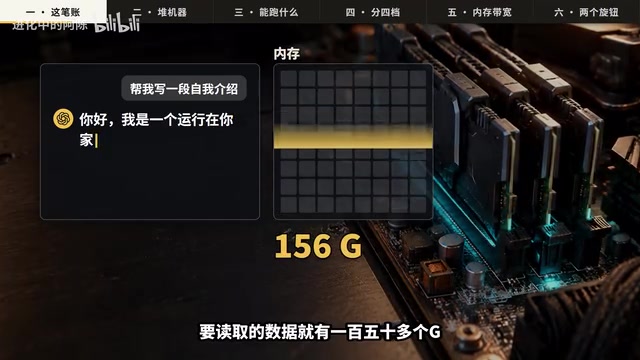
The reason it's so slow comes down to how inference works: every time the model generates a single character, it has to read the relevant portion of model data entirely from memory. At 7 trillion parameters, that's over 150 GB of data per character. These mini-PCs max out at around 270 GB/s memory bandwidth — so reading a single character takes more than half a second. The theoretical ceiling is about 1.7 characters/second; with overhead, you're left with 1.3.
Making matters worse, multiple machines can't "push together" — once the model is sharded across machines, inference runs like a relay race, with only one machine active at a time, bottlenecked by the slowest link. And inter-machine network bandwidth is over 10× slower than intra-machine memory bandwidth.
A note on "parameters": Parameters are the core unit of measurement for large models — think of them as the quantity of "learned knowledge weights" from training. Each parameter is typically stored as a floating-point number. In BF16 precision (the most common format), one parameter takes 2 bytes; with 4-bit quantization, it drops to ~0.5 bytes. So 7 trillion parameters require roughly 14 TB uncompressed, shrinking to ~3,900 GB after quantization. More parameters theoretically means more knowledge and stronger reasoning — but storage and compute requirements scale proportionally, which is exactly why there's such an unbridgeable gap between consumer hardware and top closed-source models.
Gaming GPUs? Your Circuit Breaker Won't Survive It
Some enthusiasts might wonder: why not skip the mini-PCs and just stack top-of-the-line gaming GPUs?
The highest-VRAM consumer GPU available today tops out at 32 GB. To load a model this large, you'd need 122 of them running simultaneously. Just powering them all on would draw roughly 70,000 watts — enough to trip not just your apartment's breaker, but potentially the entire building's.
Even the 31 mini-PCs would cost 20,000–30,000 RMB per year in electricity alone — about twice what you'd pay using cloud APIs. A standard power strip handles ~2,500W; plug in the 11th machine and it trips. To recoup the hardware cost through savings on cloud API fees at this output speed, you'd need to run it nonstop for 70 years.
What Level of Open-Source Model Can a Normal PC Actually Run?
So what can a regular PC realistically handle? According to Epoch AI's 2026 data, open-source models now lag behind the best closed-source models by an average of just about 4 months — likely an underestimate of the true gap, but a clear signal of how fast open-source is moving.
The current top open-source models on public leaderboards — Moonshot Kimi K3, DeepSeekAd V4 Pro, Qwen 3.8 Max, GLM 5.3 — are all from Chinese teams, with parameter counts in the trillions. Those are built for data centers. What fits on a personal computer are their "smaller siblings."

Three Tenants Fighting Over VRAM
People new to local model deployment often make a common mistake: the GPU's VRAM looks sufficient on paper, but the system locks up the moment they hit run. That's because three things are competing for VRAM simultaneously:
- The model file itself
- The conversation context, which grows as you chat
- Temporary working memory for inference computations
For example: Qwen's 27B-parameter model, after 4-bit quantization (which compresses it to under a third of its original size), is about 15.3 GB. A 16 GB GPU looks like it should fit — but once you start chatting, even a few thousand characters of conversation history pushes usage above 17 GB. The overflow spills into system RAM, and the model crawls to a near-halt. So while 27B technically "fits" in 16 GB VRAM, you really need 24 GB to be comfortable.
VRAM Tiers: Which Models Can Your Device Run?
Here's a practical breakdown by VRAM tier:
- 4–6 GB VRAM (older GPUs / entry-level thin-and-light laptops): Suitable for ~4B parameter models with files around 2–3 GB. Can't produce long-form content, but handles summarization, proofreading, and quick lookups just fine.
- 8 GB VRAM (mainstream gaming laptops / desktops): Comfortably runs ~9B parameter models like Qwen 3.5 9B (~5.7 GB file, ~7 GB with context). Solid for Q&A, copywriting, and editing — the most practical tier for most users.
- 16 GB VRAM (mid-to-high-end GPUs): Struggles with 27B, but handles 14B parameters with room to breathe, enabling more complex reasoning and longer tasks.
- 24–32 GB VRAM (top consumer GPUs): Finally enough to run 27B models comfortably — the sweet spot for a personal AI workstation today.

VRAM vs. System RAM: A 10× Speed Gap
Want to run bigger models? Here's something that often gets overlooked: not all memory is created equal. GPU VRAM is fast but limited in capacity and expensive. System RAM is cheap and easy to expand to 64–128 GB, but far slower — running a model on RAM alone means painfully slow output.
This is exactly why Apple's unified memory architecture matters. The new Mac Studio combines high bandwidth with large capacity — the 128 GB model starts at 19,999 RMB in China, and the 512 GB version starts at 46,999 RMB. Yes, it can run large models — but that price could buy a regular user decades of cloud subscriptions. "Bandwidth" is like the diameter of the pipe connecting your memory to your processor: even if the pool is huge, a narrow pipe means slow output regardless.
On memory bandwidth: Bandwidth — not raw compute (FLOPS) — is the true bottleneck for LLM inference. That's because generating each token requires reading model weights from memory into the compute unit, which is a memory-bound operation, not a compute-bound one. A top gaming GPU like the RTX 5090 has ~1.8 TB/s VRAM bandwidth; Apple's M4 Ultra unified memory delivers ~800 GB/s; standard DDR5 desktop RAM tops out at ~50–90 GB/s. That's a 20–30× spread — which directly determines how fast a model can generate tokens on any given piece of hardware. Bandwidth is the pipe width; capacity is just the tank size.
Two Knobs to Tune When VRAM Is Tight
If you're working with limited VRAM, there are two adjustable levers:
Lever 1: Quantization (compression). 4-bit quantization is the sweet spot — it retains over 90% of model capability with almost no noticeable degradation in everyday use. Push further to save space and the model starts losing coherence mid-response.
Lever 2: Manage context length. When you finish a task, open a new chat window to clear the conversation history. This single habit alone can free up several gigabytes of VRAM.

MoE Architecture: Making Large Models Easier to Fit on Consumer Hardware
Model architecture is evolving, too. Qwen 3.8 Flash Next — a predecessor to Qwen 4 — uses a Mixture of Experts (MoE) architecture with 125 billion total parameters, but only activates 6 billion per token. Even more cleverly, it stores a frequently-used 51B-parameter vocabulary embedding table in system RAM rather than VRAM, freeing up precious GPU memory. This "hot/cold data separation" approach is making large models increasingly viable on consumer hardware.
But keep one thing clear: standard MoE architectures save compute, not storage. DeepSeek V4.1 Flash has 552 billion total parameters and a 510 GB model file — completely out of reach for a consumer PC. On the cloud, though, it's incredibly affordable: roughly 1 RMB per million input tokens and 4 RMB per million output tokens. A million input tokens plus 100,000 output tokens costs about 1.40 RMB total.
On MoE architecture: The core idea behind Mixture of Experts is splitting the neural network into multiple "expert" sub-networks. During inference, a routing mechanism dynamically selects a small subset of experts to activate, while the rest remain dormant. This differs from dense (traditional) architectures, where all parameters participate in every forward pass. MoE's advantage is achieving near-large-model capability at a fraction of the per-token compute cost. However, all expert weights still need to reside in memory on standby — so the model file size doesn't shrink just because only a fraction of parameters are activated per token. That's why DeepSeek V4.1 Flash, despite activating very few parameters per inference, still has a 510 GB footprint: you're saving compute, not storage.
Local Deployment Was Never About Saving Money
Once you run through all the numbers, the conclusion becomes clear: running models locally is never about saving money. It's about keeping your data entirely on your own hard drive — completely under your control, even with the network cable unplugged.
If you just want access to the smartest AI for everyday work, a 130-something RMB/month subscription is far more sensible than spending tens of thousands (or hundreds of thousands) tinkering with hardware. No matter how expensive a machine you buy, it can't keep pace with how fast models evolve in the cloud.
Delegate the expensive compute to the data center. Keep what's private close to home. That's the most comfortable setup for most people.
Related articles

Apple HomeView Hands-On Review: Is the $300 Smart Home Hub Worth It?
Apple HomeView hands-on: a $300 smart home hub with facial recognition for quick account switching, but no App Store or voice recognition. Is the wall-mounted version worth it? Should you buy the first generation?

Meta Muse Wonder Launch: What It Means for Meta's Return to the Frontier AI Race
Meta releases Muse Wonder and WonderFull, benchmarks reach the frontier, community feedback is polarized. An in-depth look at Meta's return to the frontier AI race, its personal agent strategy, and Zuckerberg's different path.

Apple Home Smart Home Lineup Leaked: LG and Schneider Team Up, UWB Door Lock on Board
Apple Home ecosystem gains new LG and Schneider devices: UWB smart lock with proximity unlock, 2.5K dual-camera doorbell, privacy indoor camera, and AirPods-like seamless pairing.