Running Qwen3 27B on a 4090: Q4 Quantization + 128K Context VRAM Calculation & Tuning Guide

Practical guide to running Qwen3 27B with Q4 quantization and 128K context on a single RTX 4090.
This article details how to deploy the Qwen3 27B model on a single RTX 4090 (24GB VRAM) using Q4KM quantization and K8V4 asymmetric KV Cache compression. It breaks down VRAM calculations showing model weights (17GB) plus compressed KV Cache (6GB) fit within 24GB, explains why generation speed hits ~33 tokens/sec due to memory bandwidth limitations, and covers practical tuning for AI coding tools including MTP acceleration and context compression strategies.
As cloud-based LLM API prices continue to rise, more and more developers are turning their attention to local deployment. A Chinese tech content creator recently shared a highly practical case study: running the Qwen3 series 27B parameter Q4 quantized model on a single RTX 4090 (24GB VRAM), successfully supporting a 128K ultra-long context window. This article combines their hands-on testing experience to systematically break down the VRAM calculation logic, speed bottlenecks, and production environment tuning details behind this setup.
Why a 27B Model Can Fit in a 24GB GPU
Many people have an intuitive question about whether a model can run locally: how much VRAM does a 27 billion parameter model actually need? The answer depends on parameter precision.
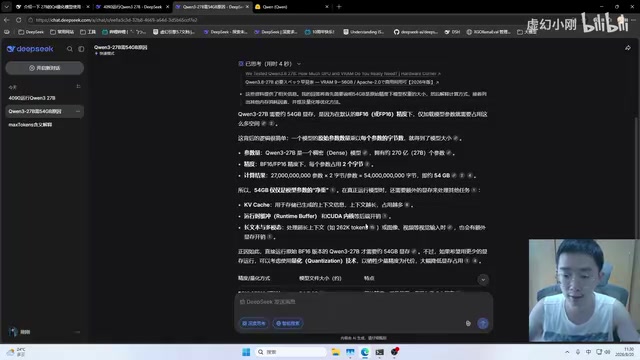
The native Qwen3 27B is trained using FP16 (16-bit floating point), with each parameter occupying 2 bytes. 27B means approximately 27 billion parameters, which directly translates to roughly 54GB of VRAM — far exceeding the 4090's 24GB capacity.
The solution is quantization. Quantization is one of the core techniques for deep learning model compression. Its principle is to map model parameters from high-precision floating-point numbers to low-precision integer representations, thereby dramatically reducing storage space and bandwidth requirements. The essence of quantization is reducing the storage precision of each parameter:
- FP16: 2 bytes per parameter, requires ~54GB
- INT8 (Q8): 1 byte per parameter, requires ~27GB
- INT4 (Q4): 0.5 bytes per parameter, requires only ~17GB
Through Q4 quantization, model weights are compressed to around 17GB, making it possible to fit within a 24GB GPU. This is the core reason for choosing the Q4KM quantization scheme. The K in Q4KM indicates the use of the K-Quant algorithm — an importance-based grouped quantization strategy, while M stands for Medium level, meaning different layers in the model use different quantization precisions: attention layers and critical layers retain higher precision, while feed-forward networks and other more redundant layers use more aggressive compression. Compared to schemes that uniformly quantize all layers, this mixed strategy preserves more model capability at the same compression ratio, with measured perplexity degradation typically controlled within 1-3%, making it virtually imperceptible in daily use.
KV Cache: The Overlooked VRAM Hog
Simply fitting the model weights isn't enough. During inference, the model also needs to store context information — the KV Cache (Key-Value Cache) in Transformer architecture. This VRAM usage is independent of model weights and grows linearly with context length.
KV Cache is a critical optimization mechanism for Transformer autoregressive generation. In standard self-attention computation, generating each new token requires recalculating the Key and Value vectors for all historical tokens, with computational cost growing quadratically with sequence length. KV Cache avoids redundant computation by caching previously computed K/V vectors in VRAM, reducing the generation phase's computational complexity from O(n²) to O(n). However, the trade-off is that VRAM usage grows linearly with sequence length — for long-context scenarios, KV Cache often consumes more VRAM than the model weights themselves, becoming the core deployment bottleneck.
How to Calculate KV Cache VRAM
The testing provides a clear estimation approach. Taking Qwen3 27B as an example:
- Layers: approximately 64
- Attention heads and dimensions per layer: 4 heads × 128 dimensions
- Each token corresponds to one set of Keys and one set of Values
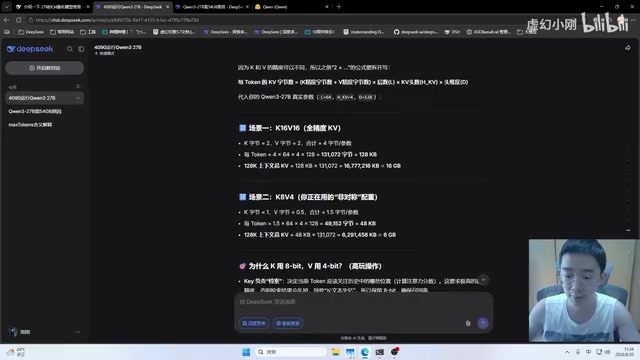
At full precision (K16V16), a single token's KV occupies approximately 128KB. When context extends to 128K tokens:
128KB × 128K tokens ≈ 16GB
Weights at 17GB plus KV Cache at 16GB totals 33GB, far exceeding the 24GB VRAM ceiling.
K8V4 Asymmetric KV Quantization: The Key Technique
This brings us to the critical technique in this test — K8V4 asymmetric quantization.
K8V4 means compressing Keys to 8-bit precision (halved) and Values to 4-bit precision (reduced to 1/4 of original). This asymmetric design works because research has found that Keys and Values play different roles in the attention mechanism and have different sensitivity to precision. Key vectors primarily participate in attention score calculation (through dot products with Queries), where precision loss directly affects the accuracy of attention weight distribution, causing the model to "look at the wrong place." Value vectors, on the other hand, undergo weighted summation after attention weights are determined — essentially a linear mixture of information that is more robust to quantization noise. Therefore, preserving 8-bit precision for Keys while compressing Values to 4 bits achieves the optimal balance between VRAM savings and output quality. This finding was first systematically validated in academic papers like KIVI and has now become standard practice for long-context deployment.
After K8V4 processing, the KV Cache for 128K context drops dramatically from 16GB to approximately 6GB.
The final VRAM budget becomes crystal clear:
Model weights 17GB + KV Cache 6GB ≈ 23GB
Just barely fitting within the 24GB VRAM limit. This is exactly the "just barely fits" configuration combination emphasized in the testing.
Memory Bandwidth and Compute: The Keys to Inference Speed
VRAM capacity determines "can it fit," while "how fast does it run" is jointly determined by memory bandwidth and compute power.
Generation Speed Is Determined by Bandwidth Bottleneck
In testing, the model's generation speed was approximately 32-33 tokens/second. Where does this number come from?
The autoregressive generation phase of large language models is a typical memory bandwidth-bound task, not a compute-bound task. This is because when generating each token, the batch size is typically 1 with relatively small computation (only one forward pass), but the entire model weights need to be loaded from VRAM to the GPU's compute units (SMs). The metric measuring this characteristic is arithmetic intensity — the number of floating-point operations per byte of data transferred. In single-batch inference, arithmetic intensity is extremely low (~1-2 FLOP/Byte), far below the RTX 4090's compute-to-bandwidth ratio (~160 FLOP/Byte), so the bottleneck is entirely in data movement rather than computation itself.
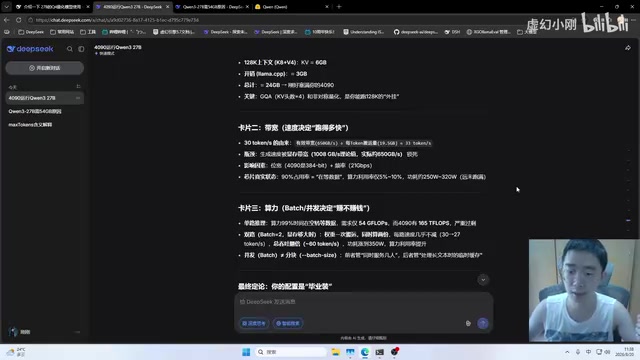
For each token generated, the weight data involved in computation (~19.5GB) needs to be fully transferred once. The RTX 4090's memory bandwidth is approximately 1008GB/s, with actual usable bandwidth around 650GB/s after accounting for effective utilization:
650GB/s ÷ 19.5GB ≈ 33 times/second
A vivid analogy is used: bandwidth is like road traffic capacity, determined jointly by "number of lanes" (bus width — the memory bus width, 384-bit for the 4090) and "vehicle speed" (frequency — the memory clock speed). This also explains why new GPUs like the RTX 5060 Ti and 5070 Ti may deliver noticeably different inference experiences despite similar VRAM capacities — they may use narrower buses or lower-frequency memory chips, resulting in significantly lower bandwidth specifications than the 4090.
Massive Compute Surplus, Difficult to Utilize
Interestingly, the RTX 4090's compute power reaches approximately 165 TFLOPS, while single-stream inference only requires about 54 TFLOPS. The chip spends most of its time "waiting for data transfer," with massive compute surplus — the vast majority of thousands of CUDA cores remain idle.
Theoretically, running dual-batch (processing two independent inference requests simultaneously) could utilize idle compute, since increasing batch size raises arithmetic intensity, allowing the same data transfer to serve more computation. But each additional stream requires approximately 6GB of additional KV Cache. Under the extreme 128K context configuration, there's no VRAM space for a second stream — unless context is reduced to 16K or 32K, making it possible to utilize that idle ~120 TFLOPS of compute power.
Configuration and Considerations for Practical Use
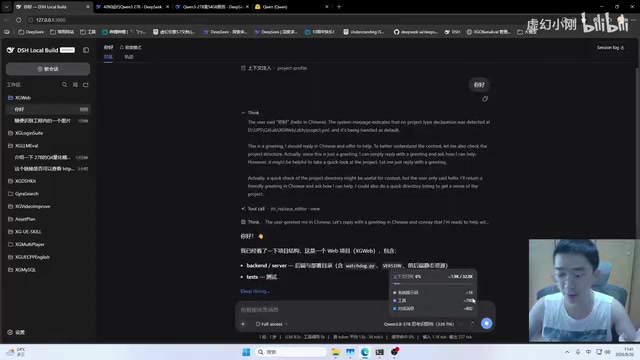
With the theory clear, several production environment insights were shared, particularly specific configuration points within DSH (an AI coding tool).
Recommended Primary Configuration
After repeated validation, the stable and usable "production-grade" configuration is:
| Setting | Recommended Value |
|---|---|
| Quantization scheme | Q4KM weights |
| Context length | 128K |
| KV quantization | K8V4 |
| Deep thinking | Maximum intensity |
| Vision model | Disabled (enabling will exceed VRAM) |
| Inference backend | llama.cpp |
The choice of llama.cpp as the inference backend deserves elaboration. llama.cpp is an open-source C/C++ inference framework developed by Georgi Gerganov, specifically optimized for local inference of GGUF-format quantized models. Its core advantages include: no Python environment or heavyweight dependencies like PyTorch needed, with fast startup and low resource consumption; support for CPU+GPU hybrid inference, allowing partial model layers to be offloaded to CPU; deeply optimized CUDA/Metal kernel implementations for various quantization formats (Q4_K_M, Q5_K_S, etc.); and extremely fine-grained memory management that maximizes utilization of limited VRAM. Compared to high-throughput inference frameworks designed for data centers like vLLM and TGI, llama.cpp is better suited for single-machine consumer hardware deployment scenarios and has become the de facto standard backend for local LLM inference.
Output Limit and Thinking Intensity Adjustment
Qwen3 models have a notable characteristic — they particularly favor deep reasoning and easily trigger the "output token limit reached" message. This is directly related to the max_token parameter, which was adjusted from the default 8K to 16K to alleviate this. However, a caution is noted: don't arbitrarily increase this parameter, as an excessively large output limit may cause the model to "overthink" in scenarios that don't require long outputs, not only wasting time and compute resources but potentially degrading the quality and focus of the final answer due to redundant reasoning.
Automatic Context Compression Mechanism
When conversation length approaches the context window limit, DSH automatically compresses conversation history and after compression re-injects necessary tool definitions, project rules, and skill metadata. This step is crucial — without re-injection, compression may lose critical context information, causing noticeable degradation in subsequent output quality. This "compression + re-injection" mechanism is essentially a context management strategy: first using summarization or key information extraction to compress lengthy conversation history and free up token space, then ensuring system-level structured information (such as callable tool lists, project coding standards, etc.) always exists in the context to maintain model behavior consistency.
MTP Multi-Token Prediction Acceleration Trade-offs
The community also provides quantized versions supporting MTP (Multi-Token Prediction). MTP is a variant of Speculative Decoding, whose core idea is to use a lightweight draft model to predict multiple subsequent tokens at once, then have the main model verify these predictions in parallel. Since verifying multiple tokens can be completed in a single forward pass (leveraging the parallel computation characteristics of the prefill phase, where arithmetic intensity increases dramatically and GPU compute power is fully utilized), while sequential generation requires multiple serial forward passes, overall generation speed can be significantly improved when the draft model's prediction acceptance rate is sufficiently high. The Qwen3 series natively supports MTP heads, with the draft model directly integrated into the model architecture as additional prediction layers, requiring no separate model loading and making deployment very convenient.
The draft model's KV can use Q4, while normal inference maintains K8V4. Enabling MTP can boost speed by approximately 40%, from 33 tokens/second to around 50 tokens/second.
But the trade-offs are clear: deep thinking and vision modes cannot be enabled simultaneously, and VRAM margin requirements are more stringent — browsers or large applications cannot run in the background (since modern browsers and desktop applications also consume GPU VRAM for rendering), otherwise crashes due to insufficient VRAM are likely.
The Value and Limitations of Local LLM Deployment
The practical significance of this configuration stems from the continuous cost pressure of cloud services. Cloud services like DeepSeekAd have been raising API prices, making heavy usage unsustainable. Taking a heavy coding assistance scenario consuming millions of tokens daily as an example, cloud API monthly costs could reach hundreds or even thousands of RMB, while local deployment's marginal cost is only electricity (RTX 4090 at full load consumes ~450W).
The Q4 quantized version of Qwen3 27B makes it possible to locally have a model that can "actually get work done" — it can help organize documents, sort through code logic, and its working capability has reached a practically usable level. While the 27B parameter scale cannot directly compete with cloud-based ultra-large models (like GPT-4 class trillion-parameter models), it demonstrates satisfying reasoning ability and knowledge coverage for most non-extremely-complex tasks. For developers pursuing data privacy, wanting to control costs, or needing to work offline, this "RTX 4090 + Q4 weights + K8V4 KV quantization + 128K context" combination provides a field-tested, deployable solution.
Of course, this is also a solution riding on hardware limits. Understanding the relationships between the three core concepts of VRAM capacity, bandwidth, and compute power is essential to truly understanding why this configuration works, how to tune it, and how to make reasonable trade-offs when switching to other GPUs. For example, switching to an RTX 3090 (24GB VRAM but only 936GB/s bandwidth) would slightly reduce generation speed; a dual-GPU setup requires considering the impact of NVLink bandwidth on cross-card communication; if future VRAM capacity increases beyond 48GB, one could try Q5 or even Q6 quantization for better output quality, or run larger parameter models.
Key Takeaways
Related articles

Free Unlimited Claude Code Solution: Agnes AI + CC Switch Setup Guide
No paid subscription needed — pair the free AI platform Agnes AI with the open-source tool CC Switch to provide a backend for Claude Code, enabling unlimited free calls to text, image, and video models. This guide covers the full setup, test results, and usage boundaries.

A Complete Zero-Cost Guide to Getting Started with Claude Code for Beginners in China
A beginner's guide to Claude Code for users in China: two installation methods (command line and IDE plugin), full configuration steps for replacing the official API with the free domestic LongCat model, and a hands-on demo of building a small tool with natural language, plus tips.

When the NSA Gets Involved: The AI Supply Chain Crisis Behind Open-Source CVEs and API Key Hijacking
Multiple open-source projects disclosed severe CVEs in one day, PHP flaws alarmed the FBI, and Railway and OpenCode were breached with API keys stolen. This article breaks down the vulnerability window, AI-accelerated exploitation, and the AI supply chain crisis behind the API key black market, with a developer defense checklist.