SCMD: An Open-Source Tool for Managing Claude Code Memory Locally

SCMD is an open-source local tool that gives users full visibility and control over Claude Code's persistent memories.
SCMD, developed by Nelson John, is an open-source tool for reviewing and managing the persistent memories Claude Code saves for users. It supports per-memory keep, delete, skip, undo, and rewrite actions, with staged decisions and a restorable trash bin to prevent irreversible mistakes. Privacy-focused by design, it runs entirely locally with no telemetry, no cloud services, and zero npm dependencies. Licensed under MIT and open to contributors, though currently Claude-only, SCMD highlights a growing demand for transparency and user control as AI memory capabilities become increasingly common.
Claude's Memory Needs a "Reviewer"
Claude Code quietly records persistent memories about you and your projects while assisting with development — a convenience that also raises privacy concerns. When an AI tool silently saves your work habits, project details, and personal preferences, do you actually know what it has stored? Do you have the power to decide what stays and what goes?
SCMD (developed by Nelson John on Product Hunt) was built to address exactly this pain point. It's an open-source, local memory review panel designed specifically to manage the persistent memories Claude Code saves on your behalf. It launched on Product Hunt with 76 upvotes and a #6 ranking, categorized under Open Source, Developer Tools, Artificial Intelligence, and GitHub.
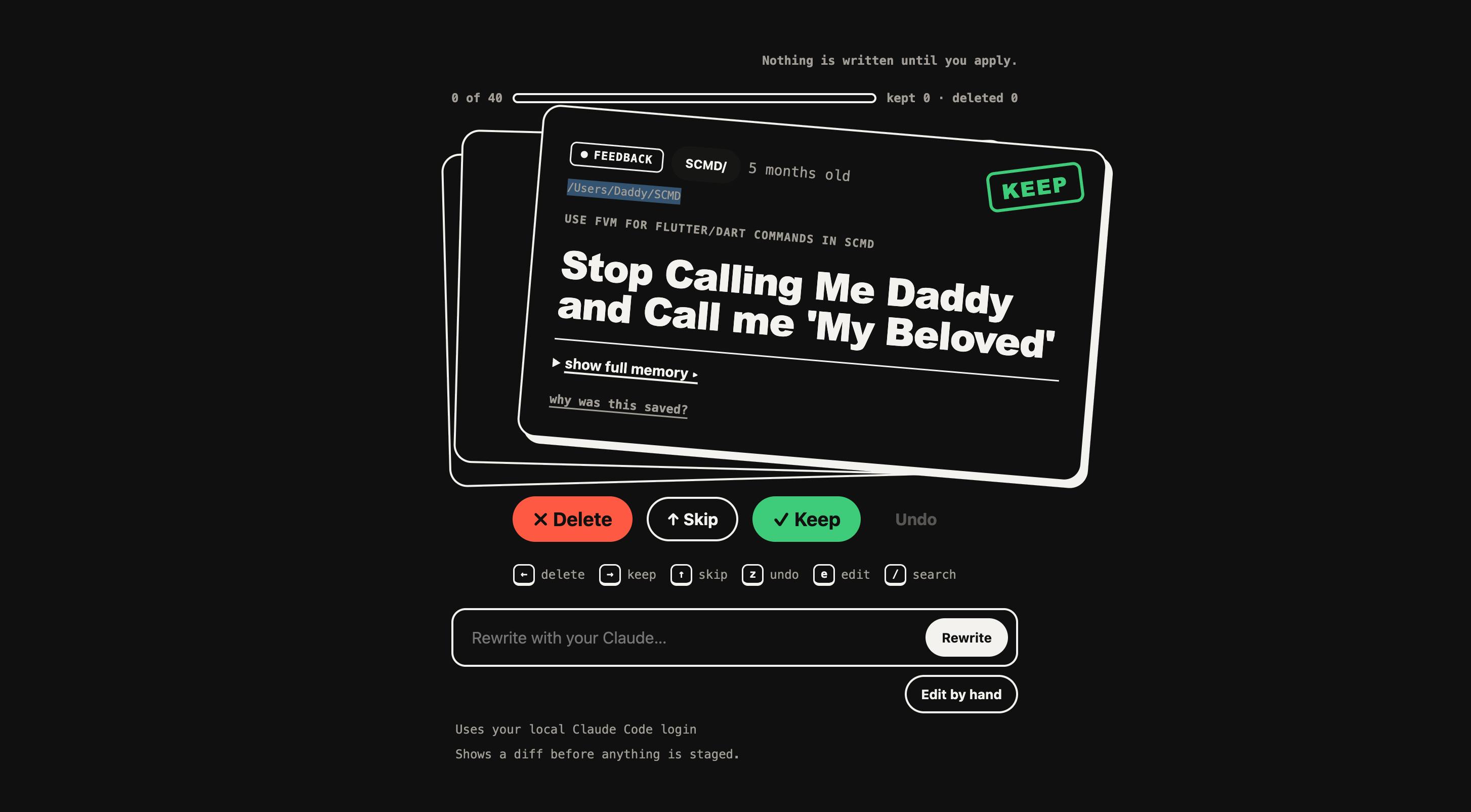
Core Features: Full Control Over Every Memory
SCMD's design philosophy can be summed up as "giving users complete awareness and control over their AI memories." It offers a comprehensive set of actions:
- Keep, Delete, Skip: Make a decision on each memory one by one
- Undo and Rewrite: Reverse decisions and edit memory content
- Inspect: See why a memory was saved, not just what was saved
This "card-by-card review" interaction resembles a review deck — users flip through each memory like a card and decide whether to keep or discard it.
Safety Design: Staged Decisions and a Restorable Trash Bin
Two safety-focused design details in SCMD are worth highlighting. First, all decisions remain in a staged state before confirmation — they don't take effect immediately, preventing irreversible mistakes from accidental actions. Second, deleted memories aren't permanently destroyed; they go into a restorable trash bin, giving users room to change their minds.
This "two-step confirmation + soft delete" mechanism is especially important when handling sensitive data related to privacy and project information.
Privacy First: No Telemetry, No Cloud, Zero Dependencies
SCMD makes a thorough privacy commitment: no telemetry, no cloud service, zero npm dependencies.
This combination means the tool runs entirely locally, never uploads your memory data to any server, and introduces no potential supply chain security risks from third-party dependencies. For developers who care about data sovereignty, these are highly appealing features — especially given that SCMD handles sensitive AI-generated information about you and your projects.
Usage is also lightweight: run it via the /scmd:run command or npx with no complex installation required.
"Supply chain security risk" refers to the danger that arises when a tool depends on a large number of third-party npm packages — any upstream package that gets maliciously tampered with or compromised could affect downstream users. Historical incidents involving packages like event-stream and ua-parser-js are prime examples. Zero dependencies means SCMD's codebase is entirely self-contained with a minimal attack surface. "No telemetry" means the tool won't silently collect usage data in the background (e.g., how often you use it, which types of memories you delete) and send it back to a developer server — a critical feature when dealing with sensitive data about personal work habits and project information. Together, these three properties create a "verifiable privacy promise" — users don't need to take the developer's word for it; they can audit the open-source code directly.
Open Source and Community: MIT License, Contributions Welcome
SCMD is licensed under the MIT License, one of the most permissive open-source licenses, meaning developers can freely use, modify, and distribute it. The project explicitly states it's "ready for contributors" and is open to community participation.
For a tool that handles user privacy data, being open source is itself a form of trust — the code is publicly auditable, so users don't have to worry about the tool doing anything behind their back.
One limitation worth noting: SCMD is Claude only. It's built specifically around Claude Code's memory mechanism and does not currently support other AI coding assistants.
What Trend Does This Reflect?
SCMD's emergence reflects an emerging topic in AI tool development: the manageability and transparency of AI memory. As tools like Claude Code and Cursor increasingly introduce "memory" capabilities to enhance personalization, user demand for awareness and control over those memories is also rising.
In the past, discussions about AI privacy mostly focused on "where does the data I input go?" SCMD shifts the focus to "what has the AI proactively remembered?" — a more subtle and arguably more concerning dimension. The tool itself isn't complex, but the question it raises is universally significant: when AI has persistent memory, users should be the ultimate managers of those memories.
For developers who rely heavily on Claude Code, SCMD offers a low-overhead, highly transparent way to take control of their AI memories. It may well inspire more tools of the same kind and push AI vendors to make memory management a standard capability.
Claude Code's memory mechanism fundamentally relies on the CLAUDE.md file in the project root directory (or a user-level global config file) to persist contextual information. Whenever Claude "learns" something worth remembering during a session — such as coding style preferences, frequently used commands, or project architecture conventions — it writes that information to this file for reuse in future sessions. This design improves continuity, but it also means the AI continuously accumulates structured knowledge about your work patterns, sometimes without the user being fully aware. SCMD works by reading and visualizing the contents of these files, making an otherwise "invisible" memory accumulation process transparent and actionable.
Related articles

Bilibili's Hit Dify Tutorial: A Practical Guide to Building 20+ AI Apps from Scratch
A distilled guide to Bilibili's top-rated Dify tutorial: Windows + Docker deployment, MySQL connection, five app types, model integration strategy, and publishing.

Agent Skills Beginner's Guide: From Concepts to Multi-Agent Collaboration in Practice
A comprehensive guide to Agent Skills: core concepts, components, the importance of Description, standardization, beginner learning paths, and multi-agent collaboration.

One Neuron Detects Both Cats and Cars? We Reproduced It and Found a New Explanation
The cat-car neuron reinterpreted: researcher Cammarata argues it distinguishes pointy from round, not cats from cars. We reproduced the experiment and found the new explanation holds on most inputs—but cars are the exception. The interpretability debate continues on language models.