Screenify Studio: Using Natural Language to Drive AI-Automated Product Demo Recording

Screenify Studio uses natural language and AI agents to automatically record and polish product demo videos on Mac.
Screenify Studio is a Mac screen recording tool that lets users describe demo workflows in natural language, then AI agents automatically drive a browser to record while adding cinematic 3D camera moves, spotlights, and callouts. It features photorealistic device mockups, on-device AI captions, and a CLI interface callable by AI coding agents like Claude Code, enabling fully automated demo generation pipelines.
An AI-Powered Product Demo Tool That Eliminates the "Editing Tax"
For any team that needs to create product demo videos, screen recording has never been the hard part — post-production is. Repeatedly adjusting zoom levels, adding highlight annotations, aligning visual rhythm — these tedious editing tasks often consume several times more time than the recording itself. According to industry surveys, DevRel professionals and indie developers spend over 60% of their video production time on post-editing rather than content creation. Screenify Studio, which recently debuted on Product Hunt, targets exactly this pain point. It positions itself as a Mac screen recording tool "recorded by AI agents," aiming to let users skip the heavy editing process and directly produce polished product demos.
On its launch day, the product received 79 upvotes and 3 comments, ranking 13th for the day, categorized under Design Tools, Productivity, and Artificial Intelligence. While the numbers aren't explosive, its "natural language-driven + AI-automated recording" approach represents a clear direction in the evolution of screen recording tools toward intelligence.
Core Capability: Generate Demo Videos with a Single Sentence
Screenify Studio's most eye-catching feature allows users to describe a demo workflow in pure natural language, and then have AI automatically drive a real browser to complete the recording. In other words, you no longer need to manually click, switch pages, and manage recording rhythm simultaneously — instead, you hand the "demo script" to AI for execution.
The underlying technology is essentially a combination of Browser Automation and large language model planning capabilities. Traditional browser automation tools like Selenium, Playwright, and Puppeteer have long been used for automated testing — they can simulate clicks, scrolling, typing, and other human operations, but require developers to write precise code scripts. Screenify's breakthrough lies in introducing an LLM as the "translation layer," converting natural language descriptions into specific browser operation commands — an approach aligned with OpenAI's Operator, Anthropic's Computer Use, and other "computer use agents." The difference is that Screenify focuses this capability on the "operate while recording" scenario — the AI needs to understand not just "what to do" but also "how to present it."
AI-Automated Recording + Cinematic Post-Production Effects
After completing the base recording, Screenify automatically layers on a series of post-production effects, including:
- Cinematic 3D camera moves, adding depth and motion to the frame;
- Spotlights, highlighting key areas of current operations;
- Callouts, adding text or graphic annotations at appropriate positions.
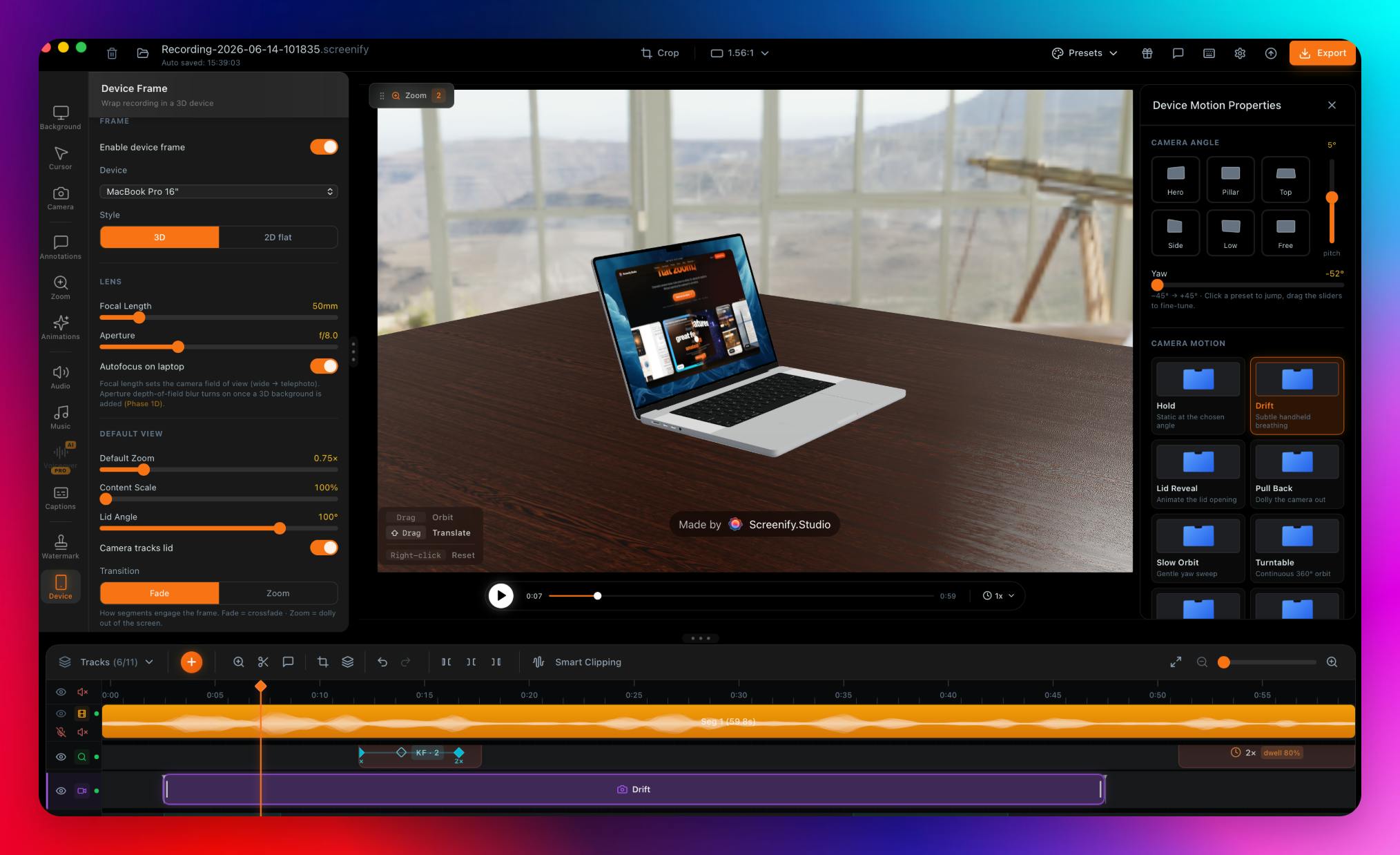
The term "cinematic 3D camera moves" refers to simulating three-dimensional camera movement effects on two-dimensional screen recordings, including dolly, pan/tilt, roll, and perspective distortion. In traditional video production, these effects typically require frame-by-frame keyframe settings in professional compositing software like After Effects or Motion, along with Bézier curve adjustments to control easing — an extremely labor-intensive process. Screenify's automated implementation likely relies on two technical layers: first, AI-based semantic understanding of screen content to determine "when to zoom into which area" — for example, automatically pushing in on a button area when the mouse clicks it; second, pre-built motion curve templates that mimic camera language commonly used by professional cinematographers. The "3D" effect is achieved by applying perspective transforms to 2D frames, making flat screen recordings appear as if viewed in three-dimensional space.
These effects, which traditionally require frame-by-frame adjustment in professional editing software, are packaged as automated AI output. For developers and product managers lacking video production experience, this dramatically lowers the barrier to producing professional-grade demo videos.
A Deep Editor That Preserves Manual Control
Commendably, Screenify doesn't completely lock users into the automated workflow. For users who want fine-grained control, it offers a deep editor that supports manually setting zoom keyframes.
Keyframe is a core concept in animation and video editing, originating from traditional animation production — lead animators drew key action frames, with in-between frames completed by assistants. In digital video, zoom keyframes define the scale and position of the frame at specific time points, with software using interpolation algorithms to automatically calculate smooth transitions between two keyframes. For example, setting 100% display at second 3 and 200% zoom focused on a specific button at second 5 — the software automatically generates a 2-second push-in animation. While manual keyframe setting is flexible, a 5-minute product demo might require dozens or even hundreds of keyframes — this is the primary component of the so-called "editing tax."
Screenify's approach makes automation the default path while allowing professional users to intervene and adjust every detail — a flexibility often missing from "one-click generation" tools.
Differentiation Highlights: 3D Device Scenes & CLI Integration
Beyond the core recording and editing capabilities, Screenify Studio offers two distinctive features that further separate it from traditional screen recording tools.
Photorealistic 3D Device Stage
Users can place their recordings in photorealistic 3D MacBook, iPhone, or iPad mockups for presentation. This "device frame + 3D scene" presentation style is very common in marketing materials and App Store showcases, and typically requires designers to create separately using tools like Blender or Figma. Screenify builds this in, allowing developers to directly output high-quality visuals suitable for social media and landing pages. Additionally, the tool supports on-device AI captions, leveraging Apple Silicon's Neural Engine to generate subtitles locally, balancing efficiency and privacy — video content doesn't need to be uploaded to the cloud for caption generation.
CLI Interface Designed for AI Agents
Among all features, the one that best embodies its "AI-native" philosophy is the command-line interface (CLI), which explicitly states it can be called by AI coding agents like Claude Code. This means Screenify isn't just a tool for humans — it's also a tool for AI — an orchestration agent in automation pipelines that can automatically invoke Screenify to generate corresponding demo videos after completing code or feature development.
This design philosophy is highly aligned with the current Agentic AI trend. Agentic AI is one of the most important paradigm shifts in the AI field during 2024-2025: unlike the traditional "human asks, AI answers" conversational mode, it emphasizes AI's ability to autonomously plan, execute multi-step tasks, and invoke external tools along the way. OpenAI's GPT-4 with Function Calling, Anthropic's Claude with Tool Use, and AI coding agents like Cursor and Devin all represent this trend. Under this paradigm, any tool that provides an API or CLI interface could become a link in an AI agent's toolchain. Screenify's CLI interface means: when a developer completes a new feature using Claude Code, the AI agent can automatically invoke Screenify to record a demo video of that feature, creating a fully automated "develop → test → demo" pipeline without human intervention.
This nested "AI calling AI tools" pattern is giving rise to an entirely new "Agent-friendly" software design paradigm, similar to the "API-first" philosophy of the Web era — as more workflows are driven by AI agents, tools that can be programmatically invoked will occupy more advantageous positions in the ecosystem.
Brief Assessment: A Small but Focused AI Efficiency Tool
From a product positioning perspective, Screenify Studio is a classic "small entry point, deep execution" efficiency tool. It doesn't try to become an all-purpose video editor — instead, it tightly focuses on the specific scenario of product demo recording, using AI automation to solve the most time-consuming aspects.
Its target user profile is quite clear: indie developers, product managers at startup teams, and Developer Relations (DevRel) professionals who need to frequently produce demos. DevRel is a role in tech companies responsible for connecting products with developer communities — core work includes writing technical documentation, producing tutorial videos, and delivering conference talks. According to industry data, DevRel professionals spend an average of 4-6 hours per week creating product demo content, with the majority consumed by post-editing. For indie developers and small startup teams, this proportion is even higher since they typically don't have dedicated video editors. Product Hunt launches, GitHub project promotion, Y Combinator applications — these critical scenarios all require high-quality product demo videos, but production barriers and time costs remain persistent bottlenecks.
This also explains why Screen Studio (a Mac screen recording tool launched in 2022, known for auto-zoom) achieved over one million dollars in annual revenue as a solo developer product — the market demand genuinely exists and remains underserved. Screenify Studio takes things a step further from Screen Studio, pushing "semi-automated" toward "fully automated" by replacing manual recording itself with natural language input.
For these users, "no time for post-production" is a real pain point, and Screenify's "natural language description + automated output" addresses it directly. The product adopts a Free to start model, further lowering the barrier to trying it out.
Of course, as a new product, it still needs real-world validation on several key questions: How stable is AI-driven browser recording? When page structures are complex or contain dynamically loaded content, can the AI accurately identify and operate on target elements? Do the automatically generated camera movements truly achieve cinematic quality, or do they feel mechanical and repetitive? Can the CLI integration's actual experience match the advertised automation level, or does it require extensive debugging to integrate into existing workflows? These all need more user feedback to verify.
Regardless, Screenify Studio demonstrates a direction worth watching — embedding AI agent capabilities into specific creative production workflows, making professional quality no longer the exclusive domain of professionals. As the AI coding agent ecosystem matures, these kinds of "agent-callable vertical tools" will likely proliferate, eventually forming complete software production pipelines orchestrated by AI agents.
Related articles

Bilibili's Hit Dify Tutorial: A Practical Guide to Building 20+ AI Apps from Scratch
A distilled guide to Bilibili's top-rated Dify tutorial: Windows + Docker deployment, MySQL connection, five app types, model integration strategy, and publishing.

Agent Skills Beginner's Guide: From Concepts to Multi-Agent Collaboration in Practice
A comprehensive guide to Agent Skills: core concepts, components, the importance of Description, standardization, beginner learning paths, and multi-agent collaboration.

One Neuron Detects Both Cats and Cars? We Reproduced It and Found a New Explanation
The cat-car neuron reinterpreted: researcher Cammarata argues it distinguishes pointy from round, not cats from cars. We reproduced the experiment and found the new explanation holds on most inputs—but cars are the exception. The interpretability debate continues on language models.