Shrine: Moving AI Agent Coding Status into the Mac Notch

Shrine tucks multiple AI coding agents' running status into the Mac notch, replacing dashboards with low-interference visual signals.
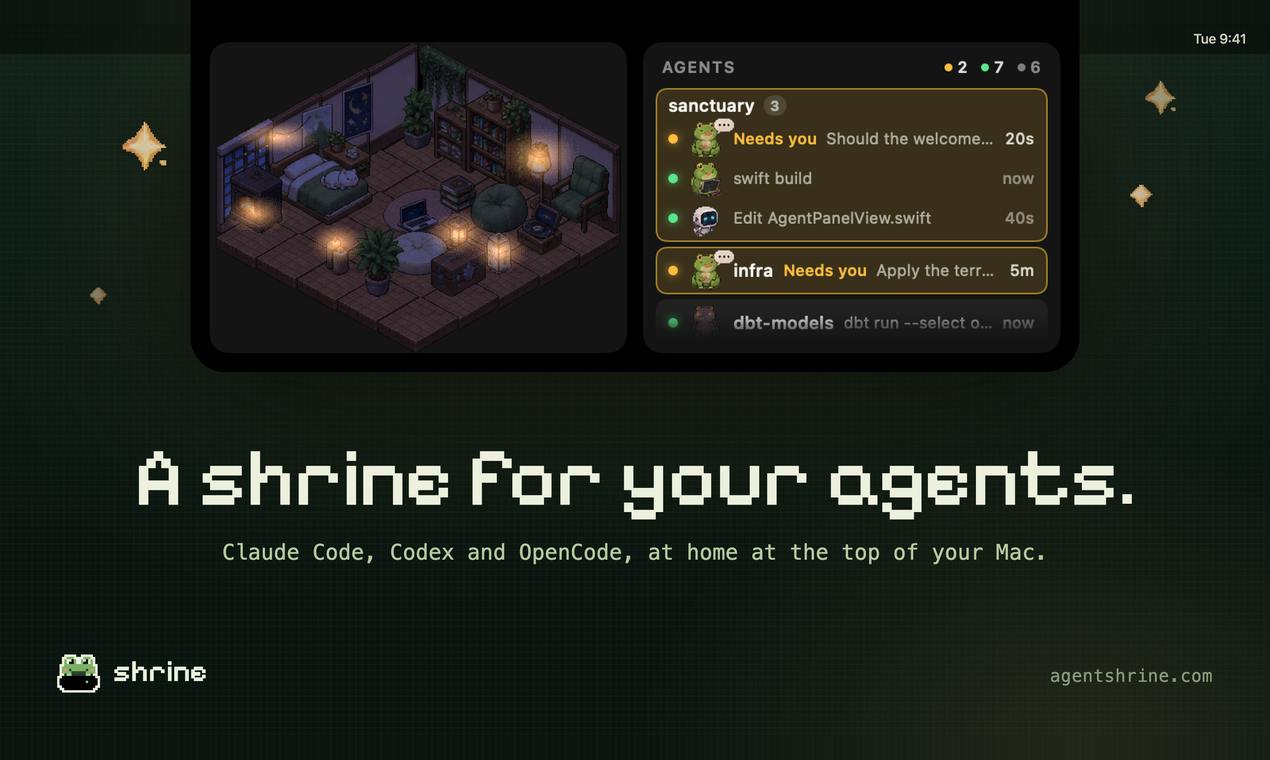
Shrine is a new Mac developer tool on Product Hunt that lives in the MacBook notch, letting you see at a glance the status of multiple AI agent sessions—Claude Code, Codex, OpenCode—and which one awaits intervention. It avoids standalone dashboards, emphasizing high-frequency glancing and low-frequency interaction. It also turns pushes, pull requests, and research into accumulating pixel art rooms, replacing leaderboard pressure with a quiet log feel. It suits developers running multiple agents; single-agent or pure IDE plugin workflows see limited benefit. Currently at 73 votes, 2 comments, rank 15 on Product Hunt, its moat lies in executing on low-interference and accumulable experiences.
When AI Agents Become Everyday Tools, Why Do We Still Need a Corner of the Screen
When you're running Claude Code, Codex, and OpenCode simultaneously on your Mac, you've probably experienced this moment: switch to the browser to check progress once, then switch to the terminal to confirm whether it's stuck. Shrine's entry point is small—it tucks all of this into the MacBook's notch.
Shrine, a new product from Product Hunt, currently has 73 votes and ranks 15th, with a team made up of several developers. Its tagline is "A home for your agents," and its goal isn't to replace the terminal or IDE, but to become a low-interference status window.
What Problem Does Shrine Actually Solve
Shrine lives in the Mac's notch. According to its product description, with just a glance, you can see how many Claude Code, Codex, and OpenCode sessions are currently running, and which one is waiting for your intervention.
Behind this design logic is a very practical judgment: the bottleneck of AI coding tools is often not generation capability, but collaboration rhythm. When multiple agents work in parallel, the thing most likely to distract a human isn't writing code—it's "is it still running?" and "is it my turn now?" Shrine compresses these judgments into a single visual signal in the notch area, eliminating the need to open a dedicated dashboard window.
Not Just Another Dashboard
Unlike typical developer monitoring tools, Shrine explicitly states "no dashboard window to keep open." This means it doesn't encourage you to stare at it, but hopes you'll only glance when needed. This restrained interaction design becomes even more important as the number of agents increases—the more dashboards, the more fragmented your attention.
Claude Code is a command-line AI coding agent from Anthropic that can directly read and write to codebases, run tests, and commit changes within the terminal; Codex originates from OpenAI's code generation model line, now supporting similar multi-step task execution in CLI/agent form; OpenCode is a terminal agent maintained by the open-source community, emphasizing model replaceability and local deployment. What all three share is that they run in the background for extended periods in units of "sessions," continuously consuming tokens and waiting for human confirmation on key operations. This operating model makes status visibility a necessity: agents don't proactively pop up notifications, so users can only judge progress by polling the terminal or logs. This is precisely the repetitive action Shrine attempts to replace with a notch visual signal.
Pixel Art Rooms: Turning Development Actions into Accumulating Rewards
One interesting design of Shrine is gamifying development actions. According to the description, each push, pull request, and research session earns a pixel art piece for a small room. The room gradually fills up as you work.
The point of this mechanism isn't the score, but transforming tasks completed by agents into a visible accumulation. It doesn't use the common progress bar or achievement badges, but rather the pixel room—a slower, more continuous visual metaphor.
Why Pixel Rooms Instead of a Leaderboard
Leaderboard-style incentives easily become another form of pressure, while a filling room feels more like a quiet log. For people who use agents for extended work sessions, it provides a sense of "today actually made progress," rather than ranking comparison. Shrine writes this into its product tone: Find the joy in your agents work.
Pixel art refers to a visual style characterized by low resolution, limited color palettes, and pixel-by-pixel rendering. It originally formed under the hardware constraints of 8-bit and 16-bit game consoles, and today is more often used as a deliberate retro aesthetic. Two of its characteristics align closely with Shrine's design intent: first, the fine granularity of elements makes it suitable for gradual accumulation "piece by piece," naturally corresponding to individual development actions; second, there's no clear endpoint—the room can be filled indefinitely, unlike a progress bar that loses meaning once it hits 100%. Compared to a leaderboard, pixel rooms don't offer a horizontal comparison dimension, avoiding turning a collaboration tool into a competition.
Who Shrine Is For, and Who It Isn't
Based on available information, Shrine's most direct audience is Mac developers running multiple AI coding agents simultaneously, especially those who have already formed a mixed workflow of Claude Code, Codex, and OpenCode.
If you only occasionally use one agent, or your workflow is concentrated in IDE plugins, the incremental information Shrine's notch status window can provide is limited. Its value scales with the number of parallel agents—in single-session scenarios, the terminal itself is already sufficient.
Multi-Agent Collaboration Is Becoming a Default Way of Working
Shrine's emergence reflects an ongoing shift: developers no longer use just one AI assistant, but orchestrate multiple agents across different tasks. Claude Code, Codex, and OpenCode appearing simultaneously in a developer's tool list is no longer a rare configuration.
This shift brings two new categories of needs. One is orchestration and status visibility, which is where Shrine lands. The other is task context migration between agents, for which mature general-purpose solutions are still lacking. Shrine currently focuses on the former and makes no promises about solving the latter.
The Notch as a Product Position
Putting persistent status in the Mac notch is actually an underrated product judgment. The notch is a spot on a laptop screen that users' eyes naturally pass by, yet it isn't as crowded as the menu bar. It's naturally suited for carrying "glance and go" information. Shrine's choice of this position indicates its expectation for usage frequency is high-frequency glancing, low-frequency interaction.
The MacBook notch originated from the mini-LED screen design introduced with the 2021 MacBook Pro, retaining a top-center cutout to accommodate the 1080p camera. In macOS, the areas on either side of the notch are occupied by the menu bar by default, but don't fall within the drawing range of any standard window, so third-party apps need private or semi-public APIs to draw content there. The advantage of this position is that it's physically located slightly above the center of the user's line of sight, with lower scanning cost than menu bar icons or the Dock; the disadvantage is extremely limited space, and system updates may affect compatibility. Shrine's choice of the notch over the menu bar means voluntarily limiting information density in exchange for lower visual intrusion.
What Can We Read from 73 Votes and 2 Comments
Shrine's early data on Product Hunt is 73 votes, 2 comments, and rank 15. This scale indicates it hasn't entered an explosive phase yet, but considering its categories are Mac, Developer Tools, and Artificial Intelligence, it faces a group of early users who are quite picky about tools.
For products like this, early vote counts reflect launch timing and community reach more than long-term value. What's really worth watching is: when Claude Code or Codex themselves start offering more polished multi-session status interfaces, will Shrine's notch position and pixel rooms still constitute a differentiated reason to exist?
Currently, its moat isn't in the feature list, but in how well it executes on the two experience judgments of "low interference" and "accumulable."
One-line Summary
Shrine tucks the running status of multiple AI coding agents into the Mac notch, replacing dashboards with low-interference visual signals.
Paragraph Summary
Shrine is a new tool on Product Hunt for Mac developers that lives in the MacBook notch, letting you see at a glance the running status of multiple AI agent sessions—Claude Code, Codex, OpenCode—and which one is waiting for your intervention. It explicitly avoids the standalone dashboard route, emphasizing high-frequency glancing and low-frequency interaction. The product also turns pushes, pull requests, and research activities into accumulating pixel art rooms, replacing leaderboard-style pressure with a quiet log feel. Shrine suits developers running multiple agents simultaneously; gains are limited for single-agent or pure IDE plugin workflows. It currently has 73 votes, 2 comments, and rank 15 on Product Hunt, in an early validation phase, with its moat lying in how well it executes on low-interference and accumulable experiences.
Related articles

Bilibili's Hit Dify Tutorial: A Practical Guide to Building 20+ AI Apps from Scratch
A distilled guide to Bilibili's top-rated Dify tutorial: Windows + Docker deployment, MySQL connection, five app types, model integration strategy, and publishing.

Agent Skills Beginner's Guide: From Concepts to Multi-Agent Collaboration in Practice
A comprehensive guide to Agent Skills: core concepts, components, the importance of Description, standardization, beginner learning paths, and multi-agent collaboration.

One Neuron Detects Both Cats and Cars? We Reproduced It and Found a New Explanation
The cat-car neuron reinterpreted: researcher Cammarata argues it distinguishes pointy from round, not cats from cars. We reproduced the experiment and found the new explanation holds on most inputs—but cars are the exception. The interpretability debate continues on language models.