Skills Manager: One Hub to Manage Skills Across 54 AI Coding Tools

Skills Manager unifies AI coding agent skill management with a single hub that distributes to 54 agents.
Skills Manager is an open-source tool that solves the fragmented management of AI coding agent Skills — structured Markdown prompts that tell agents like Claude Code, Codex, and Cursor how to use specific capabilities. It provides a unified hub to install Skills once and distribute them to 54 agents, with support for multi-source installation (marketplace, Git, local files, Zip), bidirectional project/library sync, GitHub private repo backup, multi-device sync, and secure token storage via the system Keychain. macOS builds are Apple-notarized since V1.29, with Windows and Linux builds also available.
When Skills Become Essential for Agents, Management Becomes a Headache
Skills are packages designed specifically for AI Agents — think of them as developer documentation that tells an AI how to use a particular capability. As coding tools like Claude Code, Codex, and Cursor have rolled out support for Skills, a real pain point has emerged: each Agent manages its own Skills independently.
This means that if you want to use the same set of skills across different tools, you have to add and configure them one by one. Skills end up scattered across different places with no unified entry point, and updating, backing up, and syncing everything is entirely manual — a massive drain on productivity.
The open-source tool Skills Manager, created by The Conglian, was built precisely to address this problem. Its core idea is straightforward: install Skills once, then distribute them to every Agent that needs them — much like how Git distributes code.
Technically, Skills typically exist as Markdown files stored in an Agent's designated directory (for example, Claude Code uses .claude/skills/, while Cursor has its own corresponding path). The file contents are essentially structured prompts describing how to invoke a capability, its parameter format, use cases, and caveats — essentially an "operations manual" for the AI. When handling a task, the AI reads these files to gain the ability to call external tools, follow specific workflows, or execute certain types of operations. Unlike plugins, Skills don't involve code execution — they rely entirely on the language model's comprehension and reasoning to take effect. Because they're just files, cross-tool reuse is technically straightforward, but each tool has its own directory structure and reading conventions. Manually maintaining multiple copies of the same files becomes unnecessary busywork.
Install Once, Distribute to 54 Agents
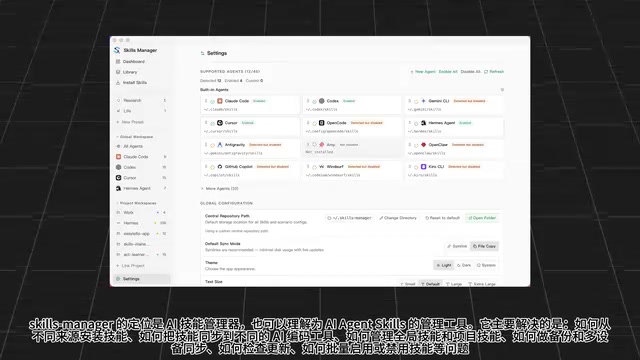
Skills Manager is positioned as an AI skills manager — or think of it as a unified management tool for AI Agent Skills. The problems it solves are very specific: how to install skills from different sources, how to sync them to different AI coding tools, how to distinguish between global and project-level skills, how to handle backups and multi-device sync, how to check for updates, and how to bulk enable or disable skills.
In practice, you install a skill once, and it gets pushed to Claude Code, Codex, Cursor, and 54 other Agents in total. The interface presents skills as cards, and each card lists all supported Agents. Click an Agent's icon to install or remove the skill for that Agent — fine-grained control right at your fingertips.
When the source of a skill has an update available, an Update badge appears on the card. You can handle it manually or let it update automatically. For the laziest workflow, you can even have your coding assistant handle it for you.
Multi-Source Installation and Bidirectional Project/Library Sync
Skills can be sourced from a wide variety of places. You can browse the built-in Skills marketplace within the app and pick popular skills by install count, or install directly from a Git URL, local folder, or Zip file. This multi-source support means you're never locked into a single channel.
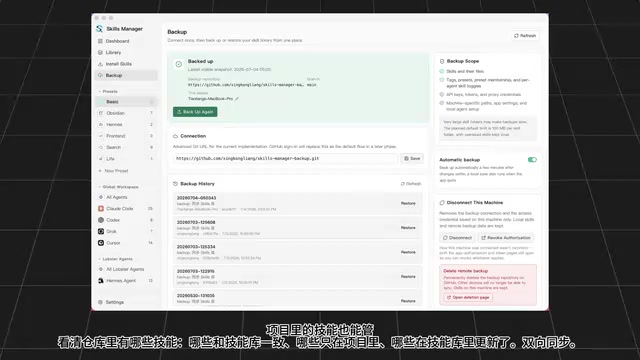
Even more useful is how it handles project-level skills. Skills Manager can inspect which skills exist in a repository and clearly indicate their status: which ones match your skills library, which ones exist only in the project, and which ones have been updated in the library. Based on this status information, it supports bidirectional sync between the project and the skills library, preventing version confusion.
Backup, Multi-Device Sync, and Security
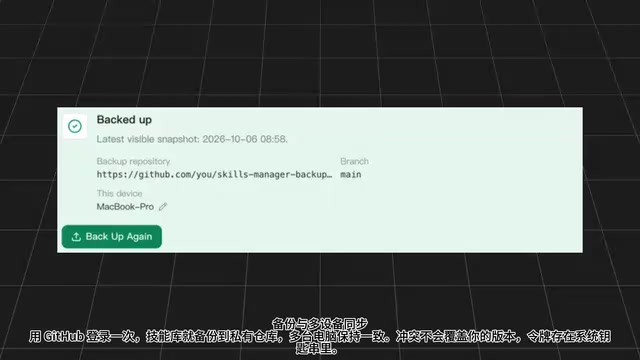
For long-term users, backup and cross-device consistency are non-negotiable. Sign in once with GitHub, and your skills library gets backed up to your private repository, keeping multiple machines in sync. When conflicts arise, the tool doesn't silently overwrite your local version — it preserves your right to choose, a design detail that's very user-data-friendly.
For credential management, login tokens are stored in the system Keychain rather than in plaintext config files, ensuring security.
The way skills are written is also worth noting: Skills Manager writes directly into each Agent's own Skills directory, requiring zero changes on the Agent side. If a tool you use isn't recognized by default, you can manually point it to the corresponding directory in settings to get it connected.
The system Keychain is an encrypted credential storage mechanism provided by the operating system. macOS Keychain Access, Windows Credential Manager, and Linux's libsecret/GNOME Keyring all fall into this category. Compared to writing tokens directly into
.envfiles or config JSON, data stored in the Keychain is encrypted at rest at the system level and can only be read by authorized processes belonging to the current user. This effectively prevents tokens from being exposed if a config file is accidentally committed or leaked. For tools that need to store GitHub Personal Access Tokens long-term, using the Keychain is the industry-recommended security practice.
Cross-Platform Support and Signing Details
The tool is thoroughly engineered. Since V1.29, the macOS version has been signed with an Apple Developer ID and notarized, so it no longer triggers security warnings on launch. Each release ships builds for both Windows and Linux simultaneously, covering all major development environments.
Closing Thoughts
Skills Manager's value isn't in creating new capabilities — it's in consolidating fragmented management overhead into a single unified entry point. As the Skills ecosystem expands across more coding Agents, the usefulness of this kind of "hub" tool will only grow. For developers who work with multiple AI coding assistants simultaneously, it addresses a real and frequent pain point: letting you focus on using your skills rather than moving them around.
Related articles

Cursor AI Programming in Practice: Build a Student Management System from Scratch in 30 Minutes
A Bilibili creator demonstrates Cursor AI programming: generating a student management system in 30 minutes with natural language. Details on Agent mode, Claude selection, prompt techniques, and thresholds.

Top 20 AI Coding Tools Ranking: From Rock-Solid to Lackluster, a Scored Matrix
Bilibili creator releases top 20 AI coding tools ranking, tiered T0–T4 from rock-solid to lackluster, with Claude Code and Codex tied at T0. This article details the scoring dimensions (capability, reliability, robustness, durability, cost, domestic availability) and tool performances to help developers choose the right AI coding assistant.

Vibe Coding Systematic Tutorial: Master AI-Assisted Programming from Zero
A three-month Vibe Coding tutorial from a Bilibili creator covering Codex, ClaudeCode, and Cursor, from core logic to commercial project practice for beginners.