SOUND: Set Individual Volume and EQ for Every Mac App

SOUND gives every Mac app its own EQ, volume, and output routing — no virtual drivers, completely free.
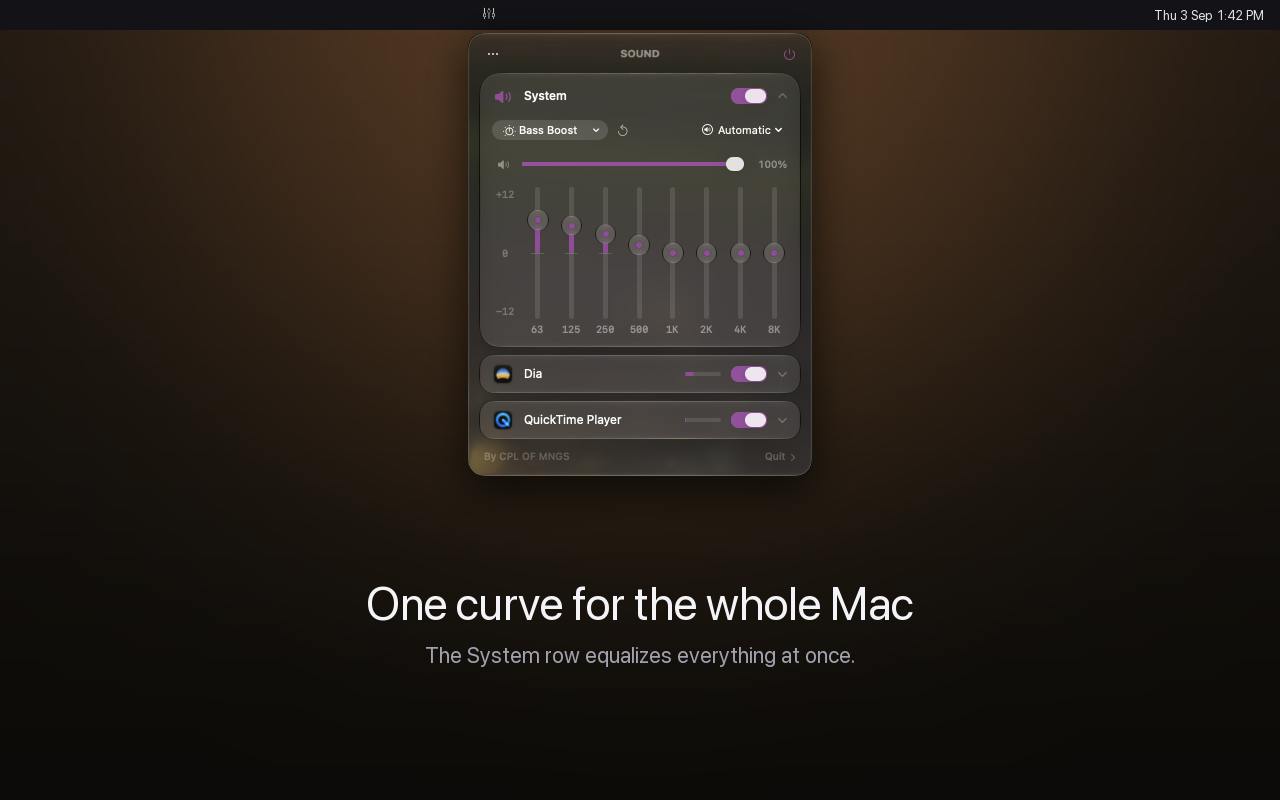
SOUND is a macOS menu bar utility that fills the system's long-missing per-app audio management gap. It provides each active app with an independent 8-band equalizer, volume control, and output device routing — so you can push music to the background while keeping calls clear, and split audio between headphones and speakers. Unlike similar tools that depend on virtual audio drivers, SOUND claims to require no driver installation and no account, keeping all audio processing local. It's currently free, supports 10 languages, and earned 94 upvotes on its Product Hunt debut. Its underlying implementation and long-term free model sustainability remain to be seen, but the concept is direct and the need is real.
A Pain Point macOS Has Ignored for Years
macOS audio control has always been stuck at the most basic level — a single global volume slider, no system-level equalizer, and certainly no per-app audio adjustments. This means when you're listening to Spotify, running a video call, and streaming a browser video in the background, all sounds share the same output settings. Want to turn up your meeting app, lower the background music, or route one app to a Bluetooth speaker? The system simply can't do it natively.
The recently launched SOUND on Product Hunt is aimed squarely at this long-standing gap. It ranked #11 on its debut day, earning 94 upvotes and 13 comments. Built by developer Fekry Aiad, it's positioned in the Mac productivity and music tools category.
What SOUND Actually Solves
SOUND's core capabilities come down to three things, all accessible directly from the menu bar:
Per-App 8-Band Equalizer
Different apps have very different audio needs. Podcasts and audiobooks benefit from vocal clarity, music players need a balance of lows and highs, and video conferencing apps benefit from boosted midrange speech. SOUND gives each actively playing app its own 8-band EQ, letting you tailor the sound for each app individually — no need to constantly tweak a single global setting.
An 8-band EQ divides the audible frequency range (roughly 20Hz–20kHz) into 8 bands, each of which can be independently boosted or cut. Compared to a simple bass/mid/treble control, 8 bands offer much finer frequency shaping. For example, you can cut the "muddy" 200–400Hz range while boosting the 3–5kHz presence for vocal clarity, without affecting other frequencies. Professional audio software often offers 31-band or parametric EQs — 8 bands strikes a reasonable balance between precision and usability for everyday use.
Independent Volume Control
This is the most straightforward feature. You can make one app louder or quieter than others — for instance, pushing music down to background level while keeping a call or video at full clarity. Compared to juggling individual in-app volume sliders, managing everything from a unified menu bar interface is far more efficient.
Independent Output Device Routing
SOUND lets you route different apps to different output devices. In theory, you could send music to your desktop speakers and calls to your headphones — true audio splitting that, under native macOS, typically requires complex third-party virtual audio driver setups to achieve.
No Virtual Audio Driver, No Account — Privacy as a Feature
SOUND highlights two things in particular: no virtual audio driver installation, and no account registration required.
These might seem minor, but they're actually significant. Many Mac audio enhancement tools rely on installing virtual audio devices, which often require elevated system permissions, can introduce compatibility issues, and frequently break after system updates — a persistent source of user complaints. SOUND sidesteps this approach entirely, and promises that all audio data stays on-device and is never uploaded to the cloud. For users who care about privacy and system stability, this is a clear differentiator.
SOUND is also currently free and supports 10 languages — impressive breadth for a menu bar utility.
A Virtual Audio Driver is a software-emulated audio device that the operating system treats as a real sound card. Traditional per-app audio control tools (such as Loopback, BlackHole, and Soundflower) work by inserting such a "virtual sound card" into the system to intercept, mix, or split audio streams from different apps. The trade-off is that these solutions require loading kernel extensions (kext) or system extensions — historically a major source of compatibility issues after macOS security updates. Apple has been progressively restricting kext permissions since macOS Catalina, causing several audio tools to break. SOUND claims to avoid this path entirely, which — if accurate — means lower system risk and better cross-version stability. However, the specific macOS native APIs it uses under the hood (such as CoreAudio tap or AudioServerPlugin) have not been publicly disclosed.
Who Needs This Most
SOUND's target user profile is fairly clear from its feature set:
- Heavy multitaskers: People who regularly run multiple audio-producing apps and need granular control over each.
- Content creators and audiophiles: Those who want to apply targeted EQ settings to different apps for better sound quality.
- Multi-device users: Anyone who needs to route different apps to headphones, speakers, or other outputs simultaneously.
- Privacy-conscious and system-hygiene users: Those who don't want to install virtual drivers or create yet another account.
For everyday users, SOUND fills an obvious gap in macOS. For power users, it consolidates what previously required stitching together multiple tools into a single menu bar experience.
A Few Open Questions
As a product that just debuted on Product Hunt, publicly available information is still limited. A few things worth watching: how SOUND actually captures and routes per-app audio without a virtual driver, and whether its underlying approach is stable across all macOS versions; whether the free model is sustainable long-term and whether paid features will eventually be introduced; and the real-world impact on system resources and audio latency.
That said, the product philosophy is sound (no pun intended) — it addresses a real and widespread need, and delivers a clean solution with the combination of "no driver, no account, local processing." For users frustrated by macOS's single-volume limitation, it's at the very least worth downloading and trying.
Related articles

Free Unlimited Claude Code Solution: Agnes AI + CC Switch Setup Guide
No paid subscription needed — pair the free AI platform Agnes AI with the open-source tool CC Switch to provide a backend for Claude Code, enabling unlimited free calls to text, image, and video models. This guide covers the full setup, test results, and usage boundaries.

A Complete Zero-Cost Guide to Getting Started with Claude Code for Beginners in China
A beginner's guide to Claude Code for users in China: two installation methods (command line and IDE plugin), full configuration steps for replacing the official API with the free domestic LongCat model, and a hands-on demo of building a small tool with natural language, plus tips.

When the NSA Gets Involved: The AI Supply Chain Crisis Behind Open-Source CVEs and API Key Hijacking
Multiple open-source projects disclosed severe CVEs in one day, PHP flaws alarmed the FBI, and Railway and OpenCode were breached with API keys stolen. This article breaks down the vulnerability window, AI-accelerated exploitation, and the AI supply chain crisis behind the API key black market, with a developer defense checklist.