Squeezing Every Drop Out of DeepSeek Harness: 9 Must-Install Plugins Tested and Recommended
9 DSH plugins selected by NPM downloads and hands-on testing, covering Tokens, efficiency, and security.
Based on hands-on testing shared by Bilibili creator "Yuanbao," the article argues against fetishizing GitHub Stars and instead screens DSH plugins by real NPM download counts and long-term experience. It organizes 9 plugins across four dimensions—Token and cost management, plugin management, efficiency gains, and security rollback—and offers layered installation priorities: foundation layer first, efficiency layer by work habits, and security layer as a must for anyone letting AI modify code or run commands. It also warns that Multi-Agent Team burns Tokens fast and that recommendations come from a single creator's testing, so verify the latest data and compatibility before installing.
In the DeepSeek Harness (DSH) ecosystem, the number of plugins has already approached ten thousand, and recommendation videos of all kinds keep popping up. But most of them share one big problem: they only look at GitHub Stars. Stars can be gamed, but NPM weekly download counts and real-world experience are hard to fake. Based on hands-on testing shared by Bilibili creator "Yuanbao," combined with screenshots and actual experience, this article rounds up 9 DSH plugins that are genuinely worth installing across four dimensions—Token management, cost control, efficiency gains, and security—along with installation priority recommendations.
Why Are Star Counts Unreliable?
In the video, the creator states bluntly that many people make a "huge mistake" when recommending plugins—fixating on GitHub Star counts. Stars are a community buzz metric that can be influenced by marketing, whereas NPM download counts reflect real installation behavior and are much harder to fabricate. So this recommendation rests on two core criteria: real NPM download data and the author's own long-term practical experience. That also means the plugins recommended here may not be the most "trendy," but they're very likely the ones you won't regret installing.
The difference between GitHub Stars and NPM weekly downloads: GitHub Stars are essentially a "bookmark/like" action—one click and you're done, at extremely low cost, which makes them easy to inflate through marketing campaigns, social sharing, or even fake engagement. They reflect a project's buzz rather than actual usage. NPM weekly downloads, by contrast, come from real npm install behavior. Although there is noise such as repeated downloads in CI pipelines, overall it is much harder to fake at scale, and it shows "how many people are continuously installing and using" a package. When evaluating a tool-type project, treating Stars as a discovery channel and download counts as a validation metric is the safer approach.
1. Token and Cost Management: First, Figure Out Where the Money Goes
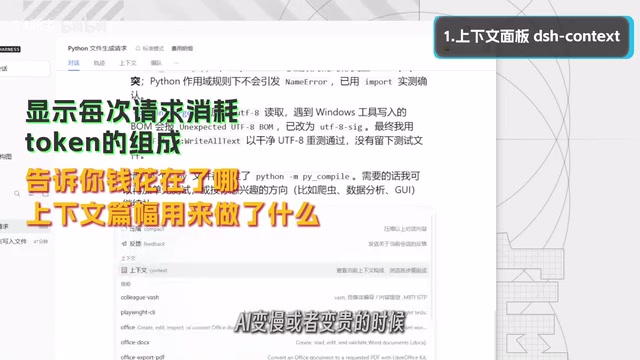
Context Panel: Make Token Consumption Visible
Where Tokens get spent is a pit many DSH users have fallen into. The Context Panel plugin visually shows what each request's Tokens consist of and how they change. When the AI gets slower or more expensive, you can quickly pinpoint the cause. For users whose context keeps growing but who don't know where to optimize, this plugin is essentially an "X-ray machine."
What the context window and Token consumption are: A large model's context window refers to the upper limit of total Tokens that can fit in a single request; the system prompt, conversation history, tool return results, and the current user input all occupy part of it. As conversation turns increase, historical content keeps accumulating, and the input Tokens per request keep inflating—directly driving up costs and slowing down responses. So-called "context management" is about controlling this overhead through history trimming, summary compression, on-demand retrieval, and similar techniques. Once you understand this mechanism, it becomes clear that the value of a visualization tool is letting you see "which segment of context the money is going to," so you can make targeted cuts instead of blindly clearing the conversation.
Balance Goldfish: Account Balance Visible in Real Time
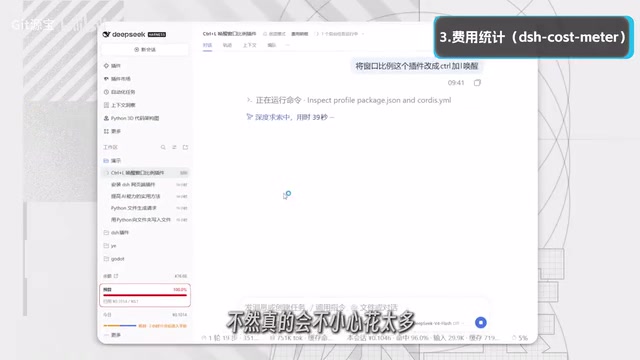
This is a small widget that stays in the bottom-right corner of the interface, showing your account balance, daily usage, and per-turn cost in real time. Users paying for the API dread running out of balance unexpectedly; with this, your remaining quota is visible at a glance, and you don't have to keep switching pages to check your account.
Cost Manhunt: Automatic Interception When You Exceed Budget
It's recommended to use this together with the Context Panel: the former tells you where Tokens go, the latter tells you how much money you've spent, and it also supports setting a budget cap. For example, set a maximum daily spend, and you'll get a pop-up reminder once you exceed it. For API users, this is the key line of defense against "spending too much without realizing it."
2. Plugin Management: Install Once, Save Yourself Trouble Later
Plugin Marketplace: Over 100,000 NPM Weekly Downloads
This is a plugin store installed inside DSH that supports browsing, searching, one-click installation, updates, uninstallation, as well as managing enabled states and backups. With over 100,000 weekly NPM downloads, it has the most impressive data of any recommendation in this article. Once installed, installing and uninstalling all subsequent plugins becomes much easier—it's basic infrastructure that "everyone needs."
3. Efficiency Gains: From Sidebar to Multi-Agent
Sidebar Enhancement: Turn the Right Panel into a Workbench
People who constantly switch between the editor and terminal will noticeably feel the efficiency loss. The Sidebar Enhancement plugin upgrades the right sidebar into an editable workbench. The creator specifically notes that users with ADHD (attention deficit hyperactivity disorder) "must install it"—the efficiency boost is very noticeable, and it also makes viewing projects more convenient.
Multi-Agent Team: Build an AI Team in One Sentence
This plugin lets users assemble a multi-agent team in one sentence so multiple AIs work together; the creator claims it "finishes in 20 minutes what used to take an hour." One caveat: this plugin burns Tokens extremely fast, so it suits users with ample quota or strong paid capacity, while free-quota users should proceed with caution.

The basic principle of multi-agent collaboration: Multi-agent doesn't simply mean opening several chat windows at once; rather, a scheduler decomposes a task into subtasks and assigns them to agents with different roles (such as planner, executor, reviewer), then aggregates and merges their results. This pattern can improve the quality of completing complex tasks, but the cost is multiplied Token consumption—each agent must carry its own system prompt and context, and agents must also pass intermediate results to one another. It's therefore better suited to scenarios with clear task boundaries, parallelizable decomposition, and ample quota; for simple Q&A tasks, a single agent is actually more economical.
Browser Control: Operate Directly While Preserving Login State
This is what the creator calls a "settled must-install plugin." It can directly operate the browser the user is currently using, with login states and cookies fully preserved. For users who need AI to handle web operations for them, it saves the hassle of repeated logins—a must-have for the lazy, and recommended for everyone.
4. Security and Rollback: Let AI Modify Code Without the Jitters
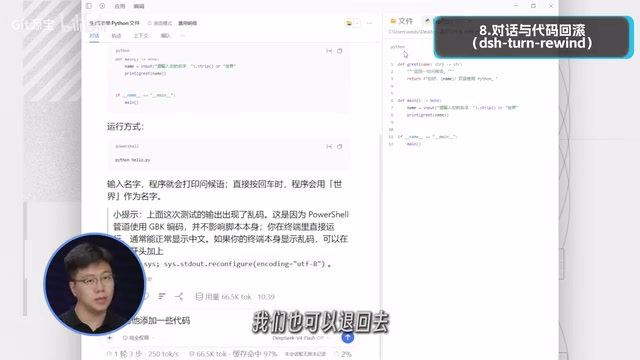
Conversation and Code Rollback: The Undo Pill for AI Programming
AI breaking code is a common pain point. This plugin can roll back both the conversation and files to a previous point, supports previews before rolling back, and automatically creates backups. For users who frequently let AI modify files in bulk, this is the confidence to "let AI take the wheel," earning it the nickname "the undo pill for AI programming."
Command Approval Interception: Defend Against Dangerous Commands in Advance
This is a security plugin that checks commands before execution: safe commands run normally, dangerous commands are rejected outright, and uncertain ones are handed to the user for confirmation. When it encounters high-risk commands like wiping data, it can intercept them in advance and prevent irreversible loss. For users accustomed to letting AI execute terminal commands, this layer of protection is very necessary.
The protection logic of command whitelisting and manual confirmation: Command approval interception is a typical "Human-in-the-loop" security design, usually employing a three-tier strategy—commands matching a safe whitelist are passed directly, commands matching dangerous rules (such as recursive deletion, disk formatting, or overwriting critical paths) are rejected outright, and all other commands that cannot be judged are paused and the user is asked to confirm. The key significance of this layer is that AI lacks real-world risk perception of command consequences; a seemingly reasonable rm or git reset --hard could cause irreversible data loss, and the interception layer returns the final decision to the human.
Installation Advice: Layer It by Need
There's no need to install all 9 plugins at once. You can plan it in three layers: for the foundation layer, install the Plugin Marketplace, Balance Goldfish, and Cost Manhunt first to get management and cost control under control; for the efficiency layer, choose Sidebar Enhancement, Browser Control, and Multi-Agent Team according to your work habits; and for the security layer, all users who let AI modify code or run commands are advised to install the Rollback plugin and Command Approval Interception. Used together, the Context Panel and Cost Manhunt form a complete "Token—cost" observability loop.
It should be noted that the above recommendations come from a single creator's hands-on experience, and the plugin ecosystem changes quickly, so it's advisable to verify the latest download data and compatibility yourself before installing. The creator says detailed installation documents and tutorials are in the video comments; you can also refer to the original video for further details.
One-line Summary
9 DSH plugins selected by NPM downloads and hands-on testing, covering Token management, efficiency, and security.
Paragraph Summary
Based on hands-on testing shared by Bilibili creator "Yuanbao," the article points out that plugin recommendations commonly fetishize GitHub Stars and argues for using real NPM download counts and long-term experience as the screening criteria. Under this principle, the author organizes 9 DSH plugins across four dimensions: Token and cost management (Context Panel, Balance Goldfish, Cost Manhunt); plugin management (Plugin Marketplace, with over 100,000 weekly NPM downloads); efficiency gains (Sidebar Enhancement, Multi-Agent Team, Browser Control); and security and rollback (Conversation and Code Rollback, Command Approval Interception). The article offers layered installation advice: install the Plugin Marketplace and cost-control tools in the foundation layer first, choose the efficiency layer based on work habits, and make the security layer a must for anyone letting AI modify code or execute commands. It also warns that Multi-Agent Team burns Tokens fast, and that the recommendations come from a single creator's testing, so you should verify the latest data and compatibility yourself before installing.
Related articles

Gemini 4 Neon Review: Benchmark Scores Rival Carbon, API Pricing and Quota Breakdown
Google Gemini 4 Neon is now live, benchmark scores closely tracking Carbon, API pricing 3/15 at twice Hydrogen's rate. This article compiles Bilibili creator testing: Neon can replace 90% of Carbon scenarios, AntiGravity quota consumption is only one-third of Carbon, plus subscription channel restrictions and 2API ban risks.

Gemini 4 Helium Coming Soon? Signals of Google Loosening Subscription Restrictions
Google team member hints releases will continue; community speculates Gemini 4 Helium (Flash Lite) may be next. Subscription ban controversy gets a response as product lead says "Soon," suggesting restrictions may be lifted. This article covers Gemini developments, OpenAI Coding Agent and risk management, Doubao real-time audio-video API, and compute business dynamics.

AI-Assisted React Development in Practice: Optimizing a Video App and Handling Errors
A 14-year veteran developer demonstrates AI-assisted React video app optimization: compressing video from 80MB to 5MB (~94%) via ImageKit, plus reliable error handling and retry mechanisms. Includes planning, code understanding, and verification methods for working with AI.