Stop Hand-Writing Prompts: Deconstructing the Graph Engineering Workflow for AI Agents
Graph Engineering is really control-graph orchestration; two implementation paths and design points explained.
The article clarifies the three concepts mixed up in Graph Engineering discussions—control graphs, knowledge graphs, and the graph of loops—noting that the real focus is control-graph/SOP orchestration. As Agent usage shifts from manual prompting to system triggering, loops and orchestrator patterns become trends and reliability becomes key. Nodes have evolved from simple actions to independent Agents, and implementation paths include code-as-graph (e.g., LangGraph) and model-as-graph (SOP as prompt), the latter needing proper node splitting, code-first, output schemas, and state design. Cases include daily bad-design triage and change-release workflows, stressing testable tools for Agents.
Over the past few weeks, the term "Graph Engineering" has been mentioned repeatedly in developer communities, but the livelier the discussion, the blurrier the concept becomes. According to a Bilibili creator's breakdown in a video, the root of the problem is that people conflate three completely different kinds of "graphs" into the same topic: control graphs, knowledge graphs, and the "Graph of Loops." The creator argues that what Peter's discussion-sparking tweet really points to is the control graph—that is, using SOP-style process orchestration to make Agent outputs more reliable. As for knowledge graphs, they belong to the domain of entity-relationship modeling and retrieval optimization, running on a parallel track to Agent workflows; the "Graph of Loops," meanwhile, is a more cutting-edge open question with no standard answer yet.
From "Humans Prompting Agents" to "Systems Prompting Agents"
What truly drives the need for control graphs is a structural shift in how Agents are used: teams are moving from humans manually writing prompts for Agents to some mechanism triggering Agents on humans' behalf. The creator summarized two patterns being experimented with by leading AI-native companies.
The first is the Loop. The trigger source can be time (pull the latest GitHub issues every day and fix them), a goal (keep optimizing the frontend until performance hits a set target), or an event (every new email wakes up the Agent). The most critical decision in loop design is drawing the boundary between "what the Agent can do autonomously" and "what must involve a human."
The second is the Orchestrator pattern. Users no longer converse directly with execution Agents; instead they talk to an orchestrator that holds global context, which spins up a group of Agents to execute tasks and monitors them throughout. The video quotes Boris, creator of Claude Code, saying he now mainly interacts with an Agent that can talk to other Agents, rather than personally prompting each execution unit—"my Agent is talking to other Agents." This means humans are always lifted one level above the actual work, no longer watching every step.
The price is that reliability becomes more important than ever. When you no longer check every execution step, you must have enough confidence that what the Agent delivers is correct.
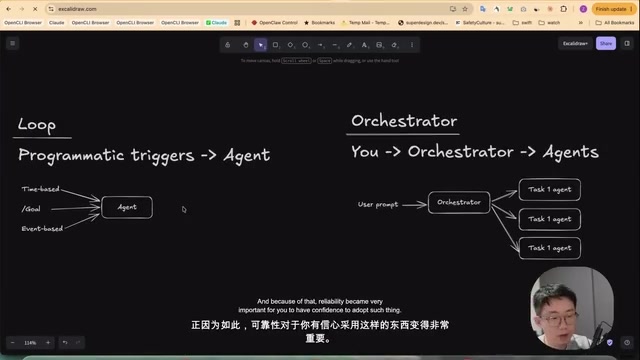
Loop is a pattern in Agent engineering that lets a system autonomously trigger Agent runs, as opposed to the traditional one-off invocation where a human manually enters a prompt. Its trigger sources typically fall into three categories: time-driven (e.g., scheduled tasks), goal-driven (iterating continuously until a metric is met), and event-driven (e.g., new emails, new issues). The core challenge of loop design is defining the boundary between the Agent's autonomous decisions and human intervention, which directly determines the system's reliability and controllability. In a loop, the Agent often needs self-evaluation or external verification capabilities to judge whether the goal has been met or iteration should continue; otherwise it easily falls into fruitless repetition or drifts off target.
The Three Basic Components of a Control Graph, and the Changing Meaning of "Nodes"
Control graphs are not a new concept—graph-based process automation has existed for decades, and its core components have always been three: nodes (the action being executed), edges (where to go after this step), and state (the data flowing between nodes).
The real change happens in what a "node" means. In traditional workflows, a node is a simple action, such as running a script or making a conditional check; a few years ago, low-code platforms introduced large models as nodes, enabling them to handle more long-tail scenarios; today, a node itself can be a highly capable Agent.
The creator uses a few familiar examples to show that "graphs" have long been around us. The goal feature in Claude Code or Codex is essentially a graph: it receives a user prompt, enters the Agent loop, and at the end the model judges whether the goal has been achieved; if not, the new message is sent back to the Agent, relying on the Agent loop plus a stop-hook system. Andrej Karpathy's automated research project is likewise a graph—the prompt lives in program.md, instructing the Agent to modify train.py with experimental ideas, run experiments, evaluate metrics, keep changes if they improve, and roll back and try the next idea if they worsen; the state is train.py and results.tsv recording all attempts. Interestingly, this graph is implemented entirely through prompting, with no fancy mechanism—at the time there wasn't even a loop or goal feature, just telling the Agent to "repeat this process forever."
Deep research Agents follow the same pattern: receive a prompt, have the orchestrator plan topics, dispatch sub-Agents to research in parallel, check whether information is sufficient, go back a step if not, and generate a report if so.
LangGraph is an open-source framework for building stateful, multi-step Agent workflows. It models processes as graph structures, where nodes represent computation steps (such as calling a model or executing a tool) and edges define control flow (including conditional branches and loops). LangGraph's core strengths are explicit state management and deterministic control, making it suitable for scenarios requiring complex orchestration and persistence. Unlike traditional low-code workflows, LangGraph lets developers finely define each node's logic and state transitions in code, improving reliability while maintaining flexibility. It is commonly used to implement patterns such as multi-Agent collaboration and plan-execute loops, and is a typical representative of the "code-as-graph" route.
Two Implementation Paths: Code-as-Graph and Model-as-Graph
From these examples, one conclusion emerges: there is no single way to implement graphs.
One path is code-as-graph, using traditional programming or dedicated frameworks (such as LangGraph, Claude Code's dynamic workflows, or Codex's code mode) to build and control the flow, offering strong control and high determinism.
The other path is model-as-graph, writing the SOP into the prompt—text, JSON, or a Mermaid diagram all work—since modern models are fully capable of understanding and following such process descriptions; you just make it into a skill the Agent can invoke. Many developers are in fact already doing this.
Modern Agent runtimes also provide many primitives to support this approach: the ability to run bash means predefined scripts can handle deterministic steps; sub-Agent and Agent-team communication protocols let the main Agent decompose the SOP and delegate work; hooks can inject real deterministic checkpoints at runtime, as the goal feature's implementation exemplifies.
Four Design Points to Note When Using Model-as-Graph
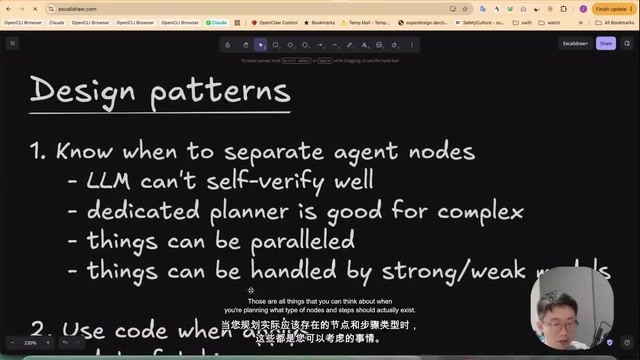
Drawing on his team's practice, the creator shares several lessons. First, know when to split off a separate Agent node. Even the strongest models are not good at self-verification, so the verifier usually needs to be its own node; according to research from OpenAI and Anthropic, a planner Agent focused on research, reasoning, and thinking is often necessary for complex tasks. Also identify which steps can be parallelized and which can be handed to stronger or weaker models.
Second, use code wherever possible. Complex data fetching, starting a dev server, result evaluation, and end-to-end testing—these frequent and deterministic tasks are better handled by scripts, which markedly improves reliability, speeds things up, and reduces pointless errors.
Third, define clear inputs and outputs for each Agent node. Outputs are best constrained by a schema; when boundaries are clear, the flow is stable.
Fourth, design the state well. Whichever path you take, you need a vehicle that lets different Agents quickly understand current progress. The simplest approach is a Markdown document recording the latest state, plus a log appended by each Agent or each round.
Model-as-graph is a method that encodes standard operating procedures (SOPs) directly into natural-language prompts, JSON, or Mermaid diagrams, relying on modern large models' ability to understand and follow them to drive Agent execution. Its core idea: the model itself can parse process descriptions and act step by step, so no external framework is needed to enforce control flow—simply provide the process as context to the Agent. This lowers engineering complexity and enables rapid iteration, especially suited to relatively simple or highly exploratory tasks. However, its reliability depends on the model's instruction-following ability and cannot guarantee determinism, so it often requires hooks or scripts to inject checkpoints for robustness.
Output schema refers to structured constraints on an Agent node's output, typically defined via JSON Schema and specifying field names, types, and required fields. In model-as-graph flows, setting an output schema for each Agent node forces the model to generate content in the expected format, reducing parsing errors and ambiguity while making it easier for downstream nodes or scripts to reliably consume the data. Schema constraints also help verify whether the Agent has completed the specified task, for example by checking for missing required fields. Combined with verifier nodes, schemas can serve as the basis for automated quality checks, maintaining flow stability even without step-by-step human supervision.
Real-World Case: Daily Bad-Design Triage and Change Release
The creator's team built Super Design, a vibe design platform, and separately maintains a state-tracking and knowledge-base repo. When making daily code changes, they mostly launch Agents in this repo rather than going straight into the business repo—because it accumulates every instance, every support ticket, and every engineering ticket for each release.
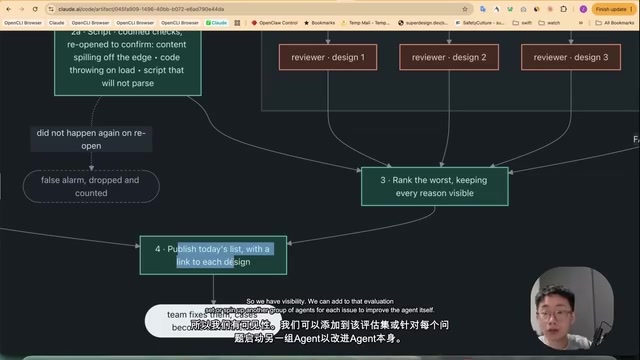
Among these, "daily bad-design triage" is a typical model-as-graph example. The goal is clear: with a large number of users designing every day, poor designs generated by the Agent or user complaints need to be captured and turned into an evaluation dataset usable for improving the model. The flow: first pull probable bad-design candidates from the database each day based on heuristic metrics; if none, stop; if there are any, run programmatic checks via scripts (errors, completely broken layout, unresponsive, etc.), and those go straight into the list; the remaining designs are processed in batches by a group of sub-Agents that take screenshots, compare against the user's actual request, and judge whether the result meets the bar; finally the main Agent ranks the day's bad designs and publishes them as a report. This graph is implemented with one skill plus several scripts: the skill spells out the flow and which script to call, defines output schemas for the judgment Agents, and defines the output contract and guardrails for the whole loop.
The other example takes the code-as-graph route. Dynamic workflows let the Agent write JavaScript directly, calling primitives like agent, pipeline (serial stages with dependencies), and parallel (parallel dispatch) to assemble graphs of arbitrary shape. The team's "change release" workflow has three stages: setup and implementation, verification, and—once verification passes—simplification and PR submission. The code defines schemas for each type of Agent; when an Agent session ends it outputs results per the schema, and the next step can construct prompts based on key information from the previous step—for example, produce an outline first, then write the body following the outline.
It must be emphasized that breaking a task into a graph does not automatically work—you must equip the Agent with tools that can genuinely test it. The creator believes this is the step most people miss and that most often causes loops to fail. The team's public repo provides a verifier-setup skill for reference.
Which Method to Choose?
The two paths produce different output forms, but both are effective. Model-as-graph yields a skill that can be invoked each loop or woken up on demand; code-as-graph yields JavaScript that runs directly. The creator personally leans toward model-as-graph in most scenarios because, under current dynamic workflows or code mode, each new Agent session cannot continue the previous conversation, which is slightly cumbersome; but if the task volume is very large, code-as-graph has the advantage.
As for how errors and improvements compound and amplify when multiple loops coexist—that is another unanswered question, and the subject of the "Graph of Loops" he plans to discuss next time.
One-line Summary
Graph Engineering is really control-graph orchestration, with two implementation paths and key design points explained.
Paragraph Summary
The article clarifies the three concepts mixed up in Graph Engineering discussions—control graphs, knowledge graphs, and the graph of loops—and points out that the real focus is control-graph/SOP orchestration. As Agent usage shifts from manual prompting to system triggering, loops and the orchestrator pattern become trends, and reliability becomes critical. Among the control graph's core components—nodes, edges, and state—the meaning of a node has evolved from a simple action to an independent Agent. There are two implementation paths: code-as-graph (e.g., LangGraph) and model-as-graph (SOP as prompt), the latter requiring attention to splitting Agent nodes, code-first, defining input/output schemas, and designing a state vehicle. Real-world cases demonstrate daily bad-design triage and change-release workflows, emphasizing that equipping Agents with testable tools is the key to making loops work.
Related articles

AI Comic Drama with WorkBuddy from Scratch: A Step-by-Step Skill Pack Installation Guide
Learn how to create AI comic dramas with WorkBuddy from scratch. This guide covers installation, Skill pack import and invocation, plus a script generation demo with manual revision tips to get you through the first step from script to storyboard.

WorkBuddy Agent Runs the Entire GEO Database Mining Pipeline with a Single Prompt
WorkBuddy agent automates GEO database mining: from data search and curation to batch correction, differential analysis, co-expression networks, feature gene screening, and immune infiltration—a single prompt generates a complete bioinformatics report, greatly lowering the barrier to bioinformatics analysis.

PC Memory Wasted? Hacker News Debates Centralized Data Centers
Hacker News users argue that personal computer memory is wasted and should be centralized in data centers, sparking debate on centralized vs. distributed computing resource allocation. This article analyzes the logic behind the claim, the costs of centralization, and new tensions in memory resource allocation in the AI era.