Subframe Editor Price Drops to $20, AI Quota Limits Become a Hidden Cost

Subframe's paid editor drops to $20, but AI quota becomes fixed credits, potentially raising hidden costs for heavy users.
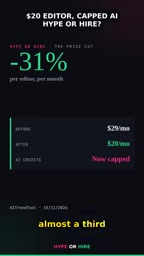
Subframe has cut its paid editor price from $29 to $20 per month, nearly a third cheaper, including unlimited projects and six times the free plan's AI credits. On the surface, this lowers the entry cost for teams, especially for light AI users. However, AI usage rules have changed from the previous "use within limits" to a fixed allocation of six times the free plan's credits per billing cycle, setting a clear usage ceiling for teams heavily reliant on AI. The article notes that the price cut delivers a cheaper "seat," not cheaper "AI usage habits," and high-frequency AI users may pay extra when credits run out. This adjustment reflects the industry trend of AI features shifting from broad inclusion to fine-grained metering, reminding users to factor AI usage into total cost of ownership and to check the pricing page carefully before subscribing.
Subframe has lowered the price of its paid editor to $20 per month, which looks like a lower entry cost for teams, but the accompanying AI usage quota limits may impose more hidden costs on users who rely heavily on AI features. This article, based on a YouTube channel's analysis of Subframe's pricing page, breaks down the real impact behind this price adjustment.
Price Reduction: From $29 to $20
According to the YouTube channel's analysis and screenshot records, Subframe's paid editor price has dropped from $29 per month to $20, a reduction of nearly one-third. The new price includes unlimited projects, as well as six times the AI credits of the free plan.
On the surface, this price adjustment lowers the barrier to use, especially for teams that need to manage multiple projects, where unlimited projects is a clear attraction. However, while the price has dropped, the AI usage rules have also changed.

AI Quota: From "Use Within Limits" to "Fixed Allocation"
According to the same source's analysis, AI usage in the previous paid plan may have been included within a certain "in-cap" range, whereas under the new pricing, AI usage is limited to six times the free plan's credits per billing cycle. This means that AI features, which may previously have been subject to no strict usage cap, now have a clear ceiling on usage.

For teams planning to use AI without limits, this is a change to watch out for. The price cut delivers a cheaper "seat," not cheaper "AI usage habits." If a team relies on AI for high-frequency content generation or coding assistance, six times the free plan's credits may be exhausted quickly, requiring additional purchases or upgrades.
AI Credits are a common unit for measuring AI usage in SaaS tools, typically converting operations such as text generation, image generation, and code completion into a certain number of credits consumed based on complexity. For example, a simple text completion may consume 1 credit, while generating a long article or complex code may consume dozens of credits. Vendors use the credit system to pass the marginal cost of AI (such as the cost of calling large model APIs) on to users, while creating room for upsells. Compared with the "unlimited use but subject to fair use policy" model, the credit system is more transparent, but it also means that heavy users may face additional charges or feature degradation after exhausting their quota. Understanding the conversion rules for credits and how overage is billed is key to evaluating the actual cost.
Who Should Pay Attention to This Price Adjustment?
This price adjustment has very different implications for two types of users.
- Light AI users: If you mainly use Subframe's project management and editor features, with AI only as an auxiliary, the $20 monthly fee plus unlimited projects may offer better value.
- Teams heavily dependent on AI: If AI generation accounts for a high proportion of your workflow, the fixed credit limit may become a bottleneck. You need to assess whether six times the free credits cover actual usage; otherwise, hidden costs may offset the savings from the price reduction.
The source recommends carefully reviewing the pricing page before signing up to confirm the specific AI credit allowance and how overage is billed.
Total Cost of Ownership (TCO) in the context of software subscriptions refers to all costs a user pays to use a tool, including explicit subscription fees, overage usage fees, add-on feature fees, as well as implicit learning costs, migration costs, and workflow interruption costs caused by quota limits. For AI tools, TCO especially needs to factor in AI usage: a lower monthly fee may be offset by purchases of overage credits, or even exceed the original price. Teams are advised, when evaluating, to use historical AI usage data as a baseline and simulate total monthly spending under different subscription tiers, rather than comparing only list prices. Subframe's case is a typical application of TCO thinking—a low-priced seat does not equal a low total cost.
Industry Trends Behind Pricing Strategy
Subframe's price adjustment reflects a broader trend: AI features are shifting from "broad inclusion" to "fine-grained metering." Many early tools bundled AI capabilities into subscription prices to attract users; as usage grows, vendors are beginning to control costs and create upsell opportunities through credit systems.
For users, this means that when evaluating tool costs, they cannot look only at the monthly fee number; they also need to factor AI usage into total cost of ownership. Subframe's case reminds us that behind a low-priced seat there may be more expensive AI habits.
Conclusion
Subframe has lowered its editor price to $20, with unlimited projects and six times the free plan's AI credits included, which is good news for light users. But heavy AI users need to watch out for the quota limits and avoid extra spending from exhausted credits. It is recommended to check the pricing page before subscribing and make a judgment based on actual AI usage frequency.
(This analysis is based on a YouTube channel's observations of Subframe's pricing page; specific terms are subject to the official page.)
Related articles

Pure-Code Video Generation Tested: Which AI Model Actually Follows Instructions?
A Bilibili creator tested three AI models' pure-code video generation with unified prompts and three revisions each: Xiaonaomao has a high ceiling but lacks stability, GPT 6.2 Extra models well but only follows half the instructions, and OPAS 5.5 remains the benchmark.
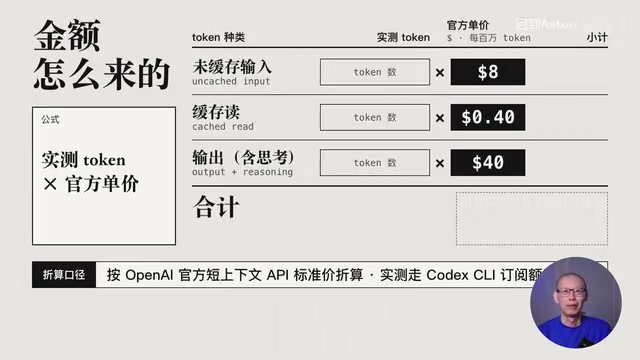
GPT-6 Six-Tier Hands-On Test: Astra Ultra Dominates but Bills Double
GPT-6 six-tier test: Astra Ultra sweeps 3:0 in 3D tasks thanks to sub-agents and runs 14% faster, but hidden backend bills make its real cost 2.6x single-threaded.

GPT-6.2 Astra vs Fable 5.2: Huge Cost-Efficiency Gap Across 12 Real-World Tests
Bilibili creator tests GPT-6.2 Astra vs Fable 5.2 across 12 real tasks: Fable wins 7-5 but costs 7.2x more and takes nearly 5x longer. Token efficiency emerges as the key selection metric.