Tangerine: A Privacy-First Offline File Processing Tool for Mac
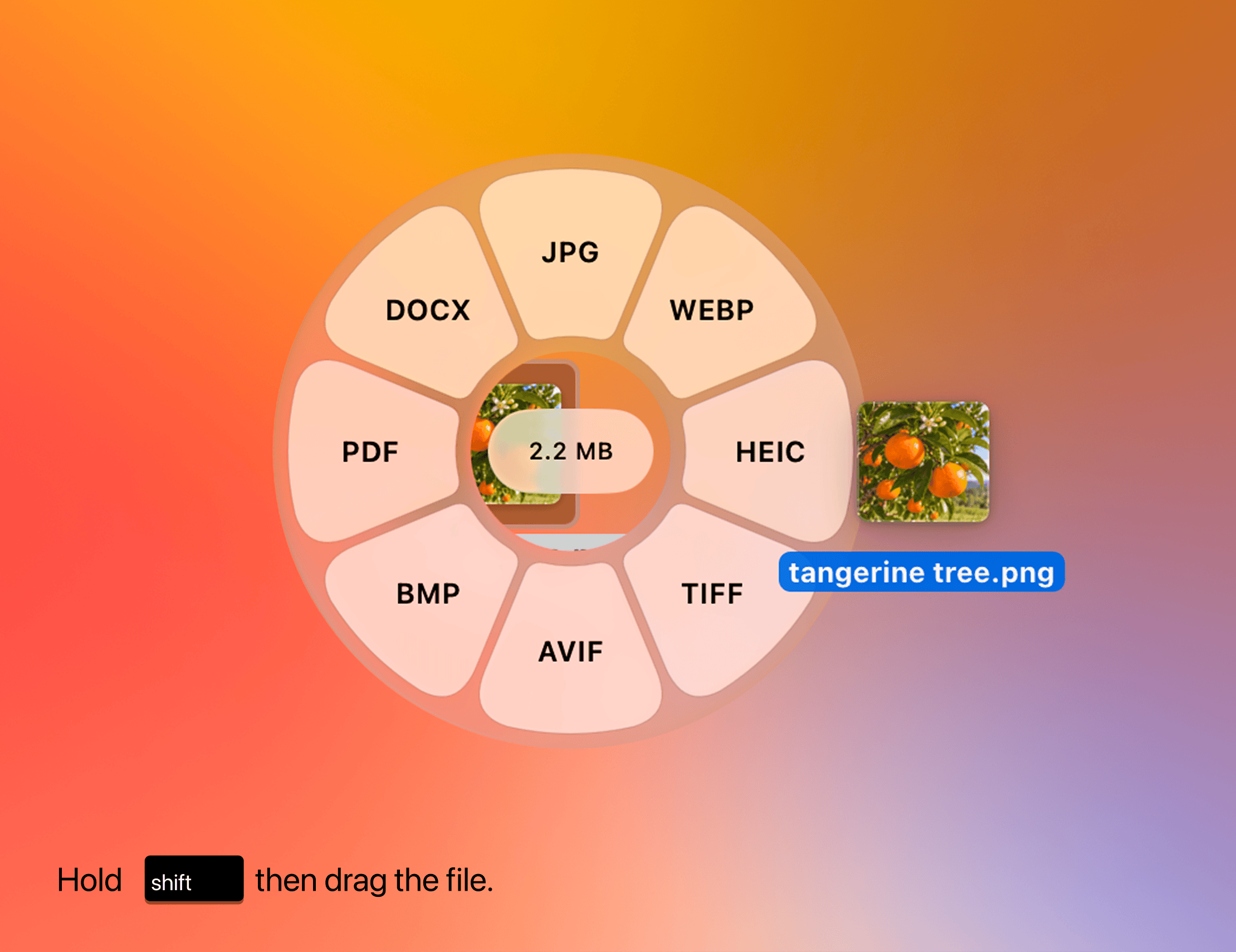
Tangerine is a privacy-first Mac menu bar app that converts files locally via Shift + drag.
Tangerine is a macOS menu bar app built around one core idea: everything stays local. No files are uploaded to any server. Users simply hold Shift and drag a file onto the app to trigger conversion, with the Option key unlocking advanced features. It supports images (conversion, compression, EXIF metadata removal, annotation), video and audio (conversion and compression), PDFs (conversion and redaction), and archive files. Its metadata stripping and document redaction features directly serve privacy protection needs — making it ideal for users handling sensitive content like business contracts or personal photos. The app recently launched on Product Hunt, earning 91 upvotes and signaling growing Mac user interest in privacy-first tooling.
A Privacy-Focused File Processing App for Mac
When dealing with files, many people default to dragging images, videos, or PDFs into an online converter. It's convenient, sure — but your files also end up on servers you have no control over. Tangerine aims to solve exactly this problem. It's a fully local Mac file processing app where every operation happens on your device, with no internet connection or file uploads required.
The app recently appeared on Product Hunt, earning 91 upvotes and ranking 19th for the day. It's listed under the Mac, Productivity, and Menu Bar Apps categories, and was built by developer thameem.
A Minimalist Interaction: Shift + Drag
Tangerine's core selling point is simplicity. Its primary interaction is Shift + drag: hold Shift and drag a file onto the app to instantly trigger a conversion. For more advanced options, hold the Option key to unlock additional tools.
This design compresses complex file processing into something that quickly becomes muscle memory. For designers, content creators, or office workers who handle large volumes of files daily, it eliminates the usual friction of opening software, selecting a format, and clicking through export dialogs. As a menu bar app, it lives at the top of your screen, always ready when you need it.
A Menu Bar App is a macOS-native application format where the program runs in the menu bar at the top-right of your screen rather than the Dock, taking up no dedicated window space. Clicking the icon summons a functional panel instantly. The design philosophy is "always available, get in and get out" — ideal for tools that are triggered frequently but don't require sustained interaction. Compared to traditional apps that require opening a main window first, menu bar apps reduce workflow interruption. Tangerine integrates drag-and-drop file conversion into this format, reinforcing the "drag once and you're done" experience.
A Wide Range of Supported File Types
According to its official description, Tangerine covers a broad range of file processing scenarios:
- Images: Format conversion, compression, metadata removal, and annotation
- Video & Audio: Format conversion and compression
- PDF: Conversion and sensitive content redaction
- Archives: Processing of compressed archive files
The metadata removal and document redaction features directly reflect its privacy-first positioning. Photos often carry hidden EXIF data including location coordinates and device information. PDFs may contain sensitive content that needs to be permanently hidden. Handling all of this locally — rather than uploading to a third-party tool — provides far greater peace of mind.
EXIF (Exchangeable Image File Format) is a metadata standard embedded in image files such as JPEG and TIFF. It can record the capture time, GPS coordinates, camera model, lens parameters, and even the device's serial number. When you send a photo to someone or upload it to a social platform, this information typically travels with it — allowing others to infer where and how the photo was taken. PDF redaction is similarly a common pitfall: simply placing a black rectangle over text does not truly remove the underlying content. Recipients can copy the text or remove the layer to reveal the original. True redaction requires permanently removing the content from the file's structure. Tangerine claims to perform both operations locally, meaning users never need to send sensitive files to a third-party server — reducing the risk of data exposure during transmission and storage.
The Value of Local Processing
Tangerine's biggest differentiator is its "no upload" approach. The vast majority of file conversion services rely on the cloud, where speed depends on network conditions and privacy remains a concern. Tangerine moves the entire process back to your local machine — eliminating the risk of sensitive file leakage and removing any dependency on file size limits or bandwidth.
For users who regularly handle sensitive materials like business contracts, internal documents, or personal photos, this "offline-first" approach is becoming an increasingly compelling product direction. Privacy-first tools have grown in popularity on the Mac platform in recent years, reflecting a rising awareness of data ownership among users.
Who Is It For?
If you frequently need to convert or compress files but don't want to rely on online tools, Tangerine offers a lightweight, fast, and privacy-conscious alternative. The interaction barrier is extremely low — Shift + drag gets you started immediately — while power users can unlock additional capabilities via the Option key.
It's worth noting that publicly available information currently comes primarily from Tangerine's Product Hunt listing. Details around pricing, the full list of supported formats, and batch processing performance will need to be verified through hands-on use. For Mac users who are privacy-conscious and efficiency-driven, it's well worth adding to your list of tools to try.
Related articles

AI Agent Fundamentals: The Three Core Components — Brain, Memory, and Tools
A beginner's guide to AI Agents: covering the three core components (brain, memory, tools), four stages of LLM deployment, and why Agents matter for real business use cases.

Boycotting Software That Doesn't Support Linux: One Developer's Philosophy of Choice
A Linux-only developer shares his philosophy of boycotting non-Linux software — without sacrificing productivity — and explains how coding agents like Claude Code are closing the gap with commercial tools.
Why Do All AI-Generated Projects Look the Same? The Aesthetic Homogenization Problem in Vibe Coding
Why do vibe coding projects all use purple gradients and dark glassmorphism? We break down the technical roots of AI aesthetic homogenization and how to escape it.