Tao Browser: A Privacy Browser with Independent Logins for Every Company

Tao Browser solves multi-identity office isolation and privacy needs with independent spaces, biometric locks, and zero telemetry.
Tao Browser is a free browser (beta) designed for multi-identity office scenarios, available on iPhone, iPad, and Mac. Its core feature is creating independent browsing spaces for each company, client, or project, with cookies and login states completely isolated to prevent account cross-use. Tabs support Face ID/Touch ID locking to protect sensitive information. For privacy, it has built-in ad and tracker blocking, runs entirely on-device, requires no account registration, and has no telemetry reporting. The product supports importing data from Arc browser, lowering migration barriers. It received 76 upvotes and ranked 11th on Product Hunt, gaining some attention, but as a beta version, extension compatibility and long-term stability remain to be seen.
In today's digital work environment, we often need to switch between multiple companies, clients, or projects. Each identity corresponds to its own set of accounts, cookies, and login states, and the single profile of traditional browsers often struggles to cleanly isolate these scenarios. Tao Browser was created to solve this pain point—it allows users to create independent spaces for each company, with each space having its own cookies and login information, fundamentally avoiding account cross-use and privacy leaks.
Core Features: Independent Spaces and Biometric Locks
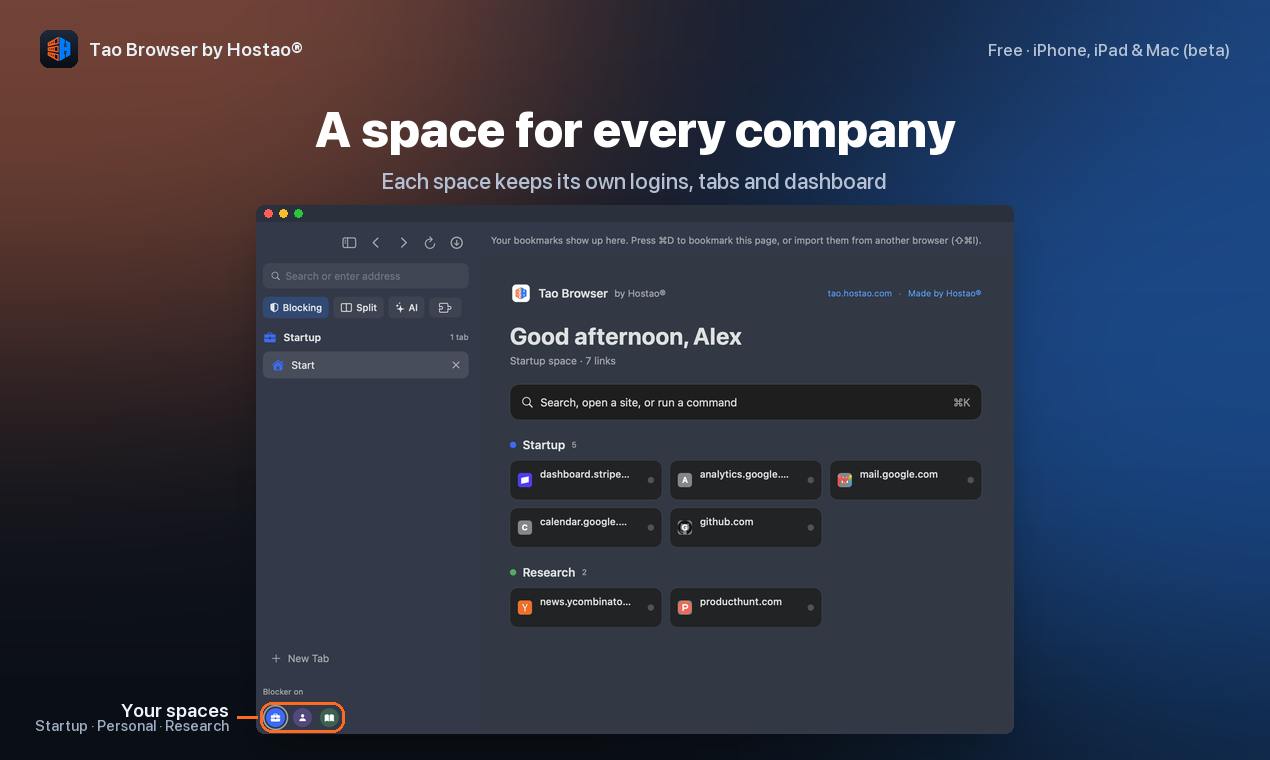
The core design philosophy of Tao Browser is "isolation." Users can create dedicated browsing spaces for each company, client, or project, with cookies and login states within each space completely independent. This means you can simultaneously log into multiple company email accounts, project management tools, or social media accounts in the same browser without worrying about data cross-contamination.
In addition to space isolation, Tao Browser also offers tab locking functionality, supporting Face ID or Touch ID unlock. For scenarios involving sensitive information, this feature can effectively prevent others from peeking at content when you leave your computer.
The difference between browser profiles and container isolation: Traditional browsers (like Chrome, Edge) achieve account isolation through "profiles," where each profile has independent bookmarks, extensions, cookies, and login states, but switching profiles requires opening a new window, and all profiles share the same browser process and resources. Tao Browser's "spaces" are closer to Firefox's "Container Tabs" or Arc's "Spaces" concept, allowing different identities' cookies and storage to be isolated through tab groups within the same window, with lower switching costs. Biometric locks (Face ID/Touch ID) add an additional layer of access control on top of container isolation: even if the device is unlocked, specific tabs still require secondary authentication, suitable for handling sensitive content like payroll and client contracts.
Privacy Protection and Account-Free Mode
Privacy is another major selling point of Tao Browser. It has built-in ad and tracker blocking, and runs entirely on-device without relying on cloud processing. More notably, Tao Browser does not require users to register an account, and has no telemetry data reporting. This means your browsing behavior and login information will not be collected or analyzed by developers, which is an important plus for privacy-conscious users.
The significance of telemetry and zero-account mode: Telemetry refers to software automatically collecting and reporting usage data during operation (such as crash reports, feature click-through rates, device models, IP addresses, etc.), commonly used for product improvement but potentially involving privacy boundaries. Tao Browser explicitly does not do telemetry, meaning developers will not receive any usage statistics, and user behavior remains entirely local. Zero-account mode further eliminates the risk of "account—cloud—data association": users don't need to provide email or phone numbers, the browser doesn't generate associable personal identifiers, architecturally reducing the possibility of data leaks and cross-device tracking. However, this also means users cannot sync bookmarks, passwords, or space configurations through accounts, and cross-device experience relies on local import/export.
Platform Support and Migration Convenience
Tao Browser currently offers iPhone, iPad, and Mac versions, and is in beta testing, completely free. It also supports importing data from Arc browser, making it easy for users to migrate from other browsers. Arc is known for its innovative sidebar and space management features, and Tao Browser clearly draws on similar concepts but focuses more on multi-identity isolation and privacy protection.
Arc browser's space management philosophy: Arc was developed by The Browser Company, known for its sidebar vertical tabs, Spaces, and "Little Arc" quick preview. Its space feature allows users to group tabs by project or scenario, and supports different spaces using different accounts to log into the same website. Tao Browser's support for importing data from Arc indicates similarities in data models (spaces, tabs, pinned tabs), with low migration costs. However, Arc is based on Chromium with better extension ecosystem compatibility; if Tao Browser uses a non-Chromium kernel, it may not be able to directly use extensions from the Chrome Web Store, which is a difference to note when migrating.
Market Positioning and Potential Challenges
On Product Hunt, Tao Browser received 76 upvotes, ranking 11th, categorized under Mac, Productivity, and Privacy. This indicates that its concept has received some attention, but it also faces competition. The browser market is dominated by giants, with Chrome, Safari, Arc, and others continuously strengthening privacy and profile features. Tao Browser's differentiation lies in extreme multi-identity isolation and zero-account mode, but whether this can support its long-term development remains to be seen.
Additionally, as a beta version, Tao Browser's feature completeness and stability still need time to be tested. For users who rely on the browser extension ecosystem, it's unclear whether Tao Browser supports mainstream extensions, which may affect its appeal.
Conclusion
Through independent spaces, biometric locks, and zero-telemetry design, Tao Browser provides a noteworthy privacy solution for multi-identity office scenarios. If you frequently need to switch between different companies or client identities and have high privacy requirements, you might want to try this free browser.
(Note: This article is based on Product Hunt product information; feature details are subject to official release.)
Related articles

Bilibili Hit Pi Agent Course: A Complete Guide to Building Agents from Scratch
In-depth analysis of the Bilibili Pi Agent course: four growth stages, differentiation from Claude Code and Codex, and key points for learning agent development from scratch.

Vibe Coding for Absolute Beginners: A Full-Stack AI Development Practical Guide
Analysis of Bilibili's 80-episode Vibe Coding beginner course: from directing AI to write code to full-chain product delivery, covering requirements analysis, UI design, front-end and back-end development, databases, testing and deployment, and AI automated operations, helping you master the full-stack AI development skills needed for a one-person company.

The Ultimate Bilibili Codex Guide: From Installation to Real-World Practice, Master It in One Sitting
A full breakdown of the Bilibili ultimate Codex guide: GPT account registration, desktop installation, login verification and network error fixes, .env file to solve 5 reconnects, PLUS quota mechanics, and Pro upgrades, plus practical usage tips.