Tencent WorkBuddy Hands-On Tutorial: From Beginner to Pro in Agent Automation

Tencent WorkBuddy is a desktop AI agent that reads/writes local files and executes multi-step tasks, turning AI from "can talk" to "can do."
Based on a 26-episode Bilibili tutorial, this article systematically outlines Tencent's AI agent desktop workspace WorkBuddy—its positioning, capabilities, and use cases. It describes WorkBuddy as a "domestic alternative to Codex" composed of an AI brain, a computer operator, and an automation engine, able to directly read local files, operate software, and deliver Word, Excel, and PDF outputs. Through an HR case of organizing 80 resumes, it contrasts traditional conversational AI's guidance-only limitation with WorkBuddy's direct execution, and compares them across five dimensions. It also covers scheduled tasks, WeChat remote control, MCP integration, and Skill extensions, while noting that automation depends on the desktop app staying running and configuration involves a learning curve.
In an era where AI tools are evolving from "can talk" to "can do," Tencent's WorkBuddy is a desktop agent workspace that aims to let AI truly take action. A 26-episode step-by-step tutorial on Bilibili thoroughly explains its core features and automation in practice. Based on that tutorial, this article outlines WorkBuddy's positioning, capability boundaries, and typical use cases to help readers decide whether it deserves a place in their workflow.
What WorkBuddy Is: Giving AI "Hands and Feet"
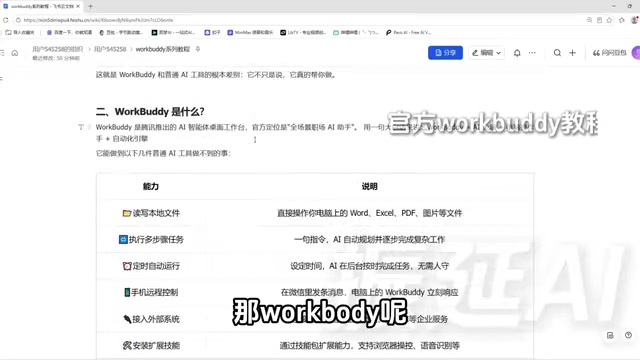
WorkBuddyAd is Tencent's AI agent desktop workspace, officially positioned as an "all-scenario workplace AI assistant." The tutorial colloquially describes it as "a domestic alternative to Codex"—an AI digital workhorse that can get things done directly on your computer.
Its core architecture can be broken down into three parts: the AI brain understands requirements and plans the path; the computer operator reads local files and operates software; and the automation engine supports scheduling fixed workflows as timed tasks. This means it no longer just generates answers—it can deliver file outputs directly.
Compared with ordinary conversational AI, WorkBuddy has a lower barrier to entry, requires no complex configuration, and is beginner-friendly. Whether you're writing proposals, building spreadsheets, analyzing data, designing posters, developing software, or taking over a browser, you can drive it all with natural language instructions.
An HR Scenario That Reveals the Fundamental Difference
The tutorial uses a highly representative example to illustrate the fundamental difference between WorkBuddy and ordinary AI tools. Suppose an HR professional has 80 candidate resumes and needs to compile a summary spreadsheet containing name, education, years of work experience, core skills, and salary expectations before leaving work, then send it to the hiring department.
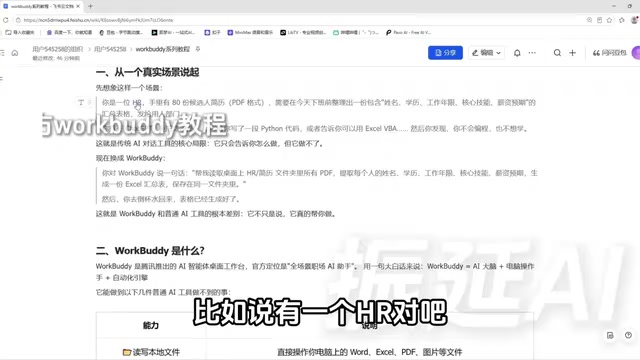
If you throw this problem at ChatGPT, it will give you a piece of Python code or suggest using Excel VBA—but only if you know how to program. Domestic AI tools like Doubao and Tongyi Qianwen can likewise only tell you "how to do it," not do it for you. This is the core limitation of traditional conversational AI: it can guide, but it cannot execute.
Switch to WorkBuddy, and you only need to say: "Help me read all the PDFs in the resume folder on my desktop, extract name, education, years of work experience, core skills, and salary expectations, and generate an Excel summary spreadsheet saved in the same folder." Then go grab a glass of water—the spreadsheet is already done.
This comparison reveals WorkBuddy's essence: it is not just a smart advisor, but an employee with hands and feet. It can read data and generate files on your computer, turning "knowing" into "doing."
Core Capabilities Breakdown: From Single-Step Operations to Scheduled Automation
WorkBuddy's capabilities can be divided into several levels by complexity.
Local File Operations and Multi-Step Tasks
It can directly read and write documents, Excel files, PDFs, images, and other files on your computer. When faced with complex requirements, WorkBuddy automatically breaks down steps, plans an implementation path, and completes them step by step. The tutorial emphasizes that if it discovers a problem with the plan midway, it can redesign the path.
Agent vs. ordinary large models: the key difference lies in the "plan—execute—reflect" loop. An ordinary conversational model generates one response and stops; an agent first decomposes the goal into subtasks, calls tools in sequence, and judges from intermediate results whether the path needs adjustment. The tutorial's mention that "it can redesign the path if it discovers a problem midway" corresponds to what the agent field calls the ReAct (reasoning and acting alternating) or Plan-and-Execute paradigm. This also explains why WorkBuddy is more reliable on multi-step tasks, while placing higher demands on model reasoning ability and tool-calling accuracy—the longer the steps, the greater the risk of error accumulation.
Scheduled Tasks and Remote Control
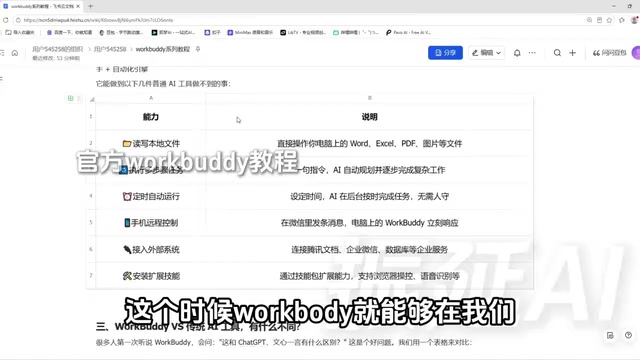
Once a workflow is fixed, it can be set as a scheduled task—for example, automatically compiling and sending a weekly report every week without anyone watching. In addition, through the WorkBuddy mini-program on your phone or the WeChat client, as long as the desktop app stays running, you can remotely send instructions for WorkBuddy to execute operations on your computer, and the results can be returned to your phone.
Scheduled Task refers to a workflow automatically triggered at a preset time or interval, similar to an operating system's scheduled tasks or Linux cron. WorkBuddy solidifies a successfully executed workflow into a reusable task template that starts automatically at the appointed time—a key capability that distinguishes it from conversational AI, which "requires someone present to issue instructions." Understanding this helps grasp its limitations: the reliability of scheduled tasks depends on whether the computer is on and whether the program is running. It is essentially a "local timer" rather than a cloud service, so it is not suitable for production-grade scheduling with extremely high requirements for timeliness and stability.
MCP Integration and Skill Extensions
WorkBuddy supports connecting to external systems via MCP—for example, searching data in Tencent Docs, connecting to WeCom or even databases—bringing more data sources into its capability scope. It can also extend functionality by installing Skill packages, such as browser data browsing and screenshots, or audio-to-text summaries.
MCP (Model Context Protocol) is a standardized protocol proposed and open-sourced by Anthropic in late 2024, designed to let AI models connect to external tools, data sources, and services in a unified way. Think of it as the "USB interface" of the AI world: before it, every system integration required separate adapter code; with MCP, as long as the other party provides an MCP Server, AI clients can call its capabilities according to a unified specification—searching documents, querying databases, sending messages, and so on. WorkBuddy's integration with Tencent Docs and WeCom via MCP essentially makes itself an MCP Client, incorporating the capabilities exposed by external systems into its own "toolbox," thereby breaking through the boundaries of local files.
Skill packages are another extension mechanism, usually a combination of packaged operation instructions, scripts, and prompts. Once installed, WorkBuddy masters a specialized skill, such as browser screenshots or audio-to-text. MCP leans toward "connecting data and systems," while Skills lean toward "packaging specific actions"; together they determine the extensibility of WorkBuddy's capability boundaries.
Five-Dimension Comparison with Ordinary AI Tools
The tutorial systematically compares WorkBuddy with traditional AI chat tools across five dimensions. These differences determine that they are suited to completely different types of tasks.
Core positioning: Traditional AI is a Q&A advisor; WorkBuddy is a digital employee that can execute tasks.
File operations: Traditional AI cannot read or write local files; WorkBuddy can do both.
Multi-step tasks: Traditional AI struggles to maintain stepwise execution across turns; WorkBuddy can plan autonomously and complete tasks step by step.
Unattended operation: Traditional AI requires someone present to send instructions; WorkBuddy's scheduled tasks can run when no one is around (provided the desktop app stays running).
Output: Traditional AI returns text; WorkBuddy delivers final file products such as Word, Excel, PDF, or format-converted results.
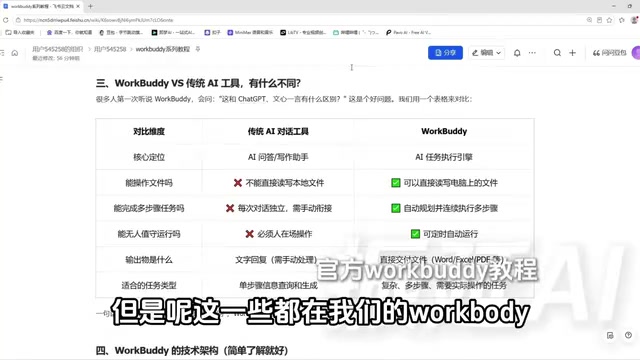
The tutorial's judgment is direct: ordinary AI tools are suitable for single-step information queries and result returns, while WorkBuddy is suitable for complex tasks that require understanding requirements, decomposing steps, and cross-file operations. Basically anything you can do on your computer, WorkBuddy can attempt to accomplish.
Who Should Use It, and What to Watch Out For
Judging from the tutorial's positioning, WorkBuddy targets workplace professionals who have no programming background but want to hand repetitive work to AI. HR organizing resumes, operations teams compiling data, and content creators processing materials are all typical scenarios.
It is worth noting that WorkBuddy's automation capabilities depend on the desktop app running continuously; scheduled tasks and remote control both presuppose that WorkBuddy on the computer is turned on. For scenarios requiring integration with external systems, MCP configuration and Skill installation still involve a certain learning curve. The tutorial provides a companion blue book, 12 commonly used Skills, and hands-on materials, indicating that the official team also recognizes that systematic guidance is needed to go from beginner to proficient.
WorkBuddy represents a trend: AI tools are evolving from chat boxes that answer questions into agents that can execute tasks on your behalf at the operating system level. Whether it is worth investing time to learn depends on how much repetitive file processing and information organization your work involves. If there is a lot, the efficiency gains from such tools are on an order-of-magnitude level.
One-line Summary
Tencent WorkBuddy is a desktop AI agent that can read and write local files and execute multi-step tasks, turning AI from "can talk" into "can do."
Paragraph Summary
Based on a 26-episode Bilibili tutorial, this article systematically outlines the positioning, capabilities, and applicable scenarios of Tencent's AI agent desktop workspace WorkBuddy. It notes that WorkBuddy can be understood as "a domestic alternative to Codex," composed of an AI brain, a computer operator, and an automation engine, capable of directly reading local files, operating software, and delivering final outputs such as Word, Excel, and PDF. Through the case of HR organizing 80 resumes, the article intuitively contrasts traditional conversational AI's "guidance without execution" with WorkBuddy's "just get it done," and compares them across five dimensions: core positioning, file operations, multi-step tasks, unattended operation, and output. It also introduces capabilities such as scheduled tasks, WeChat remote control, MCP integration, and Skill extensions, while noting that automation depends on the desktop app running continuously and that configuration involves a learning curve.
Related articles

Running a Local LLM on a Laptop CPU: Ollama + Qwen3 Gives a Desktop Pet a Brain
An ordinary laptop without a GPU can run a local LLM: a Bilibili creator uses Ollama plus open-source Qwen3 8B on pure CPU to give an original desktop pet a local brain, with DeepSeekHarness handling plugin development and three rounds of debugging — 0 yuan, works offline, privacy stays on-device.

AgentScope 2.0 in Practice: A Guide to Enterprise-Level AI Agent Development in Java
AgentScope 2.0 is Alibaba's Java enterprise-grade distributed agent framework. This article explains why it suits server-side AI applications, contrasts client-side AI apps in permissions, state management, and concurrency, and outlines a practical learning path from environment setup to project integration.

GPT-6 Astra Directly Edits Weights to Fix Models? Full Analysis of the MIT Paper and Leaks
MIT paper shows GPT-6 Astra repairs small models by directly editing weights, raising math scores from 7.9% to 48.1%; OpenAI internal charts hint an unreleased model leads on BenchCAD 2.0; Fable 5.5 pure-code movies and the Claude WiFi radar incident analyzed.