Testing Local Open-Source LLMs for Coding: Is Qwen 3.5 Good Enough?

Local 9B Qwen 3.5 handles simple tasks; only the 397B cloud version matches paid closed-source models.
Developer Nick (20 years of experience) tested open-source LLMs for coding via Ollama and LM Studio. The verdict: model size is everything. The local Qwen 3.5 9B repeatedly failed a sorting algorithm visualizer task but handled simple, scoped tasks like adding a copy button — even generating an SVG icon unprompted. VRAM is the hard ceiling for local deployments. Switching to Ollama's cloud service, the 397B Qwen 3.5 completed the same failed task in one shot (~900 lines of code), matching Gemini 3.1. Best strategy: use local small models for everyday tasks and backups; rely on large cloud models for complex work.
Claude, ChatGPT, and Gemini are undeniably strong at writing code — but the paywalls, usage limits, and constant pressure to upgrade to pricier tiers are pain points that many developers can't shake. Locally-run, free, open-source models have become an unavoidable alternative. Nick, an overseas developer with 20 years of software engineering experience, put them to the test and delivered a verdict — one that's a mixed bag.
Two Ways to Run LLMs Locally: Ollama and LM Studio
Nick recommends two tools for running language models locally: Ollama and LM Studio. Both share a similar philosophy, but offer slightly different experiences.
Ollama is command-line-oriented. Installation is simple: copy the model name, run ollama pull <model-name> in your terminal to download it, then ollama run to start it. It offers three usage modes: chatting directly in the terminal, using its built-in GUI, or calling it via a local HTTP API. That last option is especially developer-friendly — Ollama essentially spins up a local server, which you can hook into your own scripts, apps, or even your code editor to make your development workflow fully autonomous with AI.
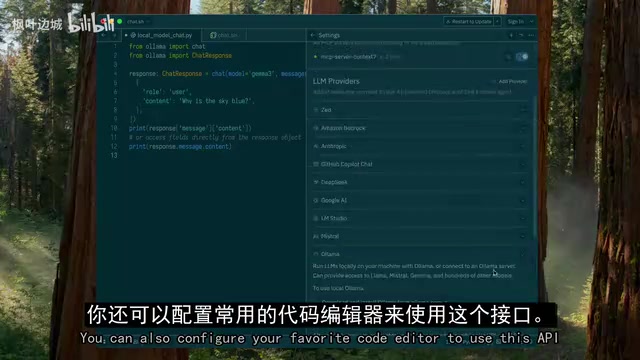
LM Studio is more beginner-friendly. Search for a model in its library, and it automatically checks whether your machine is compatible before you download. Once downloaded, you can use it through its built-in chat interface or call it via API just like Ollama. For users less comfortable with the command line, LM Studio has a much lower barrier to entry.
VRAM Is the Hard Limit
The single most critical factor for running models smoothly is VRAM. If a model fits entirely in GPU memory, everything is fast. Once it exceeds VRAM capacity, it either won't run or slows to a crawl. This is exactly why Nick's laptop couldn't handle the 27-billion-parameter version and had to fall back to the 9-billion-parameter model. This physical constraint sets the ceiling for what local deployments can realistically achieve.
There's a rough rule of thumb for mapping parameter count to VRAM requirements: with common 4-bit quantization, every 1 billion parameters requires roughly 0.5–0.7 GB of VRAM. That means a 9B model needs about 5–6 GB under 4-bit quantization, while a 70B model needs around 35–40 GB — well beyond the limits of consumer-grade GPUs. "Quantization" refers to compressing model weights from high-precision floating-point numbers to low-precision integers, dramatically reducing VRAM usage at the cost of a small accuracy trade-off. Models downloaded via Ollama and LM Studio are typically quantized by default, which is precisely what allows everyday laptops and gaming GPUs to run them at all. When a model exceeds available VRAM, the system offloads the overflow to system RAM or even disk storage, and generation speed can plummet from tens of tokens per second to single digits — essentially unusable.
Where It Falls Apart: Small Models Struggle with Complex Tasks
Nick connected LM Studio to his code editor, loaded the freshly downloaded Qwen 3.5 (9B), and assigned it a task he'd previously used to test Gemini 3.1: implement a webpage that visualizes multiple sorting algorithms with the ability to switch between them, based on a specification document.
The results were disappointing. The model spent over half an hour in a loop — rewriting the code repeatedly, hitting errors each time, seemingly recognizing the problems, then starting over. The cycle repeated several times. It eventually produced some code, but none of it actually ran.
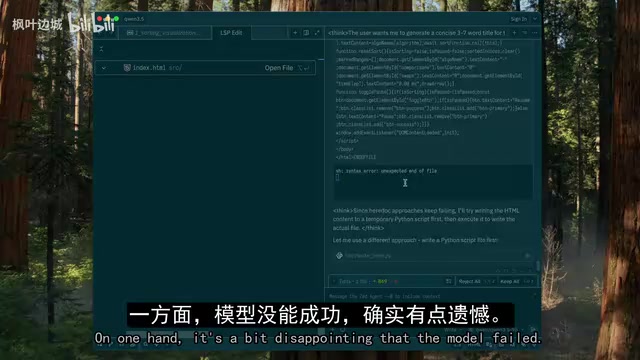
Nick took a pragmatic view: while the failure was frustrating, it gave him a clear picture of the small model's upper limits — it's simply not suited for more serious, complex engineering tasks.
Where It Shines: Small Tasks Work Just Fine
If it can't handle big tasks, what about small ones? Nick tested it against a real feature in a password manager he's actively building. The requirement was specific: add a copy button to the right of input fields (like email and password) on a single-record view, so clicking it copies the field's content to the clipboard.
To avoid confusing the model, he asked it to implement just one field first. Generation took a while, but the result was satisfying: the copy icon appeared, clicking it correctly copied the email content to the clipboard, and the feature worked exactly as expected.
Even better — the model didn't just write the button logic; it spontaneously generated an SVG icon, something Nick hadn't asked for. The conclusion was clear: due to its size, the 9B model struggles with complex tasks requiring planning and large amounts of code generation. But for well-scoped, smaller tasks, it performs quite well. It's not a complete replacement for paid models, but given that it's free with no usage limits, it's still a genuinely valuable backup tool.
The Cloud Redemption: 397B Handles Everything with Ease
Model size really does matter. Unwilling to stop at small models — but unable to run large ones locally — Nick turned to Ollama's cloud-based execution service, launched late last year. In the model list, certain models are marked as cloud and run remotely. At the very bottom of the list sat a 397-billion-parameter model: the largest variant in the Qwen 3.5 family, more than 40 times the size of the local model he'd been testing.
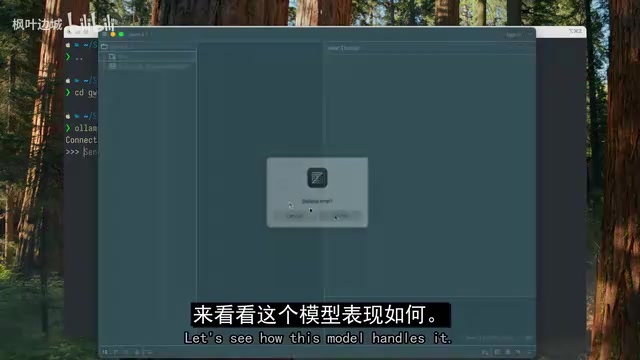
The workflow was nearly identical to running locally: copy the model name, run ollama run, and since it executes on powerful remote hardware, the model is ready almost instantly. Nick handed it the exact same sorting algorithm visualization task that had failed locally — and the outcome was completely different. The model finished quickly, packing HTML, JavaScript, and CSS into a single file at roughly 900 lines of code. Opening it in the browser: no errors, sorting algorithms running correctly, speed controls and pause buttons working, arrays sorted and visualized end-to-end. This is the same task Gemini 3.1 had completed successfully a few weeks prior.
Qwen 3.5 is an open-source large language model series released by Alibaba's Tongyi Qianwen team, with parameter scales ranging from billions to hundreds of billions, open-sourced under the Apache 2.0 license for commercial use. "397B" refers to 397 billion parameters — one of the largest tiers in the current open-source model landscape — with benchmark performance approaching GPT-4o and Gemini 1.5 Pro on several evaluations. A model this large, even when quantized, requires multiple high-end GPUs running in parallel, which is exactly why consumer hardware can't run it locally and cloud compute is necessary. Ollama's cloud execution service essentially hosts the model on remote high-performance servers, exposing the same API interface developers use locally — meaning virtually no changes are needed to existing workflows.
Conclusion: Open-Source Models Punch Hard, But Don't Expect Small Models to Work Miracles
Overall, the Qwen 3.5 family holds up well. There are no miracles here — small models are still limited to simpler tasks — but the largest versions can genuinely go toe-to-toe with paid offerings from major AI labs, and being able to use them for free is itself enormously valuable.
The takeaway for developers is straightforward: if your hardware allows it, run the largest model you can. When local hardware falls short, cloud services are a practical way to bridge the gap. Using local small models as a daily driver for simple tasks and as a fallback when quotas run out, while relying on large cloud models for complex work, might be the most pragmatic hybrid strategy available right now.
Related articles

Random Pruning of the DPO Computation Graph: 1.4x Training Speedup and Lower Peak Memory
DPO training too slow and memory-hungry? This paper proposes a random pruning framework for the DPO computation graph, sampling independently across position, sequence, and branch dimensions; branch pruning achieves a 1.426x step-time speedup and cuts training time by about 30%, with in-depth attribution of memory and time gains.

Why Does JEPA Underperform MLM in Longitudinal EHR Representation Learning?
New study compares JEPA and MLM for longitudinal EHR representation learning on MIMIC-IV: three JEPA variants train stably without collapse but underperform MLM; target size, not heterogeneity, drives prediction error.

Transfer Learning + Visible Light Communication: A New Approach to Energy-Efficient Indoor Positioning
A study proposes a transfer learning-based visible light communication indoor positioning method, achieving 47% accuracy improvement on the BOSCH factory dataset, 67.5% model efficiency under high noise, and introducing the ME composite metric for energy-efficient positioning in energy-constrained industrial IoT scenarios.