The Complete Guide to Gemini Spark: How Google's AI Agent Automates Your Daily Life

Gemini Spark is Google's AI Agent that automates scheduled, cross-service tasks with near-zero setup.
Gemini Spark is Google's AI Agent product that, unlike the conversational Gemini Chat, can execute scheduled recurring tasks and automate operations across multiple Google services — functioning more like a "digital employee" working in the background. It requires users to be 18+, hold a personal Google Account, and subscribe to Google AI Pro or Ultra. The article demonstrates its value through three practical use cases: automatically auditing paid subscriptions in Gmail weekly and logging them to Google Sheets, daily email scans to sync class schedules and avoid conflicts, and consolidating travel confirmation emails into a dedicated Drive folder before a trip. Compared to third-party agents like Hermes Agent or OpenClaw that require complex setup, Spark's deep integration with the Google Account ecosystem makes it one of the most accessible AI automation tools available to everyday users.
What Is Gemini Spark
Many people don't realize that Google has its own AI Agent — one that works similarly to tools like Hermes Agent or OpenClawAd, but with far less complexity and deep integration into Google's own ecosystem. It's called Gemini Spark.
Compared to the more familiar Gemini Chat, Spark serves a fundamentally different purpose. Gemini Chat can answer questions, search the web, and connect to Google services like Gmail and Calendar — but it only acts when you actively ask it to. At its core, it's an on-demand AI assistant. Gemini Spark, on the other hand, functions more like a true "employee": it can execute scheduled and recurring tasks, move files, manage and modify existing documents, and return results to their proper place — delivering genuine, hands-off automation.
AI Agents are AI systems capable of autonomously planning and executing multi-step tasks. The key distinction from conventional conversational AI lies in initiative: traditional chat AI waits for a user's question and delivers a single response, while an agent can break down a goal on its own, sequentially invoke tools (such as reading emails, writing files, or calling APIs), and run in loops without human intervention. The industry often uses terms like "Tool Use" and "Long-horizon Reasoning" to describe these capabilities. Hermes Agent and OpenClaw are third-party agent frameworks aimed at developers, requiring manual API key configuration and permission management. Gemini Spark packages the same class of capabilities within the Google Account ecosystem, making it accessible to everyday users without any knowledge of the underlying architecture.
Three Core Differences Between Chat and Spark
Understanding the distinction between these two products is the foundation for using Spark effectively.
Scheduled and recurring tasks. Gemini Chat only responds in real time, while Spark lets you set up automated plans like "run this task every morning at 8 AM" or "analyze my inbox subscriptions once a week."
Output consistency. If you ask Chat to generate a document — say, an invoice — the formatting can vary each time, even with a template provided. Spark, by contrast, can follow precise instructions: "read this email, find the prices I've listed, apply the invoice template from the folder, generate the invoice, and save it as a Gmail draft." The entire workflow is highly controlled and repeatable.
Stronger agentic capability. Spark can execute a coherent sequence of actions across multiple Google services — moving files, organizing materials, making edits, and putting everything back where it belongs. It's no longer a one-and-done Q&A assistant; it's a role that continuously handles tedious tasks in the background on your behalf.
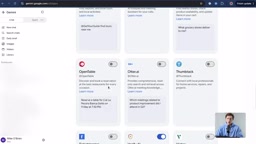
In Settings, navigate to Personal Intelligence → Connected Apps to see a wide range of supported integrations. Beyond Google Workspace, Spark supports Canva, GitHub, Granola, OpenTable, Zillow, Dropbox, Instacart, and more. For instance, you could have it generate an Instagram Story based on the theme of a weekend barbecue on your calendar, make a reservation directly through OpenTable, research properties on Zillow based on your criteria and draft a follow-up email for your review before sending — and much more.
Four Prerequisites to Access Spark
To use Gemini Spark, you'll need to meet a few requirements:
- Be at least 18 years old.
- Regional availability. Spark has launched in most regions globally, but some areas (such as Nigeria, Switzerland, and the UK) may not yet have access.
- A personal Google Account. Work or school accounts are not currently supported.
- A paid subscription. You'll need either Google AI Pro or Google AI Ultra. The author opted for the AI Pro plan — $5/month for the first three months, then $20/month thereafter. The subscription also includes several terabytes of storage and other Google One perks.
Once you're set up, visit gemini.google.com, click the top-left corner to open the sidebar, and you'll find Spark. From there, you can describe tasks, upload files, add content from Google Drive, or use the microphone for voice input.
Google AI Pro and AI Ultra are two paid tiers introduced in 2025 when Google rebranded and upgraded its original Gemini Advanced subscription. AI Pro corresponds to the former Gemini Advanced and is aimed at individual users, offering priority access to the latest Gemini models, expanded Google One cloud storage (typically 2TB), and experimental features like NotebookLM Plus and Gemini Spark. AI Ultra is priced higher, targeting power users with greater usage quotas and first access to the newest models. It's worth noting that Spark is currently only available to personal accounts — users signed in with a Google Workspace (business or education) account will not see the Spark entry point, a limitation that had not been lifted at the time of writing.
Use Case 1: Automated Subscription Auditing — Stop Paying for What You Don't Use
Lots of people pay for services that analyze their inbox and credit card statements to find subscriptions they've forgotten to cancel. The author's approach: just have Gemini Spark do it instead.
Before starting, confirm in Settings that Personal Intelligence is enabled and that Google Workspace is turned on under Connected Apps. The author then created a folder in Drive called Gemini Spark Workspace specifically for Spark-managed tasks — this keeps its working scope isolated and prevents it from interfering with other files.
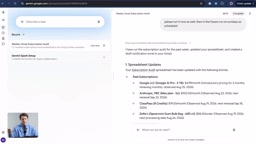
The instruction given was: every Sunday at 8 AM, audit the Gmail inbox, look for receipt confirmation emails, identify email newsletters worth unsubscribing from, and flag paid subscriptions that have been overlooked — then populate a Google Sheet called "subscription audit" with vendor name, service name, and category, and send a notification whenever a new subscription is detected.
Running it immediately as a test, the results came back surprisingly fast: Spark split everything into "paid subscriptions" and "email subscriptions," accurately identifying Google AI Pro, Anthropic, ClassPass, and even a one-time order for Spearmint Gum that was set to auto-renew. Opening the Sheet in Drive revealed that status, monthly price, and other fields were all neatly filled in — making it easy to tally total monthly spending at a glance.
Use Case 2: Automatic Schedule Syncing and Itinerary Management
The second example integrates a broader set of Google services. The author's problem: ClassPass class bookings sometimes don't automatically sync to his calendar. So he set up Spark to scan his inbox daily, detect these emails, automatically add them to the appropriate calendar type, and alert him to any scheduling conflicts. Spark had the daily routine up and running in short order.
This is where Spark has a real edge over other agent tools. Platforms like Hermes Agent, OpenClaw, and Grokbot typically require tedious configuration and authorization steps. Because Spark is already connected to all your key Google accounts, most permissions are enabled by default — almost no additional setup is needed.
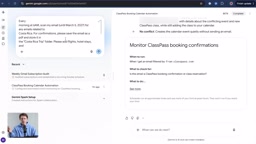
The third example involves travel management. The author was planning a trip to Costa Rica on March 5th and was tired of digging through Gmail for confirmation numbers after landing. He set up a recurring task to scan his inbox every morning at 6 AM through March 5th, find all travel-related confirmation emails, add them to his calendar, and — most importantly — consolidate everything into a "Costa Rica trip" folder in Drive, making it easy to share with travel companions. He even had Spark generate a presentation summarizing safety advisories, weather, and news. All of this completed in a remarkably short time.
Task Management and Notification Options
Spark's left panel lists all recent tasks, filterable by status: Scheduled, Needs Input, In Progress, and Completed. Frequently used tasks can be renamed or pinned via the three-dot menu for quick access.
Trigger options are flexible as well: tasks can run on a daily schedule, be triggered by a specific incoming email, or fired off entirely manually. Notification channels are equally versatile — Spark can send you an email, push a calendar reminder, or you can simply return to Spark and manage everything through conversation.
For freelancers or anyone juggling a busy schedule, Spark takes over a massive amount of background logic-heavy busywork. Its biggest value isn't any single flashy feature — it's low-friction automation: you already have a Google Account, no complex configuration is required, and a "digital employee" can start saving you time almost immediately.
From a product perspective, Gemini Spark overlaps in functionality with RPA (Robotic Process Automation) tools like Zapier or Make/Integromat — but the design philosophy is fundamentally different. Traditional RPA tools require users to define precise trigger conditions and action steps upfront ("if the email subject contains X, do Y") — they are, at their core, rule engines. Spark's differentiator is its use of a large language model to understand semantics: you can describe a fuzzy goal in natural language ("find subscriptions I forgot to cancel"), and the model decides which emails qualify. The advantage of this approach is an extremely low barrier to entry; the trade-off is reduced explainability and a degree of dependence on the model's comprehension accuracy.
Related articles

M&M's Spent Millions Replacing Artificial Blue Dye — Why Is It So Hard?
Mars spent millions trying to replace artificial blue dye in M&M's with spirulina, but thick material clogs pipes and residue risks mold, forcing a full production-line rebuild. Here's the engineering behind the reformulation.
Teammate Wanted for Meta Global AI Developer Hackathon: Computer Vision & Medical AI
A Reddit developer seeks teammates for the Meta Global AI Developer Hackathon, focusing on computer vision and medical AI. This article analyzes the track logic, skills-complementarity needs, and topic selection strategy behind this teaming signal.
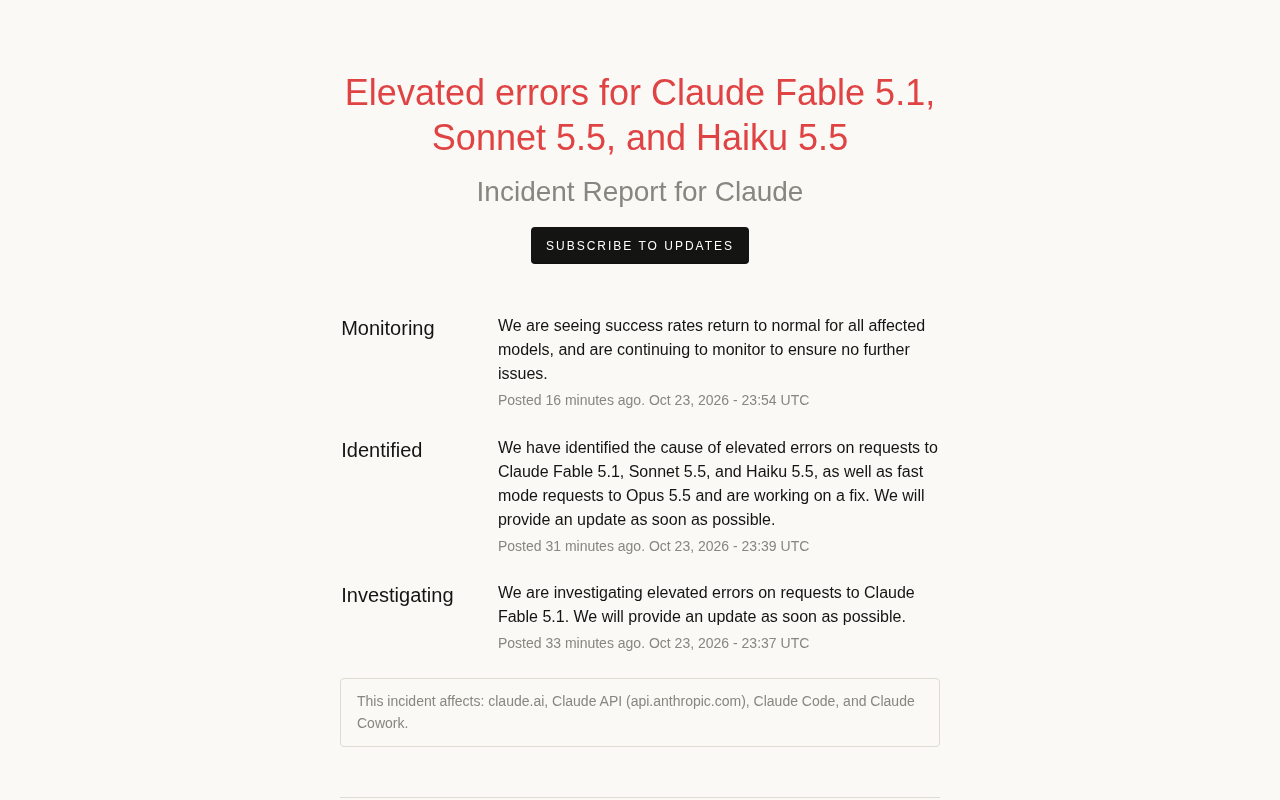
Multiple Claude Models Hit by Errors: A Postmortem of Fable 5.1, Sonnet 5.5, and Haiku 5.5
Claude Fable 5.1, Sonnet 5.5, Haiku 5.5, and Opus 5.5 fast mode saw elevated errors; Anthropic identified and resolved the issue in 17 minutes. This postmortem covers the timeline, the technical reasons for the multi-model cascading failure, and practical lessons for retry and degradation strategies.