The Complete Guide to Pi Coding Agent: A Minimalist Open-Source Model Agent Framework

Pi is a minimalist, NeoVim-style agent framework built for running open-source coding models.
Pi Coding Agent is a minimalist open-source agent harness that lets developers run models like GLM 5.2 and Kimi K3 with full control. Unlike OpenCode's out-of-the-box approach, Pi follows a NeoVim-like philosophy: bare-bones by default, fully customizable via extensions. This guide covers installation, model configuration, and three essential extensions—permission system, undo/redo, and web search—that transform Pi into a powerful coding agent.
Why Pi Has Become the Go-To Tool for Running Open-Source Models
As open-weight models like GLM 5.2 and Kimi K3 rapidly catch up to—and even surpass on certain benchmarks—closed-source SOTA models, developers are increasingly focused on how to efficiently harness these models locally as coding agents. Open-weight models are AI models whose weight parameters are publicly released, allowing developers to download, deploy, and fine-tune them. They differ subtly from fully open-source models: the latter typically also publish training data, training code, and complete reproduction pipelines, while the former may only release the weight files needed for inference. GLM 5.2 is developed by Zhipu AI, and Kimi K3 by Moonshot AI—both representing significant investments by Chinese AI companies in the open-source ecosystem. The rise of these models is reshaping the industry landscape. Developers no longer need to rely on API calls from companies like OpenAI or Anthropic; instead, they can run models of comparable caliber on local or private servers, reducing costs and eliminating data privacy concerns.
On the CodeArena Web Development Leaderboard, open-source models are rapidly closing the gap with top-tier closed-source models—and they're cheaper and more powerful. CodeArena is a benchmark platform focused on evaluating AI models' coding abilities, using an ELO rating system similar to Chatbot Arena to rank models through real-world web development tasks. Unlike traditional static code generation benchmarks such as HumanEval or MBPP, CodeArena emphasizes end-to-end web application development capabilities, including frontend UI implementation, backend logic, and full-stack coordination. The emergence of these hands-on benchmarks reflects a shift in how the industry evaluates AI coding ability—from "can it write a correct function" to "can it complete a real engineering task."
The YouTuber featured here has made it clear: Pi Coding Agent has become his absolute first choice for running open-source models like GLM 5.2 and Kimi K3. He even posted on X asking "What's the best way to run open-weight models?" and the answer was Pi. This article will walk you through what Pi is, how its design philosophy differs from OpenCode, and how to complete the basic setup.

Pi vs OpenCode: The NeoVim vs VS Code Philosophy Debate
The best way to understand Pi is to compare it with another popular tool, OpenCode. The creator offered a very apt analogy:
Pi is to OpenCode what NeoVim is to VS Code.
This analogy perfectly captures the core difference between the two. NeoVim is a modern fork of the Vim editor, known for its minimal core plus plugin ecosystem. Users spend considerable time writing configuration files (typically in Lua) to build a personalized development environment, but the end result is an editor perfectly tailored to their workflow, with blazing-fast startup times and minimal resource usage. VS Code, developed by Microsoft, provides a carefully designed default experience, a graphical settings interface, and a one-click extension marketplace—ready to use out of the box. Neither is objectively better; they represent a fundamental divergence in software design philosophy: minimal core + user-built vs. fully preconfigured + user-tweaked.
OpenCode: The Opinionated, Out-of-the-Box Solution
OpenCode is a feature-complete, opinionated coding agent. It comes with built-in MCP support, to-dos, LSP, undo/redo, and a full suite of features that work immediately after installation with virtually no configuration required. It's ideal for developers who want a plug-and-play experience.
MCP, or Model Context Protocol, is an open standard proposed by Anthropic in late 2024, designed to establish a unified communication interface between AI models and external tools and data sources. Before MCP, different coding agents had to write custom integration code for each tool (database queries, file system operations, API calls, etc.), leading to ecosystem fragmentation. MCP defines a standardized JSON-RPC protocol that allows any MCP-compatible tool server to be called by any MCP-compatible AI client. LSP, or Language Server Protocol, was originally developed by Microsoft for VS Code and has since become the de facto standard in the code editing space. LSP decouples a programming language's intelligent analysis capabilities (auto-completion, error diagnostics, go-to-definition, refactoring suggestions) from the editor, running them in an independent language server process. In the context of coding agents, LSP integration gives AI agents the same code comprehension abilities as human developers—they can not only see the text but also understand type information, function signatures, and dependency relationships, enabling more precise code modifications.
Pi: A Minimalist Agent Harness
Pi takes the completely opposite approach. It is essentially a minimal Agent Harness—after installation, it can barely "do anything." It provides a chat interface and the ability to edit files. That's it.
An Agent Harness is a software architecture that provides the minimum infrastructure needed to run an AI agent. Its design philosophy is similar to the Unix principle of "do one thing well"—it handles only the core pipeline of model interaction, message passing, and tool invocation, while delegating all higher-level functionality to plugins. In contrast, "full-stack agents" (like OpenCode or Claude Code) bundle extensive preconfigured features within the framework. The Harness approach offers extremely low resource overhead and maximum flexibility—developers can precisely control every behavioral boundary of the agent—but at the cost of a higher configuration threshold and the need for familiarity with the ecosystem.
All additional functionality—whether permission control, undo/redo, or web search—requires you to install extensions and write configuration files yourself. This means you essentially build your own coding agent from scratch, but in return you get extreme lightweight performance and complete customizability.
The takeaway is clear: if you enjoy tinkering and building your own toolchain from the ground up, choose Pi. If you want a mature, out-of-the-box solution, choose OpenCode (or the upcoming Oh My Pi).
Installation and Basic Configuration
Pi offers very flexible installation methods, supporting curl, Windows PowerShell, NPM, PNPM, and Bun. Arch Linux users can also install directly via AUR packages (yay).
Logging into a Model Provider
After installation, type pi in any directory to launch it. On first run, you'll see a "no available models" prompt because you need to log into a provider first. Using the /login command, you can choose OAuth login or provide an API key.
The YouTuber uses OpenCode Zen (OpenCode Go) to access open-source models. After pasting the API key, you can switch to GLM 5.2 using the /model command. He personally prefers setting the thinking level to max in /settings to get the best performance from GLM 5.2. The thinking level corresponds to the model's Chain of Thought depth setting. Modern reasoning models (such as GLM 5.2, DeepSeekAd-R1, etc.) support multi-step internal reasoning before answering. A higher thinking level allocates a larger token budget to the reasoning process, which typically produces more accurate results on complex coding tasks but also increases latency and token consumption.
Three Must-Have Extensions: Turning a Bare-Bones Tool into a Usable Agent
Pi's core philosophy is "install only what you need." The YouTuber demonstrated three extensions he considers most essential.
1. Permission System Extension: The First Line of Defense
Out of the box, Pi has a dangerous characteristic: when you ask it to write a Python script and run it, it executes immediately without asking for your consent. This is extremely dangerous in production environments. This design choice reflects the Harness framework's philosophy—it makes no assumptions, leaving security policies entirely up to the user. But for new users unaware of this, it means the AI agent could execute file deletions, modify system configurations, or even initiate network requests without review, posing a serious security risk.
The solution is to install the permission system extension:
pi install npm pi-permission-system
Then you need to create a pi-permissions.jsonc configuration file in the ~/.pi/agent/ directory. The syntax is very concise: set the default policy to "ask" for tools, bash commands, MCP, skills, etc. Read-only commands like ls, git status, and git diff can be allowed, while write, edit, and execute commands must be approved. Once configured, Pi will display the code and request "allow once" or "allow always" before executing any action.
Security Warning: Regardless of which Pi extension you install, you're essentially pulling npm packages or cloning GitHub repositories. Always verify that the repository is trustworthy—read the code when possible, or stick to well-known, popular packages. npm (Node Package Manager) is the JavaScript ecosystem's package manager, hosting over 2 million public packages and serving as the world's largest software registry. Pi's choice of npm as its extension distribution channel means any developer can publish Pi extensions, but this also introduces supply chain security risks. In recent years, the npm ecosystem has experienced multiple malicious package incidents, including dependency confusion attacks, typosquatting, and injection of malicious code into popular packages. Checking download counts, star counts, author history, and performing source code audits are all effective ways to mitigate risk.
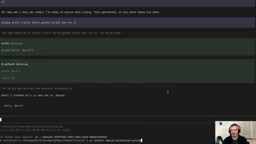
2. Undo/Redo Extension: A Code Time Machine
The second extension lets you roll back code and conversation state:
pi install npm pi-undo-redo
The YouTuber demonstrated creating a factorial script in a new session, then using the undo command to make the script disappear from the codebase, and redo to bring it back. However, note an important limitation: in non-git mode, the plugin can only restore files that Pi's write/edit tools explicitly touched—files created via shell commands cannot be restored. The technical reason for this limitation is that Pi's write/edit tools record the before-and-after states of files in an internal operation log during execution, while files created or modified through shell commands (such as touch, echo >, mv, etc.) bypass this recording mechanism. If the project is under git version control, the plugin can leverage git's staging area and commit history for more comprehensive rollbacks, but in non-git environments, the rollback scope is limited to Pi's own operation tracking.
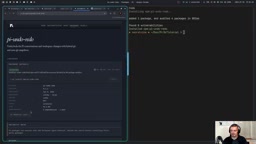
The YouTuber also shared a practical tip: search for keywords like "pi undo redo" on Pi's official website or GitHub to find the corresponding package. The page will list installation commands, author information, download counts, and other details to help you assess whether a package is trustworthy.
3. Web Search Extension: Connecting to Real-Time Information
Pi doesn't support true web search by default—it only has web fetch, and at most can use curl commands as a workaround. The difference between web fetch and web search is significant: the former can only retrieve the content of a specific URL you provide, essentially a programmatic "open webpage"; the latter can search the internet by keywords like a search engine, returning multiple relevant results. For coding agents, web search capability is crucial—when a model's training data cutoff predates the latest version of a library, real-time search is the only way to access up-to-date API documentation and usage examples.
To get full search capability, install:
pi install npm pi-web-access
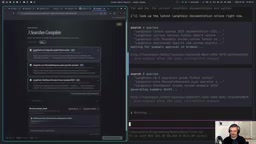
Once installed, when you ask something like "What's the latest LangChain syntax?", Pi will trigger the web search tool. Interestingly, the YouTuber's browser also popped up a web interface showing the search process, sources, and summaries in real time. After approval, the results are fed into Pi's conversation.
Who Is Pi For?
The YouTuber's stance is very clear. For him personally, Pi is the best way to run open-source models, for these reasons:
- Minimalist design: If you don't need it, it's not there—no bloat
- Lightweight and efficient: Quickly spin up models like GLM 5.2 and Kimi K3
- Fully customizable: A DIY philosophy where you build your own coding agent from scratch
If you're like him—someone who loves tinkering and wants to control every aspect from the ground up—Pi is the ideal choice. Conversely, users looking for a ready-to-use solution should consider OpenCode or Oh My Pi.
One interesting Easter egg: Open Claude is also built on top of Pi—it runs on Pi's harness. This further validates Pi's extensibility and potential as an underlying agent framework. This fact also reveals a fascinating layering phenomenon in the AI tools ecosystem: the base layer framework (like Pi) provides a minimal runtime environment, middle-layer projects (like Open Claude) wrap specific model access and interaction logic on top of it, and end users enjoy an out-of-the-box experience at the top layer. This layered architecture mirrors the "runtime → framework → application" pattern in web development, suggesting that AI agent tools are maturing toward established software engineering practices.
Final Thoughts
In an era of exploding open-source model capabilities, Pi represents a philosophy that "tools should be lightweight and controllable." It puts the choice entirely back in the developer's hands: security policies, undo mechanisms, and web capabilities are all yours to decide whether to include and how to configure. This NeoVim-style minimalism rewards developers who invest time in refining their toolchain with a coding agent that truly fits their workflow.
From a broader perspective, Pi's emergence also reflects an important bifurcation happening in the AI development tools space. On one side is the "all-in-one IDE" approach represented by Cursor and Windsurf, deeply integrating AI capabilities into graphical development environments. On the other is the "terminal-first" approach represented by Pi and Claude Code, targeting developers who prefer command-line workflows. These two paths aren't opposed—they serve different user profiles and use cases. By positioning itself as a minimal agent framework, Pi has found a unique ecological niche on the latter path—it doesn't try to be the best coding agent; instead, it tries to be the foundation for building the best coding agent.
Key Takeaways
Related articles

Uber Deploys ChatGPT Work Company-Wide: AI in the Workplace Enters the Scaled Implementation Phase
Uber deploys ChatGPT Work to 30,000+ employees, extending it from engineering to all roles. We analyze its expert-engineer pairing, end-to-end automation, and questions of AI control and power concentration—insights for scaling AI in the workplace.

Shift at Midnight Hands-On: When "ID Verification" Becomes Alien Hunting
Shift at Midnight blends ID verification with horror survival in a four-player co-op game. We break down its inspection mechanics and chaotic humor.

Zelensky Recounts the Outbreak of War: I Need Ammunition, Not a Ride
Zelensky recalls the first day of war in a YouTube interview: farewell to family, rejecting Biden's evacuation offer with "I need ammunition, not a ride," and how Bucha shaped his stance on compromise and peace talks.