The Complete n8n Guide: Building Scalable AI Automation Systems from Scratch

A full n8n course covering everything from single workflows to production-grade multi-agent AI automation systems.
This article recaps TechDome CEO Rahul Joshi's free n8n course, arguing that n8n is not a Zapier replacement but a self-hostable automation infrastructure and orchestration engine. Starting from the "Webhook in → clean → branch → AI → output" pattern, it covers AI Agents vs. LLMs, lightweight knowledge bases using Google Sheets, short- and long-term memory, and multi-agent architectures. The second half focuses on the gap between demos and production: event-driven triggers over polling, Slack-based human approval, and error handling with Telegram alerts for full observability.
Imagine your entire business running on autopilot — lead generation, content creation, and customer support all automated. That's exactly what tools like n8n are designed to make possible. In this free, comprehensive course, Rahul Joshi, co-founder and CEO of TechDome, breaks down n8n from the ground up — from core concepts to production-grade AI workflows. The course targets developers and no-code builders alike, with a clear goal: building real-world skills, not just demo-level familiarity.
n8n Is Not Just Another Zapier
The course opens by correcting a common misconception: treating n8n as just another automation tool. According to Rahul, n8n is better understood as an automation infrastructure, orchestration engine, and intelligent workflow backend — with Zapier representing only a small subset of what n8n can do.
With n8n, you can automate entire business systems: lead generation pipelines, AI-driven research workflows, fully automated customer support, data pipelines, and internal operations. This isn't simple "automation" — it's building an automation architecture.
On the deployment side, n8n offers considerable flexibility. Beginners can download it from GitHub and run it locally, or opt for a paid plan — the Starter tier works well if you expect around 2,000–2,500 workflow executions per month. But n8n's real power comes from self-hosting: you can deploy it on your own infrastructure, whether that's an internal company environment or AWS, Azure, or any custom cloud — giving you complete control over your data, workflows, and system architecture.
The Core Skeleton of a Workflow
Every n8n workflow starts with a Trigger. Triggers can be manual, event-based, scheduled, webhook-based, or even chat-initiated. For example, a user submitting a form can automatically kick off an entire workflow.

Rahul walks through a classic example to illustrate this skeleton: data enters via Webhook → gets cleaned → hits a logic branch → goes into AI → ends with a personalized email. Here's how each node breaks down:
- Webhook Trigger: Set to POST method, listening on a specified path. As soon as an external form, app, or API call pushes data, the workflow launches.
- Set Node (field mapping): Maps raw JSON into clean, structured fields using n8n expressions to extract
name,email, andcompany— with the option to hardcode additional fields per record. - If Node (branching logic): Checks whether the
companyfield is empty. The true branch continues to the AI node; the false branch can route to a different email template, a Slack alert, or a CRM update. - OpenAI Node: Calls GPT-4o mini with a dynamic prompt that injects live data from the previous node, ensuring each execution is personalized.
- Gmail Node: Sends the AI-generated email, pulling output directly from the OpenAI node.
This loop — Webhook in → clean → branch → AI process → personalized email out — is the foundational pattern behind most automation pipelines you'll build in n8n.
Truly Embedding AI into Workflows
The course dedicates significant time to making AI capabilities practical, distilling a universal pattern: Input → AI Analysis → Decision → Action. Once you recognize this pattern, almost any AI automation can be mapped onto it.
Rahul uses a Bill of Lading processing example to illustrate: AI reads a shipping document and autonomously decides whether it can be processed directly or requires human intervention. The key here is prompt engineering — if you just say "read this document," you'll get a block of text that can't be automated downstream. But if you explicitly tell the model which fields to extract (bill of lading number, shipper, consignee, vessel, port) and enforce JSON output, you get structured data that downstream nodes can actually use. A decision node then checks whether required fields are present — if anything's missing, an email alert fires, pinpointing exactly which document and which field caused the problem.
The Difference Between an LLM and an Agent
The course draws an important distinction: an LLM is just a text generator — give it text, it gives you text back. An Agent is a decision system — it can choose tools and retrieve real data, rather than simply generating a response. In a workflow, the Agent is the primary node; the LLM is the "brain" plugged into it.
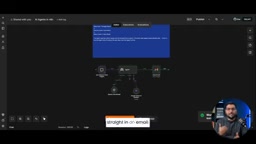
The Agent architecture always follows the same shape: User Request → Agent → Select Tool → Execute Action → Return Result. The course demonstrates an Agent that uses a SERP API to search the web and emails a summary of the results. One detail worth remembering: the email node after the Agent is not a "tool" the Agent calls — it's the next step in the workflow. Sending the email is handled by the workflow automatically, not decided by the Agent. Rahul also offers this practical advice: one well-used tool is usually better than five tools the Agent rarely touches.
More precisely, the Agent's core capability is the ReAct (Reasoning + Acting) loop: the model first reasons about what information or action is needed, then calls a tool to execute it, observes the result, and continues reasoning until the task is complete. This is fundamentally different from a single LLM call's "one question, one answer" pattern. In n8n, the Agent node has this loop built in — it automatically decides whether to call a tool again, and developers only need to attach tools and write a solid system prompt. Notably, the quality and quantity of tools dramatically affect Agent performance: vague tool descriptions cause the model to pick the wrong tool, and too many tools increase both reasoning cost and error rate — which is the underlying reason Rahul recommends one good tool over five mediocre ones.
Knowledge Bases, Memory, and Multi-Agent Collaboration
On the topic of providing data sources to AI Agents, the course takes a pragmatic stance. For small-to-medium knowledge bases like refund policies, shipping rules, and FAQs, Google Sheets works perfectly as a lightweight database — no need for Pinecone, Supabase, Weaviate, or vector embeddings. Rahul demonstrates this with a Telegram chatbot: user asks a question → AI Agent decides to query the sheet → returns matching rows → OpenAI generates a natural language response.
Memory systems come in two types: short-term memory (session buffer window — retains only the current session's context and is discarded when the session ends) and long-term memory (persisted to a database, surviving restarts and spanning multiple sessions). The course implements long-term memory using Google Sheets, with a schema of just four columns: user ID, message, response, and timestamp. The workflow loop is: retrieve history → respond → save history — so the model "reads" a user's history before composing a reply.
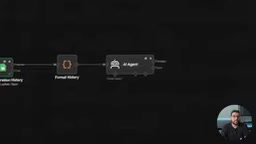
Real production systems rarely rely on a single Agent. The course demonstrates a multi-Agent content system: a Research Agent, Analysis Agent, Writing Agent, and Publishing Agent each handling their own domain, with each one's output feeding into the next. Having one Agent do everything leads to bloated prompts, model confusion, and degraded quality. Splitting responsibilities is like a small team — one person researches, one plans, one writes, one publishes — each specializing in one thing, yet collaborating to produce results none could achieve alone.
The core distinction between vector databases (like Pinecone or Weaviate) and Google Sheets lies in retrieval method: vector databases retrieve by semantic similarity, understanding that "refund" and "return" are related concepts; Sheets relies on exact matching or keyword filtering. For FAQs with a few hundred entries and predictably worded questions, the lightweight Sheets approach works fine. But when the knowledge base scales to thousands of entries and users phrase questions unpredictably, vector retrieval starts to show its advantages. In multi-Agent systems, each Agent typically also has its own dedicated knowledge slice, avoiding the context window overflow that comes from loading the full knowledge base into a single Agent — another practical engineering benefit of splitting responsibilities.
From Demo to Production: Event-Driven Design, Human-in-the-Loop, and Monitoring
The second half of the course focuses on turning "a demo that runs" into "a system that holds up in real-world conditions."
Event-driven vs. polling: Many people use cron jobs to poll every 15 minutes — that's 96 runs a day just to catch the one moment something actually happens. Production systems should react, not poll — triggering the instant an event occurs. There are three common event sources: Webhooks (the most versatile — anything that can make an HTTP request can trigger a workflow), application triggers (pre-built app-specific webhooks), and database updates (listening for row-level changes).

These three are interchangeable at the front of a pipeline, with downstream processing, logic, and alerting remaining unchanged. The lead qualification example in the course is representative: website form → Webhook → AI analysis and scoring → write to CRM → Slack alert — with filtering at the end: every lead goes into the database, but only leads scoring ≥7 ever bother a human.
Human in the Loop: Not every process should be fully automated. AI can produce content that's slightly off, misaligned with brand voice, or just plain odd. The course demonstrates using Slack's "send and wait for response" node to push an AI-drafted email to Slack with Approve/Reject buttons — the workflow genuinely pauses until someone clicks. Click Approve and the email goes out; click Reject and nothing happens.
Error handling and monitoring: The course specifically points out that any node depending on an external service — a Google Sheets call, an AI Agent — can fail, causing the workflow to fail silently while users receive no reply. The solution: add retries, a fallback response for users, and a separate Telegram alert for the workflow owner. A more complete observability setup requires just three things: logs, alerts, and a metrics dashboard — all buildable with Google Sheets and Telegram. The three core metrics to track are execution duration, failure rate, and AI token usage (which maps directly to your bill). A scheduled check running hourly, paired with an if-condition that fires a Telegram alert when failure rate exceeds 10%, takes 20 minutes to build — yet prevents the nightmare of a workflow failing silently for two days before a customer complaint reveals the problem.
The performance gap between Webhooks and polling becomes dramatic at high frequency. Polling every 15 minutes means an average response latency of 7.5 minutes — worst case nearly 15. Webhook response latency is typically under a second. Polling also generates a large number of "empty runs" — executions where no new data was found — which still consume workflow execution quota. For users on n8n's paid plans, execution count directly affects billing, so switching from polling to event-driven design is not just an architectural improvement — it's also effective cost control. n8n's Webhook node supports HMAC signature verification to prevent forged requests from triggering workflows, and this should be treated as a standard configuration in production environments.
Closing Thoughts
The real value of this course isn't in teaching you to snap a few nodes together — it's in repeatedly reinforcing one core idea: n8n is not a toy-grade automation tool. It's a complete platform for building scalable, intelligent operational systems. From the skeleton of a single workflow, to AI Agents, knowledge bases, memory, and multi-Agent collaboration, through to event-driven design, human-in-the-loop approvals, error handling, and monitoring — this path clearly maps out the dividing line between demo quality and production grade. For developers and no-code builders who want to take automation seriously rather than just dabble, this is a course worth studying systematically.
Related articles

Free Unlimited Claude Code Solution: Agnes AI + CC Switch Setup Guide
No paid subscription needed — pair the free AI platform Agnes AI with the open-source tool CC Switch to provide a backend for Claude Code, enabling unlimited free calls to text, image, and video models. This guide covers the full setup, test results, and usage boundaries.

A Complete Zero-Cost Guide to Getting Started with Claude Code for Beginners in China
A beginner's guide to Claude Code for users in China: two installation methods (command line and IDE plugin), full configuration steps for replacing the official API with the free domestic LongCat model, and a hands-on demo of building a small tool with natural language, plus tips.

When the NSA Gets Involved: The AI Supply Chain Crisis Behind Open-Source CVEs and API Key Hijacking
Multiple open-source projects disclosed severe CVEs in one day, PHP flaws alarmed the FBI, and Railway and OpenCode were breached with API keys stolen. This article breaks down the vulnerability window, AI-accelerated exploitation, and the AI supply chain crisis behind the API key black market, with a developer defense checklist.