The Complete OpenCode Tutorial: Installation, Commands, and Advanced Practice

A complete OpenCode guide from installation and commands to configuration and advanced practice.
This complete OpenCode tutorial covers desktop and WSL installation, common commands, the configuration system (models, rules, Agents), and extension capabilities including custom tools, MCP service integration, and Agent Skills—guiding developers from beginner to advanced hands-on practice.
What Is OpenCode
OpenCode is an AI programming tool that has been steadily gaining popularity in the developer community recently. Compared to traditional code completion plugins, it places greater emphasis on the "command line + Agent" work paradigm, allowing developers to interact with codebases through natural language across a wide range of development scenarios—from code generation and refactoring to debugging.
The "Agent" mode represents a major evolutionary direction in the AI tools space in recent years. Unlike traditional single-turn Q&A or code completion, an AI Agent can autonomously plan multi-step tasks, invoke external tools, execute code, and iterate based on feedback from the results. The core of this paradigm lies in the "perceive-decide-execute" loop—an architecture borrowed from the "Sense-Plan-Act" framework in robotics: "perceive" means reading the file system, parsing error messages, or understanding natural language instructions; "decide" means breaking complex tasks into subtasks and planning the sequence of tool calls; and "execute" means actually running commands, modifying files, and verifying results.
It's worth noting that the emergence of large language models has breathed new life into this classic framework: the perception layer no longer relies on structured sensor data, but instead leverages LLMs' ability to understand natural language and unstructured context; the decision layer achieves complex planning through Chain-of-Thought reasoning and task decomposition prompts; and the execution layer transforms the LLM's text output into operational instructions for real systems via the Function Calling (tool invocation) mechanism. The key innovation of this loop lies in the introduction of "feedback iteration"—the Agent dynamically adjusts its subsequent plan based on execution results, rather than linearly executing a predetermined script. This makes AI no longer a passive generator but a collaborator with a degree of autonomy. OpenCode deeply integrates this paradigm with the command line, meaning developers can issue natural language instructions in the terminal environment, with the Agent responsible for decomposing tasks, invoking toolchains, and ultimately completing code-level operations.
The combination of the command-line interface (CLI) and AI Agents represents an important direction in the evolution of developer tools. The command-line environment inherently offers advantages in scriptability and composability, and it has long been a core workspace for professional developers. Embedding Agent capabilities into the CLI allows AI to directly operate the file system, invoke build tools, and execute test commands—without constantly switching between the graphical interface and the terminal. By contrast, AI tools in the form of IDE plugins are often limited by the extension APIs of specific editors, making it difficult to break through interface boundaries to control a broader development toolchain. The CLI form naturally overcomes this barrier, allowing AI to truly become the "command center" of the entire development environment.
This article is based on a practical tutorial by a Bilibili content creator, laying out a complete learning path from beginner to advanced. It covers OpenCode's core concepts, installation methods, common commands, configuration system, and extension capabilities—suitable as a reference for developers who want a systematic introduction to this tool.
Simply put, OpenCode positions itself as a "programmable, extensible" AI coding assistant. Unlike closed IDE plugins that can only be used passively, it provides a complete set of extension mechanisms—model configuration, rule files, custom commands, custom tools, MCP service integration, Agent Skills, and more—enabling advanced users to build their own development workflows as needed.
Two Installation Methods: Desktop and WSL
OpenCode offers two mainstream installation paths, each targeting users with different needs.
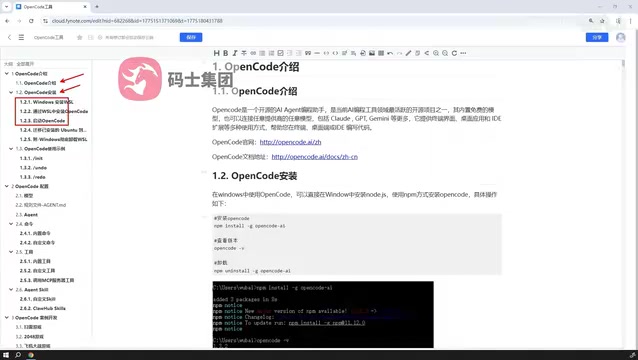
Desktop Installation: The Simplest Way to Get Started
The first is desktop installation, which is also the lowest-barrier option. For users who just want to quickly try out the features without fussing over the environment, simply downloading the desktop client works essentially out of the box.
WSL Installation: The Officially Recommended Advanced Approach
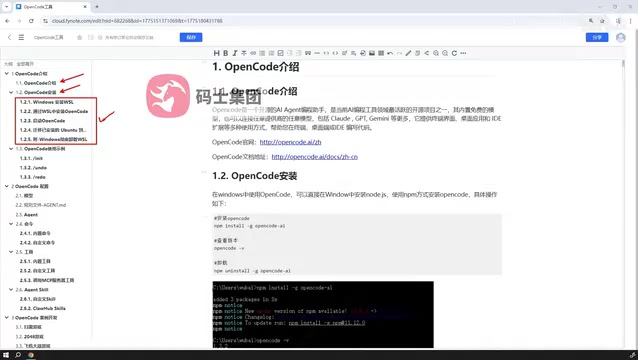
The second method is to set up a virtual Linux environment on Windows using WSL (Windows Subsystem for Linux) and then deploy OpenCode on top of it. This is also the officially recommended installation method.
WSL (Windows Subsystem for Linux) is a compatibility layer technology introduced by Microsoft starting with Windows 10, allowing users to run Linux binaries natively on Windows without a virtual machine or dual boot. WSL 2 further introduced a real Linux kernel, implemented through lightweight Hyper-V virtualization, greatly improving both file I/O performance and system call compatibility. For AI development tools, the advantages of the Linux environment are: a mature shell scripting ecosystem, rich package managers (apt/brew), better compatibility with runtimes like Python/Node.js, and native support for communication mechanisms such as Unix sockets—which happen to be the underlying capabilities that OpenCode's toolchain and MCP service communication depend on. The Unix philosophy of "everything is a file" and the pipe composition design make collaboration between tools naturally smooth. MCP services typically rely on Unix Domain Sockets for local inter-process communication, which faces compatibility obstacles in native Windows environments but is completely transparent in WSL 2.
The key difference between WSL 2 and WSL 1 lies in the upgrade of the virtualization architecture: WSL 1 maps Linux calls to the Windows NT kernel through a system call translation layer, whereas WSL 2 runs a lightweight, real Linux kernel (based on a Linux kernel fork maintained by Microsoft), executed within a Hyper-V virtual machine. This means WSL 2's compatibility with Linux system calls is close to 100%, and by managing the Linux file system through a virtual disk (VHD), the performance of I/O-intensive operations (such as npm install and git operations) is far superior to WSL 1. For OpenCode users who need to run Docker, invoke local MCP services, or frequently execute build scripts, WSL 2 provides an experience closest to a native Linux development environment—without the cost of switching between dual-boot systems.
The reason the official team recommends the WSL route is that many of OpenCode's capabilities—especially the command-line toolchain, script execution, and external tool invocation—run more stably and with better compatibility in a Linux environment. For developers who plan to use it in depth and need to customize tools and integrate MCP services, the WSL environment effectively avoids compatibility issues in native Windows environments, making it a more worthwhile investment.
Common Commands and Usage Examples
After completing the installation, you need to familiarize yourself with OpenCode's common commands through a series of usage examples. This forms the foundation for subsequent advanced operations.
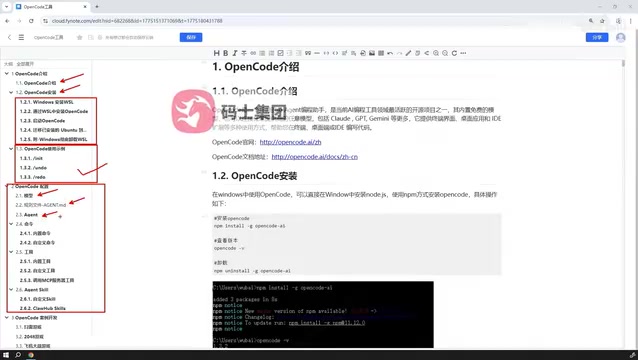
The command system is OpenCode's core interaction method. In addition to built-in commands, OpenCode also supports custom commands—users can encapsulate frequently used operations into commands for one-click reuse in daily development. This design allows the tool to align with each team's or individual's unique workflow, without being constrained by a fixed feature framework. Notably, the command-line interaction mode has a natural scriptability advantage over graphical interfaces: developers can embed OpenCode commands into Makefiles, shell scripts, or CI/CD pipelines, seamlessly integrating AI programming capabilities into automated workflows without requiring manual triggering.
The Configuration System: Models, Rules, and Agents
OpenCode's true strength lies in its complete configuration system, which mainly comprises three layers.
Model Configuration
Users can flexibly configure the underlying large language model to use. OpenCode is not tied to a single model provider; developers can freely switch based on cost, performance, and scenario needs, offering a high degree of flexibility.
Support for flexibly switching the underlying large language model is an important competitive point in current AI tool design. Different models vary significantly in coding ability, reasoning depth, context window size, and per-call cost: GPT-4o excels at multilingual code understanding, Claude 3.5 Sonnet stands out in long-context tasks, and open-source models like Qwen or DeepSeekAd Coder offer low-cost options for local deployment. For enterprise users, model replaceability also means data compliance flexibility—sensitive code can be routed to privately deployed models, while general tasks can use cloud APIs. OpenCode's multi-model support architecture essentially masks the interface differences between providers through an abstraction layer (typically compatible with the OpenAI API format), enabling users to freely choose the model best suited to the current task and budget without modifying their workflow.
Behind this "model-agnostic" design philosophy lies a forward-looking judgment about the "commoditization" trend of AI infrastructure: as more and more high-quality models emerge, tools locked into a single provider face the risk of declining competitiveness, while tools that embrace open standards (such as the OpenAI API-compatible format) can continuously benefit from the progress of the entire model ecosystem. This design also gives the tool greater longevity: even if a model provider stops service or releases a better version, users only need to update the configuration rather than migrate the entire toolchain.
Rule File Configuration
Rule files (Rules) are used to constrain the AI's behavior—for example, code style, project conventions, and comment standards. By presetting rules, the code generated by the AI can better conform to team standards, reducing the cost of later manual adjustments.
The design philosophy of rule files stems from the systematic need for "prompt engineering" in team collaboration scenarios. Manually describing coding conventions in a single conversation is both inefficient and hard to keep consistent, whereas rule files persist and version these constraints. Similar mechanisms are also seen in other AI programming tools: Cursor's .cursorrules, GitHub Copilot's custom instruction files, and so on all follow a similar approach. By writing code style (such as ESLint standards), architectural conventions (such as prohibiting direct DOM manipulation), and documentation standards (such as requiring JSDoc comments) into rule files, teams can ensure that AI-generated code conforms to project standards from the start, proactively controlling the risk of "unstable AI output quality."
From a more macro perspective, the rule file mechanism essentially transforms "tacit knowledge" into "explicit constraints." The coding experience accumulated over years by senior engineers, the architectural consensus formed by teams, and the best practices distilled after encountering pitfalls—this tacit knowledge that originally existed only in people's minds is encoded into explicit instructions that AI can understand through rule files. Crucially, rule files can be incorporated into version control systems (Git), tracked, reviewed, and iterated like code—teams can discuss rule changes during code review and automatically verify whether AI output conforms to the latest rules via CI/CD, allowing the team's AI usage experience to be accumulated and passed on rather than lost with personnel turnover. This mechanism is called "Knowledge Externalization" in knowledge management theory and is one of the core means by which organizations transform individual experience into team assets.
Agent Classification
OpenCode comes with different types of built-in Agents, each taking on a different task role. Understanding the classification of Agents helps you invoke the right agent in the right scenario, thereby improving overall development efficiency.
The classification of Agents in AI programming tools typically reflects differences in task granularity and responsibility boundaries, embodying the design philosophy of Multi-Agent Systems. In software engineering, decomposing a complex system into subsystems with clear responsibilities is a classic architectural principle—Agent classification applies this idea to AI system design: for example, an Agent dedicated to code review can optimize its prompts and tool invocation strategies for that specific task, while another Agent responsible for unit test generation is configured with a different context and rule set. This division of labor enables each Agent to produce higher-quality results within its area of focus, while avoiding the performance dilution that a "jack-of-all-trades Agent" suffers from taking on overly broad tasks.
The multi-Agent collaboration model also has natural parallelization potential—different Agents can simultaneously process different modules of a codebase, with a coordination layer ultimately aggregating the results, significantly shortening the completion time of complex tasks. This architecture is highly similar to the design philosophy of "microservices" in software engineering: each service (Agent) has a single responsibility and clear boundaries and can be independently deployed and scaled, giving the overall system far better resilience and maintainability than a monolithic architecture.
Extension Capabilities: Custom Tools, MCP Services, and Agent Skills
If the configuration system defines OpenCode's "personality," then its extension capabilities define its "ceiling."
Custom Tools and MCP Service Integration
OpenCode allows users to customize tools, connecting external capabilities into the AI workflow. Going further, it also supports invoking tools published by external MCP (Model Context Protocol) services.
MCP (Model Context Protocol) is a standardized protocol proposed and open-sourced by Anthropic in late 2024, aimed at solving the fragmentation of integration between AI models and external tools and data sources. Before MCP emerged, every AI application had to write customized integration code for different tools, resulting in extremely high maintenance costs. Through a unified client-server architecture, MCP defines three types of standardized interfaces—tool invocation, resource reading, and prompt templates—enabling any protocol-compliant tool service to be directly invoked by MCP-compatible AI clients. A large number of third-party MCP Servers—including GitHub, Slack, database connectors, and browser automation—have already been open-sourced, forming a rapidly growing ecosystem.
The design of the MCP protocol is deeply inspired by the success of the Language Server Protocol (LSP). LSP was introduced by Microsoft in 2016 alongside VS Code, decoupling language intelligence capabilities (code completion, go-to-definition, error diagnostics, etc.) from the editor through a standardized protocol: language tool developers only need to implement a Language Server once, and all LSP-supporting editors (VS Code, Neovim, Emacs, etc.) can gain intelligent support for that language—without repeatedly developing plugins for each editor. This model drove the flourishing of the entire development tool ecosystem, and today nearly all mainstream editors support LSP. MCP decouples the binding relationship between AI models and external tools with exactly the same approach: by defining standardized formats for tool description, invocation, and response through the JSON-RPC communication protocol, tool developers only need to implement an MCP Server, and AI application developers only need to integrate an MCP Client. The two collaborate in a decoupled manner through the protocol specification, greatly reducing the integration cost of the entire ecosystem. For OpenCode users, this means that any existing MCP Server in the community—whether it connects to an enterprise database, invokes a CI/CD system, or operates a cloud service API—can be directly invoked by OpenCode's Agent without writing additional integration code.
Customizing and Reusing Agent Skills
OpenCode also supports Agent Skills. Users can not only customize Skills but also directly reuse ready-made Skills shared by the community, integrating them into their own OpenCode environment.

The concept of Agent Skills is essentially a "functional encapsulation" of AI capabilities, embodying the extension of the "Composability" principle from software engineering into the AI tools domain. Each Skill encapsulates the complete processing logic for a specific task—including which tools to call, which rules to follow, and in what format to output—making it an atomic capability unit that can be independently tested and shared for reuse. This is highly similar to the ecosystem logic of npm packages and PyPI libraries: community contributors openly share validated Skills, and users can integrate them directly to gain that capability without understanding its internal implementation details. This design also aligns closely with the concept of "pure functions" in functional programming—each Skill accepts well-defined inputs, produces predictable outputs, and has controlled internal side effects. Therefore, when problems arise in a composed pipeline, developers can test each Skill individually to quickly pinpoint the faulty node, rather than facing a black-box Agent that is difficult to decompose.
The composability of Skills also means that complex workflows can be implemented by orchestrating multiple Skills, rather than piling all the logic into a single Agent. For example, a complete "code review workflow" can be composed of a "security vulnerability scanning Skill," a "performance issue detection Skill," and a "code convention checking Skill," with each Skill focusing on its own detection dimension and the output results ultimately aggregated into a comprehensive review report. This architecture allows each Skill to be independently optimized and replaced, greatly reducing the maintenance cost of the entire workflow—a concrete application of the classic software engineering principle of "high cohesion, low coupling" in AI tool design.
This "standing on the shoulders of others" reuse mechanism means developers don't have to build every capability from scratch. A community-shared Skill ecosystem can significantly lower the barrier to use and accelerate workflow setup. As the AI programming tool ecosystem matures, the Skill marketplace is likely to become an important component similar to a "plugin store."
Practical Case Study: From Tool to Implementation
The final step of learning is to connect all the preceding knowledge through actual development cases and complete real coding tasks. Only by truly getting hands-on can you deeply understand how model configuration, commands, tools, and Skills work together. During practice, it's recommended to start with a real, small-scale project—such as adding unit tests to an existing codebase or refactoring a piece of legacy code—so you can more intuitively experience OpenCode's actual performance in task decomposition, context understanding, and tool invocation, and more easily discover specific scenarios that need to be optimized through rule files or custom Skills.
Summary
Overall, OpenCode is an AI programming tool with a clear design philosophy and extremely strong extensibility. Its learning curve is not steep: desktop one-click installation gets you started, while advanced users can build a highly personalized development assistant by combining the WSL environment with custom commands, custom tools, MCP service integration, and Agent Skills.
It's recommended to proceed step by step in the order of "installation → common commands → configuration system → extension capabilities → practical cases," gradually turning OpenCode into an AI programming productivity tool you can wield with ease.
Key Takeaways
Key Takeaways
Related articles

Zero-Cost Local Jarvis: Open-Source Voice Cloning and Task Automation in Practice
AI Workshop shows how to build a zero-cost local Jarvis with Ollama and Voice Studio: local model switching, open-source voice cloning, file retrieval, and tool-calling tests, with setup steps and hardware trade-offs.

Mistral Large 4 Released: 1T-Parameter MoE Tops Western Open-Source Leaderboard
Mistral releases its flagship Mistral Large 4: a 1T-parameter MoE architecture activating only 49B parameters at inference, trained from scratch on 3,800 Grace Blackwell GPUs, topping the Western open-weight leaderboard with third-party endorsements in law, finance, and cybersecurity.

Mistral Large 4 Review: Can Europe's Strongest Open-Source Model Challenge the US and China?
Mistral Large 4 (L-Charm) review: trillion-parameter MoE, standout cybersecurity benchmarks but behind Kimi K3 in software engineering, 3,800 GPUs, a key step for European sovereign AI.