The Most Detailed Codex Guide on Bilibili: From Installation to Real-World Practice, AI Operates Your Computer for You

Codex can directly operate a computer to complete file organization, report generation, and other tasks; the video demonstrates its usage and boundaries.
Based on the Codex tutorial video by Bilibili creator "Computer Story," this article sorts out the core capabilities and usage logic of this Agent-type AI tool. The essential difference between Codex and chat AIs like Doubao and DeepSeek is that it can directly operate the user's computer to complete file organization, report generation, PPT creation, browser operations, and even scheduled tasks. The article introduces installation and configuration tips (switching to "Daily Work" mode), the project folder mechanism (automatic context reading), and Plan Mode (plan before executing complex tasks), and demonstrates its capabilities through two real-world cases: organizing a cluttered folder to generate reports and creating a visual dashboard, during which Codex successfully identified deliberately planted missing transactions and invoice anomalies. The article concludes by noting that the demonstration comes from a single creator, and the dashboard's business value and anomaly detection accuracy have not been independently verified; human review should be retained in high-accuracy scenarios.
AI tools are moving from "chatting" to "getting things done." Bilibili creator "Computer Story" (计算机物语) released a hand-holding Codex tutorial, covering everything from installation and configuration to real-world projects, fully demonstrating how this tool can directly operate a computer and complete complex tasks. Based on that video, this article sorts out Codex's core capabilities, usage logic, and real-world cases, to help you decide whether it deserves a place in your workflow.
What Is Codex: Chat-Capable AIs Are Common, Hands-On AIs Are Rare
According to Bilibili creator "Computer Story," Codex offers a chat interface just like Doubao and DeepSeekAd, but the essential difference is this: chat AIs can only give you advice, while Codex can directly operate your computer to do the work for you. Organizing files, building reports, reading work content, writing weekly reports, making PPTs, operating a browser, building software, and even setting up scheduled tasks that run automatically while you sleep—all of this is within its capabilities, and users don't need any technical knowledge.

This "hands-on" positioning means Codex's imaginative space is far greater than that of pure conversational products. The creator repeatedly emphasized in the video that users can absolutely tinker according to their own ideas, without needing to study technical details.
Codex's "hands-on" capability is technically known as Agent capability. Unlike traditional chatbots that only call a language model to generate text, Agent-type products add a "tool-calling" layer on top of the model: the model can decide when to read files, run commands, click on interfaces, or call APIs, and continue reasoning based on the execution results. This is precisely why Codex can organize folders, extract PDF invoice details, and generate Excel reports. This architecture also introduces new risk boundaries—AI operations act directly on the real file system, so accidental deletion or modification is possible, making permission control, operation confirmation, and human review especially important in product design. Understanding the concept of "Agent" helps clarify the essential difference between Codex and pure conversational products like Doubao and DeepSeek.
Installation and Initial Configuration: Available Directly in App Stores, One Setting Improves the Experience
Codex is available in both the Microsoft and Apple app stores—just search and install. Once opened, the interface resembles the web version of Doubao: an input box in the middle, a sidebar on the left, but the sidebar has additional features Doubao lacks, such as plugins, automation, and workflows.
The creator suggests new users first change one configuration—the work mode. Switch the mode to "Daily Work" in settings; Codex remains powerful but won't display large amounts of technical details, making the experience much smoother. This detail seems minor, but it actually determines whether non-technical users can keep using it long-term.
Project-Based Work Logic: Letting Codex Know Where to Work
Codex needs a working folder to get things done on your computer, and it calls these folders "projects," displayed in the sidebar. The creator's habit is to categorize different matters into different folders, so everything is clear at a glance.
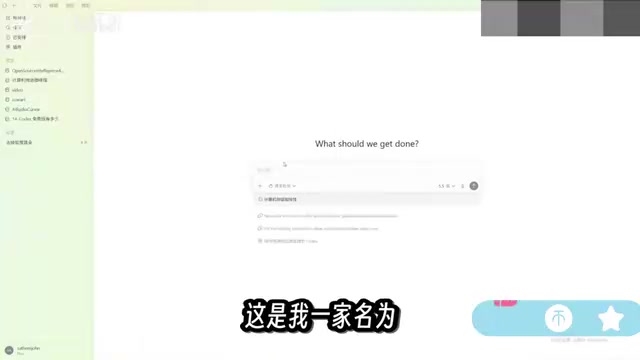
Below the input box, you can select the project for the current conversation, and Codex can then directly read all files within that project to complete the task. This design binds "file management" and "task execution" together—users don't need to explain context separately; Codex will find it on its own.
Practice Case 1: Organizing a Cluttered Folder and Generating Reports
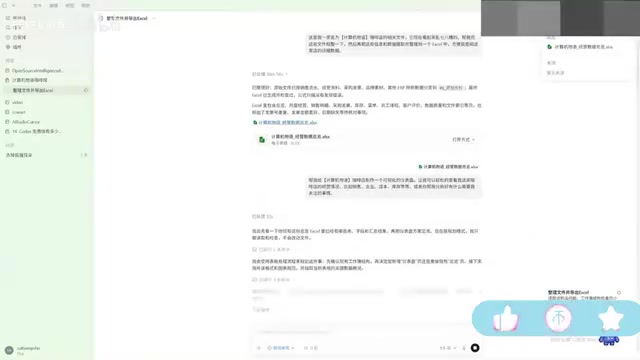
The creator prepared a real folder named "Computer Story Café," filled with sales records, invoices, and inventory lists in formats ranging from spreadsheets to PDFs and images. The task: organize the files and extract the information into an Excel sheet.
This entry-level task is actually quite laborious in practice. Codex needs to analyze files, move files, modify content, and create new files. A few minutes later, the task was done: files were organized into corresponding folders by purpose, sales data and product rankings were categorized into tables, and details from PDF invoices were extracted.
More importantly, the creator deliberately planted some traps in the files, and Codex actually found them—it flagged missing transaction records and pointed out anomalies in two invoices.

This type of task is highly representative: organizing reports, writing daily reports—any work that requires reading files on a computer and summarizing them, Codex can handle.
Practice Case 2: From Summary Table to Visual Dashboard
The second task raised the difficulty. The creator used the command line to add a summary table generated by Codex, asking it to create a visualization file for the café based on the data in the table, displaying sales, expenses, costs, inventory, and other business conditions, and to analyze matters that need attention.
Because the task was complex, the creator switched to "Plan Mode." In this mode, Codex doesn't execute directly; instead, it first analyzes the task, plans an execution checklist, and asks the user questions when encountering uncertainties before providing a detailed plan after confirmation. Users can submit for execution directly or continue adjusting the plan. The creator suggests turning on Plan Mode when executing relatively complex tasks.
Once the dashboard was complete, the interface looked quite professional, containing all the required metrics, with suggestions and key matters listed below. The creator admitted he isn't a sales professional and couldn't judge its practicality, but people in relevant fields could evaluate whether such output truly helps business operations. The creator then asked for a more modern, intuitive theme similar to Apple's style, and Codex completed the modification too. This ability to "continuously iterate on existing results" is where Codex differs from one-shot generation tools.
The "Plan Mode" mentioned in the article corresponds to the Plan-then-Execute paradigm in Agent design. If a model is allowed to act directly on complex tasks, it can easily deviate from the goal midway or miss steps; Plan Mode first has the model output an inspectable execution checklist, splitting "understanding requirements" and "executing operations" into two stages, so users can correct deviations before execution, reducing rework costs. The difference from one-shot generation tools is that Plan Mode preserves the user's judgment at key checkpoints, rather than overturning everything after the output is complete. For tasks with many steps and context dependencies, such as data summarization and report generation, aligning first and then executing is usually the safer approach.
An Interesting Detail: Desktop Pet and Task Monitoring
Typing a slash in the input box reveals the "Pet" feature; clicking it makes a small pet appear on the desktop, which can be placed anywhere. It's not just for show—it also displays all tasks currently being executed, and clicking jumps to the corresponding task. The pet's appearance can be changed in settings. This design is essentially a visual entry point for task status, letting users know at any time what the AI is busy with in the background.
The desktop pet is essentially a task status visualization design. When AI executes multi-step tasks in the background, what users care about most is often "how far along is it now, and is it stuck?" Mapping running tasks to a resident desktop widget that can be clicked to jump reduces the cognitive burden of monitoring Agent behavior. This kind of design is increasingly common in Agent products, because the higher the degree of automation, the stronger users' need for "observability"—you want to let the AI work freely, but also be able to see what it's doing at any time and intervene when necessary.
Usage Suggestions and Judgment
Judging from the video demonstration, Codex's value lies not in "smarter conversation" but in connecting AI capabilities to the real file system and desktop environment. A few lessons are worth noting: non-technical users should first switch to "Daily Work" mode to reduce information noise; use project folders to manage task boundaries; enable Plan Mode for complex tasks so the AI aligns on requirements before acting; and when unsatisfied with output, just directly request modifications—iteration costs are very low.
It should be noted that this article's content mainly comes from a single creator's demonstration; the dashboard's actual business value and the accuracy of anomaly detection have not been independently verified. If you have a lot of file organization, report generation, or data summarization work, Codex is worth a try; if tasks involve financial or compliance scenarios with high accuracy requirements, it's advisable to retain a human review step.
One-line Summary
Codex can directly operate a computer to complete tasks like file organization and report generation; the video demonstrates its usage and boundaries.
Paragraph Summary
Based on the Codex tutorial video by Bilibili creator "Computer Story," this article sorts out the core capabilities and usage logic of this Agent-type AI tool. The essential difference between Codex and chat AIs like Doubao and DeepSeek is that it can directly operate the user's computer to complete file organization, report generation, PPT creation, browser operations, and even scheduled tasks. The article introduces installation and configuration tips (switching to "Daily Work" mode), the project folder mechanism (automatic context reading), and Plan Mode (plan before executing complex tasks), and demonstrates its capabilities through two real-world cases: organizing a cluttered folder to generate reports and creating a visual dashboard. In the process, Codex successfully identified deliberately planted missing transactions and invoice anomalies. The article concludes by noting that the demonstration comes from a single creator, and the dashboard's business value and anomaly detection accuracy have not been independently verified; human review should be retained in high-accuracy scenarios.
Related articles

A 19-Year-Old's Rental Horror Story: Ceiling Collapse, Bug Infestation, and the Lessons It Taught Me
At 19, my first off-campus rental brought bug infestations, no heat, a collapsed ceiling, and a ruined laptop with no renter's insurance. Here are the hard-won lessons for first-time student renters.

Veda Nurse's Cranial Nerve Exam: Why ASMR Role-Play Is Going Viral
Bilibili creator Veda's cranial nerve exam ASMR video goes viral, blending humor and sensory triggers through nurse role-play. This article analyzes its unique appeal and the audience psychology behind ASMR role-play.

LG Cinebeam AI Review: 120-Inch Giant Screen + 3000 Lumens, a New Choice for the Living Room Theater
LG Cinebeam AI projector review: 3000 ANSI lumens, 4K, 100 inches from about 8 cm and 120 inches from about 18 cm. Built-in webOS, AI Concierge voice recommendations, AI Sound Pro 11.1.2 virtual surround, and Game Optimizer—positioned for fixed living room installation, complementing the portable Cinebeam S.